


About This File
🧩 Advanced Welcome Header 1.0.4 (IPS Plugin) — Full Details
Advanced Welcome Header is an Invision Community (IPS) plugin designed to enhance the top “welcome area” of your forum. It replaces or extends the default guest/member greeting with a more customizable, visually rich header block.
🔷 Overview
Plugin Name: Advanced Welcome Header
Version: 1.0.4
Platform: IPS Community Suite (Invision Power Services)
Purpose: Improve user engagement by showing a customizable welcome banner/header for guests and members.
🎯 Main Purpose
This plugin is mainly used to:
- 👋 Welcome new visitors in a more attractive way
- 🔐 Show login/register prompts for guests
- 👤 Display user-specific info for logged-in members
- 📈 Improve conversions (registrations & engagement)
- 🎨 Enhance forum UI/UX at the top section
✨ Key Features
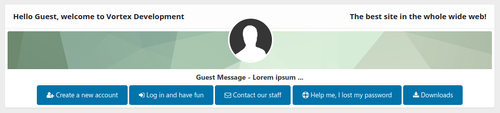
🟦 1. Custom Welcome Header (Guest View)
For non-logged users, you can display:
- Welcome message (HTML supported)
- Login / Register buttons
- Custom background image or gradient
- Promotional text or announcements
- Call-to-action buttons (Join Now, Sign Up)
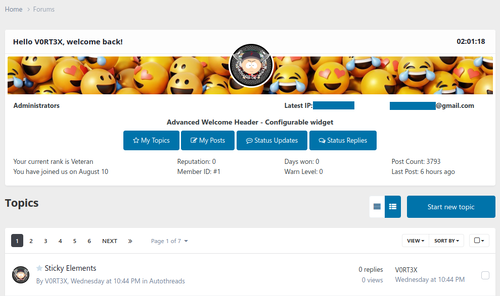
🟩 2. Member-Specific Header
For logged-in users:
- Shows username dynamically
- Displays profile picture/avatar
- Quick links (Inbox, Notifications, Profile)
- Personalized greeting text
- Role-based messages (Admin, Moderator, Member)
🟥 3. Fully Customizable Design
You can customize:
- Background colors 🎨
- Gradient styles
- Fonts and text sizes
- Button colors and hover effects
- Border radius & spacing
- Custom CSS support
🟨 4. HTML + Template Support
- Supports custom HTML blocks
- IPS template variable integration
-
Can insert dynamic content like:
-
{member_name} -
{group_name} -
{site_name}
-
🟪 5. Responsive Design
- Mobile-friendly layout 📱
- Desktop optimized 💻
- Auto adjusts header height and spacing
- Supports IPS theme responsiveness
🟧 6. Visibility Controls
You can control where it appears:
- Show only on homepage
- Show on all pages
- Hide for specific user groups
- Show only for guests or members
- Disable on mobile (optional)
🟫 7. Announcement Integration
Some configurations allow:
- News banner inside welcome header
- Sticky announcement bar
- Rotating messages (sliders)
- HTML links inside messages
⚙️ Admin Control Panel (ACP Features)
Inside IPS Admin Panel, you typically get:
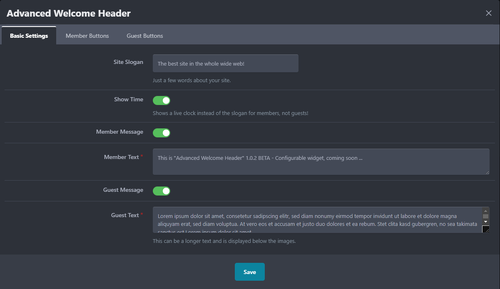
🎛 General Settings
- Enable / Disable plugin
- Choose display location
- Select user groups
🎨 Styling Settings
- Background color picker
- Text color options
- Button customization
- Custom CSS box
👥 User Settings
- Guest layout settings
- Member layout settings
- Role-based content rules
📊 Benefits for Your Forum
✔ Improves first impression
✔ Increases signups (CTA buttons help)
✔ Makes forum look professional
✔ Better engagement for returning users
✔ Useful for announcements & promotions
⚠️ Possible Limitations
- Depends on theme compatibility
- Some custom IPS themes may need CSS adjustment
- Over-customization can slow layout rendering
- Not a core IPS feature (plugin dependency)
💡 Best Use Case Ideas
For Forums like yours (FundayForum type):
- Show “Join for Urdu Poetry & Discussions” banner
- Highlight trending posts
- Add daily quote or poetry line
- Promote registration with stylish CTA button
- Display forum rules briefly for guests
🎨 Example Layout (Concept)
🟦 Welcome Header (Guest)
Welcome to FundayForum
Explore Urdu Shayari, Discussions & Community
🔘 [Join Now] 🔘 [Login]
🟩 Member View
Assalamualaikum, Waqas 👋
📩 Inbox | 🔔 Notifications | 👤 Profile
Recommended Comments
There are no comments to display.
Join the conversation
You can post now and register later. If you have an account, sign in now to post with your account.
Note: Your post will require moderator approval before it will be visible.