- 📢 Welcome to FundayForum – Explore Trending Topics
- 🌟 Discover What’s Trending Today
- Danny Hatchard engaged to Kerry Scouler after six years of dating
- 'Mysterious' virus kills Russian lab worker, sends 'hundreds' into quarantine
- 49ers' Dre Greenlaw addresses viral Sean Payton sideline moment
- Prince Harry gives ultimatum to Meghan as 'dream life' is in danger
- Kim Kardashian admits she and Kanye West have improved communication over children
- ATC reprimands police over IO's absence in Imaan, Hadi bail petition hearing
- King Charles ‘reacts' to Andrew's new bombshell: ‘not in good place'
- Ronaldo can return to Portugal team if he wants: coach Jesus
- Justin Timberlake calls wife Jessica ‘favourite person' on special occasion
- Centre weighs 'cocktail of constitutional measures' for KP: sources
IPS 4 Themes/Ranks
Welcome to the IPS 4 Themes & Ranks section at FundayForum.com — your trusted place for quality themes, rank packs, and visual resources built for Invision Community communities.
Here at FundayForum.com, members can discover professional designs created to improve forum appearance, enhance user experience, modernize layouts, and customize community identity.
Available Downloads:
✔ Premium IPS themes
✔ Free community themes
✔ Animated & stylish rank packs
✔ Gaming & modern UI designs
✔ Dark & light mode layouts
✔ VIP & usergroup badges
✔ Custom designer releases
✔ IPS 4.x compatible resources
All themes and rank resources shared on FundayForum.com should be secure, tested, and clearly marked with compatibility versions.
66 files
-
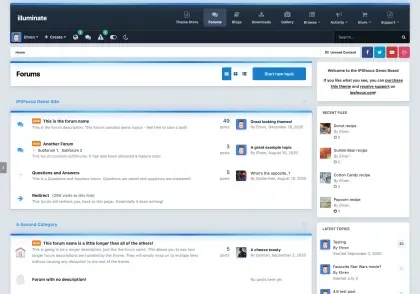
Illuminate PRO Theme for IPS – Version 4.7.10
By Waqas Dar
Illuminate PRO is a modern IPS 4.7.10 compatible theme available in Light and Dark versions. It features UI improvements, responsive design, enhanced mobile experience, and full compatibility with Invision Community applications.
📦 Illuminate PRO – Overview
Illuminate PRO is a next-generation IPS 4.x theme designed for performance, readability, and modern UI experience. It includes both Light Mode and Dark Mode versions, allowing communities to choose their preferred visual style.
Built for Invision Community 4.7.10, it ensures full compatibility with the latest system improvements and UI updates.
⚙️ Compatibility
Fully compatible with:
Invision Community 4.7.10 Forums Gallery Blogs Downloads Pages (CMS) Commerce ✨ Theme Highlights
🌗 Light + Dark Versions
Includes two complete styles Illuminate Light Edition Illuminate Dark Edition Easy switching or separate installation 📱 Fully Responsive Design
Optimized for mobile, tablet, and desktop Improved layout consistency across devices 🎯 Modern UI Structure
Clean typography Improved spacing and readability Smooth forum category layout ⚡ Performance Optimized
Reduced CSS complexity Faster page rendering Lightweight theme structure 🔧 Easy Customization
Theme settings panel support Logo, colors, and layout customization No template editing required for basic changes 🚀 What’s New in IPS 4.7.10 Compatibility
6 Based on IPS 4.7.10 system improvements, this theme includes:
🔄 Core Compatibility Update
Fully upgraded for Invision Community 4.7.10 🐞 Fixes & Improvements
Fixed layout issues in expanded forum views Improved thumbnail rendering in image widgets Mobile search filter menu now fully responsive Fixed captcha alignment in Edge browser Fixed dropdown layering issues in some themes ✨ UI Enhancements
Improved reaction wrapping for better display Enhanced mobile responsiveness across all pages Better spacing and alignment consistency 🆕 New Additions
Added Mastodon social icon support Added Telegram social icon support 🎯 SEO Keywords
IPS 4.7.10 theme, Illuminate PRO IPS theme, IPS dark theme download, IPS light theme 2026, Invision Community theme responsive, IPS forum modern UI, IPS customization theme, IPS 4.x professional theme
📌 About Illuminate PRO
Illuminate PRO is designed for communities that want a clean, modern, and flexible IPS experience. With both Light and Dark versions, it provides full control over user experience while maintaining performance and compatibility with the latest IPS updates.
1 download
0 comments
Updated
-

theme/skin IPS Villain Theme ipsfocus Updated
By Waqas Dar
Villain is a modern dark-style IPS 4.x theme designed with a semi-transparent UI and high customization flexibility. It allows users to personalize their experience using a built-in background image picker while maintaining a clean, gaming-friendly interface.
This theme is ideal for gaming communities, forums, and any website that wants advanced visual customization options.
⚙️ Compatibility
Fully compatible with:
Invision Community Suite 4.x Gallery Blog Downloads Chat Pages (IP.Content) Commerce (Nexus)
✨ Theme Features
🎛 Theme Settings Panel
Easily manage:
Background images Logo and slogan Social media links Guest message system Theme colors and layout options 👉 No heavy template editing required
Theme Settings
Easily enable, disable or modify theme features such as background images, logos, social media links, guest messages and colors. This makes modifications and upgrades very simple since little code changes are required.
🖼 Background Picker
Users can select their own background from preset images Selection is saved via cookies Can be enabled or disabled from ACP
👤 Guest Message System
Display custom message for guests Encourage login or registration Two styles available: Billboard layout Alert style
🔗 Social Media Integration
Add custom social links Supports platforms like Facebook, Twitter, and more Fully enable/disable from settings
🧾 Logo & Branding
Add text-based logo with slogan Option to replace with image logo Fully editable via theme settings
📌 Fixed Header Navigation
Sticky header stays at top while scrolling Improves navigation experience Can be disabled in ACP if needed 🆕 Update Notes (Latest Build Improvements)
Upgraded for IPS 4.4.2 compatibility improvements Reverted multiple template files for easier future updates Fixed mobile dropdown menu issues in Clubs view Fixed grid layout issue in Topic Thumbnail addon Improved “Manage Album” dropdown wrapping for multilingual support Fixed Enhanced User Profile layout issues on mobile Fixed Network Status table alignment Re-coded highlighted replies system using CSS variables for easier customization
IPS 4.x theme, Villain IPS theme download, dark IPS theme, gaming forum theme IPS, responsive IPS skin, IPS customization theme, Invision Community dark skin, IPS 4 theme free download
Villain is designed for communities that want a modern dark interface with user personalization features, improved usability, and flexible design controls without complex coding.
5 downloads
- black theme
- dark theme
- (and 11 more)
0 comments
Updated
-
![More information about "[Dark / Light] Fluent Design Theme Edition"](https://fundayforum.com/uploads/monthly_2022_10/1.thumb.png.2ade2c3bae599c8d90ce20980a1e1307.png)
[Dark / Light] Fluent Design Theme Edition
Fluent Design Theme Edition is a combination of Fluent Design styles Microsoft, iOS Design, Android Design and Google Design. We have also introduced many interesting features that are unique in standard themes.
Other settings:
It is possible to change all colors, both light and dark, by editing the settings (without editing the CSS code), Enable / disable animation and direction animation, Adjust the width of the blocks in the footer, Adding your own background along with its setting in the footer, Changing the position of the forum description (Before or after sub-forums), Enable / disable shrink forum names, Enable / disable Forum statistics (Posts and topics), Custom forum category icons (Font Awesome 5), Enable / disable Unread Forum Badge, *Recommended* Viewing Topic Ratings in the Forum View, Viewing Topic Reactions in the Forum View, Custom background with customization (Separate for dark and light modes or only one for all styles), *Recommended* Personalization of the Scrollbar, Change the position of the cake when the user has a birthday in topic view (Next to the nickname or At the bottom of cAuthorPane), *Recommended* Notification with a red message if user the inbox is full, *Recommended* Blocking of reputation reversal, Enable / disable "Go to top" button, Enable / disable icons in Profile Fields, Change the position of the logo (Right, Left, Center), Header height change, Enable / disable sticky userbar, Enable / disable search icon in elUserNav, Enable / disable social media icons (Own icons with Font Awesome 5), Changing the position of social media (UserBar, Header, Footer), Enable / disable nav icons (Own icons with Font Awesome 5), Enable / disable UserLink_menu icons (Own icons with Font Awesome 5), Change the navigation background, Your own image in the header with its personalization, Enable / disable home icon Enable / disable Hook the navigation bar to the mobile style screen, You can choose the default header's style or with the logo only in the center of the screen in mobile mode. Changing all button positions in elMobileNav, Ability to choose the main color, *Recommended* It is possible to turn on the automatic change of the dark / light theme depending on the settings in the system, [cAuthorPane] Enable nick formatting, Change position "Report" and "Edit" button, Enable / disable Online status icon in topics, *Recommended* [Signature] Enable / disable text collapse, Hide the "Mark as resolved" button in the first post, Possibility to choose the location of the field with widgets (Default or on the entire width of the page), Enable / disable widgets icons (Own icons with Font Awesome 5), Change widget title text-align, *Recommended* Enable / disable trophies in top blocks, Enable / disable (Who's Online Witget) Count all users together, (Topic Feed) Show / hide where the topic was written, (Post Feed) Show / hide a piece of post content, (Post Feed) Show / hide where the topic was written, Option to colorize ticket statuses from ModeratorCP, Ability to disable hooking items from the userbar, Option to change the language in the form of a drop-down list or flags, Separate logos for the dark and light theme0 downloads
0 comments
Submitted
-

Invisioncommunity
By MrAbdoO
invisioncommunity theme
Demo > https://invisioncommunity.com/forums/
Picture >
6 downloads
- black theme
- dark theme
- (and 9 more)
0 comments
Submitted
-

0 comments
Submitted
-

0 comments
Submitted
-

H2k
By MrAbdoO
Skin by seremakedyta.pl & youtheme.net
9 downloads
- black theme
- dark theme
- (and 9 more)
0 comments
Submitted
-

DeagleShot_v2
By MrAbdoO
Very nice template, hold it
Demo >>
11 downloads
- black theme
- dark theme
- (and 9 more)
0 comments
Submitted
-

WARZ PROJECT 1.0.4
By MrAbdoO
About This File
Warz, it's crafted for all categoryes ( gaming / business e.t.c )
Info:
- It's the first release, so if you see some bugs just give me a pm here.
- If you want to change body / background / top / footer, give me a pm.
- Theme it’s made with profile in topic ( so you don’t need to install plugins for that )
- For footer i used ( general statistics widget, members widget, who’s online widget )
- For sidebar i used ( top contributors, topic and post feed widgets )
- For minor changes im open for free ( so just give me a pm )
Info 2:
- I used FontAwesome & Material Icons
- 100% responsive
- 80% hoverable theme ( https://gyazo.com/62f527aeaeb52d28ca5cec807d04e019 / https://gyazo.com/c6c15549bfe8ca863a9b2ef25dbd54d3 )
- Theme use custom panel for colors ( you can change entire color with just 1 click
DEMO UNAVAILABLE
CHECK ALL MY STUFFS HERE - CLICK
What's New in Version 1.5 See changelog
Released 16 hours ago
- Chatbox fixed error
- Fixed template bugs
8 downloads
- 1.0.4
- black theme
- (and 11 more)
0 comments
Updated
-

Vulpes Dark 2.0.6
By MrAbdoO
Vulpes Theme
Vulpes is a new unique theme in darkcolors and gradients.
Can be used for any forums. Have a lot of settings and you can fully customize it.
Version 2.0 is based on my new framework. Now you have a lot of theme settings. Customize header, navbar, slider, articles, popups, comments, forms and more!
Demo
News about my themes
//dne4i5cb88590.cloudfront.net/invisionpower-com/monthly_2018_12/1.png.72c248494a8a36032e895c439a67fe2b.png
//dne4i5cb88590.cloudfront.net/invisionpower-com/monthly_2018_12/2.png.0c66c862676c4c95b3f2d50496c826e9.png
//dne4i5cb88590.cloudfront.net/invisionpower-com/monthly_2018_12/3.png.8a0cdd78ff666c5d9a31365b60b0beda.png
//dne4i5cb88590.cloudfront.net/invisionpower-com/monthly_2018_12/4.png.06bce5cd09e4936d841ce1b1c868f148.png
//dne4i5cb88590.cloudfront.net/invisionpower-com/monthly_2018_12/5.png.baf21ce42517ae9c96d1ff25d4656400.png
//dne4i5cb88590.cloudfront.net/invisionpower-com/monthly_2018_12/6.png.448eb8434d73718678925532ddf6902a.png
//dne4i5cb88590.cloudfront.net/invisionpower-com/monthly_2018_12/7.png.e2208bc8d89c397c63a24026316327fa.png
//dne4i5cb88590.cloudfront.net/invisionpower-com/monthly_2018_12/8.png.6b77ae909c86538e4c632f74b265ae7c.png
7 downloads
- 2.0.6
- black theme
- (and 11 more)
0 comments
Updated
-

AZ24 - light style for IPS 4
By Kim Asyifa
The bulletin is a light style with a stunning modern design that will be an excellent choice for the classic IPS 4 forum on any subject. The user panel is perfectly hidden in the left sidebar, where you
1 download
0 comments
Submitted
-

theme/skin Deflection for IP.Suite
By Waqas Dar
Theme features
Theme Settings
Easily enable, disable or modify theme features such as background images, logos, social media links, guest messages and colors. This makes modifications and upgrades very simple since no code changes are required.
Minimal HTML edits
This theme has only 3 modified template files, which means in most cases, you will not need to install theme updates between IPS versions. Too easy!
Dropdown Navigation Menus
All sub navigation links are placed inside a dropdown menu which is visible on-hover.
Background Picker (optional)
If enabled, your members can choose their own header background image from a predefined selection and their choice is saved via cookies. This feature can be customized within the theme settings.
Mega Footer (optional)
A mega footer with configurable column numbers and content can be enabled and customized all within the theme settings.
Social links
Social links from over 20 sites can be customized via the theme settings, allowing you to easily link to your social network pages (facebook, twitter, etc)
Global message
Display a message across the top of your site with important announcements. Once your members have seen the message, they can press the Dismiss button to remove it (until you configure a new one).
Guest message
A customizable message can be shown to guests, prompting them to either register or login to your forum.
HTML logo with slogan
Easily add/edit your text logo and slogan from within the theme settings. If required, the text can be replaced by an image instead.
Latest Topic on Mobiles
The latest topic title is visible on tablets and mobiles, allowing more convenient access to your latest content for mobile users.
Retina Ready
All gradients, shadows and icons are generated using css which means your site will look great on all devices - even those with high resolution screens.
77 downloads
- deflection
- for
- (and 7 more)
Updated
-

theme/skin Gradient theme
By Waqas Dar
Gradient
Gradient is highly customizable theme comes with a lot of features and settings. Included with palette and 3 color schemes (Dark and Light color schemes included), The whole theme color scheme can be changed with single click in theme settings which makes it super easy to switch between a dark or light color versions or to customize on them.
Some areas like navbar and widgets, topic author background colors are controllable with gradient color options.
DEMO
Key Features
Palette. 3 color schemes. Dark & Light versions included. One click to switch your website between 3 elegant color schemes.
You can also customize from any of the colors schemes you want all within theme settings. Color Management %99 all theme colors are customizable with color settings. Without touching a line of code you can change the entire front-end colors all in a theme editing page.
Customize colors of CK Editor, Widgets, Navigation's, Social links, Topic background, Author panel background, Forms & Toggles, Pagination & tabs, Buttons, Notifications, Messages...etc). Forum Category Styles. Set a custom background, title background, colors, and a cover to specific forums.
No custom css or coding knowledge is required, All you have to do is selecting forums and apply your colors. Footer. Enable/Disable footer. optionally show/hide on mobiles and tablets. Editor field column. with a header text field and a Truncatable option. Custom HTML field column. provided with a sample for quick links. Pages application column to get records from database. Color settings for footer background, Header color, Text color & link hover color. Upload a background image for footer, with an optional setting to apply opacity. Advanced Footer Application.
With advanced footer application you can have ultimate footer columns. Add footer rows, Add any number of custom column blocks, feed from all IPS applications. add different footers for different themes and more...
Custom Widgets. Add Two Editor field widgets to show on top or bottom of your website. Optionally show it to specific pages like Registration, Login, Staff directory, User profiles ...etc). Set user group permissions, customize colors and backgrounds. Great for guest messages, or custom html. Advanced Custom Widgets Plugin.
Advanced custom widgets allows you to add Sticky and Normal custom TXT and HTML widgets to your website. Each widget you add is fully customizable with its own configuration settings.
RTL Support.
Theme add-ons
Swiper Slider. Swiper is a powerful and a modern touch slider integrated in this theme, You can add 5 custom slides. also feeds from Pages app. Enable/Disable Swiper. Who can see. Where to show. Excludable from IPS applications and other pages on the site. Add custom slider height. Show pagination. Show navigation. Enable/Disable Autoplay. Loop Mode. Swiping mode. Lazy Loading. Add a texture overlay. Add a color overlay. Sliding Effects. Custom Slider content CSS, background color, Title color and title font size. Slider image position. 5 Custom and reorderable Sliders.
Each slider have its own Editor field, Title field, Image field and User group permissions. Swiper Slider Application
With swiper slider application you can add infinite custom sliders, and feed from IPS applications ( Downloads, Pages, Gallery ). on thefly add/edit sliders. give permissions for those you want to add sliders and more...
News Ticker. With this horizontal and auto scrolling news ticker present headlines or minor updates on your website. Customize background and text color of tickers. Add a news ticker title with options to customize background, text color. News Ticker Plugin
News Ticker plugin comes with many more options and configurations to customize including a couple more different styles. and on the fly add/edit tickers with options for who can add/edit... and more...
Free Resources
This theme is included with the following paid resources
A different article styles.
Copyright text removal
If you must remove the copyright notice on bottom of the theme. you need to purchase the theme copyright removal plugin.
IPSkit.com Theme Copyright Removal
10 downloads
0 comments
Submitted
-
![More information about "[IPS] Vulpes Dark"](https://fundayforum.com/uploads/monthly_2019_01/vulpesgt.png..thumb.png.a1214b6a971117364b4125c1a3484add.png)
theme/skin [IPS] Vulpes Dark
By Waqas Dar
Vulpes IPS Theme latest
Vulpes is a new unique theme in darkcolors and gradients.
Can be used for any forums. Have a lot of settings and you can fully customize it.
Version 2.0 is based on my new framework. Now you have a lot of theme settings. Customize header, navbar, slider, articles, popups, comments, forms and more!
Admin Control Panel
11 downloads
0 comments
Submitted
-
.thumb.png.d95a6e8b1f54f66938d0eed3c952b021.png)
theme/skin ProVision _ xenforo style IPS Theme
By Waqas Dar
ProVision Theme from
an IPS Theme with Different Taste.
Its supports all IPS addons [RTL support not completed yet]
Attached, a plugin file that will change the default gallery landing page to be in a similar a different look 🤙 .
Hope you enjoy it... 🙂
1 download
0 comments
Submitted
-

theme/skin Eligius IPS Theme
By Waqas Dar
Eligius Project, it's a dark theme for all category ( gaming / business e.t.c )
Info:
- It's the first release, so if you see some bugs just give me a pm here.
- If you want to change the logo / background / top / footer, you have the psd files in the folder.
- Theme it’s made with profile in topic ( so you don’t need to install plugins for that )
- For footer i used ( general statistics widget, members widget, who’s online widget )
- For sidebar i used ( top contributors, topic and post feed widgets )
- You dont need to renew this theme.
- For minor changes im open for free ( so just give me a pm )
14 downloads
Submitted
-

Invision Community Suite - IBTheme.com - Business One - Retail 4.3.6
By voidstar
Product Details
Invision Community Suite 4.3.6 Business One Reial Theme About Business One Works with the latest versions of these applications: IP.Board 4.3.x Admin Control Panel IP.Commerce IP.Pages IP.Downloads IP.Gallery IP.Blog IP.Calendar Chatbox Clubs Subscriptions & More! Included in the download: Skin XML file for installation
- Matching Admin CP Theme
- All fonts used throughout the skin
- logo.psd
- team-icon.psd
- IBTheme copyright and license agreement
- Links to purchase add-ons like installation, copyright removal, logo text change, etc. Retail Skin7 downloads
Updated
-

theme/skin mdPanel - Material Design
By Waqas Dar
mdPanel is a material design inspired IPS theme. It comes with a palette and 6 awesome Light/Dark color schemes, Switching between color schemes is One Click in the theme settings, Without touching a line of code You can customize ALL front-end colors with well organized color settings.
DEMO
Scroll to bottom and change the theme to mdPanel.
Key Features
Palette. 6 color schemes. Dark & Light versions included. One click to switch your website between 6 elegant color schemes.
You can also customize from any of the colors schemes you want all within theme settings. Color Management %99 all theme colors are customizable with color settings. Without touching a line of code you can change the entire front-end colors all in a theme editing page.
Customize colors of CK Editor, Widgets, Navigation's, Social links, Topic background, Author panel background, Forms & Toggles, Pagination & tabs, Buttons, Notifications, Messages...etc). Forum Category Styles. Set a custom background, title background, colors, and a cover to specific forums.
No custom css or coding knowledge is required, All you have to do is selecting forums and apply your colors. Footer. Enable/Disable footer. optionally show/hide on mobiles and tablets. Editor field column. with a header text field and a Truncatable option. Custom HTML field column. provided with a sample for quick links. Pages application column to get records from database. Color settings for footer background, Header color, Text color & link hover color. Upload a background image for footer, with an optional setting to apply opacity. Advanced Footer Application.
With advanced footer application you can have ultimate footer columns. Add footer rows, Add any number of custom column blocks, feed from all IPS applications. add different footers for different themes and more...
Custom Widgets. Add Two Editor field widgets to show on top or bottom of your website. Optionally show it to specific pages like Registration, Login, Staff directory, User profiles ...etc). Set user group permissions, customize colors and backgrounds. Great for guest messages, or custom html. Advanced Custom Widgets Plugin.
Advanced custom widgets allows you to add Sticky and Normal custom TXT and HTML widgets to your website. Each widget you add is fully customizable with its own configuration settings.
RTL Support.
Theme add-ons
Swiper Slider. Swiper is a powerful and a modern touch slider integrated in this theme, You can add 5 custom slides. also feeds from Pages app. Enable/Disable Swiper. Who can see. Where to show. Excludable from IPS applications and other pages on the site. Add custom slider height. Show pagination. Show navigation. Enable/Disable Autoplay. Loop Mode. Swiping mode. Lazy Loading. Add a texture overlay. Add a color overlay. Sliding Effects. Custom Slider content CSS, background color, Title color and title font size. Slider image position. 5 Custom and reorderable Sliders.
Each slider have its own Editor field, Title field, Image field and User group permissions. Swiper Slider Application
With swiper slider application you can add infinite custom sliders, and feed from IPS applications ( Downloads, Pages, Gallery ). on thefly add/edit sliders. give permissions for those you want to add sliders and more...
News Ticker. With this horizontal and auto scrolling news ticker present headlines or minor updates on your website. Customize background and text color of tickers. Add a news ticker title with options to customize background, text color. News Ticker Plugin
News Ticker plugin comes with many more options and configurations to customize including a couple more different styles. and on the fly add/edit tickers with options for who can add/edit... and more...
Free Resources
This theme is included with the following paid resources
A different article styles. -1.0.4: "Entertainment" is a new tab in the theme settings, included with Christmas Mode & Snowfall options.
Stay tuned for more cool stuff in future updates
3 downloads
0 comments
Submitted
-

theme/skin Flatum IPS
By Waqas Dar
Flatum 1.0.2 (4.3 IPS)
A dark template for the latest version of IPS 4.3.x, which has a very advanced configuration in the ACP (including a top in the style of fixed, changing the display of the subforum, layout of the header and other visible in the gallery), which allows you to adapt it to every requirement. This theme is fully responsive.
click -> Live Demo <- click
Test account:
Login: demo / password: demo123
ACP Settings
You can customize the template as you like.
Category
----
Header and More
----
Forms
----
User profile
----
Sidebar
----
Slider
----
Editor colors
10 downloads
0 comments
Submitted
-
![More information about "Veizor Neon 4.3 [IPS THEME]"](https://fundayforum.com/uploads/monthly_2018_11/Ava-Neon.thumb.png.097a1df870935b93f835ba290f5571f0.png)
theme/skin Veizor Neon 4.3 [IPS THEME]
By Waqas Dar
Veizor Neon this is a new template created from the first version of Veizor. Unique design in the style of cyberpunk and very simple customization. We tried to make the style lively and interesting. Maintains its own atmosphere of Noir style.
A huge number of settings, effects for the slider, simple color change.
Attention, the theme will be constantly updated and get new features.
Click here for demo! Login and Pass: test
Main Settings
Backgrounds
3 downloads
0 comments
Submitted
-

theme/skin Evave 4.3.x
By Waqas Dar
Evave 4.3.x Works with the latest versions of these applications:
IP.Board 4.3.x
Admin Control Panel
IP.Commerce
IP.Pages
IP.Downloads
IP.Gallery
IP.Blog
IP.Calendar
Included in the download:
Theme XML file for installation
All fonts used throughout the theme
logo.psd
team-icon.psd
IBTheme copyright and license agreement
Admin CP is themed to match forums
3 downloads
Submitted
-

theme/skin 25+ Forum Ranks PSD files
By Waqas Dar
Latest forum ranks. 25+ folders and files including PNG images and PSD files.
10 downloads
0 comments
Submitted
-

theme/skin Titan 4.3 // ips 4.3.6+
By Waqas Dar
Titan for IPS.Suite 4.3
Titan is the ultimate gaming theme, based upon a large wallpaper image which is blurred behind textured navigation and category bars. Easily upload your own image via the theme settings to completely change the colour scheme, or let your members choose from a predefined selection!
Theme features
Theme Settings
Easily enable, disable or modify theme features such as background images, logos, social media links, guest messages and colors. This makes modifications and upgrades very simple since little code changes are required.
Unique navigation design
Titan features a unique navigation design, utilising an animated effect on-hover.
Blurred headers
The navigation bar and category headers inherit a blurred version of your background image. Compatible with all modern browsers, except IE.
Social links
Social links can be enabled/disabled and customized to your own URL, allowing you to easily link to your social network pages (facebook, twitter, etc)
Background picker
Your members can choose their own background image (or color) from a predefined selection and their choice is saved via cookies. This feature can be configured and disabled if necessary within the theme settings.
Global message
Display a message across the top of your site with important announcements. Once your members have seen the message, they can press the Dismiss button to remove it (until you configure a new one).
Guest message
A customizable message can be shown to guests, prompting them to either register or login to your forum. Two designs, "billboard" and "alert" (shown) are available.
HTML logo with slogan
Easily add/edit your text logo and slogan from within the theme settings. If required, the text can be replaced by an image instead.
Mega Footer
A mega footer with configurable column numbers and content can be enabled and customized all within the theme settings.
Demo // Detailed list of features
Compatible with IPS.Suite 4.3.6 Fixed zebra striping in some tables, particularly in 3rd party addons Fixed pagination colours when used outside of the ipsButtonBar class Minor bugs reported in the ipsfocus Bug forum have also been patched10 downloads
Submitted
-

theme/skin Luxury ib theme
By Waqas Dar
Works with the latest versions of these applications:
IP.Board 4.2.x and 4.3.x
Admin Control Panel
IP.Commerce
IP.Pages
IP.Downloads
IP.Gallery
IP.Blog
IP.Calendar
Included in the download:
Theme XML file for installation
All fonts used throughout the theme
logo.psd
team-icon.psd
IBTheme copyright and license agreement
Admin CP is themed to match forums
3 downloads
0 comments
Submitted
-

theme/skin Mind - Professional Theme 4.3
By Waqas Dar
Mind theme has been updated to the latest version 4.3.
Basic instructions are included in the package.
IMPORTANT UPDATE:
A series of blocks has been included in this version, so it's recommended to use PAGES App.
55 downloads
Updated
-
Top Downloads
Week
Month
Year
All Time
-
-
Download Statistics
544
Files185
Comments29
Reviews












-
Files
-
![More information about "[IPS] News Ticker"](https://fundayforum.com/uploads/monthly_2026_05/newsticker-min.thumb.png.544d5e6b104aa08fa5f842d6771b43b1.png)