
Search the Community
Showing results for tags 'category'.
Found 3 results
-

Version 2.0.0
0 downloads
Add an image to every IPS Pages database category for use in your templates! NOTE: V1 plugin users please see note near bottom for installation instructions - short version is do NOT uninstall the plugin! Any settings? Nope. Just install and go. When editing/creating a category in an IPS Pages database this application appends a new tab where you can upload an image. That's it. And how do I use this? Images are stored wherever you have set the Pages Category Images file handler set to store them and you can access the image anywhere the $category variable is available to you in Pages templates. $category->pcimage = The local url to the stored image. You will rarely use this by itself as it will return "uploads/monthly_07/thisismyimagename_34erjfhrufhdheh.jpg" or something along those lines. {file="$category->pcimage"} = The COMPLETE url to the stored image. "https://myawesomesite.com/uploads/monthly_07/thisismyimagename_34erjfhrufhdheh.jpg". Just sticking this in a template will output that as a line of text. <img src='{file="$category->pcimage"}'> = The image will be displayed in your template at this location at full size. You get the idea. From here you can format the image with css, use it as a background element, and so on. Why am I using this again? Give every category its own image. Format it like an icon and stick it next to the category title in your templates. You could create a large section background for your categories using this image. And so on... Why $category->pcimage and not just $category->image? If IPS ever adds something like this to Pages database categories themselves I predict with 99.999% certainty they would use the word "image". I added the "pc" in front to hedge against that potential future conflict. What happens if I disable this application? Everything will continue to work, you just won't be able to add an image to Pages database categories until you re-enable it. You are just disabling the category edit/create category image tab when you disable this; that's all. And if I uninstall this? All of your uploaded images will be deleted of course. Consider that you will be editing your Pages templates to add calls to these images too. You'll need to edit your templates to remove those calls after you uninstall this. Did this used to be a plugin? Yep. Now its an application with a proper file handler. I have the plugin now should I uninstall that or...? DO NOT UNINSTALL THE PLUGIN! You'll lose all of your files and have to re-upload them again. I've set up the install routine for the new application to handle it all for you. Install the app just like any other app and it will automatically take over the file handling from the piggybacked core_Attachments handler, remove the plugin uninstall routine that would normally delete your uploaded images, and then uninstalls the plugin for you. If for some reason you install the plugin again afterwards you're on your own... Seriously, delete any copies of the plugin you have lying around. Only bad can come from those being used after you've installed the app. What's New in Version 2.0 Moved to application from plugin. Own File HandlerFree -
Version 1.0.1
11 downloads
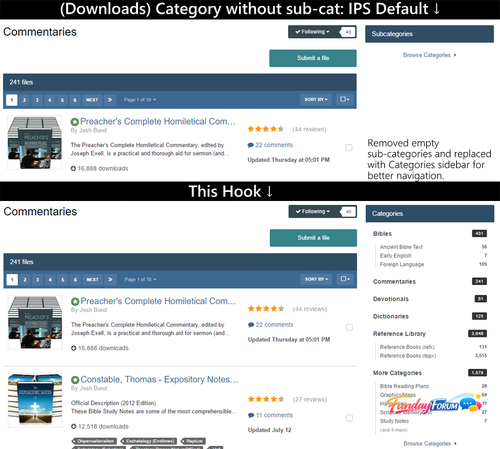
Several changes to the Categories sidebar in the Downloads area, when and how sub-categories are displayed, and when the full navigation Categories sidebar displays. And changes to how categories/subcategories are shown when a category has sub-categories but the parent category is empty.Free -
Version 1.0.0
3 downloads
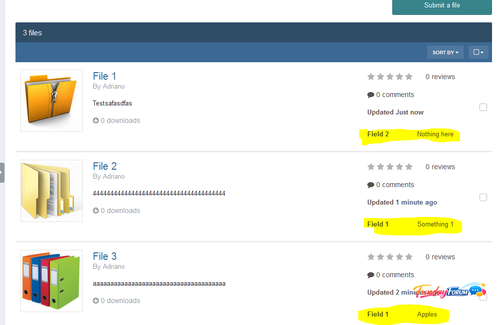
This plugin will allow admins to choose which file extra fields to show on category view. Settings: Extra fields to display Requirement: DownloadsFree