Search the Community
Showing results for tags 'sticky'.
Found 4 results
-

Version 1.1.0
5 downloads
This plugin removes the “Contact Us” text link in the footer and places a much more prominent sticky button in the bottom right corner. When clicked, it loads the regular contact form as a pop-up window. With this change visitors are more likely to reach out to you, e.g. with pre-sale questions. The plugin comes with lots of settings to make it fit your needs. The output is limited to one language though. No multi-language support. Live Demo What’s needed: IPS 4.2/4.3/4.4 Features/Settings: Button Change text Change background color Change text color Use user avatar or comment icon next to text Added a new option to pick a staff member and show their profile image in the button Contact Form Contact form title Add additional description text above form fields, e.g. to tell users in which cases they should use the form. Success message after submit Visibility Choose groups which will see the button Choose if the regular Contact Us text link in the footer will be hidden or not Hide on phones yes/no Hide on tablets yes/no Hide on desktop yes/no Note: The text fields are not translatable. Only one language is supported at this time.Free -

Version 2.1.0
6 downloads
This application will allow you, or if you have selected members, To post global sticky notes to other members on your board Global Sticky Notes ( ACP ) Display up to 10 admin based global sticky notes to your members Choose what user groups can see the sticky notes Add a signature (username and avatar) to the bottom of each sticky note allowing members to see who wrote it, as a clickable link to said profile Choose the colour of the sticky notes Choose from 9 different positions to show each individual sticky note Set a expiry time and date for each sticky note with a option to just show it until the user dismisses it Global Sticky Notes Front End Admin The admin/s can send the global sticky notes from the front end via the create menu ( Only admins can use this feature ) Personal Sticky Notes ( MEMBERS ) Allow chosen user groups to send personal sticky notes to other members Members can receive a unlimited amount of sticky notes All sticky notes are dismissable All personal sticky notes will automatically add the username and avatar, unless you have selected in the ACP to allow anonymous sticky notes (read ACP Menu below) Personal sticky notes will display the time the note was sent to the member for example "just now", " 5 minutes ago", "4 hours ago", "16th July" and so on Members can either send personal sticky notes to members by their hover card or via their forums topics and you can also send them via the users create menu Each ( Non anonymous ) personal sticky note has a reply icon on allowing users to easily reply to other members notes Front End ( PERSONAL STICKY NOTES ) Added a link to the users drop down menu linking to the new tables listed below Shows a table listing all the members received sticky notes with the ability to restore the note bringing it back to life Shows a table listing all the members sent sticky notes with the ability to edit and resend or just resend the stickynote, it also shows if the user has dismissed the sticky note Members can view all their sent and received sticky notes between them and X member All tables can be sorted by time and date and also have a advanced search for members or a time and date stamp Widgets Show a widget with a list of members who have sent the most sticky notes Show a widget with a list of members who have received the most sticky notes ACP Menu Sticky Notes (Global including personal) Choose to use either a pin or a bit of sticky tape to hold the sticky note Choose to show or hide sticky notes on mobile or tablet devices Personal Sticky Notes Allow members to send anonymous sticky notes to other members (admin can view all sticky notes in the ACP read below) Read all the sticky notes send by members in a nice and tidy table and you (being the admin) can even view the sender if they sent it anoymous Select what member groups can use personal sticky notes Choose from 9 different positions to place the sticky notes Mass delete sticky notes by either "ALL", "READ", "UNREAD", by individual members or by chosen user groups Choose the colour of personal sticky notes Member Group ACP Menu Choose how many personal sticky notes each member group can send per day, with a unlimited option Members Settings ACP Menu Block individual members from using personal sticky notes Block individual members from receiving sticky notes How to install If you have version 1.0.3 or below installed, uninstall it as it's a plugin and will conflict with the new application Go to your ACP and applications then click to install and upload the downloaded .tar file New Features Members can now block other members from sending them personal sticky notes via their profile setting page Added the ability for members to mass dismiss personal sticky notes ( This can be turned on or off in the ACP settings of the personal sticky notes ) Added the ability to hide the ' send sticky note ' link on the members topic posts via the ACP settings of the personal sticky notes Added a little note count bubble to the dismiss button on personal sticky notes showing the amount of notes they have got to dismiss ( This will only show if there is more than 1 )Free -
4 downloads
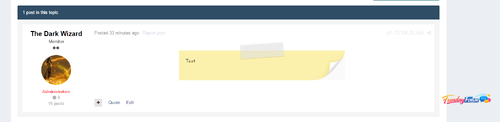
Hey All, Here is a sticky note button for the editor. No plugin is included, just the images/html/css and the instructions required to use them. In my journey to migrate my 6million+ post xenforo board to IPS, I've been creating my old bbcodes in the way that IPS does it which does it. I have more that I will release in the future. Enjoy! Note: If you want to change the width then please alter the following css line: max-width: 500px; The original version was 450px but I made it 500px for IPS. Feel free to choose a number that works better for you!Free -

Version 1.0.0
3 downloads
Plugin shows a sticky message on your board.Free