Add-ons
Browse our xenForo 1.4 and 1.5 Add-ons content.
12 files
-
Extra Portal
By Waqas Dar
Portal Application for XenForo
Compatible XF Versions:
1.2
1.3
1.4
1.5
Visible Branding: Yes, but removable with payment
[Extra] Portal for XenForo 1.2
by ExtraLicense
First of all, this is a free addon. Keep things fair and do not remove the copyright at the bottom of the Portal Page.
8 downloads
0 comments
Submitted
-

Themehouse - Extended Forum Banning
By Waqas Dar
This add on follows the example of the Thread Reply Ban option in xenforo, but it is extended to work on a forum level (for each forum), and it adds several extra options.
0 downloads
0 comments
Submitted
-

Themehouse - HTML BB Code
By Waqas Dar
This add-on is designed to allow posting of html in your forum. It adds a html button to the Rich Text Editor, which then it will parse the html in posts, threads, signatures, personal conversations and in all the other third party add ons that make use of the the Rich Text Editor such as my Articles Manager add on, or the Resource Manager to name a few.
3 downloads
0 comments
Submitted
-

download Themehouse - Thread Rating 1.3
By Waqas Dar
This add-on is designed to add a rate and review system on your forum for your members. Rating uses font awsome. Members will receive an alert when their threads have been rated. Threads can be sorted based on ratings that they have received and you can exclude forums from thread ratings. Ratings will be disabled in closed threads and in forums where posting is not allowed. An option to reset all ratings from a thread can be found at the Thread Tools link. It is available to admins and supermoderators only.A full list of all features and permissions will be listed below.
1 download
0 comments
Submitted
-

Themehouse - Post Comments 1.1
By Waqas Dar
This add-on is designed to add a comment system for your members to discuss messages. Comments can be moderated for groups and they can be limited to forums. Comments are disabled in closed topics and forums where posting is disabled. Staff members will not be affected by this.
2 downloads
0 comments
Submitted
-

Themehouse - Top Posters 1.2
By Waqas Dar
Display the top posters for the day, week, month and overall top posters. You can choose how many top posters to display and the position where to display them, on top of the forum, bottom of the forum, on the forum 's sidebar, or all places, in your Admin Panel and then Top Posters settings.
2 downloads
0 comments
Submitted
-

Themehouse - Xen Blog
By Waqas Dar
Add a blogging system to your forum and enhance your community experience with the following features:
Assign blogs to categories: You can add unlimited categories from your ACP. When you add an category, you can set it as parent or a child of another category. You can also set the category order in which to display them and enter a description as to what that category is about. You can also re-arrange the categories display order with ease. Attachments supported Admins can add 3 types of blogs: Plain text with BBcode and smiley support, HTML, and PHP (using the $output variable) Add a navigation tab linking to the blog Comment system Display order by: Most recent, last updated, most viewed, most replied, title (alphabetical), latest comments, most rated, or most liked Sort blogs in ascending or descending order Sort comments by date or likes in ascending or descending order New blog indicator for the navigation bar Inline moderation of blogs/comments: Mass delete/undelete and mass approve/unapprove Quick stats Top bloggers Display a select number of blogs on the forum index page Like integration: Blog owners receive an alert when their blog is liked Blogs and comments can be edited or deleted by anyone with appropriate permissions Soft or hard delete blogs: Soft delete can be restored Time limits for editing/deleting blogs Maximum length settings for blogs and comments (excluding staff members) Tagging integration: Tagged users receive an alert Daily limits on blog posts or comments Reply alert: Author receives an alert when a comment is posted on their blog User group permissions can be set for blogs or comments to be moderated before being posted Report integration Sitemap integration What’s New integration Search integration Newsfeed integration Moderation log integration Users will not see blog posts by users they ignore View IP permissions extended to view IP of blog poster or commenter Admin blog tools including: Stick/unstick blog, enable/disable blog, enable/disable comments, prune comments, prune ratings, see which users viewed the blog, and see which users are watching the blog Recount and rebuild to delete blogs, comments, and ratings by deleted users and guests Notable page with a list of the top bloggers Top commenters listed in a block on the blogs page When viewing a users profile, a blog button is seen that allows you to view blogs by that user1 download
0 comments
Submitted
-
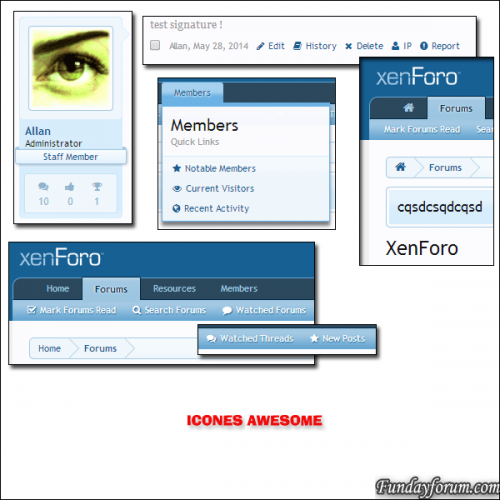
XenCore Tools 3.0.2
By Waqas Dar
XenCore Tools allows you to get much 60 new features easily, quickly, and without knowledge of html/css!
This is a great tool for administrators!
Everything is automatic, you simply click on the function you want to activate and XenCore Tools does the rest!
XenCore Tools is a real Swiss knife, after trying it, you can not do without.
60 news features for your XenForo
Work With XenForo 1.3.x/1.4.x/1.5.x and of course xF 1.5.3!
Installation:
Upload files into their respective folders on your ftp.
Import "addon-XenCore.xml"
Enjoy!
3 downloads
0 comments
Submitted
-
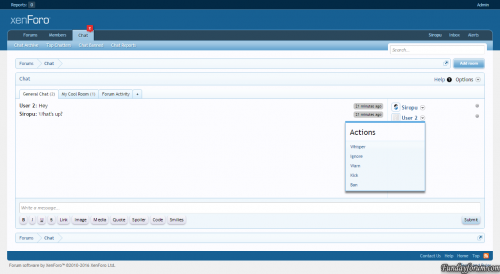
Chat By Siropu
By Waqas Dar
Admin Features
Enable Chat Enable Chat Rooms Enable Chat Page Rooms to display in the navigation Display Mode (All Pages, Forums List Above, Forums List Below, Sidebar Below Visitor Panel, Sidebar Bottom, Chat Page Only, Embed) Allow room change in embed mode Enable chatters list Enable top chatters list with limit Hide users after x minutes of inactivity Enable tag alerts Link tagged users to their profile Enable avatars in users list Enable avatars in message list Enable colored messages Enable color picker Choose if banned users can view chat Set maximum messages displayed Set maximum smilies used in a message Delete messages older than x days Delete rooms inactive for x days Enable /me command Enable /whisper command Enable /quit command Enable /kick command Display user commands by chat bot Chose which editor buttons are displayed (bold, italic, underline, strike-through, link, image, media, quote, spoiler, code, smilies) Disallow certain BBCodes Disable All BBCodes Set default user settings Displayed notifications Refresh rate control (4 states) Enable Chat Page Sidebar Display top chatters widget on chat page sidebar Notices (You can use multiple in rotation) Ads (You can use multiple in rotation) / Support for Ads Manager is available.
All Pages Mode it displays a bar at the bottom of the window with the last posted message and the number of chatters. When you click on the bar, the chat get displayed and you can chat from any page at any time. This way you don't have to stay on specific page to chat.
Embed Mode allows you to embed the chat with any room anywhere you want in the template using a template callback with XF's Template Modifications System.
There is also a mode called Full Page Mode which allows you to embed the chat using an iframe. To use it, you just need to add /fullpage to the end of the chat page URL.
Rooms (User Group Based Permissions)
Admin option to globally enable/disable rooms feature. Users can Add/Edit/Delete Rooms from within the chat if they have permission. Admin can create rooms with user group based permissions. Users can password protect their rooms if they have permission. Users can bypass password if they have permission. You can view who's chatting and in which room. By using /room and then typing you can search for rooms. /whisper command (Permission based)
Allows you to send private messages to chatters and the best part is that it supports multiple recipients at the same time.
/whisper [User 1, User 2] your message
You can either write this manually or you can click the new "Whisper" link in the user actions menu. If you click on multiple users "Whisper" action, they will be added to the group.
When the message shows up, you can see who else received the message and if you click on the "Whisper" text, you can send a new message to the same group, without having to click again on their "Whisper"link.
The /whisper command can be globally switched on/off from admin options and there are also user group permissions.
/me command (User Group Based Permissions)
Enable/disable the /me command. Set if command is displayed by the chat bot. /quit command (User Group Based Permissions)
Enable/disable the /quit command. Set if command is displayed by the chat bot. Command will display a message to all users: Username has left the chat.
If you write something after the command, that message will be included with the notification: Username has left the chat (Your message).
/prune command (User Group Based Permissions)
Will delete all the messages in the current room.
By adding all after the command will delete all the messages in all the rooms.
By adding the username of a user after the command, will delete all the messages by that user from the room.
/status command (User Group Based Permissions)
Allows you to set a status that will be displayed under your username in the chatters list. The status can be also set from the user options.
/mute command (User Group Based Permissions)
Allows you to mute users from the room for x hours (specified in the admin option). Muted user will not know that he/she is muted as the messages posted will not be saved and only displayed to that user.
/kick command (User Group Based Permissions)
Allows you to kick users from the room for x hours (specified in the admin option).
/clear command
Will clear all the messages in the chat window (does not delete them).
/rules command
Will display an overlay with the rules you have set.
/rooms command
Will display the available rooms.
/help command
Will display an overlay with information about the chat commands.
/user command
By typing /user followed by a username, will display only the messages associated with that user.
/giphy command
Will post a random GIF image using Giphy service. If a keyword is specified, the GIF will be random based on that keyword.
Bot Responses
Allows you to set keywords that can trigger automated messages posted by chat bot.
Bot Messages
Allows you to automatically post messages at a scheduled time.
Desktop Notifications
Allow you to display desktop notifications when there are new messages and the chat window is unfocused. You can set which message types are displayed (normal, whisper, tag, bot). Users have the option to disable this from their settings.
Default Joined Rooms
This feature will set the default rooms for new chat users. The rooms can be selected from the chat admin options and it only works with rooms that don't require a password. For rooms that are permission based, the permissions will be taken into consideration before joining.
Keep Session Alive
If enabled, active chat sessions will be updated every 5 minutes to keep them alive.
Set last active tab default
If enabled, the last active room tab in the chat will be set as default on the next page load.
Top Chatters
Enable/disable top chatter list with limit. Admin can reset top chatters list any time. Displayed notifications (By the Chat Bot)
User has been banned User has been unbanned User has joined the room User has left the room User has registered Display new forum Threads & Posts
Choose to display new threads Choose to display new thread posts Choose to display post content excerpt (with length control) Choose to display posts from selected forums only The messages will get posted by the Chat Bot and you can set the name for it.
Display moderator ban actions
If enabled, moderator ban/unban actions will be displayed in the chat by the chat bot.
Style Properties
Allows you to style almost every element of the chat.
You can also change the image icons and set bot avatar.
Font Awesome Support
Allows you to use Font Awesome icons instead of image icons. You can choose your own icons and you can even include Font Awesome if you don't have it installed.
Permissions
View chat Use chat View archive Search archive Edit own messages Edit messages by anyone Delete own messages Delete messages by anyone Delete all messages Ban users from chat View banned users Join rooms Join multiple rooms Add rooms Password protect rooms Bypass Password Delete any room Edit any room Use /me command Use /whisper command Use /quit command Use /kick command Allow room authors to use /kick command Choose display mode Use color Manage reports Report messages View whispers (Optional for Admins/Moderators) Read whispers (Optional for Admins/Moderators) Edit notices View Ads User Features
Enable/Disable Sound Maximize Chat Window Inverse Direction Set chat editor position (top or bottom) - Requires page refresh. Hide/show bot messages Hide/show chatters list Hide messages from ignored users Hide desktop notifications Enable/Disable Chat (Not applies to Chat Page Mode) Choose display mode Set massage color using color picker User Tagging (When you post with0 downloads
0 comments
Updated
-
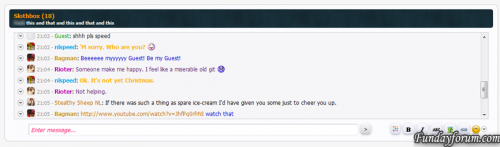
TaigaChat Pro - Realtime chat/shoutbox
By Waqas Dar
TaigaChat Pro brings to the table a wide array of commonly-requested features in the original TaigaChat free version, along with many improvements of my own concoction to make TaigaChat Pro more than an old-fashioned shoutbox - it is now also suited to replace highly-concurrent Flash, IRC and proprietary chatrooms.
For your money, you will not only receive a significantly more versatile and powerful product, but the same lifetime updates and support I offer on all my premium addons. By contrast, the free version of TaigaChat is largely unsupported - all future updates will be channelled into TaigaChat Pro. You are also buying into tried and tested technology - TaigaChat was one of the first major XenForo addons and has existed since the first beta versions of XenForo, with constant updates ever since.
In moving from the free version to TaigaChat Pro on my live forum, the activity of the shoutbox has drastically increased. Factors such as the new 'speed mode' refresh system and persistent message colouring have given it the 'XenForo Effect'; it is simply more fun to use. Of course, standard forum posting has not decreased - on the vast majority if not all forums, shoutbox messages and forum posts are used for entirely discrete purposes.
1 download
0 comments
Submitted
-
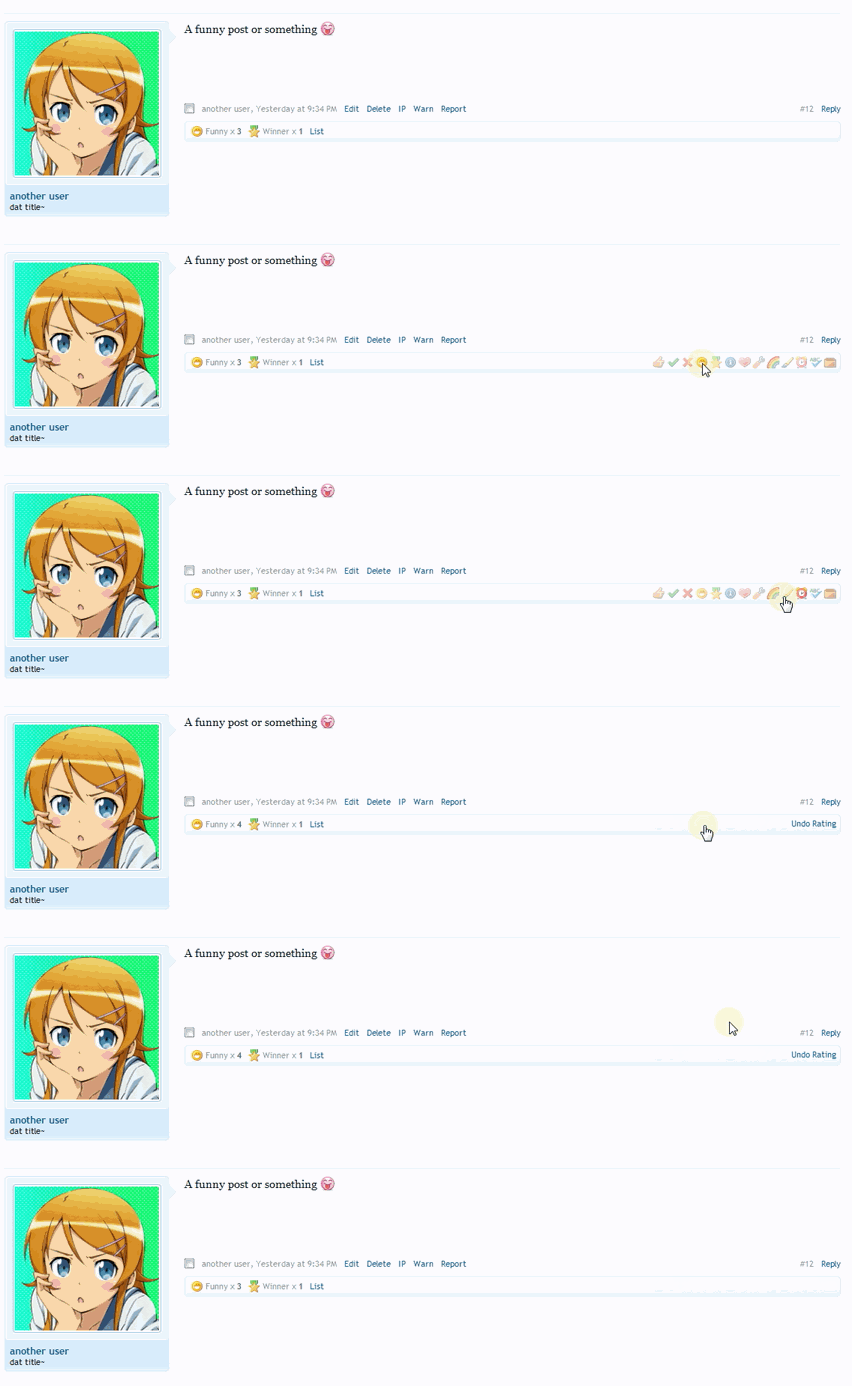
Post Ratings - taking likes to the next level
By Waqas Dar
At its most basic level, this addon is a massive improvement on the likes system of XenForo by allowing users to express a wide range of views on a post.
From first glance it may look like one of those silly addons for moods, points, credits, etc. that really adds nothing of benefit to your forum, but the reality is very different.
This addon:
Increases daily posts (read on for proof) Improves signal to noise ratio; less short/unnecessary posts Improves quality of posts (posters want to avoid negative ratings) Makes lurkers useful for something and gives them a means of interaction Like Alerts and similar features, I have found this addon to be a major source of the 'XenForo effect' - people just can't stop using it.
0 downloads
0 comments
Submitted
-
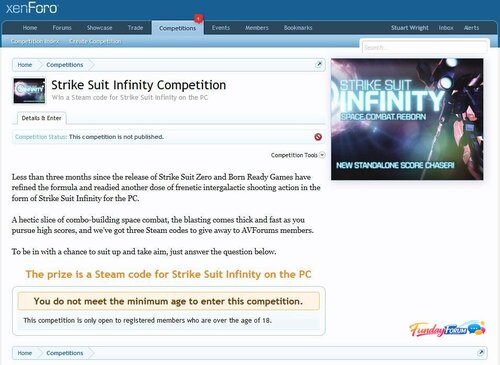
Competitions for XenForo
By Waqas Dar
Invigorate your community and engage your website sponsors with competitions.
Easy to set up competitions Competition pages have a sidebar in which competition images are displayed Automatically close competitions on the end date, pick the winners and notify them by alert Optionally create a discussion for a competition in chosen forum See what competitions a user entered/won in their profile Home page competitions sidebar block displays random selection of competition thumbnail images Permissions to view/enter/create/open and publish competitions The basics include
Rich text editor for competition details Set the date the competition runs from and to Set the number of winners and runners up Easy set up of question and answer with optional multiple choice options Image upload with crop tool with optional Alt/Title text, caption and link URL Restrictions and conditions include
Set usergroup permission to view, enter, create, open and publish competitions globally and on a per competition basis Optional age restriction to enter Optional country restriction to enter (requires GeoIP for PHP) Optional additional restriction rich text Optional opt in/opt out tick boxes with marketing message to create a marketing list for the competition sponsor Options include
Orient the sidebar on the right or left (the competition images are displayed in a sidebar) Force a competition's thumbnail image on the home page sidebar block (when there are several competitions, they are normally picked randomly) Optional forum specified for the creation of an associated discussion The cron
Opens published competitions on the start date Closes open + published competitions on the end date After closing a competition, the winners are picked at random and sent an alert, plus the competition author is alerted of the end of the competition Note: The cron entry is configured to run at around midnight GMT. This is how the XenForo cron system works. You will need to manually adjust this according to your timezone.1 download
0 comments
Submitted
-
Top Downloads
Week
Month
Year
All Time
-
-
Download Statistics
540
Files185
Comments29
Reviews


![More information about "Dilchasp_Hikayat-e_Saadi-[fundayforum.com] Urdu PDF Book"](https://fundayforum.com/uploads/monthly_2018_06/1178326569_Dilchasp_Hikayat-e_Saadi-fundayforum_com.thumb.jpg.1d0d05334dd4fd5194494a6b71b7fbbb.jpg)












-
Files
-

![More information about "[Romanian] IPSuite 4 translation (All Apps) 4.4.0"](https://fundayforum.com/uploads/monthly_2019_03/Romanian.thumb.jpg.b40713aa642f799dc3a66a22e6d6f262.jpg)