
- 📢 Welcome to FundayForum – Explore Trending Topics
- 🌟 Discover What’s Trending Today
- Megyn Kelly under fire after mocking Christina Applegate's health struggles
- Gracie Abrams dishes on preparing for 'SNL' Halloween show
- Australian fast bowler Megan Schutt suspended over medication breach
- Jake LaRavia injury: Lakers' head coach JJ Redick shares positive update after win
- Prince Harry wants 'closure' in crucial meeting with Princess Eugenie
- Leigh-Anne Pinnock breaks silence after troll brands her 'flop' in Jade Thirlwall comparison
- Mike Tindall makes never before heard confession about Zara
- Novo Pakistan Supports Insulin Access
- Charli D'Amelio breaks silence on family feud: 'Can't trust a person'
- Chappell Roan debuts 'expectations' live after collab with Olivia Rodrigo


Waqas Dar
-
Posts
11,303 -
Joined
-
Last visited
-
Days Won
559
Content Type
Profiles
Events
Forums
Gallery
Blogs
Downloads
Articles
Page News
Release Notes
Store
Files posted by Waqas Dar
-

Free
White Christmas
By Waqas Dar in IPS 4 Themes/Ranks
Skin XML file for installation All fonts used throughout the skin logo.psd team-icon.psd IBTheme copyright and license agreement Admin CP is themed to match forums 4.1.158 downloads
0 comments
Submitted
-
Free
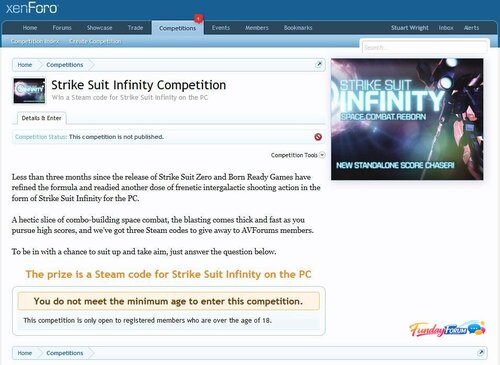
Competitions for XenForo
By Waqas Dar in XenForo Mods Hub
Invigorate your community and engage your website sponsors with competitions.
Easy to set up competitions Competition pages have a sidebar in which competition images are displayed Automatically close competitions on the end date, pick the winners and notify them by alert Optionally create a discussion for a competition in chosen forum See what competitions a user entered/won in their profile Home page competitions sidebar block displays random selection of competition thumbnail images Permissions to view/enter/create/open and publish competitions The basics include
Rich text editor for competition details Set the date the competition runs from and to Set the number of winners and runners up Easy set up of question and answer with optional multiple choice options Image upload with crop tool with optional Alt/Title text, caption and link URL Restrictions and conditions include
Set usergroup permission to view, enter, create, open and publish competitions globally and on a per competition basis Optional age restriction to enter Optional country restriction to enter (requires GeoIP for PHP) Optional additional restriction rich text Optional opt in/opt out tick boxes with marketing message to create a marketing list for the competition sponsor Options include
Orient the sidebar on the right or left (the competition images are displayed in a sidebar) Force a competition's thumbnail image on the home page sidebar block (when there are several competitions, they are normally picked randomly) Optional forum specified for the creation of an associated discussion The cron
Opens published competitions on the start date Closes open + published competitions on the end date After closing a competition, the winners are picked at random and sent an alert, plus the competition author is alerted of the end of the competition Note: The cron entry is configured to run at around midnight GMT. This is how the XenForo cron system works. You will need to manually adjust this according to your timezone.1 download
0 comments
Submitted
-
Free
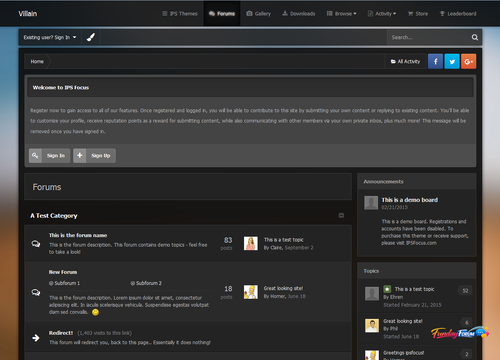
Villain - IPSFocus
By Waqas Dar in IPS 4 Themes/Ranks
Updated Version for 4.1.17.1
Villain is a dark, semi-transparent dark skin which includes a simple background picker allowing your members to choose their own image from a preset array of high quality background images. Perfect for any community, and especially great for gaming forums or site who want to offer customization options to their members!
11 downloads
0 comments
Submitted
-
Free
Babble: Real Time Chat
By Waqas Dar in IPS 4 Applications
Babble is a real time chat system using node.js and sockets. It uses less resources and doesn’t rely on long polling or interval scripts to check for new message. Babble is fully featured with those features laid out below.
NOTICE: If you are upgrading Babble, you will need to restart your babble.js application. if you have moved it from the default directory you will need to take the updated one, verify the information it contains, and replace the one you removed and then restart the babble.js app for node.
Requirements:
A modern browser that supports web sockets. (Firefox/IE11/Edge/Chrome/Safari supports websockets. For mobile browsers, I will only be supporting Safari and Chrome).
Node.js installed on a local or a remote server that can run a node.js script. I have only tested the last 4 versions of node.js, but the latest version of node.js you can install, the better. I will attempt to compile a node.js versions that are compatible with Babble.
Note:
babble requires node.js. This is an unconditional requirement. So many of the features of babble are node.js dependent, that there isn’t any fallback to another web technology (like ajax/long polling). With that in mind, Babble is very javascript dependent, it will not degrade gracefully if javascript has been disabled in the browser,if you have any tin foil hat wearing members, they will not be able to use babble.
Note 2:
Cloudflare, cloudflare only has a limited range of ports that can be used if you choose to use this particular service, you will need to contact them about what ports are available to you. the only alternative to this is to use a sub-domain (not tied into cloudflare) and/or the servers IP address instead of your sites URL for the NODE URL in the ACP.
Note 3:
**if you are running a server that doesn't use a LAMP ( Linux, Apache, MySQL, PHP) or LEMP (Linux, NGINX, MySQL, PHP) server, I will not be able to give support for. AFAIK node.js/socket.io will run on windows and mac os x, but configuration might prove difficult. As for *BSD servers, they should operate similar to a Linux server. Refunds will be given at my discretion, this does not mean I will not provide them for any reason, but for a valid reason.
Each purchase only entitles a installation on 1 live site and 1 dev site. If you wish to run babble on multiple sites, you will need to purchase babble for each site. If you are found in violation of this agreement, I can choose to revoke your access to future updates and support until the matter is rectified.
If you purchase a copyright removal, Babble will occasional make a call home to http://codingjungle.com to validate the copyright removal key. Copyright Removal keys will need to be purchased for each purchase of babble if you wish to run it on multiple sites without branding.
Features:
Rooms: Babble comes with two default rooms that can not be removed. The “Babble” room is used by default for Babble, and the Widget Room is used by the “Widget” (the widget can be configured to use the default room). Each room has permissions that can be set like “View, Message, Whisper, Edit, Delete, Upload, and Archives”. Each room also has the ability to be configured independently of each other on uploads (what types and sizes), how many messages to show by default, rules to show before entering the room. Rooms can also have 3 bots they can configure (more on bots later). Rooms can be password protected.
Uploads: Each room can be configured to allow uploads. If the upload is an image, the image will be “lazy loaded” and resized to fit the dimensions of the message area better. If it is a non-image upload, it will display a link to download. NOTE: Groups who can see the room, can also download and view images.
Sounds: Babble comes with a collection of sounds for send, receive, entering, leaving and whispers. Users can enable or disable each sound as they see fit. The sound files can be replaced at any time in the ACP by pointing to the corresponding sound setting to the new location (this is to avoid future updates from overwriting your sound files). NOTE: due to some limitations in mobile OS’s (iOS and android) even if the sounds are enabled by the user, there is one additional step they must take to hear sounds on the effected OS’s. On mobile devices a Speaker Icon will appear, that will need to be activated to be able to hear sounds, this action must be done each page refresh.
Whispers: Whispers are private messages that are sent in between users. They will open in a “tab” in the room and will flash when a new message is received if you aren’t currently active on the tab that is. Whispers only work inside the room, you currently can not “whisper” to some one who is not logged into the room you are in (at a later date this might change).
Browser Notifications: A user can set how many new messages they receive in a room before a browser notification is triggered (or they can disable them all together). Currently these do not work on mobile OS’s, in the future I plan on adding notifications for iOS and Android.
New Message Order: By default babble will order messages newest to oldest, for some users this might not be ideal, so they can reverse the order to oldest to newest. Any new message after this will honor the setting.
Group Content: You can set a min. content count per room for each user group before they can send messages. You can use this feature as a reward to your members for participation on your site. Note: Messages made in babble will not increment content counts.
Command Aliasing: you can set any number of aliases to existing/custom commands, this will help if you want to "localize" the commands.
Stats - if stats are enabled for a room, you can keep track of basic stats like how many messages have been made in a room, the most online ever in a room, the current day's tally of how many have been in a room, and the top 5 users who make messages in a room.
Archive - if enabled, a user can select to load messages previous made in the room. this is a group permission.
BOTS:
Babble comes with 4 bots, each serve a different function and are triggered in different ways. 3 of the bots can be configured per room, where the 4th bot can be configured to which rooms it sends messages too, as most of its settings are “global”. Hopefully Babble Bots can help you accomplish some pretty amazing things and enrich your users experience with babble.
Time Bot: the time bot can be configured per room*. This bot can be configured to send different messages at different times**. You can use HTML/BBC in the bots messages. This bot runs from a task, so its HIGHLY recommend that you have your task configured to run as a cron job to see the best results. If not configured to a cron, this bot might not function properly.
* you can configure this bot to store its messages in the database or not. Due to a technical limitation with node.js the bot is unable to check to see if there are any users in the room or not, so instead of having the chat history filled with messages from the time bot, they will “go away” on a page refresh.
** this is in minutes passed since the bot was configured, if you set a message to send every 10 minutes, then the first message will be sent 10 minutes after you configured the bot, and each additional message will be sent 10 minutes after this.
Count Bot: This bot can be configured per room. You can configure this bot to send messages after x amount of messages sent by users*. You can also send different messages x amount of messages sent. You can use HTML/BBC and special variables(1) in your messages.
* this does not include whispers sent or messages from other bots.
Phrase Bot: This bot can be configured per room. You can configure this bot to send messages when a match to a word/phrase is made. You can have multiple matches for the same message or multiple messages for different matches. You can use HTML/BBC and specials variables(1) in the messages.
Notifications: This is the bot that has a global configuration. This bot will send messages out when new content is posted to the supported applications*. Permissions are honored on these notifications, so if the user doesn’t have access to to view the area in question, they wont see the notification. This bot can only be configured to tell it which rooms to run in, the rest of its settings are global due to its nature.
* IPS applications are the only ones support for notifications. In theory any application that uses the content item class should work, but I have only tested my own application that use this and they will work with it, so I’m pretty sure it will work with the other 3rd party application that use the classes. Babble has some API elements to it that will be document on my site later, so any application it doesn’t support, the application developer should be able to create a hook without much of a problem.
(1) There are special variables that the count bot and phrase bot have access to, that can be used in the message, to show the name of the person who triggered, the bot’s name, and the match (this is for the phrase bot only).
Bots can use commands, if it the command requires a the members name, use the special variable #member#
Commands:
Commands can perform special functions when issued. The commands can be issued thru the chat area (similar to how IRC does it). Some commands have group restrictions. You can add commands in 2 ways, in the ACP you can add basic commands , if you need more advanced functionality you can create a “command” file. Commands have been expanded greatly in 2.1, you can now "alias" them and the phrase/count bot can now use commands (the time bot can as well, but it wont have access to the #member# special variable).
Command list:
Announce – adds or removes an announcement to the room Ban – bans a user for a room. Unban – unbans a user for a room. BanList – Show’s who has been banned from a room. Ignore – Ignore a user in a room. Unignore – Stop ignored a user in a room. Kick – kick a user from a room. Me – an action command for a room. Mute – Mutes a member for everyone in a room. Unmute – unmutes the member in a room. Mutelist – shows a list of users who have been muted. Notifications – disables or enables notifications from the notification bot. Topic – adds or removes a chat topic from a room. Rules - Show the rules for a room if they have them. Password - sets a password for a room Purge - deletes all the existing messages in a room Stats - displays a rooms stats if enabled Rand - display a random GIF from giphy.com and many more!13 downloads
0 comments
Submitted
-
Free
IPS Community Suite 4.1.17.1 Nulled
By Waqas Dar in IPS Community Suite 4 Resources
Key Changes fixed version 4.1.17.1
This is a maintenance release to fix minor issues.
Additional Information
This release:
Fixes an issue where the "Who's Online" widget / "Online Users" page shows the wrong number of guests or the wrong date. Fixes an issue where Display Name History shows the history from other accounts. Fixes an issue where deleting a member in the AdminCP may not work. Fixes an error when using tags in some circumstances. Fixes an error when creating an advertisement. Fixes an error when setting profile photo to use Gravatar. Improves the Diagnostics section of the AdminCP Support wizard. Key Changes 4.1.17
In addition to many small bug fixes, this release includes:
Accounts flagged as spammers are now more visibly different on the member list in AdminCP Added quite a few new embed providers codepen.io coub.com deviantart.com docs.com funnyordie.com gettyimages.com iFixit.com kickstarter.com meetup.com mixcloud.com mix.office.com on.aol.com reddit.com reverbnation.com screencast.com screenr.com slideshare.net smugmug.com ustream.tv Google Maps (requires free Google API key) Default location for an AdminCP tab honors the admin's ordering Staff notification emails for tickets in Commerce now include the ticket ID Auto-saved content in the editor will now expire after 48 hours If you load an editor that has previous auto-saved content you will now be prompted to keep or remove it You can now set pre-filled reasons for Warning actions that will automatically populate the member notes editor when a moderator warns a user Escape key will now cancel quick-edit on titles Adds a setting to restrict member birthday view to admins only or to completely disable prompting for birthday to member There are now more "save and reload" options in various places to keep your place when editing content or settings New check all box when viewing activity on a member profile for easier moderation You can now hide posts that are unapproved rather than just approve or delete When a moderator changes the status of a report in the ModCP the system now puts a reply in moderator comments noting the change When you see a "could not write file" error the file it was trying to write now shows in the error logs You can now quickly edit tags when viewing an item without having to edit it if you have permission If you are using multiple devices to login to a site you will be less likely to be logged out Tags can now be quickly edited when viewing an item Administrators can now create custom RSS feeds for various content Enhancements to IP discovery tools for moderators Actions for reports in ModCP now show when status is changed as a comment Redesigned support tool More REST API methods Password strength rating and requirement option Guest terms of service alert Minimum age requirement Ban Filters are now Word Filters and can set words to automatically moderate Display name history is now available on profile view Better analytics integration Leaderboard
More release information...
Additional Information
Developer Changes
The \IPS\Ftp class now has a chmod() method Node Controllers can now implement an _afterReorder() method that is fired after reordering nodes The REST API POST /forums/topic/id endpoint will now update the first post content appropriately XRegExp has been upgraded to 3.1.1 Whoops has been upgraded to 2.1.4 php-punycode has been upgraded to 2.1 FontAwesome has been upgraded to 4.7 CodeMirror has been upgraded to 5.20.2 Stripe has removed the feature used for payouts, so that functionality is now deprecated The image proxy cache now uses a proper file storage extension (core_Imageproxycache) Stack form helpers can now specify a minimum amount of items "Word Filters" (previously, "Profanity Filters") now use an Active Record model, and are now extendable (\IPS\core\Profanity) The installation will now define an \IPS\CIC constant to indicate whether or not the community is on IPS Community in the Cloud platform \IPS\Content::searchResult() can now specify an optional $template parameter to use a custom template. \IPS\Content\Search\Result\Content::html() can now specify an optional $template parameter to use a custom template. \IPS\Content\Search\Result\Content now has an asArray() method, which will return search index data as an array The Translatable form helper now has an sprintf option, to allow for swapping sprintf parameter within the text box with a different value The Password form helper can now show a "strength" meter, and set a minimum strength required
53 downloads
0 comments
Submitted
-
Free
Snow Falling
By Waqas Dar in IPS 4.7 Plugin
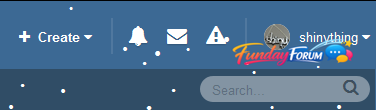
The Snow plugin adds a festive, wintry touch to any IPS4 website with configurable JavaScript-driven snow.
Features:
Snow that gently falls and gathers, with wind speed and direction determined by the mouse X position. Settings provided include: Number of snow particles on screen and active ("falling") at any time Configurable Animation tick rate Snow Color (with color picker) Snow by default is in the header, but can be configured to be in any HTML element ID, or within the document body. Snow "floor" can be set in pixels (the absolute pixel value at which the snow stops falling or sticks) Stickiness of snow (does it stick to the bottom of the window/element or not?) Twinkle effect - snow fades in and out as it goes down the screen Optional support for mobile devices (will be cruel to their CPU and battery!) New feature to enable/disable snow on specific themes only. Enjoy what is perhaps the second most useless plugin ever developed for IPS4!
Original BSD-licensed code for snowstorm provided by Scott Schiller (2007).
WARNING: Will slow down browsers. As the JavaScript implementing this functionality is not mine, only critical IPS-breaking issues will be fixed. What you see is what you get, take it or leave it.
10 downloads
0 comments
Submitted
-
Free
Don't automatically log out other sessions on login
By Waqas Dar in IPS 4.7 Plugin
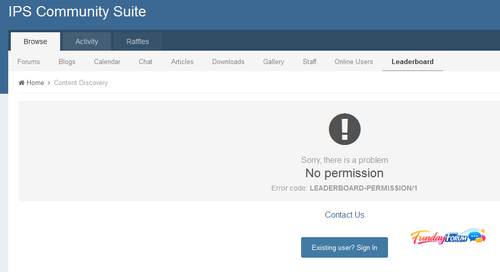
By default, IPS4 will automatically log out other sessions if you log in more than 90 days after logging into the first device. This behaviour is counter-intuitive and annoying for users.
This plugin prevents members from being automatically logged out because they logged into a new device.
This free plugin is provided with no warranty of any kind, either explicit or implied, to the extent permissible by the applicable laws. Please do report bugs to me, but I make no promises about fixing them.
3 downloads
0 comments
Submitted
-
Free
Leaderboard Access Permisison
By Waqas Dar in IPS 4.7 Plugin
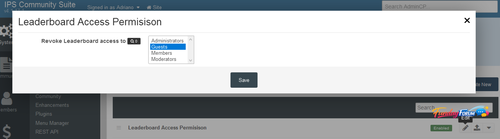
Will restrict Leaderboard acces to specific groups.
Settings:
Groups that won't have access to Leaderboard1 download
0 comments
Submitted
-

Free
IPS Pinterest Share Link Button
By Waqas Dar in IPS 4.7 Plugin
Share on Pinterest button for ips.
0 downloads
0 comments
Updated
-

Free
0 comments
Updated
-
Free
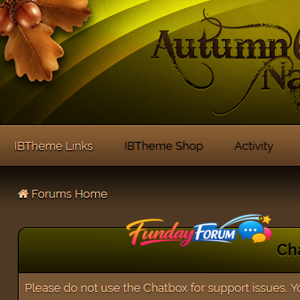
Autumn Nature
By Waqas Dar in IPS 4 Themes/Ranks
Works with the latest versions of these applications:
IP.Board 4.1.x Admin Control Panel IP.Commerce IP.Pages IP.Downloads IP.Gallery IP.Blog IP.Calendar IP.Chat Chatbox Included in the download:
Skin XML file for installation All fonts used throughout the skin logo.psd team-icon.psd IBTheme copyright and license agreement Admin CP is themed to match forums10 downloads
0 comments
Submitted
-
Free
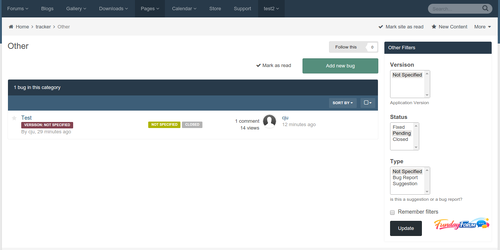
Bug Tracker
By Waqas Dar in IPS 4.7 Plugin
Read the Install.txt file for proper use.
Used to create a custom Page to report bugs or suggestions.
15 downloads
0 comments
Submitted
-
Free
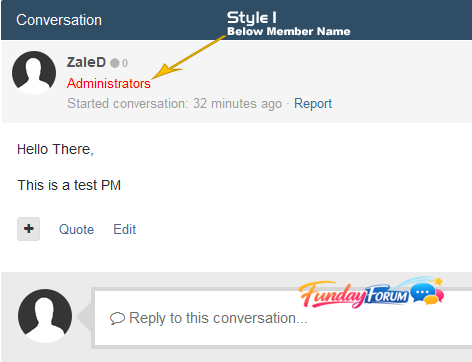
Display member group in messenger
By Waqas Dar in IPS 4.7 Plugin
This plugin will display member group in messenger in two locations (as you choose):
- Below Member Name
- Beside Member Name
3 downloads
0 comments
Submitted
-
Free
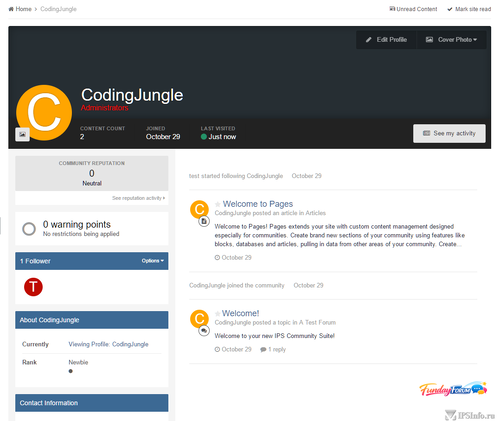
Name2Color Avatars
By Waqas Dar in IPS 4.7 Plugin
I was bored and was browsing around and saw a list of "new features" in a competing software to IPS and was like "now IPS should have this".
if the USER has the "default" user avatar, the "egg person" not sure what else to call it, this plugin will take the first character of their username and create a color code out of it (they are not unique to the user, its not that advance) and create a "text based" avatar for the account.
should work with a majority of places as long as they are using the IPS templates: userPhoto and uaserPhotoFromData.
the css is pretty straight forward, and follows a similar path to what ipsPhoto does (related to sizing and positioning). should work just like if there was an avatar image.
the colors for the backgrounds are auto generated, if you want to override the colors, you can do this:
take the first character of the username, uppercase it, as name2color Avatar will uppercase it. for our example we will use "bob". in your customs.css add this:
.toColorNameClass_B {
background-color: orange !important; //you can use any hex/rgb you want here
}
this will make any B name2color avatar's this color.
feel free to use however want or add it to any project you'd like.
2 downloads
Submitted
-

Free
Verifying Googlebot
By Waqas Dar in IPS 4.7 Plugin
This mod will take care about fake googlebot user-agent and block them more info
How To Install
first you need upload all contents of upload folder to IPS root folder
then you need install the plugin (Admin CP > System > Site Features > Plugins > Install)
2 downloads
0 comments
Updated
-
Free
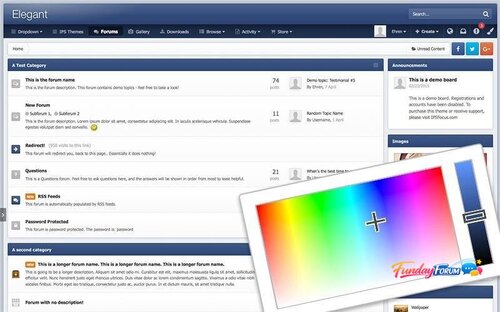
Elegant for IP.Suite 4.1.x
By Waqas Dar in IPS 4 Themes/Ranks
Demo
Elegant for IP.Suite 4.1.x
Bugs fix for 4.1.16.1
Elegant is a minimalistic theme controlled by a color picker, allowing each of your members to choose their own unique color scheme.
10 downloads
0 comments
Updated
-
Free
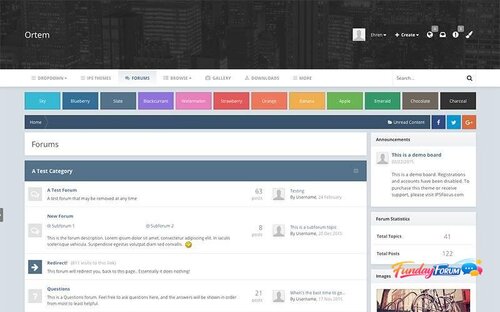
Ortem for IP.Suite 4.1.x
By Waqas Dar in IPS 4 Themes/Ranks
Demo
Ortem for IP.Suite 4.1.x
Bugs fix for 4.1.16.1
Ortem is a minimalistic design focused around a simple color picker, allowing your members to easily customize the colors of the layout by selecting from a preset array. The header area is large enough to accommodate for big logos and full width banners, and the navigation bar sticks to the top of the screen for easy access.
15 downloads
0 comments
Submitted
-
Free
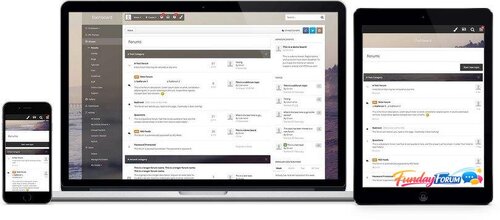
Dashboard for IP.Suite 4.1.x
By Waqas Dar in IPS 4 Themes/Ranks
Demo
Dashboard for IP.Suite 4.1.x
Bugs fix for 4.1.16.1
Dashboard is a feature-rich IPS theme and includes a nice blur effect behind the vertical navigation panel, a background changer and 'transparent' strips which allow the background image to alter specific internal areas of the theme.
12 downloads
0 comments
Submitted
-

Free
Commerce Banner
By Waqas Dar in IPS 4.7 Plugin
Displays a banner advert or header message on selected Commerce pages. Can be used for promotional offers etc.
Use built in advert (single image upload, linked image or HMTL), IPS formatted message or plain text. Group Selector Page Selector: index, category, product. Sidebar widget to add banner to other pages Compatibility: tested on 4.1.14.3 with default skin only.
Requirements: Commerce App
NEW: Sidebar widget to add your banner to any page on your site. Bug Fix: Fixed multiple page selector10 downloads
0 comments
Submitted
-
Free
Commerce Product Status
By Waqas Dar in IPS 4.7 Plugin
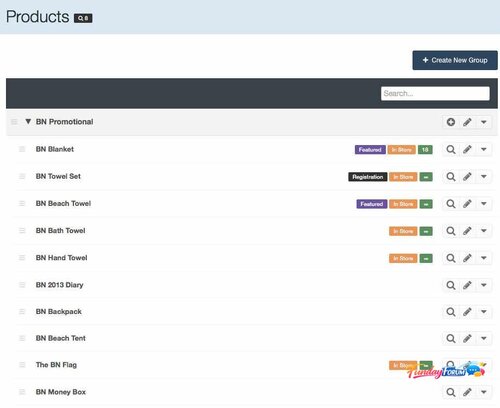
I use Commerce to sell tickets to lots of events which means that I have a lot of products listed in the ACP, most of which are hidden from the front end. Scrolling through long lists of archived products to find the one you need can be frustrating so this plugin adds handy badges to the ACP product listing page to show which products are currently:
Live in store.
Featured in store.
Showing on the registration screen.
It also displays current stock levels and has a setting to display stock levels for none, currently in store or all products. Turns a basic listing table into a handy little dashboard.
Improved support for items with multiple stock levels based on product options
0 downloads
0 comments
Submitted
-
Free
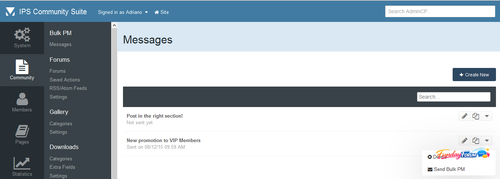
(SOS40) Bulk PM
By Waqas Dar in IPS 4 Applications
send bulk Pm to all at once to ur community users in forum.
16 downloads
0 comments
Submitted
-

Free
XenForo 1.5.11 Nulled
By Waqas Dar in Free XenForo Resources
XenForo 1.5.11 Released. nulled version
12 downloads
Submitted
-
Free
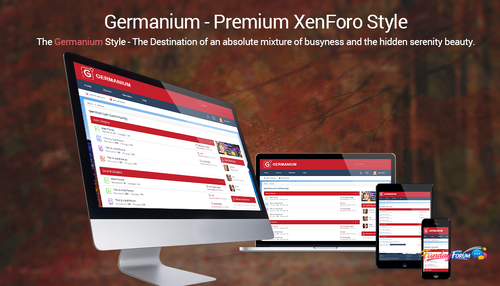
Brivium - Germanium 1.5.2
By Waqas Dar in XenForo UI/UX Styles Hub
Germanium is a chemical element with symbol Ge and atomic number 32. It is a lustrous, hard, grayish-white metalloid in the carbon group, chemically similar to its group neighbors tin and silicon. Purified germanium is a semiconductor, with an appearance more similar to elemental silicon. Germanium was named as the name of "Germany".
From this point, we created "Germanium Style" with the default theme is "red and blue" color in contrast. We use a default background which is an image of a busy city with a lot of high buildings, skyscrapers...
Maybe, it’s not the icon of Germany in the past, but it’s a suitable message for Germany nowsaday. A country broke out of World War II and now that country is trying to assert themselves in the world.
With a crowded city, we hope that you could have a feeling of the treadmill working as German with lots of passion and inspiration.
The balance between the red passion and the blue cold is absolutely harmony and as a tune is played at the sunset… All of them are blending….
2 downloads
0 comments
Submitted
-
Free
Steam Profile Integration
By Waqas Dar in IPS 4 Applications
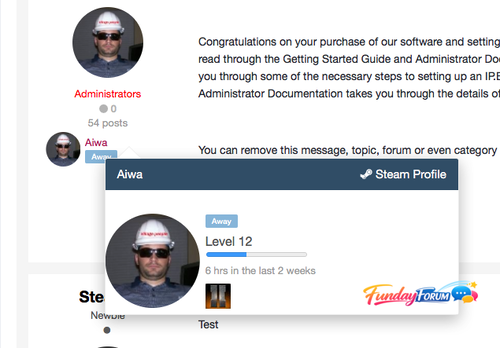
This app will obtain data from Steam for your users and place it in your IPS Community database for use anywhere on your site. Your board will re-load your members Steam Online information, in configurable batches, every 2 minutes, so you always have up to date information without impacting load times of your community pages.
Out of the box, this app will display steam information in the following places
Member Profile Next to Members' posts Member Hovercards (Steam Online Status only) Widget: X Random Online Steam Members displayed anywhere you can place a Widget More detailed information about the members Steam profile is displayed on the Members Profile page. Including an optional list of games the member owns. Out of the box the list of games can be shown in either an image grid layout, or list view.
This app integrates seamlessly with Lavo's Sign in through Steam.. It will automatically detect if it is installed and pull that users Steam information.
Don't have Lavo's sign in installed? No problem, this app works with a Custom Profile field also. Want to use both a custom profile field AND Lavo's hook? Not a problem, this app seamlessly pulls information from both locations to create a single list of users to pull information.
Valid Steam Input format for Custom Profile Field:
Steam Name: ex. ' Aiwa ' 17 digit Steam ID: ex. 76561197964468370 Old school Steam ID: ex. STEAM_0:0:2101321 *** If there are any other places you'd like to see a users steam information displayed, let me know!
Scales seamlessly to work with larger boards without impacting site / server performance.
6 downloads
0 comments
Submitted
-
Free
Country Field
By Waqas Dar in IPS 4.7 Plugin
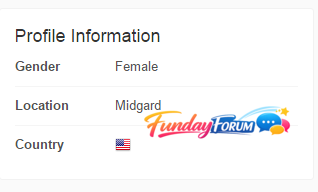
plugin for flags your states in your profile.
13 downloads
0 comments
Submitted
-
Recently Browsing 0 members
- No registered users viewing this page.