
- 📢 Welcome to FundayForum – Explore Trending Topics
- 🌟 Discover What’s Trending Today
- Megyn Kelly under fire after mocking Christina Applegate's health struggles
- Gracie Abrams dishes on preparing for 'SNL' Halloween show
- Australian fast bowler Megan Schutt suspended over medication breach
- Jake LaRavia injury: Lakers' head coach JJ Redick shares positive update after win
- Prince Harry wants 'closure' in crucial meeting with Princess Eugenie
- Leigh-Anne Pinnock breaks silence after troll brands her 'flop' in Jade Thirlwall comparison
- Mike Tindall makes never before heard confession about Zara
- Novo Pakistan Supports Insulin Access
- Charli D'Amelio breaks silence on family feud: 'Can't trust a person'
- Chappell Roan debuts 'expectations' live after collab with Olivia Rodrigo


Waqas Dar
-
Posts
11,303 -
Joined
-
Last visited
-
Days Won
559
Content Type
Profiles
Events
Forums
Gallery
Blogs
Downloads
Articles
Page News
Release Notes
Store
Files posted by Waqas Dar
-

Free
Rules - Starter (Example) Rules Pack 1.2.0
By Waqas Dar in IPS 4.7 Plugin
This "rule pack" consists of starter (example) rules which you can import into the Rules application and learn from, or customize to fit your own needs and use them in production. In order to use any of these rules on your site, you must first install the Rules application:
The following rule sets are included:
Prestige Reputation System
The prestige reputation system is an example of how you can create your own reputation rankings based on the existing reputation system built into IPS4.
It works by attaching a new integer data field to members called "Prestige Rank", which in turn is updated when a member recieves reputation in the core IPS suite. You can customize the rule conditions to your liking to determine when a member actually recieves the "prestige" reputation rank ( the default is when an admin or moderator gives the reputation.)
Also included is another rule that will promote the member to a group of your choosing when they reach a certain "prestige" rank level. You can customize the threshold and the group by editing the "Promote member" rule settings.
Member Re-Engagement Rule Set
This rule demonstrates the power of scheduling with rules.
The first rule in this set schedules an email for a member to be sent 2 months after they log in to the site. If they do not log in again within that timeframe, then the email will be sent. However, if they do log into the site again, then the email is simply re-scheduled to be sent another 2 months in the future. This way, you can have a "re-engagement" email always scheduled for members to be sent out if they haven't logged into the site for a while.
Another rule included with this set will delete any scheduled "re-engagement" email for a member when they are removed from the system.
Auto Lock Old Topics
This rule set schedules a topic to be automatically closed, a reply made, and a PM sent to the author after a period of inactivity of the forum topic. When a reply is made to the topic, the date for auto-locking is automatically rescheduled for the set time period. If the topic is not replied within that time period, then the custom action is taken which locks, replies, and PM's the topic author.
Much more to come. Follow and stay tuned. If you have any ideas or requests for new rules to go into the example pack, drop me a line in the discussion topic!
4 downloads
0 comments
Submitted
-

Free
Developer Tools
These files are required to use developer mode in IPS Community Suite.
4.1.11.1 compatibility
5 downloads
0 comments
Updated
-

Free
Norwegian Language IPB 4.X
By Waqas Dar in Language Packs
Here is the Norwegian Language pack for IPB 4.x
2 downloads
(0 reviews)0 comments
Submitted
-
Free
Social Icons
By Waqas Dar in IPS 4.7 Plugin
About
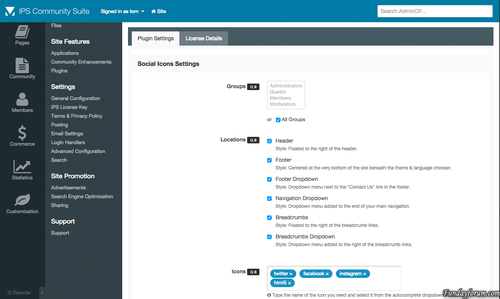
Social Icons for IPS4 is the most advanced plugin available for integrating your favourite social media networks into several locations throughout the suite. This plugin takes full advantage of font icons by allowing full control over size, colour and positioning using simple cross-browser & cross-device CSS code. This eliminates the need for additional raster based icons thus massively improving site performance.
Features
The plugin is shipped with over 170 vector icons that cover all popular social networks.
Choose to show your icons in seven locations including – header, footer, navigation & sidebar.
Drag & drop icons directly to your homepage widgetable areas.
Search for and then preview the icons you need directly from the plugin settings.
Customize the size of your icons directly from the plugin settings.
Want to override the default brand colors? We’ve included a setting for just that.
The settings offer complete control over which groups can and cannot use the plugin.
Integrated with IPS4 Localization.
Coming Soon
Additional icons (after several have been requested)
12 downloads
0 comments
Submitted
-
Free
Extra Portal
By Waqas Dar in XenForo Mods Hub
Portal Application for XenForo
Compatible XF Versions:
1.2
1.3
1.4
1.5
Visible Branding: Yes, but removable with payment
[Extra] Portal for XenForo 1.2
by ExtraLicense
First of all, this is a free addon. Keep things fair and do not remove the copyright at the bottom of the Portal Page.
8 downloads
0 comments
Submitted
-

Free
FAQ System
By Waqas Dar in IPS 4 Applications
The FAQ System allows Administrators to create custom questions and answers and display them anywhere on their site.
Uses the full IPB Editor Group Questions into FAQ Collections to show different questions on different pages Display Collections easily on any page, in any IPS component Answers are displayed in a popup window so users are not taken to another screen Note: Compatibility for version 4.1
10 downloads
0 comments
Updated
-
Free
Enable Signatures on Mobile View
By Waqas Dar in IPS 4.7 Plugin
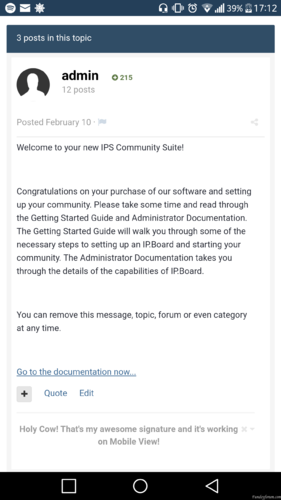
This plugin is enabling member's signature in topic.
0 downloads
0 comments
Submitted
-
Free
Introduction Notice
By Waqas Dar in IPS 4.7 Plugin
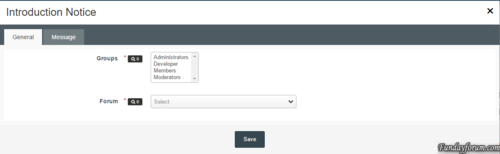
This plugin will redirect a user to a forum until they have posted in it.
Settings:
Groups - selected groups that will be redirected if they haven't posted Forum - the forum to redirect users to Title - title of the notice Content - content of the notice Fixed the issue where all users no matter which group (except guests) where being redirected.
6 downloads
0 comments
Submitted
-
Free
Bind Attachments to Post Autho
By Waqas Dar in IPS 4.7 Plugin
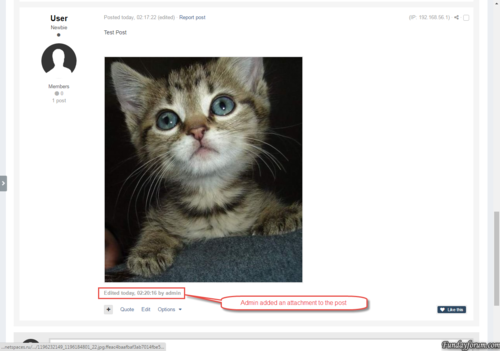
The plugin changes the owners of the attachments. The author of the post becomes the owner attached to the post attachments.
This can be useful if your moderators often change other people's attachments.
The plugin has no settings, and runs as a task 1 time per day.
1 download
0 comments
Submitted
-
Free
Server Console
By Waqas Dar in IPS 4.7 Plugin
Server Console
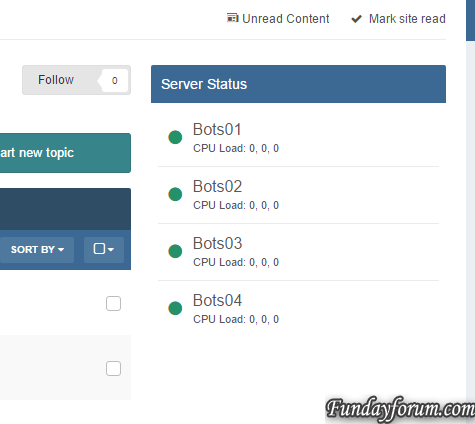
Simple Application to observe multiply servers and bigger infrastructures.
The application was basically written that I can keep track of all my servers, without having different pages for monitoring, backups and so on.
Features:
Frequent checks if a server is online/offline and also getting some information, such as: CPU Usage CPU Load RAM Usage (free/total/percentage) DISK Usage (free/total/percentage) Uptime
Block/Widget that users can see the status of the servers as well Dedicated Front Page to observe the status Maintenance mode for servers
As this is only an early development a lot things are planned:
Graphs displaying status/values over the time More detailed stats Dedicated status page Notifications on downtimes / uptimes Backup system
This applications requires the PHP-cURL extension!
This applications requires that this script is installed on any client server and is reachable by the forum server.
Besides there application there some plugins that are created per request, but are not mandatory or useful for everyone using the application. Here is a list of plugins:
Allow users on selection to select servers which they want to get notified from, commonly useful for hosting companies with infrastructure and a support forum: https://dev.grief.network/files/file/3-server-console-register/ What's New in Version 0.1.9
Added protection against false positive alerts Created config option to define failure tolerance per server before the status is actually changed6 downloads
0 comments
Submitted
-
Free
Discord Server Widget
By Waqas Dar in IPS 4.7 Plugin
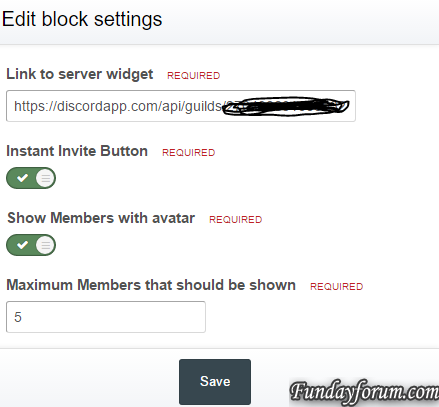
Simple widget to display activity and online members on a discord server.
The widget uses the wdiget.json api provided by discord:
This widget requires that PHP cUrl extension.
22 downloads
0 comments
Submitted
-

Free
theme/skin Forum Ranks Fantasy + PSD + Font
By Waqas Dar in IPS 4 Themes/Ranks
Includes:
Fonts .PSD File17 downloads
0 comments
Submitted
-
Free
Pages SuperGrid
By Waqas Dar in IPS 4.7 Plugin
Pages SuperGrid is a set of Pages templates and a complete solution to make your Pages databases (with articles, directories and so on) appealing and engaging.
What’s needed:
IPS 4.1 in its most recent version with the Pages application A pages databases that uses the stock Record Image field and has images with a sufficient resolution uploaded through that field. (Technically, the templates also work without images, but it’s an image-centered design and works best when most or all records have images.)
Which templates are included:
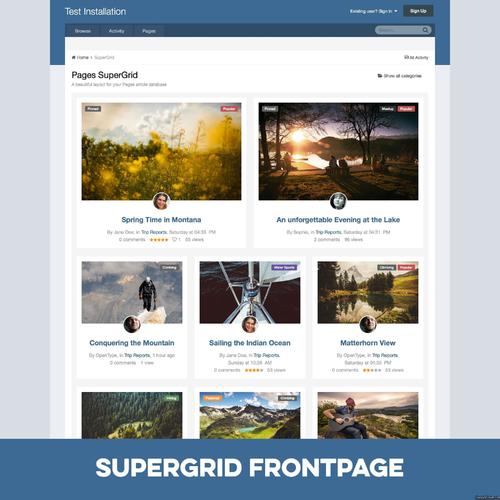
A beautiful grid-based Front Page template with two records featured at the top — for when your database is set to article mode. A beautiful grid-based Listing template replacing the dull forum listing design — for when you open a category or have a database without categories. A unique Record View template with a large header image — for when you open a specific record. A category listing template – in case you use more than one category. Note: You can use the templates for any number of databases, but the settings will always apply to all SuperGrid templates. 2 Bonus Features included:
Twitter Card support! Yes, you read that correctly! The SuperGrid record view template adds Twitter Card support to your records. You just have to provide your Twitter handle. Tweets with images have a significantly higher click rate and with Pages SuperGrid any link to an article in your database (which has a record image) will automatically get a beautiful Twitter Card like this:
Block template! Create blocks anywhere on your site – pointing to your database – and make them as beautiful as the database itself.
Detailed Feature Description and Notes:
Pages SuperGrid is built with the IPS design framework and is therefore fully responsive and compatible to most well-coded/well-designed themes. The styling of your theme(s) is inherited and the Pages SuperGrid templates will usually work out of the box. The template is designed to work on single-column pages with or without a sidebar. The grid will automatically adopt to the available width and collapse on smaller devices. The content field is not shown in the grid-based listing templates and all images will be scaled and cropped (without distortion) to the same size to allow a consistent look. If you need to show the content field or need to use images shown with different sizes, check out Taman’s templates. The templates come with lots of options you can easily adjust within the template. Front Page/Listing Template: Show author/category/date: Yes/No Alignment author/category/date Show comments/views/ratings/likes: Yes/No Alignment comments/views/ratings/likes Show record owner’s avatar: Yes/no Alignment record owner’s avatar Title alignment Image Aspect Ratio Use thumbnail or full-size images Turn images into record link: Yes/No Assign fallback image for records without an image Show “featured record” badge for featured records: Yes/No Pick badge style for featured records Show “pinned record” badge for pinned records: Yes/No Pick badge style for pinned records Record View Template: Image Aspect Ratio Pick Avatar size from 7 options Turn header image on or off Assign Twitter handle for Twitter Cards Show “featured record” badge for featured records: Yes/No Pick badge style for featured records Show “pinned record” badge for pinned records: Yes/No Pick badge style for pinned records
What's New in Version 2.1
Minor update to also support manual pages beside horizontal/vertical blocks on Page Builder pages. You only need to upgrade from 2.0 if you need this feature. The upgrade requires a complete deinstallation of all 2.0 components.
6 downloads
0 comments
Submitted
-

Free
Qasas ul Anbiya Urdu New Version Free Download pdf
By Waqas Dar in Quran & Islamic Books
Qasas ul Anbiya Urdu New Version. This book contains Stories of the Prophets of Allah in Urdu language. Qasasul Anbiya book is the world famous book on the topic and originally written by Imam Ibn Kathir r.a.
Qasasul Anbiya Urdu version is available here for reading and download. Click on the following links to read online or download the complete book in pdf format for offline reading and references.
1,049 downloads
0 comments
Updated
-
Free
plugin TDB Stop Shouting (RC)
By Waqas Dar in IPS 4.7 Plugin
What does it do?
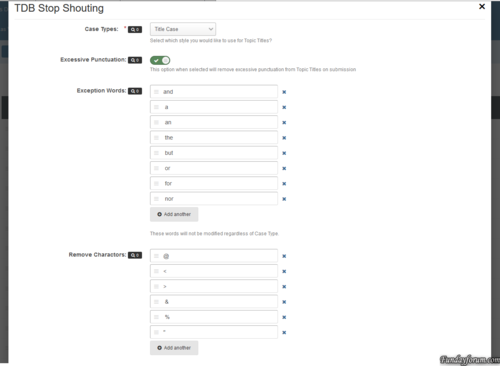
This plug-in prevents your members from trying to steal attention, by entering a title in purely uppercasing with lots of punctuation. The Plug-in will try and strip the text to a more readable format that is constant with your board posting guidelines.
Plug-in Settings:
Case Types: There are 5 different types of casing that you can use. No Modification, Sentence Case, Upper Case, Lower Case and Title Case. Excessive Punctuation: This tries to reduce excessive punctuation from the title. This will turn ??????? to ? and !!!!!! to !. Exception Words: These are word of your choosing that will never have their casing changed, regardless of your plug-in settings. If the word is upper case, all of these words in the title will be forced Upper case for example. Remove Characters: These are characters that will be removed regardless of how many there are in the title text. Names that begin with O', Mc or Mac will be processed automatically from o'neill to O'Neill or mcneill to McNeill.
At the moment, only the Forum Topics and Pages Applications will have their titles changed.
Please note: This is a RC version and use on a production site at your own risk.
1 download
0 comments
Submitted
-
Free
Advanced Footer
By Waqas Dar in IPS 4.7 Plugin
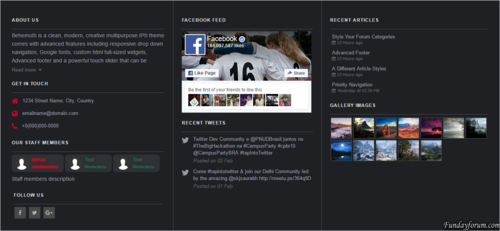
Advanced footer allows you to add a footer to your site with many blocks including Facebook feed, Twitter feed, Gallery images, Articles feed, Staff members, Custom blocks and more, Beautiful and clean design it is fully responsive and perfectly suits your theme due to its highly customizable options.
Advanced footer is featured with two row layouts with multiple columns it has a unique design with a lot of options, Footer blocks are entirely customizable, resizable, and reorderable.
__________________________________________________________
Features:
Up to 10 blocks and more in feature updates
Blocks: About us, Staff members, Social links, Get in touch, Quick links, Twitter feed, facebook feed, Custom block templates for gallery images and articles, two Custom blocks.
Custom color options. / or Match colors to your theme.
Resizable and reorderable blocks.
Highly customizable options.
Super clean and fully responsive design.
Fixing facebook and twitter feed not showing up.
10 downloads
0 comments
Submitted
-

Free
Themehouse - Extended Forum Banning
By Waqas Dar in XenForo Mods Hub
This add on follows the example of the Thread Reply Ban option in xenforo, but it is extended to work on a forum level (for each forum), and it adds several extra options.
0 downloads
0 comments
Submitted
-

Free
Themehouse - HTML BB Code
By Waqas Dar in XenForo Mods Hub
This add-on is designed to allow posting of html in your forum. It adds a html button to the Rich Text Editor, which then it will parse the html in posts, threads, signatures, personal conversations and in all the other third party add ons that make use of the the Rich Text Editor such as my Articles Manager add on, or the Resource Manager to name a few.
3 downloads
0 comments
Submitted
-

Free
download Themehouse - Thread Rating 1.3
By Waqas Dar in XenForo Mods Hub
This add-on is designed to add a rate and review system on your forum for your members. Rating uses font awsome. Members will receive an alert when their threads have been rated. Threads can be sorted based on ratings that they have received and you can exclude forums from thread ratings. Ratings will be disabled in closed threads and in forums where posting is not allowed. An option to reset all ratings from a thread can be found at the Thread Tools link. It is available to admins and supermoderators only.A full list of all features and permissions will be listed below.
1 download
0 comments
Submitted
-

Free
Themehouse - Post Comments 1.1
By Waqas Dar in XenForo Mods Hub
This add-on is designed to add a comment system for your members to discuss messages. Comments can be moderated for groups and they can be limited to forums. Comments are disabled in closed topics and forums where posting is disabled. Staff members will not be affected by this.
2 downloads
0 comments
Submitted
-

Free
Themehouse - Top Posters 1.2
By Waqas Dar in XenForo Mods Hub
Display the top posters for the day, week, month and overall top posters. You can choose how many top posters to display and the position where to display them, on top of the forum, bottom of the forum, on the forum 's sidebar, or all places, in your Admin Panel and then Top Posters settings.
2 downloads
0 comments
Submitted
-

Free
Themehouse - Xen Blog
By Waqas Dar in XenForo Mods Hub
Add a blogging system to your forum and enhance your community experience with the following features:
Assign blogs to categories: You can add unlimited categories from your ACP. When you add an category, you can set it as parent or a child of another category. You can also set the category order in which to display them and enter a description as to what that category is about. You can also re-arrange the categories display order with ease. Attachments supported Admins can add 3 types of blogs: Plain text with BBcode and smiley support, HTML, and PHP (using the $output variable) Add a navigation tab linking to the blog Comment system Display order by: Most recent, last updated, most viewed, most replied, title (alphabetical), latest comments, most rated, or most liked Sort blogs in ascending or descending order Sort comments by date or likes in ascending or descending order New blog indicator for the navigation bar Inline moderation of blogs/comments: Mass delete/undelete and mass approve/unapprove Quick stats Top bloggers Display a select number of blogs on the forum index page Like integration: Blog owners receive an alert when their blog is liked Blogs and comments can be edited or deleted by anyone with appropriate permissions Soft or hard delete blogs: Soft delete can be restored Time limits for editing/deleting blogs Maximum length settings for blogs and comments (excluding staff members) Tagging integration: Tagged users receive an alert Daily limits on blog posts or comments Reply alert: Author receives an alert when a comment is posted on their blog User group permissions can be set for blogs or comments to be moderated before being posted Report integration Sitemap integration What’s New integration Search integration Newsfeed integration Moderation log integration Users will not see blog posts by users they ignore View IP permissions extended to view IP of blog poster or commenter Admin blog tools including: Stick/unstick blog, enable/disable blog, enable/disable comments, prune comments, prune ratings, see which users viewed the blog, and see which users are watching the blog Recount and rebuild to delete blogs, comments, and ratings by deleted users and guests Notable page with a list of the top bloggers Top commenters listed in a block on the blogs page When viewing a users profile, a blog button is seen that allows you to view blogs by that user1 download
0 comments
Submitted
-

Free
Chameleon 4.1.18
By Waqas Dar in IPS 4 Themes/Ranks
Chameleon by ipsfocus
Updated for IPS.Suite 4.1.18
This update also includes minor bug fixes based on customer feedback
Chameleon Dark is an adaptive skin which uses semi-transparent "frosted glass" content boxes, allowing your background image to partially show through. This allows you to easily customize the genre of the theme by changing only the background image. The header collapses on-scroll, and stays at the top of the screen for easy access.
Themes features
Theme Settings
Easily enable, disable or modify theme features such as background images, logos, social media links, guest messages and colors. This makes modifications and upgrades very simple since little code changes are required.
Sticky, shrinking header
The header shrinks in size and sticks to the top of the page for easy access to user controls and the board index.
Frosted Glass content boxes
Your background image is displayed beneath your content boxes which have a frosted glass effect (available in all modern browsers except IE and Edge).
Background picker
If enabled, your members can choose their own background image from a predefined selection and their choice is saved via cookies.
Guest message
A customizable message can be shown to guests, prompting them to either register or login to your forum. Two designs, "billboard" and "alert" (shown) are available.
Social links
Over 20 social links can be enabled/disabled and customized to your own URL, allowing you to easily link to your social network pages (facebook, twitter, etc). If your site doesn't exist, it's easy to add custom icons to the list!
HTML logo with slogan
Easily add/edit your text logo and slogan from within the theme settings. If required, the text can be replaced by an image instead.
Mega Footer
A mega footer with configurable column numbers and content can be enabled and customized all within the theme settings.
High quality on every screen!
By using scalable fonts and css effects to create the theme, it'll look great on any screen - even ones with high resolutions!
Want to see more? Check out the screenshots and live demo on IPSFocus!
30 downloads
0 comments
Submitted
-

Free
Get Ready For IPS
This script will check if you are ready to use IPS Community Suite 4.x
Please note that if you are on IPS Hosting you do not need to worry about this, it will be taken care of for you!
Simply upload the script either to the directory where your current IP.Board 3.x. installation is (if you want to test if you're ready to upgrade) or anywhere else on your server (if you want to test if you can perform a fresh install) and run it in your web browser.
The script will check your PHP and MySQL versions against what is required and what we recommend. It's important to note that the recommendations are just recommendations for optimum performance for IPS 4. If you're still running IP.Board 3.x then we recommend that you stay on the PHP and MySQL versions you have currently.
Updated PHP requirements
3 downloads
0 comments
Updated
-
Free
XenCore Tools 3.0.2
By Waqas Dar in XenForo Mods Hub
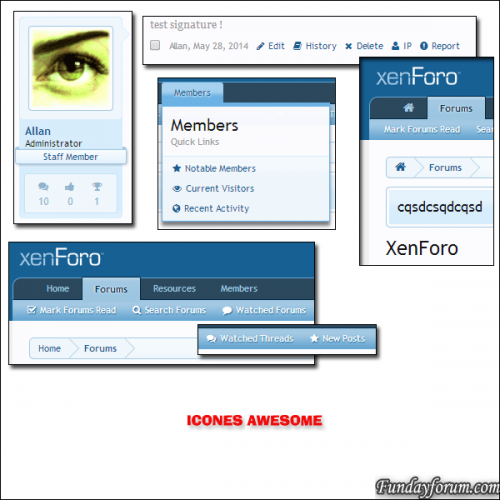
XenCore Tools allows you to get much 60 new features easily, quickly, and without knowledge of html/css!
This is a great tool for administrators!
Everything is automatic, you simply click on the function you want to activate and XenCore Tools does the rest!
XenCore Tools is a real Swiss knife, after trying it, you can not do without.
60 news features for your XenForo
Work With XenForo 1.3.x/1.4.x/1.5.x and of course xF 1.5.3!
Installation:
Upload files into their respective folders on your ftp.
Import "addon-XenCore.xml"
Enjoy!
3 downloads
0 comments
Submitted
-
Recently Browsing 0 members
- No registered users viewing this page.