
Search the Community
Showing results for tags 'hooks'.
-
Version 1.0.7
27 downloads
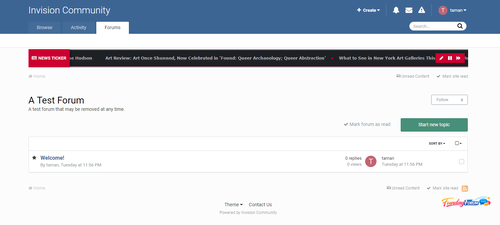
News Ticker adds news navigation system to your site, it can be used to display news, custom tickers, Pages database records and RSS import ribbon (Pages application is required if you want to show entries in the page database and RSS-channel). Comes with a variety of settings for customization. Fully customizable colors with 6 different styles and 6 different positions to show a news ticker on your topic that can work with any themes Features 6 Different positions to show a news ticker on your topic. Highly adjustable parameters. Change the scrolling speed. Height, Font size. Show pause and continue buttons. Hide on mobile and / or tablets, etc.). Clean design and fully controllable colors, comes with 6 different styles, you can also add a texture for application in the news ticket. On the fly, add / edit the tickers without going to ACP. User Group Permissions for Who can add tickers and Who can see. It is excluded from any applications that you installed. It is excluded from any Pages page. (New) Requirements If you want to use the RSS feed in a news tick, you need to create a Pages application to create an RSS Import block. News Ticker adds a news ticker nav on your website, it can be used to display news, custom tickers, Pages database records and RSS import feed (Pages app is required if you want to show pages database records and RSS feed ). Comes with a lot of settings to customize, Fully customizable colors with 6 different styles, and 6 different position to show the news ticker on your theme that can work with any themes out there Features 6 Different position to show the news ticker on your theme. Highly customizable options, Change Scrolling speed, Height, Font size, Show pause and continue buttons, Hide on mobile and/or tablets...etc). Clean design and fully controllable colors, comes with 6 different styles, You can also add a texture to apply on the news ticker. On the fly Add/Edit tickers without going to ACP . User group Permissions for Who can add tickers and Who can see. Excludable from any Applications you have installed. Excludable from any "Pages" page. (New) Requirements If you want to use RSS feed in news ticker, Pages application is required to create an RSS Import feed block.Free -

Version 1.0.2
43 downloads
Turn your boring type of information the user panel in a nice user information panel Information Added by (each of them has its own Font Awesome Icon) Group Rank User ID Counting posts Reputation Effective Date Online status mood of the user (must be set HQ4 mood) Total wins high-rap per day (banner must be active) Show or hide any of the users - the plugin panel - Edit You can add your own user profile, go to the Admin Panel -> Settings -> Profiles now: Create a new field and select the field that you want to use Seeding is required, the field format: Enter the code below and replace the amazing code font to the one you want to use <li class = 'ipsResponsive_hidePhone' > <span class = 'aupTitle' > <i class = "fa fa-id-card-o" aria-hidden = "to true" > </ i> {title}: </ span> <span class = 'aupContent' > {content} </ span> </ li> <br/> <hr class = 'aupHr' >Free -

Version 1.0.2
26 downloads
This plugin will join the statistics of members and forums into one widget that can be displayed on the front end. Requirements The Forums application installed and enabled. Updated for 4.2.XFree -

Version 3.1.2
23 downloads
(BIM43) Chatbox 3.x - this is an AJAX chat application for IPS Community Suite 4.3 About This File This is very simple chat system with the basic features: Ajax chat, auto update. Display as IPS widgets, so you can place it in sidebar or top page. Sound notification. User can toggle on/off. Admins/Moderators can block users. Users can ignore some chatters they don't want to see. Load more messages when scrolling end (or top). Announcement (on Top or Tab). Support emoticons, URL, Image URL (gif, png, jpg) @mention by clicking on usernames. (If @mention plugin installed - Check my other plugins) Flood control. Time format. Display newer messages in top or bottom. Permissions for viewing, chatting & management. Edit/Delete messages.Free -

Version 1.0.0
28 downloads
Plug-in music playing in the background.Free -

Version 2.0.0
94 downloads
This plugin will allow you to add music to your profile. Profile Songs is originally a 4.1.x plugin developed by Rory Soh from the IPS Marketplace. It's been abandoned for nearly a year so I've taken the liberty of updating the plugin. Original File Description This allows you to set a custom song to the forum profile. Moderators and Administrators are allowed to remove them easily, it will erase the file from your web server as well. You simply just go to the member's profile who has an inappropriate song and remove it by selecting "Remove Song" from Profile Song option. You can also set profile songs for members if you wish. What's New 4.3.x compatibility, no template changes needed. Any changes you made to your profile template for this plugin should be reverted. NEW configurable profile song size setting. Song size is in kB (kilobytes). A minimum size of 1,000 (1MB or 1 Megabyte) and a maximum size of 50,000 (50MB). This setting defaults to 2,500 (or 2.5MB). Future Updates I'll do my best to update this plugin for 4.4.x compatibility, if necessary, in a timely fashion. I'd also like to implement a configurable volume setting. In the meantime, you can use the steps below to add your own volume setting manually. Add your own volume setting Locate your ps_display HTML template and replace this: <div class='ipsType_center'> <p> {{if \IPS\Settings::i()->song_display_autoplay}} <audio autoplay="" controls="" loop="" preload="" class="ps_audio"> <source src="{$profileSong->file->url}"></source> </audio> {{else}} <audio controls="" loop="" preload="" class="ps_audio"> <source src="{$profileSong->file->url}"></source> </audio> {{endif}} </p> </div> With this: <div class='ipsType_center'> <p> {{if \IPS\Settings::i()->song_display_autoplay}} <audio autoplay="" controls="" loop="" preload="" class="ps_audio" id="profilesong"> <source src="{$profileSong->file->url}"></source> </audio> {{else}} <audio controls="" loop="" preload="" class="ps_audio" id="profilesong"> <source src="{$profileSong->file->url}"></source> </audio> {{endif}} </p> </div> And then add the following code to the bottom of that template: <script> var audio = document.getElementById("profilesong"); audio.volume = 0.25; </script> You can change the volume setting by changing the 0.25 (1.0 is default).Free -

Version 1.1.2
7 downloads
Adds the WhatsApp share service to IPS 4.1.x. Once enabled, the WhatsApp icon should appear in your share links on your phone/tablet. It is hidden by default on desktops because clicking the icon on desktop does nothing and the ability to share has not yet been added to WhatsApp Web. This is toggable in the WhatsApp share link settings. After clicking the link it opens WhatsApp and you will need to click on a user/conversation for the text to appear. Notice: If you're updating to 1.0.9 or later you need to upload the contents of the /upload folder to your IPS 4.1.x install. Customize: As of 1.0.6 the text string has been removed to improve performance. To customize you still have access to $url and $title within the whatsapp_cvh template (Core > Global > Plugins in the template editor). You will need to format the text string as desired. An example would be: <a href="whatsapp://send?text={expression="\IPS\Content\ShareServices\Whatsappcvh::encodeURIComponent( $title . ' ' . $url )"}" class="cShareLink cShareLink_whatsapp" title='{lang="whatsapp_text"}' data-ipsTooltip> <i class="fa fa-whatsapp"></i> </a> Added /dev folder so it can now work in IN_DEV mode Unless you are having issues you can skip this update which is meant to remove any code ambiguitiesFree -

Version 1.2.0
17 downloads
Minimized Quote- This is a simple plugin that alters the amount of text/image shown in quote boxes. The changes are purely visual, no permanent change will be done to the stored post. It is also backward compatible with older posts. And everything will be restored if the plugin is disabled/uninstalled. The minimizer would in some cases be applied to the quote in an editor, making a permanent change to that quote box. This is now fixed.Free -

22 downloads
The plugin will add a block with countdown timer.Free -

Version 1.0.1
1 download
If you have Google Adsense adverts on your forum, then you will know how fussy they are about where you place their adverts. This plugin will automatically try removing Ads from pages or area's where Google might not want their adverts displayed. For example this plugin will automatically remove adverts: When the site is off-line, On specific Core Pages: Settings, Notifications, Attachments, Followed Members, Messenger, ModCP, Ignore Members, Support, Register Page, Login Page and Member Profiles, Most Pages where there might be a Edit/Add/Modify/Submit/Create form, On the Commerce Pages for Clients and Support, On the Discovery and Stream Pages, Any Forum which is selected in the plugin Settings. This could be for forums that you would not want Google poking around in, You can also add Pages to the ignore list via the plugin settings. You can select to display Ads on the Staff Directory, Online Users and Leaderboard Pages. At the moment this plugin has been tested on Forums, Pages and Nexus and may not work 100% of the time. If that is the case then use the Disable Urls option within the settings.Free -

Version 1.0.0
3 downloads
[IPS4] Profile Backgrounds Let your members set their own profile backgrounds with this easy to use plugin DEMO Features Let your members set profile background images Upload most image files including .gif Select what groups can use profile backgrounds PLEASE NOTE I created this after a few requests from members after the last one on the marketplace was broken and the dev was ignoring support, IPS have now removed the file and the members who wanted it have asked me to release my version, So here it isFree -

Version 1.0.0
1 download
The plugin allows you to embed video from Vkontakte. Just paste the link into the editor and the system automatically turns the link into a video.Free -

Version 3.0.4
16 downloads
(BIM42) Quick Search Features: This plugin provides a search form that will search for any content with autocomplete and show results with icons for applications: Downloads, Forums (Theme Sketches Required), Pages, Gallery, Videobox and Musicbox. Settings: Enable / disable the plugin. Permissions for user groups. Results Max. Find incomplete words Find results: only the titles Content | Names of publications and bodies Search mode: AND / OR The default setting is the type of global page search. Show the category, the author in the search results.Free -
Version 0.19
2 downloads
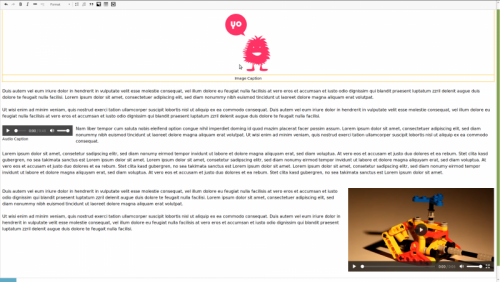
Categories: Contents, Semantics Author: akilli License: MIT, GPL, LGPL, MPL Updated: 05 Dec 2018 This media widget can embed image, audio, video and iframe elements solely with their corresponding tags (<img>, <audio>, <video> and <iframe>) or wrapped within a <figure> when used with a caption. In case the media element is wrapped within a figure element, this widget will add the CSS class image, audio, video or iframe to the figure element. It also supports alignment by setting an appropriate CSS class (left or right), and the attributes width, height and alt. The controls(audio and video) and allowfullscreen (iframe) are automatically set. If you have installed a file browser that uses the API of the mediabrowser add-on or the filebrowser add-on, the Browse serverbutton will appear. This widget itself does not provide any file browser. No configuration necessary. Usage with the mediabrowser add-on If you use the mediabrowser add-on, your media browser implementation can currently send following keys with the message: { alt: 'Alternative text', // optional src: '/url/to/media', //required type: 'image' // optional, one of audio, iframe, image or video } Screenshots Releases Plugin versions CKEditor versions 4.11 4.10 4.9Free -
Version 4.11 - 4.10 -4.9
1 download
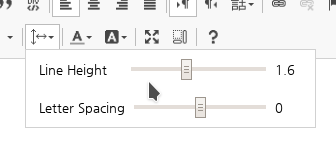
Installing: Go IPS ACP> Themes> Toolbars > Add Buttons > Upload Zip File. Categories: Styling Author: mysticfall License: GPL, LGPL, MPL Updated: 09 Dec 2018 Combined slider controls to adjust 'line-height' and 'letter-spacing' CSS values of text. CkEditor Version : 4.11 - 4.10 -4.9 ScreenshotsFree -
Version 1.0.8
18 downloads
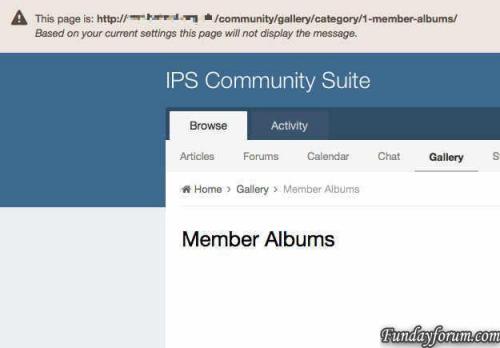
IPS style header block for displaying messages and links across the the top of your board. Use either the built in message formats or set you own custom formatting. Settings Show/Hide Message. Select which groups can see the message. Display the message on selected pages based on a whitelist or blacklist User can hide message if permitted by admin. 4 built in message formats. Custom message format including; icon, text colour and alignment, background colour. Supports multilingual sites. Compatible with 4.2 (IPS4) Global Header MessageFree -

Version 1.0.0
2 downloads
The widget extension allows you to easily add custom blocks and then style them using your own CSS styles and classes. The plugin will add three different types of custom widgets: Text, HTML and PHP. Allowed Block Options: Set the block to display on or off, Set the block to display to selected groups only, Can elect to use a block title or not. Good if you are showing adverts or not, You can use CKEditor or CodeMirror for the block content and this can be toggled via the Blocks settings. For example, HTML and PHP can use CodeMirror to make life easier if you are using HTML or PHP in your blocks. You can easily add CCS styles to the Block Title and Content using the Widget Forms rather than having to edit templates. This makes it easier to customise each block differently to have a different look and feel to match your website theme. You can add custom CSS classes via the Widget Form for quickness. Bear in mind this will add inline CSS to your theme, so it would be better to add custom CSS Classes to the Theme Custom.css instead. And yes, it's free and you're welcome 😉Free -

Version 1.1.2
21 downloads
(BIM42) (BIM43) Clubs Enhancements This resource will give more power to Club Owners. They will be able to execute functions currently only possible in the Admin CP. Features: Add ability to create a custom HOME page for the Club Convert forums or apps categories into Club Features with a single click, so you don't need to manually move a bunch of items (topics, images, files, events, etc) - Admin CP feature. Convert Club Features into forums or categories Manage Club Features: Reorder (drag and drog) features Disable features: items from a disabled feature will not appear in the Club activity stream Delete features: just like on ACP, with option to delete content or move it to another club/category. Ability to ADMINS ban/unban members from the whole clubs. A banned member won't be able to access any club page, including its content (topics, files, images, etc.). IMPORTANT: Club items will continue to appear in Activity Streams, profiles, searchs, etc. The restriction will happen only when the member tries to read them. Allow members to choose which features will be automatically created when creating a club. Restrict number of equal features per club (example: you can only have one "topic" feature). Restrict Number of Clubs per member. Restrict Number of Clubs a member can join. Add ability to create a QUESTION feature when creating a feature from FORUMS app. Add members to the club (setting to allow Club Owners to use it. Admins can use it). Add members from a specific user group to the club (secondary groups checked) (setting to allow Club Owners to use it. Admins can use it). Change owner of the club. Change type of the club (option according to the owner group setting). Display club icons on users posts Display club icons on user profile (hover card) Settings: Allow admins/club owners to create a custom HOME page for the Club Restrict Number of Features? Number of features per club Allow Club Owners to manually ADD MEMBERS? Display 'Added By' info when admin/owner add members manually Display Club Icon on posts panel? Number of Club Icons to display Club Icons Sort Order: name, last activity and random Display Club Icons on Hovercard Profile? Number of Club Icons to display Club Icons Sort Order: name, last activity and random What's New in Version 1.0.17 New features: Add a new setting to give the admin the ability to add new registered members as a MEMBER in selected clubs when they create the account. Members will be deleted if the admin deletes the account Add a new setting: Allow Club Owners to change Club ownership? Added a button as a template by request.Free -

Version 1.0.6
0 downloads
Expansion of information blocks for users Enhanced Profile Blocks About User Block Enhance the about user block with more detailed member information of the member each with its own font-awesome icon Choose the font-awesome icon of each section from a predefined list of 600 icons (just start typing) Show/Hide the members user group Show/Hide the members rank Show/Hide the members id Show/Hide the members post count Show/Hide the members post ratio per day Show/Hide the members total reputation Show/Hide the members member of the days won Show/Hide the members joined date Show/Hide the amount of days the member has been registered Show/Hide the members last activity Show/Hide the members current location (on your site) Show/Hide the members age User Group Block Display the users group and secondary group images in a separate block Choose to display it above or below the about user block Choose to display the images in a list (above each other) or in a inline-block (left to right) Clubs Block Display the users clubs as icons (The club name will show on hover) Choose to display it above or below the about user blockFree -

Version 2.0.0
5 downloads
Send PM via Admin CP Profile This plugin will allow administrators to start a conversation with the user directly from the profile .Free -

Version 1.9.5
3 downloads
Anti-Spam Ips4.3 No CAPTCHA, no questions, no counting animals, no puzzles, no math. No spambots signups, no spambots posts. Hook uses invisible tests to stop spambots at the IP.Board. Anti-spam features of the hook Stop spambots at registrations. Stop spambots at the topics. Contact form protection (CAPTCHA should be disabled!) Allow guest posting on the forum without CAPTCHA. iPhone/iPad, Android app to control registrations and posts on the board. Anti-spam hook info We have developed an anti-spam hook for IP.Board that would provide maximum protection from spam and you can provide for your visitors a simple and convenient form of posts/registrations without annoying CAPTCHAs and puzzles. Used to detect spam multistage test that allows us to block up to 100% of spambots. Low false/positive rate This hook uses multiple anti-spam tests to filter spambots with lower false/positive rate as possible. Multiple anti-spam tests avoid false/positive blocks for real website visitors even if one of the tests failed. Spam attacks log Service CleanTalk (this hook is a client application for CleanTalk anti-spam service) records all filtered comments, registration and other spam attacks in the "Log of spam attacks" and stores the data in the log up to 45 days. Using the log, you can ensure reliable protection of your website from spam and no false/positive filtering. Private blacklists Automatically block comments and registrations from your private black IP/email address list. This option helps to strengthen the protection from a manual spam or block unwanted comments from users. You can add not only the certain IP addresses but also a separate subnet to your personal blacklist. Blocking users by country Automatically block comments and registrations from the countries you have set a ban for. This option is useful in cases of manual spam protection and for protection enhancement. If your site is not intended for an international audience and you do not expect comments/users from other countries. Blocking comments by "stop words" You can block comments which contain "stop words" to enhance spam filtering and messages with obscene words blocking. You can add particular words or phrases. SpamFireWall CleanTalk has an advanced option "SpamFireWall". This option allows blocking the most active spambots before they get access to your website. It prevents spambots from loading website pages so your web server doesn't have to perform all scripts on these pages. Also, it prevents scanning of pages of the website by spambots. Therefore SpamFireWall significantly reduces the load on your web server. SpamFireWall also makes CleanTalk the two-step protection from spambots. SpamFireWall is the first step and it blocks the most active spambots. CleanTalk Anti-Spam is the second step and checks all other requests on the website at the moment of submitting comments/registers etc. How SpamFireWall works? The visitor enters to your website. HTTP request data are being checked in the nearly 5.8 million of the identified spambot IPs. If it is an active spambot, the bot gets a blank page, if it is a visitor then he receives a normal page. This process is completely transparent for the visitors. All the CleanTalk SpamFireWall activity is being logged in the process of filtering. Private blacklist for SpamFireWall It allows you to add individual IP addresses and subnets to SpamFireWall. It blocks the attacks from IP addresses which are not included in the SFW base yet. This option can help to block HTTP/HTTPS DDoS, SQL, brute force attacks and any others that made it through the HTTP/HTTPS. You can add not only the certain IP addresses but also a separate subnet to your personal blacklist. The CleanTalk is premium anti-spam for IPS4, please look at the pricing. We try to provide the service at the highest level and we can not afford to offer a free version of our service, as this will immediately affect the quality of providing anti-spam protection. Paying for a year of service, you save a lot more and get: 100% protection against spambots Time and resources saving More registrations/comments/visitors Protect several websites at once at different CMS Easy to install and use Traffic acquisition and user loyalty 24/7 technical support Clear statistics No captcha, puzzles, etc. Free mobile app Also, you can use CleanTalk app for iPhone/iPad to control anti-spam service on website or control comments, signups, contacts, and orders. 1. Download the latest version of the CleanTalk Anti-Spam hook. 2. Place the downloaded xml-file in the folder "<IPS4-root-folder>/plugins". 3. Go to "System —> Plugins" and press the button "Install New Plugin". 4. Choose the CleanTalk xml-file from "<IPS4-root-folder>/plugins" and press the button "Install". 5. During the installation 3 files will be downloaded to "<IPS4-root-folder>/uploads": https://github.com/CleanTalk/ips4-antispam/blob/master/general/cleantalk-sfw.class.php https://github.com/CleanTalk/ips4-antispam/blob/master/general/cleantalk.class.php https://github.com/CleanTalk/ips4-antispam/blob/master/general/sfw_die_page.html If it didn't happen for some reasons, download them manually and put them in the folder "uploads". Create this folder if it does not exist. 6. Click the pencil symbol opposite the "CleanTalk Spam protect" line. 7. Copy the access key from your CleanTalk Control Panel and paste it in the field "Access key", turn the plugin's options on and press the button "Save". Do a test registration using the blacklisted e-mail stop_email@example.com. Please go to Dashboard to see the anti-spam status, add new websites or manage existing ones! Please check your email to get the account password. The hook is a client application for cloud anti-spam service CleanTalk.org, which are daily protects 5k websites from spambots. Also, you can use CleanTalk app for iPhone/iPad to control anti-spam service on website or control posts and signups on the board. How can I test anti-spam protection? Please use email stop_email@example.com to test anti-spam for signups. Should I use another antispam hook? Use other antispam hooks not necessarily, because CleanTalk stops up to 100% of spambots. In some cases, several anti-spam hooks can conflict, so it will be better to use just one plugin. Troubleshooting Guide Anti-spam by CleanTalk support forum If you're having trouble getting things to work after installing the hook, here are a few things to check: If you haven't yet, please upgrade hook to the latest version. If you have error '*** Forbidden. Enable JavaScript. Anti-spam service cleantalk.org. ***' please check JavaScript support in your browser and do JavaScript test at this page Check out JavaScript support. If you have spam signups or posts please check the Access key at hook settings. The key should be same as you can find in service Control panel. Additional features Online, daily and weekly anti-spam reports traffic VS spam. Apps for iPhone, Android to control anti-spam service, comments, signups, contacts. With traffic and spam statistics for last 7 days. Anti-spam apps for most popular CMS on cleantalk.org. What's New in Version 1.9.5 Add update system Rework spam check users system Increase JS protection Bug fixes and other minor improvementsFree -

Version 1.0.4
55 downloads
Chatwee is an advanced chat plugin for real time communication among members of online communities. It offers private, group, and public chats, including file uploads, clickable links, images, animated gifs, and a rich set of emoji. Users have several log in methods available, and chat owners can customize the plugin to a large extent. Chatwee chat is an excellent plugin for any IPB forum. It promotes interaction and engagement among visitors, as well as between visitors and site owners. Chatwee will help you build and grow a community of active users by providing a platform for real time, rich communication. Chatwee features include: Extensive customization options Multiple chat rooms Messenger-style group conversations Private chatting Offline messaging Rich media messages Multiple log in methods Cross-tab synchronization Powerful moderation options Click for a full features list Visit the official site for more information and to see Chatwee liveFree -

Version 1.0.1
2 downloads
This plugin (hook) will add a new block on Downloads portal, below Most Downloaded files, to list the latest updated files. Requirement For Latest Updated Files: Downloads applicationFree -

Version 1.0.0
5 downloads
This plugin will make the member who joins the club to follow it automatically. The follow will be removed when the member leave the club.Free -


Version 1.0.0
31 downloads
Rankings: top posters, top topic creators, most liked [ips4] Plugin LibterRanking plugin adds highly configurable members ranking widget which works both in horizontal and vertical orientation. Configuration Widget title Number of members to display Time in days to count posts/topics/reputation Content type (posts, topics or reputation) Excluded member groupsFree