
- 📢 Welcome to FundayForum – Explore Trending Topics
- 🌟 Discover What’s Trending Today
- Michael Douglas fears of losing his charm amid Davina McCall's health battles
- Meghan Markle's awkward gaffe that went viral: Truth revealed
- Maradona doctor was made 'scapegoat' for his death, Argentine court told
- What you need to know about the 2026 US midterm elections
- Harry Styles loses temper after 'menacing' fan encounter
- Lady Gaga hints at nw album with just two words response
- Govt approaches JI for fresh talks on petroleum levy ahead of third phase of protest
- Gracie Abrams, Paul Mescal face trouble in paradise after 2 years together
- A 'misunderstood' relationship?
- Country singer John Anderson dies at the age of 71


Waqas Dar
-
Posts
11,303 -
Joined
-
Last visited
-
Days Won
559
Content Type
Profiles
Events
Forums
Gallery
Blogs
Downloads
Articles
Page News
Release Notes
Store
Files posted by Waqas Dar
-
![More information about "[IPS42] Sticky Notes"](https://fundayforum.com/uploads/monthly_2018_01/5a6be22a2f7a2_StickyNotes1.thumb.png.07936ef4683b036c0cf23047ed3dad83.png)
Free
[IPS42] Sticky Notes
By Waqas Dar in IPS 4 Applications
This application will allow you, or if you have selected members, To post global sticky notes to other members on your board
Global Sticky Notes ( ACP )
Display up to 10 admin based global sticky notes to your members Choose what user groups can see the sticky notes Add a signature (username and avatar) to the bottom of each sticky note allowing members to see who wrote it, as a clickable link to said profile Choose the colour of the sticky notes Choose from 9 different positions to show each individual sticky note Set a expiry time and date for each sticky note with a option to just show it until the user dismisses it Global Sticky Notes Front End Admin
The admin/s can send the global sticky notes from the front end via the create menu ( Only admins can use this feature ) Personal Sticky Notes ( MEMBERS )
Allow chosen user groups to send personal sticky notes to other members Members can receive a unlimited amount of sticky notes All sticky notes are dismissable All personal sticky notes will automatically add the username and avatar, unless you have selected in the ACP to allow anonymous sticky notes (read ACP Menu below) Personal sticky notes will display the time the note was sent to the member for example "just now", " 5 minutes ago", "4 hours ago", "16th July" and so on Members can either send personal sticky notes to members by their hover card or via their forums topics and you can also send them via the users create menu Each ( Non anonymous ) personal sticky note has a reply icon on allowing users to easily reply to other members notes Front End ( PERSONAL STICKY NOTES )
Added a link to the users drop down menu linking to the new tables listed below Shows a table listing all the members received sticky notes with the ability to restore the note bringing it back to life Shows a table listing all the members sent sticky notes with the ability to edit and resend or just resend the stickynote, it also shows if the user has dismissed the sticky note Members can view all their sent and received sticky notes between them and X member All tables can be sorted by time and date and also have a advanced search for members or a time and date stamp Widgets
Show a widget with a list of members who have sent the most sticky notes Show a widget with a list of members who have received the most sticky notes ACP Menu
Sticky Notes (Global including personal) Choose to use either a pin or a bit of sticky tape to hold the sticky note Choose to show or hide sticky notes on mobile or tablet devices Personal Sticky Notes Allow members to send anonymous sticky notes to other members (admin can view all sticky notes in the ACP read below) Read all the sticky notes send by members in a nice and tidy table and you (being the admin) can even view the sender if they sent it anoymous Select what member groups can use personal sticky notes Choose from 9 different positions to place the sticky notes Mass delete sticky notes by either "ALL", "READ", "UNREAD", by individual members or by chosen user groups Choose the colour of personal sticky notes Member Group ACP Menu
Choose how many personal sticky notes each member group can send per day, with a unlimited option Members Settings ACP Menu
Block individual members from using personal sticky notes Block individual members from receiving sticky notes How to install
If you have version 1.0.3 or below installed, uninstall it as it's a plugin and will conflict with the new application Go to your ACP and applications then click to install and upload the downloaded .tar file
New Features
Members can now block other members from sending them personal sticky notes via their profile setting page Added the ability for members to mass dismiss personal sticky notes ( This can be turned on or off in the ACP settings of the personal sticky notes ) Added the ability to hide the ' send sticky note ' link on the members topic posts via the ACP settings of the personal sticky notes Added a little note count bubble to the dismiss button on personal sticky notes showing the amount of notes they have got to dismiss ( This will only show if there is more than 1 )6 downloads
0 comments
Submitted
-

Free
IPS Testimonials Manager
By Waqas Dar in IPS 4 Applications
This application allows you to showcase testimonials on your Invision community forum site.
Main Features:
Display testimonials friendly on sliders. There are 3 slider's styles. Option to sort descending/ascending or random. Responsive layout (desktops, tablets, mobile devices). Support caterories. Enable/Disable Title on testimonial. Enable/Disable Rating on testimonial. Enable/Disable testimonial must be approved by moderators. Enable/Disalbe other informations: Company, Job, Website. Permissions to View, Submit and Manage. Fully manageable (edit, show/hide, delete). RSS for latest testimonials
If using IPS 4.1.x, download 1.0.x versions. If you use IPS 4.2.x, download 2.0.x versions. (Click the "Change logs" button to select versions to download)
9 downloads
0 comments
Updated
-

Free
(V42) Surface Dark
By Waqas Dar in IPS 4 Themes/Ranks
Surface Dark Ips Theme 4.2.x
The theme of «Surface» is a fully modernized design IPS in different colors.
We tried to make the best design and make it easier to customize style, so have worked out every detail.
We wish to make as high quality a product as possible and «Surface» will reveal it.
Full Screen: Home Page, Calendar, Downloads, Blogs, Gallery, Article Page Styling
Also in the archive are present:
Skin Images (4 custom guestmessage cover backgrounds)
Articles
Main Settings
Backgrounds
Forms
Forum Nodes
GuestMessage
NavBar
Other Settings
Footer
Slider
Social Icons
Typography
160 downloads
0 comments
Updated
-

Free
iAwards
By Waqas Dar in IPS 4 Applications
The long awaited awards application for IPS has arrived!
iAwards provides administrators the ability to award their members with badges that show in their profile and, if chosen, on their posts.
Standalone this application has the ability to manually award members and to award members based on the amount of awards the member has. You can award both from the ACP as well as from the create menu at the top of your site.
In order to give everyone a fully customizable way to award we have integrated it with the Rules application. This gives you the power to award your members based on rules that you create instead of the ones that we think up.
Features include:
Choose location of awards – Under the post or under the author pane. Hide awards – To allow members to show the ones they want. Award based on number of awards. Manual awarding. Upgrade Tools for both HQ Awards and Awards (Free). Category and awards management. Recommended addons:
Automation Rules Lite or Automation Rules Full35 downloads
0 comments
Updated
-

Free
Automation Rules - FULL Latest version
By Waqas Dar in IPS 4 Applications
Synopsis
Automatically update/modify content and member attributes, statuses, and properties Automatically send emails, create conversations, and send notifications Add your own custom data fields to any content, categories, or members Build relationships between fields and content to keep data synchronized Create rule sets that work together to form automated workflows Define your own custom actions that can be used in rules Schedule actions to happen at specific times (one-time or recurring) Schedule bulk processing routines for content and members on your site Share and refine your rules with other communities using import/export Example Rule #823:
This will send all new members a welcome email after their first post.
Example Rule Set #56:
Rules also allows you to attach new “custom data” fields to any member, content container, or content type in your system which you can use to create all new features and behaviors on your site that go beyond what was ever imagined with the core IPS suite. For example, you can create a new “integer” data field for members and call it “Prestige”. Then you can create a rule such as:
Congratulations, you’ve just created a brand new type of reputation system. And to take that example a step further, you could write another rule such as:
You have just created a whole new social promotion system within your community! The possibilities of what you can do with rules are only limited by your imagination.
Expansion Packs (plugins that add ECA's to apps): Forums Calendar Pages Commerce
Enhanced Applications (apps with customized ECA's): Group Collaboration Account Deactivation by Makoto Forms by Mike John Advanced Path Aliases Points Economy iAwards by -RAW-
Rule Packs (pre-built customizable rules): Rules Starter Pack free Member Pip Ranks System Auto Join Collaborations Move Topic Between Collaborations 8 Hour Lock Forum Game Topic Ban Members Rules Cookbook on IPS Guru Notable Features
Over 500 built in events, conditions, and actions for stock IPS products and contributed apps. Rule actions can be configured to happen in real time or at a future time. Schedule and unscheduled actions from inside of rules or manually through your ACP. Built in lists of “replacement tokens” for including variable data in text entry fields (like email content) Fully extensible by other apps and plugins to add new tokens, events, conditions, and actions. Look for Rules Expansion Packs in the marketplace which add new events/conditions/actions. Create your own custom actions within the rules app which can be invoked by rules. Create your own custom data fields for any entity on your site to manipulate with rules. Rules can be grouped together into rule groups and rule sets for easy management. Easily import and export rules and sets to share with friends or distribute as your own rule packs. Built-in rule debugging console for full visibility of what your rules are doing on your system. Built in rules error and performance logging console. Complete Stock ECA List:
New in Version 1.1.x
New range of custom data input fields for public/admin use Limit custom data fields by category/container Set member group permissions on custom data fields View complete overview summaries of rules and rulesets Choose content items from autocomplete form input New in Version 1.2.x
added ability to manually schedule custom actions added ability to schedule custom actions on a recurring basis added ability to bulk process records with custom actions added new table filters to scheduled actions page20 downloads
0 comments
Updated
-
![More information about "[ips42] Siders theme"](https://fundayforum.com/uploads/monthly_2017_12/Screenshot_1.png.ead85418efc4746982e1be3fdcea3cdb.thumb.png.e0269a06bff24407392bc32336a0b7d7.png)
Free
[ips42] Siders theme
By Waqas Dar in IPS 4 Themes/Ranks
Siders theme for 4.2.x its really nice theme with dark colors.
dont forget to click like button and pass ur comments . thanks
95 downloads
Submitted
-

Free
IPS Community Suite 4.2.6 Nulled latest Version
By Waqas Dar in IPS Community Suite 4 Resources
IPS Community Suite 4.2.6 Nulled
This is nulled version of latest IPS. Please dont forget to like and comments . Thanks
Released 11/14/2017
Key Changes
This is a maintenance release to fix reported bugs. Other changes include:
RSS feeds now use guest page caching system Analytic tracking code has been moved to inside head tag Ad code placement has a new setting to clarify how sidebar display should be handled Various enhancements to Redis engine including data stored encrypted at rest Search result improvements248 downloads
Updated
-

Free
(SOS42) Links Directory
By Waqas Dar in IPS 4 Applications
Links Directory is an application that provides your community with a member driven web directory. Allow members to submit websites for approval in categories you define. Users can comment and rate on other member’s submissions. You can also mark websites as official affiliates, fostering traffic between friends.
Features
Submit links to websites along with a title, description, and an image generated from extensible APIs: Sneak.pw, WebThumbnail, Thumbshots (requires an API Key) and Upload field. You can also save the image locally, which will reduce the API call. Image is updated when you update the link. Admin can choose if new links are moderated, per category. Submit comments to links. Admin can choose if new comments are moderated, per category. Rate links using the star rating system used throughout the IPS4. Per category setting. Integrates to Share Links to share or email inks. Inregrates to Google Maps if and address is provided in the link submission (IPS 4.1.13+: Google Map APIs now requires an API key. Go toAdminCP -> System -> Community Enhancements to enable Google Maps support) Ability for users to report potentially offensive content or broken links using the built-in Report Center Search integration: search links along with the rest of your community’s content Supports item marking, allowing your users to see what links have been added or commented on Integrates into Activity Streams. Supports the built-in tagging system including prefixes. Support for notifications such as new links and comments on user links. Ability to follow/like categories and individual links. Unlimited categories of links, plus unlimited depth of parent-child relationships Category Icons Drag & drop reordering of categories in the ACP. Per-category permissions to show category, view links, submit links, add comments, and avoid approval queues Provide “link back” code so other websites can link back to yours. Mark links as official affiliates and display them in a different section on the Links Directory index Integrates into IPS4 Moderating system, which all commons permissions, such as pin, unpin, delete, feature, move, etc. Per-category Permissions allowing you to specify which permission sets are allowed to view category, view links, add links, edit links, comment, rate, and avoid moderation at a granular level. Robust Admin Restrictions. Integration with the Advertisements system Integration with Sitemap system to include links in your sitemap Ability to create RSS feeds of all links Integration with ACP Live Seach (Links categories) Support Extra Fields so you can define different fields per category Friendly URLs for links and categories Ability to configure the Links Index page to display the blocks you want And much, much more! Notes
Each purchase entitles you to use of Links on one Community installation. Upgrade tested only from versions 4.1.1 and 4.1.0. So if you're using an older version, update to 4.1.X first.11 downloads
0 comments
Updated
-

Free
IPS Kitchen Sink
By Waqas Dar in IPS 4.7 Plugin
Kitchen Sink
All the things you want changed or restored in one single plugin! Everything including as they say...
Restores topic stats! Topic authors can always edit first posts! Customize the breadcrumb! Remove the Create menu! Better IPS update notifications! Change the lightbox! More!
Why?
There are many small things with the IPS suite that need to be customize-able or restored from the 3x series. I could write a bajillion single-use plugins or I can put some effort into it, pile them all into one plugin, and make a few bucks for the work (and she is wrapping up her second cancer in three years so yes, money good...)
So this includes...?
Global:
Customize the breadcrumb! Remove the last element, swap out the home icon, etc. Control appearance of Mark Site Read and Unread Content (just words, just icons, or move them out of the breadcrumb to the user menu). Square up the appearance of the search entry area. Customize the light box! Full screen effect? White instead of black? Yes! NEW IN KS 10! Change the follow button to match standard IPS button style and move to the forum/topic button rail. More! NEW IN KS 10! Customize the error page. Change the FA icon, swap it out for an image, more! NEW IN KS 10! Enable a compact star rating display!
Userbar:
Disable the Create menu. Replace the Create menu appearance with just a FontAwesome icon. I recommend fa-pencil. Remove all horizontal separators in the userbar. Change the member menu dropdown link. Leave it as the default avatar and member name, just member name, or just avatar.
Calendar:
When you scroll down, the view title (day, month, week, etc.) is pinned to the very top edge of the browser. Adds padding to make it look much better. Square up those calendar and event tags from those rounded monstrosities. Make the cover photo header area for events much bigger (larger event title font too).
Forums and Topics:
Restores the 3x series topic count statistic on forum index views. Yes, it's back! Can choose to display post count, topic count or both on forum index views. Add a locked icon badge in front of topic titles in topic view when a topic is locked (similar to pinned and featured posts). Change start new topic, moderator option, etc. links in topic view to appear as buttons instead of text links. Disable reply to topic button if you like (no one really uses it anymore...) Fully customize-able new posts separator in topic view. Set some basic info in custom.css and then use the full editor here to add content! Change number of topics listed per page on forum view (same as one of my free plugins). NEW IN KS 10! Add a last reply time blurb on topic view in conversational language. Support for non-English languages available (see support topic)
First posts:
Allow all topic authors to edit their first posts regardless of any edit time restrictions in the ACP. You can even configure this on a per-forum basis!
Post view:
A bunch of structural options. Hide the multi-quote button. Move the quote and/or edit buttons under the options menu. Change the options menu to a single gear icon.
IPS Upgrades:
For admins with permissions to view upgrade announcements this replaces the full page width upgrade announcement header with a pulsing download icon in the userbar. Clicking it displays a popup with the complete upgrade information.
(The pulse is sped up for the gif. It's slower on normal upgrades; security upgrades will pulse faster but not this fast (and they pulse red!)
I've probably forgotten some stuff. And there is more to come too!
Questions
Can I ask for something to be changed or included?
Yes, absolutely! That's kind of the whole point of this. There are some basic rules though. If I think it is too involved, or I think that once I start it that it would be better off as it's own plugin I'll pass. Just ask in the support topic and we'll go from there. I decide in the end, you may or may not like my decisions...
What if IPS changes something and...
If they add something into the suite that I fixed/added here then it will probably be removed from Kitchen Sink. No need to duplicate functionality. If something in this plugin breaks due to a change in the IPS Suite I'll of course try to fix it if it is fixable. Or I might remove it until it can be fixed; I expect things to change over the years - you should too.
Seems to be forums heavy...
Yep. I can only target what I'm most familiar with. If you need something with the other applications speak up! The focus of this plugin is on the Core, Calendar, and Forums. I can fold in some stuff from the other apps if they are small things but otherwise I've got something else in the works for Gallery, Commerce, and Downloads (yes, another all in one...probably).
Anything on the ACP side?
No but... Spacious ACP! Get that! Especially since I'm due to rewrite it and it will include a Kitchen Sink-like plugin to tackle any ACP things that need to be done!
This <feature> isn't working on my site!
If you have custom.css that conflicts, or your custom theme has moved elements around, and so on, there is not a lot I can do. I can give you some help in the support topic but the further you (or theme authors) move away from the default IPS structure the harder it will be for plugins to work. Most of Kitchen Sink should work for everyone. I do not support modified themes but I'll lend a hand as I can time permitting. This plugin is FULLY tested on a fresh 4.1.12.1 installation of the IPS suite with no other plugins loaded and no custom.css.
What's next?
If I don't release Kitchen Sink now I would never release it as I would always be waiting to add "just one more thing..." But yes, there is stuff already marked for inclusion. I recently took over a ton of Adriano's free work. Most (all?) will remain free but updates and new features are likely to be folded into here or the revised Spacious ACP.
Cost
$10 to buy, $5 every six months. That's $8.50 and $4 to me after IPS fees. Regular renewals keep me perky enough to want to support this wonderful monster. Your renewals get you support, bug fixes, and new features too! You don't have to renew of course but if you lapse too long I might make you just buy it outright again.
Terms
One buy, one site. Feel free to use on your test site if you have one of course. If you lapse on renewals so long that I tell you to buy it again that does NOT mean you now have licenses to two separate copies.
AFTER INSTALLATION
Be sure to drag KS to the top of your list of plugins in the ACP. The order of the plugins in that list is the order in which they are built out into the IPS system and given that KS does so much stuff, to avoid conflicts with other plugins, drag it all the way to the top!
Thank You!
4 downloads
0 comments
Updated
-

Free
IPS- Invision Power Board 4.2.5 Nulled Full Community Suite
By Waqas Dar in IPS Community Suite 4 Resources
IPS Community Suite 4.2.5 Nulled Suite Released 10/13/2017
This is a security release and we recommend all clients upgrade as soon as possible. Key Changes
4.2.5 is a maintenance release that fixes issues identified in 4.2.4.
Additional Information
This release addresses an XSS vulnerability. We would like to thank Maverick and Mike for responsibly disclosing the details of this vulnerability to us.
316 downloads
Updated
-

Free
(BIM42) Topic Thumbnail
By Waqas Dar in IPS 4 Applications
( This file requires an upload so you will not be able to install this on an IPS Cloud hosted community. )
Main Features:
Display thumbnails of topics in the main forum view. Topic's authors or member groups that you specify can change thumbnails. They can choose a thumbnail from images in topic content, external URL, or upload from computer. Abitily to generate thumbnail from Youtube, Vimeo, Dailymotion and Wistia. Using ajax, no need to reload the page after changing the thumbnails. Support "Gallery View Mode" with big images in responsive grid. (credits to Masonry) Widget to display new topics with thumbnails. Option to replace Forum Icons with Topic Thumbnail. Thumbnails in search results, activity. Permissions for viewing and changing thumbnails. A Toggle Show/Hide for members. Live Demo: http://demo.ipsviet.com/forums/ If you use IPS 4.1.x, download 1.2.x versions. If you use IPS 4.2.x, download 2.0.x versions. (Click the "Change logs" button to select versions to download)
Fixed:
Vimeo's thumbnails problem. Missing original thumbnail when editing topic. Gallery Mode permission issue. Forum Icons permission issue.32 downloads
Submitted
-

Free
IPS Weather Plugin
By Waqas Dar in IPS 4.7 Plugin
Weather website.
This plugin can detect user's location using his IP and show the weather in his city, or it can display the weather in the default location on your forum header.
You can customize the following options:
Choose units: Celsius or Fahrenheit; Choose the type of weather icons: font icons or colorful image icons; Set icon height to fit your template. The weather and location information is cached in a browser Local Storage to reduce the number of external requests and provide fast and smooth experience. The weather is updated every 10 minutes.
This plugin supports translation of all text strings except of location names (e.g. United States, Miami), because Yahoo Weather API currently doesn't provide them in other languages.
Installation instructions
Upload all files from uploads folder into your uploads folder on the server; Install the plugin in the ACP. Translation tip
The archive includes two files which can help you to translate this plugin into Russian or German languages. Currently IPS doesn't support language packs for plugins, so you have to simply copy strings from these files and manually paste them in the translation tool in the ACP.
This plugin uses Yahoo Weather API via SimpleWeather.JS, Weather Icons by Erik Flowers and image weather icons by umutavci.
What's New in Version 2.0.2
JS library update, fix Yahoo problem.
Weather description strings now are translatable.
15 downloads
0 comments
Submitted
-

Free
(NE) HTML5 Audio/Video Player
By Waqas Dar in IPS 4.7 Plugin
(NE) HTML5 Audio/Video Player
Plugin Forum, which will display the audio / video player for the HTML5 audio / video attachments and / or remotely connected audio / video files. Ability to turn on / off the player for audio or video or both (disabled by default, so the effect will not be seen immediately in the messages) Ability to turn on / off the relevant players from the processing of remote video / audio files. The ability to control the initial size of the video player in order to avoid the "big" video beyond the mail container. Ability to include the original link, to act as a backup for users with browsers that do not.
Forum plugin which will display a HTML5 audio or video player for audio/video attachments and/or remotely linked audio/video files. Ability to enable/disable the player for audio or video or both (disabled by default, so effect will not be immediately seen on posts) Ability to enable/disable the respective players from handling remotely linked audio/video files. Ability to control the initial size of the video player so as to avoid 'large' videos pushing outside the post container. Ability to include the original link, to act as a fallback for users with browsers which cannot either display the HTML5 player or play the audio/video file Admin configurable list of audio/video file extensions. Plugin is compatible with IPS 4.1 (tested with 4.1.19.4) and IPS 4.2 (tested with 4.2.5) Please note the following:
If you require support then please post in the provided support topic. Do not use PM and do not use the review functionality. Plugin support does not extend to assisting you with adding support for playing a specific audio/video file/codec to your browser (Google is your friend in this situation) Want to test your browser's ability to show a HTML5 player? Go here: https://tools.woolyss.com/html5-audio-video-tester/ Questions:
Why are you charging more than your usual $5 for your plugin? Development of this plugin took longer than others, and I envisage future development and support will be time consuming too. Will the plugin be extended to work on other applications in the IPS suite? I will try to develop it to work within the Pages application, however other applications will be more difficult due to me not owning licenses to use them. Never say never, but for now it's a 'No' What's New in Version 1.0.3
Released November 22
added option to use fluid width instead of fixed width/height for videos (assists with responsiveness, and helps maintain aspect ratio of original video) minor typo fixes minor modifications to settings layout, in preparation for new functionality changes in version 1.120 downloads
0 comments
Submitted
-

Free
(SOS42) Custom Username Icon
By Waqas Dar in IPS 4.7 Plugin
(SOS42) Custom Username Icon 1.0.1
This plugin allows users to select one of 634 font awesome icons to be displayed in front of them through the reference package.
The icon will be displayed only to the user's reference.
This plugin will allow users to choose one among 634 font awesome icons to be displayed before their link across the suite. Icon will be displayed only before the user link.
Setting:
Groups allowed to choose an icon
Compatibility: with IPS 4.1x and 4.2x
Member's Country:
Group Color on User Link:
18 downloads
Submitted
-

Free
IPS Community Suite 4.1.18.1 Nulled
By Waqas Dar in IPS Community Suite 4 Resources
IPS Community Suite 4.1.18.1 Nulled
New version is uploaded
Released 02/01/2017
Key Changes
Fixes upgrade issues in some server configurations (already silently patched). Fixes some AdminCP settings showing the wrong value selected, especially in Spam Service settings/ Fixes an error when trying to split a topic. Fixes missing images when setting up Google Authenticator, and an issue which may setup to fail. Fixes broken links on the new Two-Factor Authentication setup page. Fixes missing language string in AdminCP Dashboard warning when site is offline and in image sharer settings. Fixes errors for some communities that have previously converted from other software. Fixes an issue with grid layout on some pages. IPS Community Suite 4.1.18 Nulled
Key Changes
In addition to bug fixes and performance improvements, this release also includes:
Pinterest share link has been added Converters are now included as a Suite-level application you can download with your package in the Client Area Running a conversion will now skip steps that do not have anything to convert Two Factor Authentication Images embedded in the editor can now have an alternative title set for accessibility Users signing in through social services, such as Facebook, will no longer be required to validate their email address When a location is specified for a Calendar Event, the address will be shown underneath the map. The map itself should also be more accurate now. The Approval Queue page now has a "Hide" button to hide content (rather than only being able to approve / delete) Disabling Profile Photo uploads will now also disable importing from a URL An issue has been fixed where adding tags using other languages may not work properly Cropping Animated GIF's for photos is now supported when ImageMagick is in use Files purchased in Downloads will now have a link back to the file from their purchase page in the Manage Purchases section The Admin CP will now indicate whether or not a member is connected to a social network The Admin CP will now display more information for a user who has been banned imgur embedded is now supported Errors caused by third party applications / plugins will now be clearer Option to report fatal errors automatically to IPS so we can fix common issues Release Patches
We sometimes release patches for issues that come up frequently between full releases. If you are experiencing any of the issues below on this version you can download and apply the patches using the instructions provided. An issue has been identified that may prevent you from moving comments from one item to another item (e.g. splitting posts from one topic to another topic), resulting in an error code 2F173/I. To resolve this issue please upload the following patched file to your server:
system/Content/Comment.php
Additional Information
Developer Notes
CKEditor updated to 4.6.2 Template Tags are now parsed in plugin CSS while IN_DEV All tables that store member ID's have been adjusted to use BIGINT(20) on new installs. Existing installs will remain the same. CodeMirror updated to 5.22.1 \IPS\Image\Gd can now be properly extended \IPS\gallery\Album::setLastImage() has been abstracted further to add a $sortBy parameter \IPS\Task::runUntilTimeout() now understands when memory_limit is configured to 2G (for example) Converter Improvements
Our converters are now part of the core Suite. The following updates have been made:
If a specific conversion has things available to convert but there are none in the third party database, you will no longer be required to convert them. For example, if you are converting from vBulletin and you do not have any profile field groups, you will not be required to 'convert' this step. The converters have been updated to work with developer mode properly (which has in turn led to many miscellaneous bug fixes) Converting from SMF will now prompt you to choose whether to keep member real names or display names when converting members Full language abstraction Redirections are now handled automatically without the need for uploading extra PHP files (and in the case of some conversions, overwriting the default index.php upon each upgrade) Converted links (i.e. links to topics, forums, profiles, etc.) will no longer redirect to the new locations within the Suite if the user does not have permission to view the content Gallery images embedded as attachments in posts in vBulletin will now work correctly post-conversion (for new conversions) Improved converters so that conversions that require a 'parent' (i.e. converting forums requires members to be converted first) will not allow you to start until the parent has been converted Converter version number has not been set inline with the rest of the Suite API endpoint added for converters to fetch details about what can be converted Joomla, Photoplog, Coppermine, BBPress converters added Miscellaneous performance improvements Dozens of bug fixes129 downloads
0 comments
Updated
-

Free
Commerce Sitemap
By Waqas Dar in IPS 4.7 Plugin
This plugin extends the sitemap to include products from your store.
For some reason commerce products aren't included in the default sitemap, which can have a negative impact on your search ranking. With this plugin, your products will now show up in the sitemap that is submitted to search engines, and consequently be included in search result. Having used this on my site for the last week, I am starting to see my products show up in search where they previously were not.
This will NOT include products that have "Show in store" turned off. Likewise anything that can't be seen by a guest will also not be included.
To install just go to Applications -> Install and upload the .tar file. You can configure the options from Search Engine Optimisation -> Sitemap -> Untick 'Use recommended settings' and configure Commerce.
1 download
0 comments
Submitted
-

Free
IPS Community Suite 4.1.19.4 Nulled
By Waqas Dar in IPS Community Suite 4 Resources
This is a security release and we recommend all clients upgrade as soon as possible.
We know security updates can be distracting but we take security very seriously and do not want to delay getting you the latest enhancements. As we continue to audit security hardening, we will do these focused update releases.
This release addresses two possible XSS scenarios.
244 downloads
Updated
-
Free
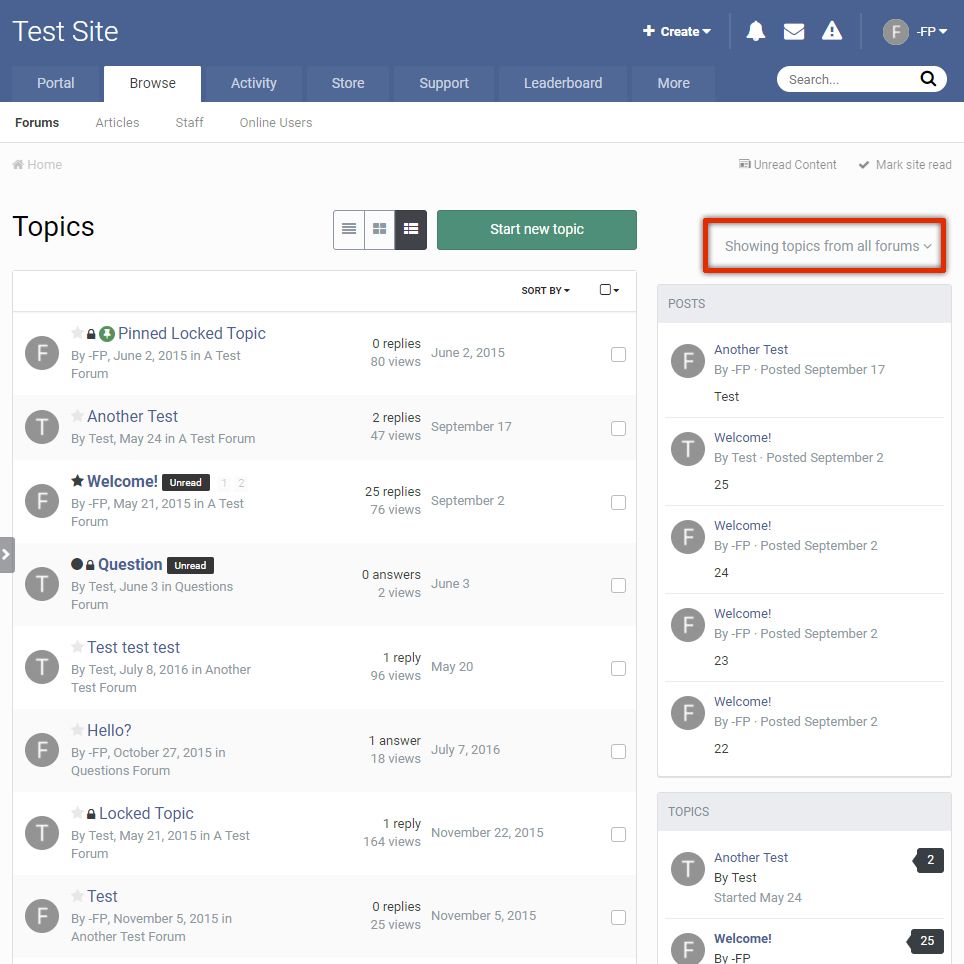
Desktop Fluid View Modal Filter
By Waqas Dar in IPS 4.7 Plugin
This plugin removes the default desktop view forum filter when in fluid forum view.
It adds a button on the sidebar and/or on the forum index. Clicking this button brings up a window to filter the forums, like in mobile view.
Compatible with Community Suite 4.2.4
(If the plugin seems not to be working on a 3rd party theme, try reinstalling it)
4 downloads
0 comments
Submitted
-

Free
Portal
By Waqas Dar in IPS 4 Applications
Adds a Portal application to IP.Board. Based upon IP.Board Portal by IPS. Please be sure to direct all support questions or suggestions in the discussion topic rather then at IPS. The Portal is currently exclusive to the IPS Marketplace, I do not support this application elsewhere.
What's New in Version 1.7.0
Compatibility update for IP.Board 4.2.x.
If you use Advanced Tags & Prefixes and you want to integrate Icon on your Portal follow this step
1) Go to AdminCP and Theme
2) click on Edit HTML and CSS
3) Under template select Portal => Front => Browse and select topicRow
4) in line 4 you have this code
<h2 class='ipsType_sectionTitle ipsType_reset'><a href='{$topic->url()}' title='{lang="view_this_topic" sprintf="$topic->title"}' target='_top'>{$topic->title}</a></h2>
5) replace code with this code and save
{{if $topic->prefix()}} <h2 class='ipsType_sectionTitle ipsType_reset'>{template="prefix" group="global" app="core" params="$topic->prefix( TRUE ), $topic->prefix()"} <a href='{$topic->url()}' title='{lang="view_this_topic" sprintf="$topic->title"}' target='_top'>{$topic->title}</a></h2> {{else}} <h2 class='ipsType_sectionTitle ipsType_reset'><a href='{$topic->url()}' title='{lang="view_this_topic" sprintf="$topic->title"}' target='_top'>{$topic->title}</a></h2> {{endif}}
15 downloads
0 comments
Updated
-

Free
Member Lists Pro
By Waqas Dar in IPS 4 Applications
Member Lists Pro by @Fosters gives you the ability to create an unlimited number of ways to customize, craft, and populate your member lists. Create staff lists, create clan lists, create special lists, create multiple lists, create as many custom member lists as you want! Break beyond the standard IPS member list with a customized set of tools and designs to connect your members with a more meaningful set of userdata. Member Lists Pro is perfect for gaming and clan communities; dating and social communities; regional and geographic communities; and any community that demands a more specialized set of memberlists.
This application enables you to curate new memberlists based on multiple criteria like primary group, secondary group, validating status, avatar, and content count. You also control how the list is displayed, with powerful design options to show group icon, join date, reputation, birthday, content count, ranks, and options to View Content and Send PM.
26 downloads
0 comments
Updated
-
![More information about "[4.1-4.2] Ips Profile Video"](https://fundayforum.com/uploads/monthly_2017_09/2.thumb.png.d64f72ad8428ff395b313a41d571281e.png)
Free
[4.1-4.2] Ips Profile Video
By Waqas Dar in IPS 4.7 Plugin
Plugin to embed video into profile.
С youtube. player.twitch. player.vimeo
Stated for versions:
4.1.x
4.2.x
Original Description:
Let your members set and display a video on their profiles with a user toggle button to show or hide the video
Plugin Settings
Choose what user groups can use Profile Video
Choose what user groups can see the members Video
Select to show the video in the sidebar blocks or the activity stream
Hide the toggle button on the members profile
Links Supported
Any link what will play via embedding the src url
For Example
https://www.youtube.com/embed/TheUniqueID
https://player.twitch.tv/?TheUniqueID
https://player.vimeo.com/video/TheUniqueID
How To Install
Go to your admin panel and plugins then install the downloaded .xml file
Version Compatibility
4.1.x
4.2.x
43 downloads
0 comments
Submitted
-

Free
Clear Notifications
By Waqas Dar in IPS 4.7 Plugin
This plugin will allow users to clear their notifications list.
version compatibility
4.1.x
4.2.x
9 downloads
Updated
-

Free
plugin Uncheck Admin Emails on Registration
By Waqas Dar in IPS 4.7 Plugin
When this plugin is enabled, the checkbox "Send me news and updates" on the registration page will be removed by default to comply with certain email laws.
The user can still turn it on, but it will start uncontrolled, whereas by default it will be started.
Version Compatibility
4.1.x
4.2.x
2 downloads
0 comments
Submitted
-

Free
plugin Chatbox entries count on profile cover
By Waqas Dar in IPS 4.7 Plugin
This Plug-in Chatbox entries count on profile cover will displays the number of messages count of chatbox on profile cover.
4.1 plugin
6 downloads
0 comments
Submitted
-

Free
IPS- Invision Power Board 4.2 Nulled Full Suite
By Waqas Dar in IPS Community Suite 4 Resources
This is latest nulled files of IPS Community board 4.2.1 -- 4.2.2 with all applications.
Version 4.2 is the next large release for Invision Community! We are very excited to introduce all the new features and improvements.
Full information on 4.2.0 ...
1,010 downloads
Updated
-
Recently Browsing 0 members
- No registered users viewing this page.