
- 📢 Welcome to FundayForum – Explore Trending Topics
- 🌟 Discover What’s Trending Today
- Michael Douglas fears of losing his charm amid Davina McCall's health battles
- Meghan Markle's awkward gaffe that went viral: Truth revealed
- Maradona doctor was made 'scapegoat' for his death, Argentine court told
- What you need to know about the 2026 US midterm elections
- Harry Styles loses temper after 'menacing' fan encounter
- Lady Gaga hints at nw album with just two words response
- Govt approaches JI for fresh talks on petroleum levy ahead of third phase of protest
- Gracie Abrams, Paul Mescal face trouble in paradise after 2 years together
- A 'misunderstood' relationship?
- Country singer John Anderson dies at the age of 71


Waqas Dar
-
Posts
11,303 -
Joined
-
Last visited
-
Days Won
559
Content Type
Profiles
Events
Forums
Gallery
Blogs
Downloads
Articles
Page News
Release Notes
Store
Files posted by Waqas Dar
-

Free
Arabic Language IPS.Community.Suite.4.1.19.4
By Waqas Dar in Language Packs
Arabic Language IPS Community .Suite.4.1.19.4
For any support please leave comment !
Version 1.0 Front End Community suite translation.27 downloads
(0 reviews)0 comments
Submitted
-

Free
Mobile Commerce Cart
By Waqas Dar in IPS 4.7 Plugin
This simple plugin adds a shopping cart icon to the mobile navigation bar if the user has any product in the store cart.
Compatible with Community Suite 4.1.10
If you are wondering what's the + icon in the screenshot...
7 downloads
0 comments
Updated
-

Free
Mobile Create Content
By Waqas Dar in IPS 4.7 Plugin
This plugin adds a "Create" button to the mobile layout. Just like the "Create" button in desktop view, now in mobile view you'll have quick access to create content for every section of your site.
Compatible with Community Suite 4.1.7.
WARNING IF RUNNING 4.1.6 OR PREVIOUS VERSIONS
If you are running 4.1.6 or lower, you must edit the theme template core -> front -> global -> mobileNavBar
Find
<li{{if ! $defaultStream}} class='ipsHide'{{endif}}>
Replace with:
<li {{if ! $defaultStream}} class='ipsHide'{{endif}}>
9 downloads
0 comments
Updated
-

Free
Link To Product Page In Cart
By Waqas Dar in IPS 4.7 Plugin
This plugin adds a link to the product page of the products listed in the shopping cart.
Compatible with Community Suite 4.1.10
2 downloads
0 comments
Updated
-

Free
Andheri raat mein jugnoo by Farzana Gilani
By Waqas Dar in Urdu Afsana & Novels Hub
Andheri raat mein jugnoo by Farzana Gilani
Download free online Urdu books, free online reading social / Romantic Urdu novel complete in pdf. This novel is taken from Pakeeza Digest December 2007. Click the Button on sidebar to download.216 downloads
0 comments
Updated
-

Free
Russain language for IPS 4.2
By Waqas Dar in Language Packs
Russian language pack for IPS Community Suite 4.2. Full translation. It is maintained and updated constantly and on a free basis. Join our Russian community .
We will be very happy for the feedback and the search for shortcomings.
1 download
(0 reviews)0 comments
Submitted
-
Free
French translation for IPS Community Suite 4
By Waqas Dar in Language Packs
This is the French (fr-FR) translation file for IPS Community Suite 4 and contains translations for:
System Forums Calendar Pages Gallery Commerce Downloads Blog Converter Front-end and back-end are fully translated.
This translation made by Invision Board France, the french support community for IPS software.
7 downloads
(0 reviews)0 comments
Submitted
-

Free
plugin (sos4) 2 Letters in Profile Letters
By Waqas Dar in IPS 4.7 Plugin
This plugin will display 2 letters in the profile letter, if the user has 2 names, like Adriano Faria.
Examples:
Setting:
Exclude word: First letter from these words will not be used in the avatar. You can see above it excluded the "di" word. Note:
This change does not happen automatically for users already registered. It will occur after they change their display name. Compatibility:
IPS Community 4.2 Script optimization.
6 downloads
0 comments
Updated
-

Free
Hide Empty Reviews 1.0.0
By Waqas Dar in IPS 4.7 Plugin
This is a free plugin. No guarantee of support is provided in any manner.
This is a simple plugin which does just what the title says: it hides "empty" reviews.
When upgrading your community from 3.4.x, you are able to convert "ratings" to "reviews" in the new system. However, these converted ratings all end up being displayed as reviews with no associated text, which is unsightly and generates pointless clutter.
This plugin allows you to keep ratings from the old system and simply hides them from view the reviews tab. This means old ratings will still count towards an items overall rating, but the review page won't be cluttered with those empty reviews.
Members will still see their own review, regardless; this way a member who previously rated a file in the old system can still edit their review and add content to it after you upgrade.
0 downloads
0 comments
Submitted
-

Free
plugin (TB4) Bump Up Topics
By Waqas Dar in IPS 4.7 Plugin
This modification adds a button to bump a topic, useful to avoid useless replies with something like "bump" or "up".
Features
Coded as plugin, disable it to disable the whole modification Each group has its own options: Enable/disable bump option Restrict only to specific forums or all Bump all topics or only the ones started Limit the number of bumps per day Set a waiting time after the last bump Set a waiting time after the last topic post Secondary groups options are properly checked Different icon to easily confirm the status visually Full star: bump option is available Half star: bump option will be available after some time (last post/bump limit) Empty star: bump option is not available until next day (daily limit) Bump button is always hidden for guests and search engines Javascript timer in the disabled button to show how much time the members must wait The topic is automatically marked as read for the member that bumps it, but not for the others! Fixed the error message not display correctly the number of days/hours remaining
Fixed the uninstall process not handling correctly some columns
11 downloads
0 comments
Submitted
-

Free
Full ramazan Timetable 2017 with Ashra Dua PDF File
By Waqas Dar in Quran & Islamic Books
Ramazan Month ki daily dua'ain and timetable of 2017 . 28 May to 25 June 2017. click to download or read at fundayforum in pdf format.
31 downloads
0 comments
Submitted
-

Free
Ramazan Mubarika ki dua'ain.pdf
By Waqas Dar in Quran & Islamic Books
Ramazan Month ki daily dua'ain. 1 to 30 . click to download or read at fundayforum in pdf format.
43 downloads
- download books
- dua'ain.pdf
- (and 6 more)
0 comments
Updated
-

Free
Ramazan Timetable 2017 Pakistan
By Waqas Dar in Quran & Islamic Books
Download or click to find out timetable of Ramazan 2017 Pakistan in PDF format.
28 May To 25 June 2017
29 downloads
- 2017
- download books
- (and 7 more)
0 comments
Updated
-
![More information about "[IPS4] CCBill Payment Gateway"](https://fundayforum.com/uploads/monthly_2017_05/ccbill1.thumb.png.683ac15f570cd64086eee4be0a19d6f8.png)
Free
application [IPS4] CCBill Payment Gateway
By Waqas Dar in IPS 4 Applications
Thank you for considering a purchase of the CCBill Payment Gateway, released by @Joel R. CCBill is now available (for the first time ever!) for IPS 4 with the integration of this payment gateway, enabling your users to check-out and pay for your goods and services using CCBill.
This file is coded for IPS 4.x IP.Commerce.
You are encouraged to read through the entirety of this description to ensure this file is appropriate for your use case.
Why CCBill?
CCBill offers a trusted and dedicated payment processing system used to process millions of transactions each year between webmasters and consumers. It's developed a reputation as one of the leading payment processing systems, where your clients can securely and conveniently buy and you can manage purchases and subscriptions. It offers complimentary fraud control, membership and purchase management, and 24/7 consumer and merchant support - all in a trusted brand built over a decade and a half.
CCBill offers payment types that are familiar and convenient for your users, no matter where they are located. Whether your consumers are using credit cards, electronic checks, bank debit, or are in Europe, the United Kingdom, Canada, or the United States, they can buy your product or service. CCBill accepts all major payment methods in a global processing system with multiple currency options, multilingual support, and dedicated payment options for geographic regions.
CCBill offers payment processing in a variety of channels, including online businesses, dating, nonprofit organizations, high risk websites, live entertainment, and subscriptions. As a brief highlight:
Online Business - CCBill provides your company with affordable and easy options in a technology-driven system that accepts credit card, debit card, and checking accounts through secure payment pages that can be branded as your own.
Dating - CCBill integrates high-risk management into a dating business model that offers dynamic pricing and shopping features.
Nonprofit - CCBill offers discounted rates for 501 (C)(3) status and access to millions of potential donors. CCBill can increase your fundraising through low rates and automated renewals.
High-Risk - If you are a high-risk business model such as online adult entertainment, live entertainment and cam sites, penny auction sites, and complex business selling, CCBill is one of the few trusted choices for you and your consumers. It handles fraud and risk mitigation, consumer satisfaction, and banking and credit card regulation in a trusted brand which layers regulatory support for regulatory and legal factors, compliance support for content and legal issues, and consumer support for consumer satisfaction.
Live Entertainment - If you offer live entertainment through the use of webcams, CCBill offers highly configurable business concepts such as multi-sign and one click upgrades.
Subscriptions - For content-rich websites that offer digital or soft goods, CCBill offers a decade of experience specializing in subscription billing for content-rich websites.
Learn more about CCBill: Merchants | Pricing
My Story
I wanted to share my own experiences and how I came about commissioning this payment gateway in a heartfelt story about how important it is to me to offer this payment gateway to the IPS Community.
IPS Clients create communities around a diverse variety of topics, not all of which are suitable for mainstream payment providers such as PayPal and 2Checkout. Unfortunately, due to our content or business model, we are locked out of mainstream payment processors and unable to financially fund our communities. My community is like that too, and ever since I installed IP.Nexus back in 2012, I've been rejected over and over - and over and over! - again by mainstream payment providers. I know what it's like to make painful choices such as killing my own traffic so my website doesn't become a financial drain.
It's taken me 3 years to get here. I've burned through highly-reputable IPS third-party developers who were recommended to me, but who couldn't finish the gateway. I've burned through an IPS third-party developer who supposedly specializes in IP.Commerce. I've even burned through Indian, Nepalese, and Bangladesh developers I found through oDesk. I've burned through thousands of dollars in wasted efforts and failed attempts. But the payment gateway is finally made!
Offering this gateway is an affirmation of the incredible array of IPS communities and our diverse audiences -- to help your community as well as mine thrive by allowing our communities to self-finance in a sustainable manner so we can continue to grow, build, and celebrate the richness of our awesome communities and members.
My First Steps
I recognize that due to its price, this purchase is not a casual purchase. It's not designed to be. This is not one of those free or low-cost plugins in the Marketplace that you try, buy, and then discard. This is an investment into your community's future sustainability and financial success, and you should consider it as such.
As the first steps to getting started, I encourage you to follow the instructions below to ensure you and your community are properly onboarded:
Your Merchant application to CCBill is approved. Your website has been reviewed and is approved.
You read through the "Merchants" section of CCBill's Merchant Knowledge Base (Link) in its entirety.
You outline the types of goods and services you want to offer and how you want users to pay (eg. payment workflow).
You converse with CCBill's Merchant Support regarding your proper choice(s) for Subaccounts and Forms. This step is critical, as it will determine how you will configure your payment gateways.
You upgrade to the latest stable version of IPS 4.x with IP.Commerce enabled and no outstanding bugs. You have no third-party applications, plugins, or hooks that interfere with the normal functioning of IP.Commerce.
I will make every effort to explain what options are available to you in CCBill and to assist you. However, due to the nature of this payment gateway and how CCBill receives pricing information in their forms, it is critical that you ultimately communicate with your Account Representative at CCBill to determine what options are most appropriate for you.
Learn More about CCBill: Learn More | Merchant Sign-Up | Admin Login
My Commitment
This file is tested. Before releasing this file to the Marketplace, I ran through three rounds of testing. In my first round, I ran six test transactions on my demo website to ensure they gave the right result:
Discover Card - Approval
Discover Card - Denial (Risk)
Discover Card - Denial (Banking)
US Checking Account - Approval
US Checking Account - Denial (Risk)
US Checking Account - Denial (Banking)
In my second round of testing that happened on my live website, I ran the same 6 test transactions to ensure they gave the right result. Finally, I ran two real transactions on my live website using my own Discover Card and US Checking Account to ensure the payments were triggered in CCBill. I also ran so many other test transactions during the development phase that I lost count.
This file works. If I personally want to make money on my website, then my only recourse is to use my own CCBill Payment Gateway. As such, I can provide a live demo on my own website which walks you through a live and functioning CCBill Payment Gateway. The screenshots are also of a live, real transaction on my community.
This file will support IPS 4.x over its lifetime. I am personally committed to ensuring this file works for the lifetime of IPS 4.x, and if there are any changes that need to be made to the file, I will ensure those changes are immediately released.
This file will be documented. Working with CCBill can be tricky and complex. This payment gateway is different from others and isn't a one-click install. CCBill doesn't have a true API, so you will need to configure both CCBill and your IP.Commerce settings to match your needs. I am personally committed to making sure you understand your options and steps you need to take through documentation, screenshots, and other assistance.
Screenshots
The screenshots walk you through a complete transaction from beginning to end, so you can see how IP.Commerce interacts with CCBill.
Checkout - 2 Images. I add "VIP Olympian" purchase to my cart, which is a recurring subscription of $20 / mo. On the checkout page, I am presented with two payment options to pay using credit card or online check, both through CCBill.
CCBill Forms - 2 images. I am redirected to the CCBill form, which requires me to enter in my billing, address, and new account information. Once I submit, CCBill gives a payment confirmation with a link back to website. Success!
CCBill Portal - 2 images. The first image is homepage of CCBill with link to Admin Login. Second image is my dashboard, which confirms the 2 purchases made Yesterday.
Email - 3 images. First email is CCBill's confirmation to the subscriber. Second email is CCBill's confirmation to merchant. Third email is IPS 4's confirmation.
Payment Settings - 2 images. First image shows two different payment gateways for CCBill (one for credit cards; the other for online bank checks). Second image shows live transaction marked as approved in ACP.
Images valid as of April 2016.
Questions & Answers
Does the gateway accept ## payment type in ## country? You will need to refer to CCBill's payment processing options for your account. Some countries allow certain payments while others don't. Most clients will find CCBill's payment options are more than enough.
What pricing option do you use? I'm on the Direct plan, which is only available to new sign-ups, although you should converse with an Account Representative to determine which one is most appropriate.
Can my website contain ## content? You will need to submit a Merchant Application to see if your project is approved. For example, during my website's risk and compliance review I had to remove certain kinds of content.
How do I configure my webhooks / subaccounts / test user / dynamic pricing in CCBill? CCBill offers extensive documentation, and you'll find their Live Chat is fantastic and will even do most of the work for you if you ask nicely.
Is this purchase for life? Yes, this is a one-time purchase that is for lifetime and gives you download rights to all future updates to this specific file.
Are there any restrictions on the purchase? You are welcome to use your gateway on as many IPS communities that you personally own. Happy selling to you. However, I'd like to request that you not redistribute your personal copy to anyone else. You paid a lot for it, and you should protect your copy.
Why is the purchase so expensive? This cost is a fraction of what it would cost for a custom development job. Let's face it, you're already losing money every month on server costs, bandwidth, storage, cloud distribution, domain renewals, and everything else - I know I was. How much more can you afford to lose before you find a suitable solution? This gateway is a one-time, upfront investment so you can begin earning money. This file's price point is calibrated for serious webmasters who need a reputable and trusted payment gateway for high risk content. And since you're a serious webmaster, then you're serious about finding a solution to make your community sustainable and financially prosper.
Are refunds allowed? No, this file is designed for webmasters who understand and want to invest in their own communities for the long-run, and understand the expectations before purchase.
Will the gateway work with Community in the Cloud customers? This payment gateway may not work on Community in the Cloud customers as you may not (in most cases ) have any direct filesystem (FTP) access. You will need to check with your IPS hosting representative to see if you have FTP access, or if they can upload the file on your behalf.
Does the gateway support CCBill Flexforms? No. Flexforms are best used when you can customize forms in advance (eg. an Online Business sells one and only kind of product, and you can define product in advance). In our case, we pass along variables via dynamic pricing to CCBill's standard Jpost form based upon the buyer's cart, so the gateway already customizes the form for you. This gives flexibility to you as a webmaster, since you can add / remove products and increase / decrease prices in the ACP without worrying about changing your Flexform; when your buyers checkout, the exact price is passed on to CCBill's standard form. If you'd like to customize the standard form with colors and logos, CCBill will be happy to assist you.
What are your use cases? I personally use the gateway to sell recurring membership subscriptions, although it can be used for any of the major classes of IPS products: digital goods, physical goods, advertising, subscriptions, etc. All this gateway does is handle the actual payment; everything else is handled by IP.Commerce.
Does the gateway support the scenario where members sell ## and I get a commission (such as the IPS Marketplace)? Kind of. You, as webmaster, will get paid the full amount at time of checkout. CCBill does not offer an API and, by itself, cannot do automated pay-outs like PayPal. What instead will happen is that your sellers will be credited with funds into Account Credit. They may then use those Account Credits for other purchases on your website, manual payouts using another payment gateway, or automated payouts using another payment gateway.
If I use CloudFlare, what do I need to do? Please be sure to add CCBill's IP address to your CloudFlare firewall, so the API notification will go through. Thank you to one of our purchasers for reporting this.
More Q&A will be posted as inquiries are made. I am committed to providing as much upfront transparency as possible so you can be successful with the gateway.
If you have a question, please ask. I will be more than happy to walk through your payment workflow.
Reviews Feedback
Thank you in advance for any positive feedback you leave below in the Reviews. I would love to hear your stories on how this payment gateway empowered you to start earning money and to become a profitable, self-sustaining community!
4 downloads
- applications
- ccbill
- (and 9 more)
0 comments
Updated
-

Free
theme/skin Flat Forum Ranks
By Waqas Dar in IPS 4 Themes/Ranks
Cool Flat Forum Ranks With PSD File.
52 downloads
0 comments
Submitted
-
Free
plugin Description Footer
By Waqas Dar in IPS 4.7 Plugin
Description Footer - displaying message In Footer
Settings
set Description
set Background color
set Text color
set Font Size
set Margin
set Padding
5 downloads
- description
- footer
- (and 9 more)
0 comments
Submitted
-

Free
theme Uniform - ipsfocus
By Waqas Dar in IPS 4 Themes/Ranks
Uniform is a light, modern theme focused around a background picker which applies a single background image throughout the entire forum, including category bars and forum icons. The theme is packed with customizable features which can be easily enabled or disabled from within the Admin Control Panel.
compatible for 4.1.16.x
48 downloads
0 comments
Updated
-
Free
plugin (SOS40) Automatic Post When Moving Topic
By Waqas Dar in IPS 4.7 Plugin
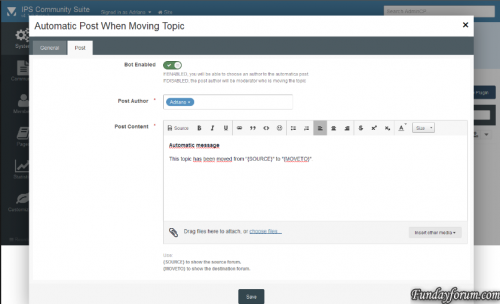
This plugin will create a automatic post when u will move some topic.
Works with
IPS 4.1.x
IPS 4.0
8 downloads
0 comments
Submitted
-
Free
(SOS41) Profile Field Per User Group
By Waqas Dar in IPS 4.7 Plugin
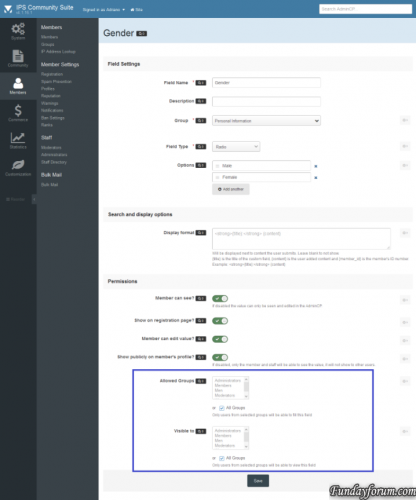
The plugin allows administrators to choose which user groups can use and view each profile field. All groups, by default, will be able to use any profile field. Members of the groups that are not selected in field settings, will not be able to view and fill the field in your profile.
9 downloads
0 comments
Submitted
-
Free
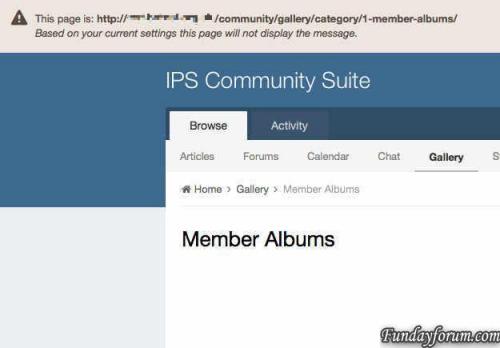
(IPS4) Global Header Message
By Waqas Dar in IPS 4.7 Plugin
IPS style header block for displaying messages and links across the the top of your board. Use either the built in message formats or set you own custom formatting.
Settings
Show/Hide Message. Select which groups can see the message. Display the message on selected pages based on a whitelist or blacklist User can hide message if permitted by admin. 4 built in message formats. Custom message format including; icon, text colour and alignment, background colour. Supports multilingual sites. Compatible with 4.2
(IPS4) Global Header Message
18 downloads
Updated
-
Free
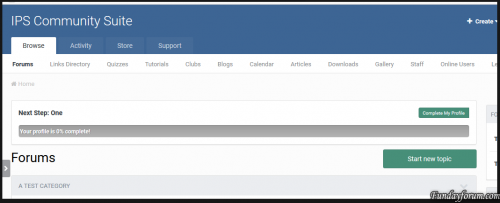
plugin Hide Dismiss Button
By Waqas Dar in IPS 4.7 Plugin
This plugin will hide the Dismiss button in the profile completition message.
2 downloads
0 comments
Submitted
-

Free
IPS Invision Community 4.2 Beta Full
By Waqas Dar in IPS Community Suite 4 Resources
Please note the following:
Beta 2 release. Do not use it on a live site. Invision Community 4.2 is now available as a beta in the client area. The final release will be later in summer 2017.
Here is the roundup of what's new in Invision Community 4.2!
Highlights
There's a lot of new feature in 4.2 but here are a few of the highlights:
Promoting Content - A new way to promote content in your Community internally, on Facebook, and on Twitter.
Clubs - Clubs are a brand new way of supporting sub-communities within your site. Many people have requested social group functionality in the past and Clubs are our implementation of this concept.
Reactions - Offer more fine-grained sentiments towards content than a simple up/down or 'like'. They are now in common usage on social networks, and so users expect to be able to be more nuanced in their response to something they see.
Complete Your Profile - Encourage or require members to fill out the details on their profile. Also now allows for quick registration to encourage joining.
And a whole lot more..
It goes on... here is the full list!
Leaderboard Enhancements Richer Embeds Group Promotion Improvement Fluid Forum View Member History Editor Uploading Improvements Authy Integration Commerce Improvements New REST API Endpoints Gallery Improvements Statistic Reporting Copy Topic to Database Downloads Index Page Blog Sidebar Promoting Content Clubs Reactions Calendar Venues Social Sign In Streamlining Calendar Add Similar Event Gallery Lightbox Navigation Letter Profile Photos SEO Improvements Device Management Delayed Deletes Calendar Event Reminders Content Messages Recommended Replies Complete Your Profile Be sure to visit each entry above for more information and screenshots. We hope you enjoy Invision Community 4.2!
Release
The final release will be available summer 2017.
92 downloads
0 comments
Submitted
-

Free
Latest IPS Converter
If a specific conversion has things available to convert but there are none in the third party database, you will no longer be required to convert them. For example, if you are converting from vBulletin and you do not have any profile field groups, you will not be required to 'convert' this step. The converters have been updated to work with developer mode properly (which has in turn led to many miscellaneous bug fixes) Converting from SMF will now prompt you to choose whether to keep member real names or display names when converting members Full language abstraction Redirections are now handled automatically without the need for uploading extra PHP files (and in the case of some conversions, overwriting the default index.php upon each upgrade) Converted links (i.e. links to topics, forums, profiles, etc.) will no longer redirect to the new locations within the Suite if the user does not have permission to view the content Gallery images embedded as attachments in posts in vBulletin will now work correctly post-conversion (for new conversions) Improved converters so that conversions that require a 'parent' (i.e. converting forums requires members to be converted first) will not allow you to start until the parent has been converted Converter version number has not been set inline with the rest of the Suite API endpoint added for converters to fetch details about what can be converted Joomla, Photoplog, Coppermine, BBPress converters added Miscellaneous performance improvements Dozens of bug fixes7 downloads
0 comments
Updated
-
Free
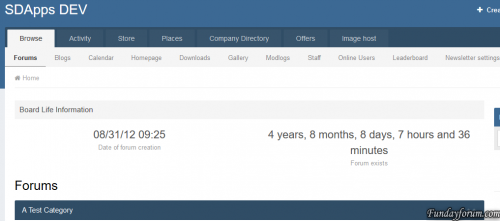
(SD) Board Life Counter
By Waqas Dar in IPS 4.7 Plugin
Plugin to display the time that has elapsed since the creation of your forum.1 download
0 comments
Submitted
-

Free
Pages SuperHelp
SuperHelp page is a set of page templates to help / FAQ sections, books, online courses and similar content.
What is necessary:
IPS 4.1 in the latest version of the page application
A page in the database, which uses multiple levels of categories.
Benefits SuperHelp:
Uterine templates page is restricted to show only one level at a time: one level categories; one level records links in the same category; a full report. SuperHelp based on IPS »Help section of the Guide and can show much more information and make browsing the database a lot easier. template set is beautiful and clean appearance and, of course, to fully react. It takes almost all sites and enable IPS plug-in allows you to change the appearance of the template without any - any HTML knowledge.
What's included:
The first sheet listing category template that shows the primary and secondary categories.
Listing Template that shows subcategories entries in categories and entries in the current category.
Record View template with the side panel that shows the other entries in the same category.
A plugin that allows you to change the template settings easily.
Setting a PDF with detailed instructions and tips to create your SuperHelp database.
Note: You can use templates for any number of databases, but the settings will always be applied to all templates SuperHelp.
Plugin Settings:
Display category button followed by Yes / No
Show images were recorded with a view to listing: Yes / No
Show the image recording in the presentation of records: Yes / No
The number of lines, then text gets cut off preview
The number of entries displayed in the list of sub-categories
icon type to use for reference steps: automatic numbering or a user-defined FontAwesome icon
The text alignment for the title / description on the home page
The text alignment for the title / description on the data page
Align text to the category titles / descriptions on the main page
Expert options:
Add a photo of your main categories category
Redefine the style (for example, the color icon) in your theme custom.css
14 downloads
0 comments
Submitted
-
Recently Browsing 0 members
- No registered users viewing this page.