Applications 4.x
Invision power board applications 4.x version.
99 files
-

Portal
By waqas dar
Adds a Portal application to IP.Board. Based upon IP.Board Portal by IPS. Please be sure to direct all support questions or suggestions in the discussion topic rather then at IPS. The Portal is currently exclusive to the IPS Marketplace, I do not support this application elsewhere.
What's New in Version 1.7.0
Compatibility update for IP.Board 4.2.x.
If you use Advanced Tags & Prefixes and you want to integrate Icon on your Portal follow this step
1) Go to AdminCP and Theme
2) click on Edit HTML and CSS
3) Under template select Portal => Front => Browse and select topicRow
4) in line 4 you have this code
<h2 class='ipsType_sectionTitle ipsType_reset'><a href='{$topic->url()}' title='{lang="view_this_topic" sprintf="$topic->title"}' target='_top'>{$topic->title}</a></h2>
5) replace code with this code and save
{{if $topic->prefix()}} <h2 class='ipsType_sectionTitle ipsType_reset'>{template="prefix" group="global" app="core" params="$topic->prefix( TRUE ), $topic->prefix()"} <a href='{$topic->url()}' title='{lang="view_this_topic" sprintf="$topic->title"}' target='_top'>{$topic->title}</a></h2> {{else}} <h2 class='ipsType_sectionTitle ipsType_reset'><a href='{$topic->url()}' title='{lang="view_this_topic" sprintf="$topic->title"}' target='_top'>{$topic->title}</a></h2> {{endif}}
15 downloads
0 comments
Updated
-

Member Lists Pro
By waqas dar
Member Lists Pro by @Fosters gives you the ability to create an unlimited number of ways to customize, craft, and populate your member lists. Create staff lists, create clan lists, create special lists, create multiple lists, create as many custom member lists as you want! Break beyond the standard IPS member list with a customized set of tools and designs to connect your members with a more meaningful set of userdata. Member Lists Pro is perfect for gaming and clan communities; dating and social communities; regional and geographic communities; and any community that demands a more specialized set of memberlists.
This application enables you to curate new memberlists based on multiple criteria like primary group, secondary group, validating status, avatar, and content count. You also control how the list is displayed, with powerful design options to show group icon, join date, reputation, birthday, content count, ranks, and options to View Content and Send PM.
26 downloads
0 comments
Updated
-
![More information about "[IPS4] CCBill Payment Gateway"](https://fundayforum.com/uploads/monthly_2017_05/ccbill1.thumb.png.683ac15f570cd64086eee4be0a19d6f8.png)
application [IPS4] CCBill Payment Gateway
By waqas dar
Thank you for considering a purchase of the CCBill Payment Gateway, released by @Joel R. CCBill is now available (for the first time ever!) for IPS 4 with the integration of this payment gateway, enabling your users to check-out and pay for your goods and services using CCBill.
This file is coded for IPS 4.x IP.Commerce.
You are encouraged to read through the entirety of this description to ensure this file is appropriate for your use case.
Why CCBill?
CCBill offers a trusted and dedicated payment processing system used to process millions of transactions each year between webmasters and consumers. It's developed a reputation as one of the leading payment processing systems, where your clients can securely and conveniently buy and you can manage purchases and subscriptions. It offers complimentary fraud control, membership and purchase management, and 24/7 consumer and merchant support - all in a trusted brand built over a decade and a half.
CCBill offers payment types that are familiar and convenient for your users, no matter where they are located. Whether your consumers are using credit cards, electronic checks, bank debit, or are in Europe, the United Kingdom, Canada, or the United States, they can buy your product or service. CCBill accepts all major payment methods in a global processing system with multiple currency options, multilingual support, and dedicated payment options for geographic regions.
CCBill offers payment processing in a variety of channels, including online businesses, dating, nonprofit organizations, high risk websites, live entertainment, and subscriptions. As a brief highlight:
Online Business - CCBill provides your company with affordable and easy options in a technology-driven system that accepts credit card, debit card, and checking accounts through secure payment pages that can be branded as your own.
Dating - CCBill integrates high-risk management into a dating business model that offers dynamic pricing and shopping features.
Nonprofit - CCBill offers discounted rates for 501 (C)(3) status and access to millions of potential donors. CCBill can increase your fundraising through low rates and automated renewals.
High-Risk - If you are a high-risk business model such as online adult entertainment, live entertainment and cam sites, penny auction sites, and complex business selling, CCBill is one of the few trusted choices for you and your consumers. It handles fraud and risk mitigation, consumer satisfaction, and banking and credit card regulation in a trusted brand which layers regulatory support for regulatory and legal factors, compliance support for content and legal issues, and consumer support for consumer satisfaction.
Live Entertainment - If you offer live entertainment through the use of webcams, CCBill offers highly configurable business concepts such as multi-sign and one click upgrades.
Subscriptions - For content-rich websites that offer digital or soft goods, CCBill offers a decade of experience specializing in subscription billing for content-rich websites.
Learn more about CCBill: Merchants | Pricing
My Story
I wanted to share my own experiences and how I came about commissioning this payment gateway in a heartfelt story about how important it is to me to offer this payment gateway to the IPS Community.
IPS Clients create communities around a diverse variety of topics, not all of which are suitable for mainstream payment providers such as PayPal and 2Checkout. Unfortunately, due to our content or business model, we are locked out of mainstream payment processors and unable to financially fund our communities. My community is like that too, and ever since I installed IP.Nexus back in 2012, I've been rejected over and over - and over and over! - again by mainstream payment providers. I know what it's like to make painful choices such as killing my own traffic so my website doesn't become a financial drain.
It's taken me 3 years to get here. I've burned through highly-reputable IPS third-party developers who were recommended to me, but who couldn't finish the gateway. I've burned through an IPS third-party developer who supposedly specializes in IP.Commerce. I've even burned through Indian, Nepalese, and Bangladesh developers I found through oDesk. I've burned through thousands of dollars in wasted efforts and failed attempts. But the payment gateway is finally made!
Offering this gateway is an affirmation of the incredible array of IPS communities and our diverse audiences -- to help your community as well as mine thrive by allowing our communities to self-finance in a sustainable manner so we can continue to grow, build, and celebrate the richness of our awesome communities and members.
My First Steps
I recognize that due to its price, this purchase is not a casual purchase. It's not designed to be. This is not one of those free or low-cost plugins in the Marketplace that you try, buy, and then discard. This is an investment into your community's future sustainability and financial success, and you should consider it as such.
As the first steps to getting started, I encourage you to follow the instructions below to ensure you and your community are properly onboarded:
Your Merchant application to CCBill is approved. Your website has been reviewed and is approved.
You read through the "Merchants" section of CCBill's Merchant Knowledge Base (Link) in its entirety.
You outline the types of goods and services you want to offer and how you want users to pay (eg. payment workflow).
You converse with CCBill's Merchant Support regarding your proper choice(s) for Subaccounts and Forms. This step is critical, as it will determine how you will configure your payment gateways.
You upgrade to the latest stable version of IPS 4.x with IP.Commerce enabled and no outstanding bugs. You have no third-party applications, plugins, or hooks that interfere with the normal functioning of IP.Commerce.
I will make every effort to explain what options are available to you in CCBill and to assist you. However, due to the nature of this payment gateway and how CCBill receives pricing information in their forms, it is critical that you ultimately communicate with your Account Representative at CCBill to determine what options are most appropriate for you.
Learn More about CCBill: Learn More | Merchant Sign-Up | Admin Login
My Commitment
This file is tested. Before releasing this file to the Marketplace, I ran through three rounds of testing. In my first round, I ran six test transactions on my demo website to ensure they gave the right result:
Discover Card - Approval
Discover Card - Denial (Risk)
Discover Card - Denial (Banking)
US Checking Account - Approval
US Checking Account - Denial (Risk)
US Checking Account - Denial (Banking)
In my second round of testing that happened on my live website, I ran the same 6 test transactions to ensure they gave the right result. Finally, I ran two real transactions on my live website using my own Discover Card and US Checking Account to ensure the payments were triggered in CCBill. I also ran so many other test transactions during the development phase that I lost count.
This file works. If I personally want to make money on my website, then my only recourse is to use my own CCBill Payment Gateway. As such, I can provide a live demo on my own website which walks you through a live and functioning CCBill Payment Gateway. The screenshots are also of a live, real transaction on my community.
This file will support IPS 4.x over its lifetime. I am personally committed to ensuring this file works for the lifetime of IPS 4.x, and if there are any changes that need to be made to the file, I will ensure those changes are immediately released.
This file will be documented. Working with CCBill can be tricky and complex. This payment gateway is different from others and isn't a one-click install. CCBill doesn't have a true API, so you will need to configure both CCBill and your IP.Commerce settings to match your needs. I am personally committed to making sure you understand your options and steps you need to take through documentation, screenshots, and other assistance.
Screenshots
The screenshots walk you through a complete transaction from beginning to end, so you can see how IP.Commerce interacts with CCBill.
Checkout - 2 Images. I add "VIP Olympian" purchase to my cart, which is a recurring subscription of $20 / mo. On the checkout page, I am presented with two payment options to pay using credit card or online check, both through CCBill.
CCBill Forms - 2 images. I am redirected to the CCBill form, which requires me to enter in my billing, address, and new account information. Once I submit, CCBill gives a payment confirmation with a link back to website. Success!
CCBill Portal - 2 images. The first image is homepage of CCBill with link to Admin Login. Second image is my dashboard, which confirms the 2 purchases made Yesterday.
Email - 3 images. First email is CCBill's confirmation to the subscriber. Second email is CCBill's confirmation to merchant. Third email is IPS 4's confirmation.
Payment Settings - 2 images. First image shows two different payment gateways for CCBill (one for credit cards; the other for online bank checks). Second image shows live transaction marked as approved in ACP.
Images valid as of April 2016.
Questions & Answers
Does the gateway accept ## payment type in ## country? You will need to refer to CCBill's payment processing options for your account. Some countries allow certain payments while others don't. Most clients will find CCBill's payment options are more than enough.
What pricing option do you use? I'm on the Direct plan, which is only available to new sign-ups, although you should converse with an Account Representative to determine which one is most appropriate.
Can my website contain ## content? You will need to submit a Merchant Application to see if your project is approved. For example, during my website's risk and compliance review I had to remove certain kinds of content.
How do I configure my webhooks / subaccounts / test user / dynamic pricing in CCBill? CCBill offers extensive documentation, and you'll find their Live Chat is fantastic and will even do most of the work for you if you ask nicely.
Is this purchase for life? Yes, this is a one-time purchase that is for lifetime and gives you download rights to all future updates to this specific file.
Are there any restrictions on the purchase? You are welcome to use your gateway on as many IPS communities that you personally own. Happy selling to you. However, I'd like to request that you not redistribute your personal copy to anyone else. You paid a lot for it, and you should protect your copy.
Why is the purchase so expensive? This cost is a fraction of what it would cost for a custom development job. Let's face it, you're already losing money every month on server costs, bandwidth, storage, cloud distribution, domain renewals, and everything else - I know I was. How much more can you afford to lose before you find a suitable solution? This gateway is a one-time, upfront investment so you can begin earning money. This file's price point is calibrated for serious webmasters who need a reputable and trusted payment gateway for high risk content. And since you're a serious webmaster, then you're serious about finding a solution to make your community sustainable and financially prosper.
Are refunds allowed? No, this file is designed for webmasters who understand and want to invest in their own communities for the long-run, and understand the expectations before purchase.
Will the gateway work with Community in the Cloud customers? This payment gateway may not work on Community in the Cloud customers as you may not (in most cases ) have any direct filesystem (FTP) access. You will need to check with your IPS hosting representative to see if you have FTP access, or if they can upload the file on your behalf.
Does the gateway support CCBill Flexforms? No. Flexforms are best used when you can customize forms in advance (eg. an Online Business sells one and only kind of product, and you can define product in advance). In our case, we pass along variables via dynamic pricing to CCBill's standard Jpost form based upon the buyer's cart, so the gateway already customizes the form for you. This gives flexibility to you as a webmaster, since you can add / remove products and increase / decrease prices in the ACP without worrying about changing your Flexform; when your buyers checkout, the exact price is passed on to CCBill's standard form. If you'd like to customize the standard form with colors and logos, CCBill will be happy to assist you.
What are your use cases? I personally use the gateway to sell recurring membership subscriptions, although it can be used for any of the major classes of IPS products: digital goods, physical goods, advertising, subscriptions, etc. All this gateway does is handle the actual payment; everything else is handled by IP.Commerce.
Does the gateway support the scenario where members sell ## and I get a commission (such as the IPS Marketplace)? Kind of. You, as webmaster, will get paid the full amount at time of checkout. CCBill does not offer an API and, by itself, cannot do automated pay-outs like PayPal. What instead will happen is that your sellers will be credited with funds into Account Credit. They may then use those Account Credits for other purchases on your website, manual payouts using another payment gateway, or automated payouts using another payment gateway.
If I use CloudFlare, what do I need to do? Please be sure to add CCBill's IP address to your CloudFlare firewall, so the API notification will go through. Thank you to one of our purchasers for reporting this.
More Q&A will be posted as inquiries are made. I am committed to providing as much upfront transparency as possible so you can be successful with the gateway.
If you have a question, please ask. I will be more than happy to walk through your payment workflow.
Reviews Feedback
Thank you in advance for any positive feedback you leave below in the Reviews. I would love to hear your stories on how this payment gateway empowered you to start earning money and to become a profitable, self-sustaining community!
4 downloads
- applications
- ccbill
- (and 9 more)
0 comments
Updated
-
![More information about "[HQ] Member of the month"](https://fundayforum.com/uploads/monthly_2017_04/56a66559f26e2_Schermata2016-01-25alle19_08_49.png.d12935ab2e1e86db4a35dc9e1ed3a8c7.png.2e91d306a56b375dbd940b7b5a183ab0.thumb.png.ceb609ad7f8b15c4f08d69379a55c50b.png)
[HQ] Member of the month
By waqas dar
Member of the Month (MotM)
MOTM is an application that will allow you to designate a “member of the month”. Compared to the previous version for IPB 3 has been added the “elections” feature, now users can vote for their candidates.
Features:
Admin can set up Application on/off. Enable/disable Motm widget in home page Admin can enable/disable Motm Archive Page (with historical data) Popup modal window for Staff Note Settings to configure a signature for motm note Stats page in acp to easy find your motm 12 stats displayed on widget for member of the month Members can vote for their candidates Notify user MotM are tested on default IPB skin (4.1.X), for custom skin I provide a full support for free!!!
Installation
Log in to your IPS4 Admin CP Go to System -> Site Features -> Applications Click “Install” Upload the .tar file included with this distribution and install! USAGE
From your AdminCP, go to:
14 downloads
0 comments
Updated
-

(R41) Post Notes
By waqas dar
This application allows members to add notes to posts.
Added new language strings
7 downloads
0 comments
Submitted
-

Steam Profile Integration 2_0_12
By waqas dar
This app will obtain data from Steam for your users and place it in your IPS Community database for use anywhere on your site. Your board will re-load your members Steam Online information, in configurable batches, every 2 minutes, so you always have up to date information without impacting load times of your community pages.
Out of the box, this app will display steam information in the following places
Member Profile Next to Members' posts Member Hovercards (Steam Online Status only) Widget: X Random Online Steam Members displayed anywhere you can place a Widget More detailed information about the members Steam profile is displayed on the Members Profile page. Including an optional list of games the member owns. Out of the box the list of games can be shown in either an image grid layout, or list view.
This app integrates seamlessly with Lavo's Sign in through Steam.. It will automatically detect if it is installed and pull that users Steam information.
Don't have Lavo's sign in installed? No problem, this app works with a Custom Profile field also. Want to use both a custom profile field AND Lavo's hook? Not a problem, this app seamlessly pulls information from both locations to create a single list of users to pull information.
Valid Steam Input format for Custom Profile Field:
Steam Name: ex. ' Aiwa ' 17 digit Steam ID: ex. 76561197964468370 Old school Steam ID: ex. STEAM_0:0:2101321 *** If there are any other places you'd like to see a users steam information displayed, let me know!
Scales seamlessly to work with larger boards without impacting site / server performance.
IP.Board 3.4.x version available here.
*** Supported natively on 64 bit server configurations. For 32 bit server configurations, php-bcmath is required to decode this format.
What's New in Version 2.0.12
-Security Update: SQL injection vulnerability fixed. Thanks to Jazz Cat for reporting.
-View Profiles Table enhancements. More to come here, wasn't quite finished but needed to get this released ASAP.
23 downloads
0 comments
Submitted
-

IPBWI for WordPress v4 - Sync Groups 4.0.0
By waqas dar
Automatically synchronize WordPress' user roles with IPS community suite groups!
No core files touched!
Once you have mapped the WordPress user roles with IPS user groups of your choice, you will get IPS secondary usergroups synced with WordPress' user roles.
Primary Group in IPS community suite remains untouched - this allows you to give users in IPS and WordPress extra permissions without showing them to public.
You can map each WordPress user role to a unique corresponding IPS user group or map several WP user roles to the same IPS user groups - once a user group in IPS is removed or added from member, all mapped user roles from WordPress are synced instantly, too.
Important Requirements:
IPBWI for WordPress v4 installed on WordPress and IPS Community Suite Please note that we only test on most recent release version of IPBWI for WordPress v4.
Documentation
Bulk Sync/Import all members at once?
This Group Sync addon works for all future changes. If you want to bulk sync or import existing IPS members to WordPress, you will need IPBWI4WP – IPS User to WordPress Import
5 downloads
0 comments
Submitted
-

FAQ System
By waqas dar
The FAQ System allows Administrators to create custom questions and answers and display them anywhere on their site.
Uses the full IPB Editor Group Questions into FAQ Collections to show different questions on different pages Display Collections easily on any page, in any IPS component Answers are displayed in a popup window so users are not taken to another screen Note: Compatibility for version 4.1
10 downloads
0 comments
Updated
-

Generic Moderator for Warnings 1.0.0
By waqas dar
This plugin will preserve the identity of your moderators by using a generic user as the author of warnings.
Notes:
Only moderators with permission Can issue warnings? can view the real moderator on warning details Warned members won't be aware of the real moderator who issued the warning: the user won't see the real moderator on warning details or on received email The generic moderator does not have to be a moderator; you can choose a regular member. Real moderators will be back on plugin uninstall5 downloads
0 comments
Submitted
-

Trader Feedback System
By waqas dar
Members can leave positive, negative, or neutral feedback Integrates feedback information in member profiles Restrict access and features based on user group Source code is completely un-encoded One-click install. No file edits required. Captcha on Feedback Submission Flood Control on Feedback Submission10 downloads
0 comments
Updated
-

Forms
By waqas dar
Build your own forms for your members without coding experience. Support included for pm, email and topics.
Feature List:
Optional confirmation email to let members know there message was received. Send reply emails within the Form Manager Quick preview feature for form logs. Per form option for rules or instructions for each form. Submit time wait feature, set how long each member group must wait before resubmitting a form. Per form permissions for who can view and submit to a form. And also who can view any form logs. Per member group option to bypass captcha. Per form option to send out personal messages when new form submissions are made. Per form option to send out emails when new form submissions are made. Per form option to create a forum topic when new form submissions are made. What's New in Version 1.1.7
Several more bug fixes. See full list of bug fixes here. IP.Board 4.1.12 compatibility update. Hook into main "Contact" link. PM confirmation option added.17 downloads
0 comments
Updated
-

(itzknotty) Facebook widgets 4.0.5
By waqas dar
What is it?
A small plugin that brings two widgets with it:
A widget to display the latest posts of a configured facebook page A widget to display the latest live stream of a configured facebook page. The livestream widget will only be displayed if there are users viewing the stream at the moment. There is also a page...
...that shows the complete activity stream of the configured page. The user can click on a button to load the next activity items from the facebook page. All you have to do is to create a facebook app and configure the facebook page in the admin control panel where you can paste the appID and the app secret. Place the widget wherever you want and you will see the lastest posts or the latest live stream.
Configure the plugin
Go to the admin control panel of your site and login with your account. Go to Community > Itzknotty > Settings Fill in your data:
Facebook Pagename
The name of the page you want retrieve data from (https://www.facebook.com/your-pagename).
Facebook App ID
The app id of your application. For further information how to create an app scroll down.
Facebook App Secret
The secret of your application.
Place the widgets you prefere to your board.
Add a link to the complete stream if you want:
How to create a Facebook application to access data of your page
You need an active Facebook account to create an app.
Go to https://developers.facebook.com/apps/ and make sure you are logged in with your preferred account. Click the button "Add a new App" And fill in the information for Display Name, Contact Email and choose Apps for Pages as category.
Click on Create App ID and confirm the security check to proceed. Navigate to the Settings page in the left navigation bar. Copy your App ID and your App Secret and insert both in your admin control panel.
Everything should work now.
What's New in Version 4.0.5
Released January 1
It is possible to display facebook group feeds or other items that supports a "feed" endpoint Fixed the error that not the configured count of feeds were displayed in the widgets8 downloads
0 comments
Updated
-
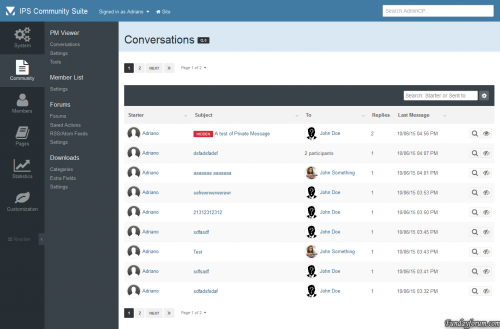
application PM Viewer
By waqas dar
This application will allow administrators to read conversations on Admin CP. If admins has a special permission, they will also be able to VIEW hidden conversations, EDIT, HIDE/UNHIDE conversations (from appearing on PM Viewer application) and INVITE/REMOVE MEMBERS from conversations.
Conversations can also be tracked by filtering keywords. If a specific keyword added by an admin is used on Conversation, users from selected group will receive a notification with a link to the conversation on PM Viewer application.
Admins can also use tools to HIDE or UNHIDE all conversations with one click.
18 downloads
- download
- fundayforum
- (and 6 more)
0 comments
Submitted
-

Name2Color Avatars
By waqas dar
I was bored and was browsing around and saw a list of "new features" in a competing software to IPS and was like "now IPS should have this".
if the USER has the "default" user avatar, the "egg person" not sure what else to call it, this plugin will take the first character of their username and create a color code out of it (they are not unique to the user, its not that advance) and create a "text based" avatar for the account.
feel free to use however want or add it to any project you'd like. no support will be provided.
What's New in Version 2.0.2
if you have the plugin installed, please remove it before installing this.
added in support for imagick, if you have imagick installed and your suite set to use it, it will use this to generate the images. the images come out cleaner.
prerendered images are now rendered by imagick.
7 downloads
0 comments
Updated
-
Babble: Real Time Chat
By waqas dar
Babble is a real time chat system using node.js and sockets. It uses less resources and doesn’t rely on long polling or interval scripts to check for new message. Babble is fully featured with those features laid out below.
NOTICE: If you are upgrading Babble, you will need to restart your babble.js application. if you have moved it from the default directory you will need to take the updated one, verify the information it contains, and replace the one you removed and then restart the babble.js app for node.
Requirements:
A modern browser that supports web sockets. (Firefox/IE11/Edge/Chrome/Safari supports websockets. For mobile browsers, I will only be supporting Safari and Chrome).
Node.js installed on a local or a remote server that can run a node.js script. I have only tested the last 4 versions of node.js, but the latest version of node.js you can install, the better. I will attempt to compile a node.js versions that are compatible with Babble.
Note:
babble requires node.js. This is an unconditional requirement. So many of the features of babble are node.js dependent, that there isn’t any fallback to another web technology (like ajax/long polling). With that in mind, Babble is very javascript dependent, it will not degrade gracefully if javascript has been disabled in the browser,if you have any tin foil hat wearing members, they will not be able to use babble.
Note 2:
Cloudflare, cloudflare only has a limited range of ports that can be used if you choose to use this particular service, you will need to contact them about what ports are available to you. the only alternative to this is to use a sub-domain (not tied into cloudflare) and/or the servers IP address instead of your sites URL for the NODE URL in the ACP.
Note 3:
**if you are running a server that doesn't use a LAMP ( Linux, Apache, MySQL, PHP) or LEMP (Linux, NGINX, MySQL, PHP) server, I will not be able to give support for. AFAIK node.js/socket.io will run on windows and mac os x, but configuration might prove difficult. As for *BSD servers, they should operate similar to a Linux server. Refunds will be given at my discretion, this does not mean I will not provide them for any reason, but for a valid reason.
Each purchase only entitles a installation on 1 live site and 1 dev site. If you wish to run babble on multiple sites, you will need to purchase babble for each site. If you are found in violation of this agreement, I can choose to revoke your access to future updates and support until the matter is rectified.
If you purchase a copyright removal, Babble will occasional make a call home to http://codingjungle.com to validate the copyright removal key. Copyright Removal keys will need to be purchased for each purchase of babble if you wish to run it on multiple sites without branding.
Features:
Rooms: Babble comes with two default rooms that can not be removed. The “Babble” room is used by default for Babble, and the Widget Room is used by the “Widget” (the widget can be configured to use the default room). Each room has permissions that can be set like “View, Message, Whisper, Edit, Delete, Upload, and Archives”. Each room also has the ability to be configured independently of each other on uploads (what types and sizes), how many messages to show by default, rules to show before entering the room. Rooms can also have 3 bots they can configure (more on bots later). Rooms can be password protected.
Uploads: Each room can be configured to allow uploads. If the upload is an image, the image will be “lazy loaded” and resized to fit the dimensions of the message area better. If it is a non-image upload, it will display a link to download. NOTE: Groups who can see the room, can also download and view images.
Sounds: Babble comes with a collection of sounds for send, receive, entering, leaving and whispers. Users can enable or disable each sound as they see fit. The sound files can be replaced at any time in the ACP by pointing to the corresponding sound setting to the new location (this is to avoid future updates from overwriting your sound files). NOTE: due to some limitations in mobile OS’s (iOS and android) even if the sounds are enabled by the user, there is one additional step they must take to hear sounds on the effected OS’s. On mobile devices a Speaker Icon will appear, that will need to be activated to be able to hear sounds, this action must be done each page refresh.
Whispers: Whispers are private messages that are sent in between users. They will open in a “tab” in the room and will flash when a new message is received if you aren’t currently active on the tab that is. Whispers only work inside the room, you currently can not “whisper” to some one who is not logged into the room you are in (at a later date this might change).
Browser Notifications: A user can set how many new messages they receive in a room before a browser notification is triggered (or they can disable them all together). Currently these do not work on mobile OS’s, in the future I plan on adding notifications for iOS and Android.
New Message Order: By default babble will order messages newest to oldest, for some users this might not be ideal, so they can reverse the order to oldest to newest. Any new message after this will honor the setting.
Group Content: You can set a min. content count per room for each user group before they can send messages. You can use this feature as a reward to your members for participation on your site. Note: Messages made in babble will not increment content counts.
Command Aliasing: you can set any number of aliases to existing/custom commands, this will help if you want to "localize" the commands.
Stats - if stats are enabled for a room, you can keep track of basic stats like how many messages have been made in a room, the most online ever in a room, the current day's tally of how many have been in a room, and the top 5 users who make messages in a room.
Archive - if enabled, a user can select to load messages previous made in the room. this is a group permission.
BOTS:
Babble comes with 4 bots, each serve a different function and are triggered in different ways. 3 of the bots can be configured per room, where the 4th bot can be configured to which rooms it sends messages too, as most of its settings are “global”. Hopefully Babble Bots can help you accomplish some pretty amazing things and enrich your users experience with babble.
Time Bot: the time bot can be configured per room*. This bot can be configured to send different messages at different times**. You can use HTML/BBC in the bots messages. This bot runs from a task, so its HIGHLY recommend that you have your task configured to run as a cron job to see the best results. If not configured to a cron, this bot might not function properly.
* you can configure this bot to store its messages in the database or not. Due to a technical limitation with node.js the bot is unable to check to see if there are any users in the room or not, so instead of having the chat history filled with messages from the time bot, they will “go away” on a page refresh.
** this is in minutes passed since the bot was configured, if you set a message to send every 10 minutes, then the first message will be sent 10 minutes after you configured the bot, and each additional message will be sent 10 minutes after this.
Count Bot: This bot can be configured per room. You can configure this bot to send messages after x amount of messages sent by users*. You can also send different messages x amount of messages sent. You can use HTML/BBC and special variables(1) in your messages.
* this does not include whispers sent or messages from other bots.
Phrase Bot: This bot can be configured per room. You can configure this bot to send messages when a match to a word/phrase is made. You can have multiple matches for the same message or multiple messages for different matches. You can use HTML/BBC and specials variables(1) in the messages.
Notifications: This is the bot that has a global configuration. This bot will send messages out when new content is posted to the supported applications*. Permissions are honored on these notifications, so if the user doesn’t have access to to view the area in question, they wont see the notification. This bot can only be configured to tell it which rooms to run in, the rest of its settings are global due to its nature.
* IPS applications are the only ones support for notifications. In theory any application that uses the content item class should work, but I have only tested my own application that use this and they will work with it, so I’m pretty sure it will work with the other 3rd party application that use the classes. Babble has some API elements to it that will be document on my site later, so any application it doesn’t support, the application developer should be able to create a hook without much of a problem.
(1) There are special variables that the count bot and phrase bot have access to, that can be used in the message, to show the name of the person who triggered, the bot’s name, and the match (this is for the phrase bot only).
Bots can use commands, if it the command requires a the members name, use the special variable #member#
Commands:
Commands can perform special functions when issued. The commands can be issued thru the chat area (similar to how IRC does it). Some commands have group restrictions. You can add commands in 2 ways, in the ACP you can add basic commands , if you need more advanced functionality you can create a “command” file. Commands have been expanded greatly in 2.1, you can now "alias" them and the phrase/count bot can now use commands (the time bot can as well, but it wont have access to the #member# special variable).
Command list:
Announce – adds or removes an announcement to the room Ban – bans a user for a room. Unban – unbans a user for a room. BanList – Show’s who has been banned from a room. Ignore – Ignore a user in a room. Unignore – Stop ignored a user in a room. Kick – kick a user from a room. Me – an action command for a room. Mute – Mutes a member for everyone in a room. Unmute – unmutes the member in a room. Mutelist – shows a list of users who have been muted. Notifications – disables or enables notifications from the notification bot. Topic – adds or removes a chat topic from a room. Rules - Show the rules for a room if they have them. Password - sets a password for a room Purge - deletes all the existing messages in a room Stats - displays a rooms stats if enabled Rand - display a random GIF from giphy.com and many more!13 downloads
0 comments
Submitted
-
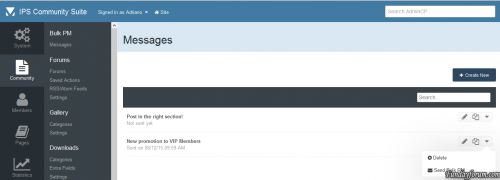
(SOS40) Bulk PM
By waqas dar
send bulk Pm to all at once to ur community users in forum.
16 downloads
0 comments
Submitted
-
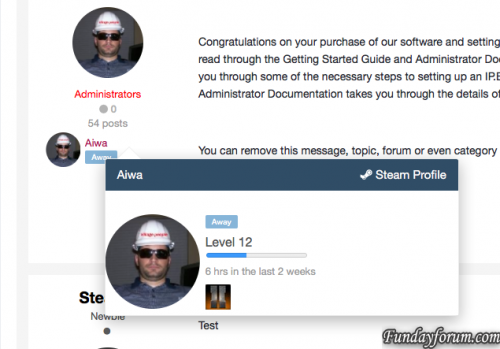
Steam Profile Integration
By waqas dar
This app will obtain data from Steam for your users and place it in your IPS Community database for use anywhere on your site. Your board will re-load your members Steam Online information, in configurable batches, every 2 minutes, so you always have up to date information without impacting load times of your community pages.
Out of the box, this app will display steam information in the following places
Member Profile Next to Members' posts Member Hovercards (Steam Online Status only) Widget: X Random Online Steam Members displayed anywhere you can place a Widget More detailed information about the members Steam profile is displayed on the Members Profile page. Including an optional list of games the member owns. Out of the box the list of games can be shown in either an image grid layout, or list view.
This app integrates seamlessly with Lavo's Sign in through Steam.. It will automatically detect if it is installed and pull that users Steam information.
Don't have Lavo's sign in installed? No problem, this app works with a Custom Profile field also. Want to use both a custom profile field AND Lavo's hook? Not a problem, this app seamlessly pulls information from both locations to create a single list of users to pull information.
Valid Steam Input format for Custom Profile Field:
Steam Name: ex. ' Aiwa ' 17 digit Steam ID: ex. 76561197964468370 Old school Steam ID: ex. STEAM_0:0:2101321 *** If there are any other places you'd like to see a users steam information displayed, let me know!
Scales seamlessly to work with larger boards without impacting site / server performance.
6 downloads
0 comments
Submitted
-

ArrowChat v1.8.41
By waqas dar
Add Chat to Your Site
The most powerful PHP/JQuery chat software
Installation Instructions
This is a general guide for installation ArrowChat on every supported integration because they are all the same method. The latest version of each integration is always supported. Here is a list of our supported integrations:
We're going to assume that you have already downloaded ArrowChat and unzipped the file. At this point, you should have a folder named arrowchat and a file named INSTRUCTIONS.txt. The instructions file can safely be deleted.
Using a FTP client such as WinSCP (http://winscp.net) or whatever method you use to put files on your server, simply place the ArrowChat folder inside your integration's directory. Most setups will require you to put the folder in your www or public_html folder. Do not place in your integration's plugin or application folder.
For example, if you have a forum installation such as vBulletin or phpBB and your main site is www.yoursite.com, but your forums are located at www.yoursite.com/forums/, you would put the arrowchat folder into the /forums/ directory.
Don't worry if you get it wrong, the ArrowChat installation will check if it's in the right spot.
Web Installer
Run http://www.yoursite.com/arrowchat/install/ (replacing yoursite.com with your own domain and path to ArrowChat)
The web installation will take you through all the necessary steps to setuping up your ArrowChat installation the first time. Follow each step carefully and don't pass on anything.
After you have completed the final step and added the ArrowChat header/footer code to your template, ArrowChat will be visible on your site upon logging in.
Short Installation Guide (TL;DR)
1. Upload the arrowchat folder to your integration's root folder
2. Run http://www.yoursite.com/arrowchat/install, replacing yoursite.com and the path to your arrowchat folder
3. Follow all the on-screen instructions; you're done!
Adding the Header / Footer Code
The following header code must be added to your website in order for ArrowChat to display:
<link type="text/css" rel="stylesheet" id="arrowchat_css" media="all" href="/arrowchat/external.php?type=css" charset="utf-8" /> <script type="text/javascript" src="/arrowchat/includes/js/jquery.js"></script> <script type="text/javascript" src="/arrowchat/includes/js/jquery-ui.js"></script>
and the following footer code...
<script type="text/javascript" src="/arrowchat/external.php?type=djs" charset="utf-8"></script> <script type="text/javascript" src="/arrowchat/external.php?type=js" charset="utf-8"></script> Please note that you must change the paths to ArrowChat if it is not correct.
You may also leave out the jquery.js and jquery-ui.js calls if you already have them on your site.
54 downloads
0 comments
Submitted
-

Help File Management
By waqas dar
This app restores the old Help File Management from IPS 3.
Fixed issue on category view when to enable/disable.
0 downloads
0 comments
Updated
-

iMakeup
By waqas dar
This application will allow to setup many "makeups" for your forum.
Index Page Features:
Selective Grid Feature ( for category ) Custom container for every forums, background color and border Custom Tag for every forums, text, color and size Global Features
Remove the word "forums" from index for a more compact index view Add a special icon if a forum has special rules Other customization coming soon...
iMakeup are tested and developed on default IPB4 skin
Last compatibility check: 4.1.14.2
If you have a problem with a custom skin I provide a full support for free!!!
9 downloads
0 comments
Submitted
-

IPS Badges
By waqas dar
This application will allow admin to setup a badge for any user in topic view with a large customization options.
Features:
Admin can set up Application on/off. Admin can set up which groups or which members have a Badge in topic view (secondary group support!). Admin can set up which forums show the single badge Badge "Link To" feature Custom Style (you can "move" your badge anywhere in the topic view) This app now support CSS BADGES responsive badges placement Last compatibility check: 4.1.14.1
Bugs:
Better management of topics with many posts.
20 downloads
0 comments
Updated
-
Tutorials
By waqas dar
About this File
A full-featured Tutorials/Article system for your IPS Community.
Here's a quick rundown of some of the features for this application:
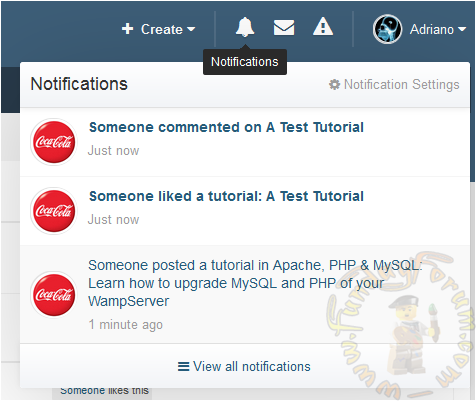
Unlimited categories of articles, plus unlimited depth of parent-child relationships Category Icons Ability to use comments system or support topics, or both Per-category permissions to show category, read articles, submit articles, add comments, and avoid approval queues Extra Fields that can be used per-category Quick edit (ajax) of tutorial's title on category view Preview the tutorial content when you hover the tutorial link on category view Group permissions on specifc actions Integration with the Advertisements system Integration with the Bulk Mail system Integration with ACP Live Seach (Tutorials categories) Integration with Tag system Integration with Report system Integration with Search system Integration with Share Links to share, download, or print articles Integration with Sitemap system to include tutorials in your sitemap Moderator actions on articles and comments Ability to create RSS feeds of all tutorials Ability to attach files to tutorials and comments Ability to quickly convert a forum post into a new tutorial Ability to copy a tutorial from one category to another or to the same category Friendly URLs for tutorials and categories Ability to give reputation points for tutorials Ability to rate tutorials Ability to follow categories and tutorials to receive notifications on updatesupdates Tools to create topics to existing tutorials, make tutorials of topics and rebuild support topics text if you have changed the template on Tutorials settings. And much, much more! Missing in this version:
Multi-page tutorials. It will be back in a future version.6 downloads
0 comments
Updated
-
Mail Bouncer
By waqas dar
Mail Bouncer is a fully automated app to handle email bounces and spam complaints via 3rd Party Email services SparkPost & Mandrill
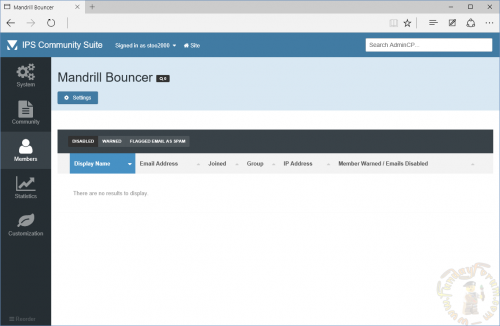
Hard Bounce If a hard bounce is detected, all email to that user will be instantly disabled, they will be placed into 'validating' status which means that IPS4 will prevent them accessing the community until they have updated their email address. Soft Bounce Soft bounces are counted over a number of days, if they exceed 1 bounce a warning message will be shown, if they exceed 4 bounces it will be converted to a 'hard bounce' Spam reports via Mandrill/SparkPost are when a user clicks on 'Spam' in AOL/Gmail/YahooMail etc, this user is blocked from having emails sent to them. The user is presented with a message on every page that tells them that they should update their email preferences instead of marking an email as spam. They are offered a chance to opt-in to emails again, once they opt-in the Mandrill side block is also removed. Removing 'Spam' users from the services reject list may cost a small amount of reputation. To prevent a user exploiting this they are only allowed to opt-in once. Reject Mail Bouncer app will learn your existing reject list as emails are sent to them (this won't hurt your reputation), This allows the app to start telling users to update their email address right away. This app is a zero-configuration app providing your Mandrill/SparkPost API Key setting is present. - See included PDF.
Requirements
You must use Mandrill or SparkPost Email Services CURL Ability to communicate with mandrill.com and/or sparkpost.com Bugs
If you find any bugs in this product, please report them to our bug tracker. (If you have an issue that you need support with, please see the client area link below).
Support
If you require any support for this product please create a Technical Support ticket in the Client Area. You must supply your IPS Community email address.
Please note
There are three files available for download, one is for IPS4.0.x, one for IPS 4.1.x and the other is for IP.Board 3.4. The IPS 4.1.x version has all of the features listed above, the older versions may not.
1 download
0 comments
Submitted
-

Cometchat 5.8.0
By waqas dar
CometChat – that can be integrated into your website. This chat enhances interactivity, allowing users to chat with friends and other Internet users. CometChat uses standard PHP and MySQL to communicate. No additional modules on the server side is not required. CometChat can be used to create online support on the site, as well as a regular chat for all users.
Features
New HTML5 whiteboard plugin CometChat is now compatible with self-hosted CometService New ready-to-use plugins for super simple installation for: Boonex Dolphin with Inbox message sync and usergroup restrictions ILIAS with Inbox message sync and usergroup restrictions SocialEngine with Inbox message sync and usergroup restrictions Drupal 8 with usergroup restrictions VBulletin 5 with usergroup restrictions MyBB with usergroup restrictions SkaDate with Inbox message sync and usergroup restrictions
Enhancements
Sent, delivered and read receipts for plugin messages (when using CometService)
Fixes
Fixed issue with offline messages when using CometService Invitation only chatrooms are now visible in lobby to invited users CometChat plugin now works with memcached Xenforo Fixed issues with transliterate and two player games plugins on SSL Fixed issue with file transfer modal window in mobile browsers Fixed issue with Load Earlier Messages in Hangout Theme Fixed issue with theme changer module Miscellaneous bug fixes
Important note:
Using an older version you need to re run yoursite.com/cometchat/install.php
And re do the cometchat settings on yoursite.com/cometchat/admin
How to install this:
Upload to your ips directory Unzip Make sure all the files are in the map cometchat and this map is in the root of your ips install than go to http://yoursite.com/cometchat/install.php copy the integration code and paste it into the head of your theme! To edit the settings of the app and got to http://yoursite.com/cometchat/admin/ Standard password and login cometchat
9 downloads
0 comments
Updated
-
Top Downloads
Week
Month
Year
All Time
-
-
Download Statistics
537
Files185
Comments29
Reviews



![More information about "Dilchasp_Hikayat-e_Saadi-[fundayforum.com] Urdu PDF Book"](https://fundayforum.com/uploads/monthly_2018_06/1178326569_Dilchasp_Hikayat-e_Saadi-fundayforum_com.thumb.jpg.1d0d05334dd4fd5194494a6b71b7fbbb.jpg)