Applications 4.x
Invision power board applications 4.x version.
99 files
-

Group Collaboration - FULL
By waqas dar
Group Collaboration
With group collaboration, members of your community are able to form their own groups, ranks, memberships and micro communities within the fold of your whole community.
Any group can collaborate to create, maintain, and manage its own content based on what you allow as the site administrator. Out of the box, you can allow groups to manage their own forums, galleries, calendars, blogs, downloads, databases, and more. You control all the permissions and limits.
Features Overview
Create any number of categories and subcategories for groups to operate in, and set permissions and limits for groups on a per category basis. Move groups in and out of different categories at any time. Customize what groups are called on a per category basis. Set permissions for each category to determine which content types the group can use, how much they can use, what moderation permissions they are allowed within their group, who can view, create, and join groups in the category and more. Group leaders can create their own roles within the group, assign any of the permissions they’ve been allowed to those roles, and assign roles to other group members. Group leaders can set permissions on the content within their group based on the roles that they have created. All permissions for the content type are available. Group leaders can decide how they want to manage memberships to their group. Groups can be set to automatically accept new members, queue members for approval, be invitation only, or closed altogether. You can configure how many members a group can have total on a per category basis. You can configure how many groups an individual member can create or be a member in on a per category basis. You can configure how many groups members can own and be a part of on a sitewide level on a per member group basis. Group members have their own member titles, ranks, and post counts within each group which can be customized by group leaders. You can decide if post counts are added to the whole site post count or kept separate for the group on a per category basis. You can create “group models” in each category which act as a base layout and content structure for new groups. Group models can be used automatically, or you can give new group owners the choice as to which model they want to use. Features Added in 1.1
Added built in import utility for rsyvarth social groups 2.x Content feeds (widgets, etc) on collab pages will now only show content from that collab Content feeds on non-collab pages will only show non-collab content and content the user has access to see in collabs Added new private listing mode for collab categories Added ability to move/copy non-collab content into collabs Added ability to extract content from collabs into main site Added featured/latest collabs widgets Added autofill of member name when inviting to collab Added support for disabling "view other members topics" inside collabs Collab title in the group header now links to the collab homepage Collabs now inherit join mode of models Collabs now inherit default member title of models Collab stats can be added to collab header via Automation Rules Added collab menu manager Collabs and collab categories can now be shown on forums index New widget to show collabs for the currently logged in member Features Added in 1.2
Performance options are now available for unread content calculation inside of collaborations Events can now be created in collabs directly from the calendar Import from social groups has improved accuracy Group Collaboration Expansions
Group Collaboration Badges ( by wohali )
Maintenance
added a couple missing language strings fixed bug with content not showing to members in a private collab fixed an uncaught exception when check for forums linked to collab categories fixed an error caused if a content type was mising a language string on the collab management page15 downloads
0 comments
Updated
-
application Trader Feedback System
By waqas dar
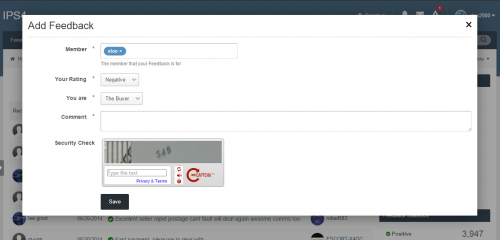
Trader Feedback System Build trust in your community, or forum-based marketplace with the Trader Feedback System.
This application allows members to leave feedback for each other on forum transactions.
Members can leave positive, negative, or neutral feedback Optional or mandatory link in feedback to the topic or classifieds item where the deal took place (currently IP.Board 3 only) Integrates with IP.Board's notification system (currently IP.Board 3 only) Integrates feedback information in member profiles Restrict access and features based on user group Source code is completely un-encoded One-click install. No file edits required. Captcha on Feedback Submission Flood Control on Feedback Submission Upgrading
Please see the included documentation for upgrade instructions
Please note
The current version of this application is compatible with both 4.2.x and 4.3
5 downloads
- feedback
- fundayforum
- (and 11 more)
0 comments
Submitted
-
application (IPS 43) Bulk PM
By waqas dar
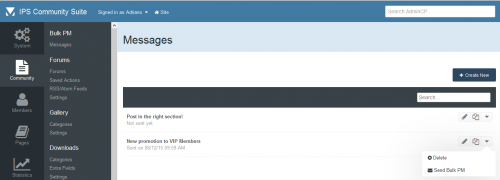
This application will allow admins to send Bulk PMs to specific user groups.
PM Settings:
Author Allow reply & add a copy on author Inbox folder Title Content PM Filters:
Groups to send the PM Include Secondary Groups Content Count Reputation Points Joined Date Last Visit to the Site Compatibility:
IPS 4.3 IPS 4.2 IPS 4.1 What's New in Version 1.0.3
FIxed error that was sending multiple emails to pm sender in certain circumstances. Fixed error: it wasn't sending notification (email) when receiving the new PM. Added Update Check URL to notifify administrator when a new version of the app is released.5 downloads
0 comments
Submitted
-
application F.A.Q - IPS Application 4.3
By waqas dar
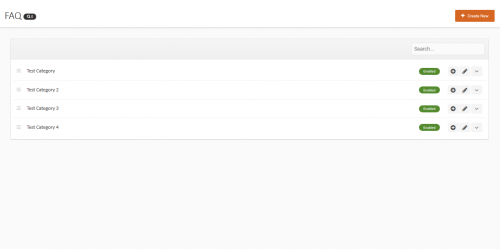
This application will add a FAQ module to your site allowing admins, moderators even your members if you choose to allow them add frequently asked questions to your site
DEMO
Main Features Create unlimited Questions & Answers Create categories to place the Q & A's in Allow certain usergroups to add Q & A's After a user submit's a Q & A it will require approval by the admin or moderators ( Read below ) Allow moderators to add Q & A's without needing approval Allow moderators to be able to approve member submitted Q & A's Moderators with approval access will receive a notification when a user submits a Q & A Pending submissions will also show a little green button showing that is it pending Pick and choose to either use a javascript show/hide feature for the answers or choose to show the answers using Ajax pop up's If there are pending submissions to the Q & A moderators with approval permissions will see a button on the FAQ with the amount of pending submissions there are Easily add / edit / move / disable / enable or delete any Q & A from the front end How to install
Download the .tar file and go to your ACP then applications and install the downloaded file
New Features
You can now pick to choose from showing the answers using either the javascript show/hide or show them using Axax pop up's You can now add Q & A's from the front end You can now allow members to submit Q & A's Each member submitted Q & A will require approval You can approve these from the front end You can now also edit, delete, approve, move, disable or enable each Q & A from the front end Allow moderators to approve member submitted Q & A's When a user submits a Q & A the moderators with approval permissions will receive a notification Allow moderators to add Q & A's without requiring approval Added a new table to the front FAQ with all the pending submissions listed Only moderators with approval permissions will be able to see this Added a new setting in the ACP allowing you to change the F.A.Q text above the FAQ table on the front Added a new setting so you can pick the amount of Q & A's to show on each page of the table10 downloads
0 comments
Submitted
-

IPS Featured Content Latest Version
By waqas dar
Beautiful responsive sliders for IPS
Create multi sliders, fully responsive - will adapt to any device. Flexible customization: horizontal/vertical layout, random mode, autoplay, speed, duration, button,... Auto get contents from all IPS addons: Pages, Forums, Gallery, Downloads. Auto get contents from RSS url. Add custom contents to sliders manually, easy manage them, drag & drop to sort the contents, click to edit the title, upload image, link, The sliders was added as widgets, easy to drag and place them to your site.36 downloads
0 comments
Updated
-
(BIM43) Quizzes
By waqas dar
Quizzes
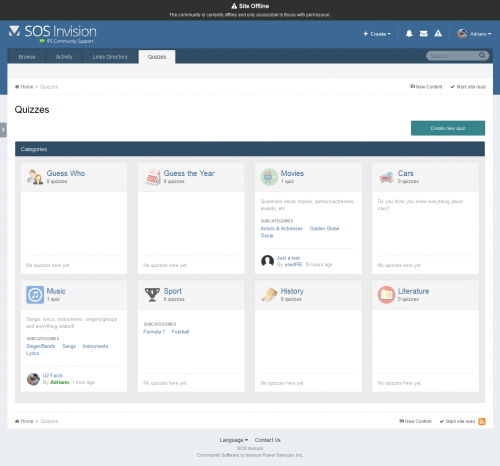
Quizzes is a fun application which allows you and your members to add Quizzes to your forum. With leaderboards, categories and a unique layout, The Quizzes is sure to be a hit with your members. The Quizzes comes, among other things, with the following features:
Two type of quizzes: graded moded (with time challenge and leaderboard ranking) and study mode (with no time challenge and leaderboard) Unlimited categories of quizzes, plus unlimited depth of parent-child relationships with a lot of settings, including: Category icon Extra fields Minimum and maximum number of questions and answers per quiz Comments and reviews, including requirement to play the quiz to submit a review Tags & Prefixes Requirement to take quizzes, by: Number of content items Number of reputation points/likes Number of days as a member Groups Discussion topic: will create a topic when a new quiz is submitted. Also there's an option to create a reply showing the score/time when someone completes the quiz Per-category permissions to show category, view quizzes, submit quizzes, comment and review quizzes Per member settings: allows to access the app and allows to submit quizzes Per group settings: allows to access the app, how many approved content items must have to access the app Integrates into IPS4 Moderating system, which all commons permissions, such as pin, unpin, delete, feature, move, etc. Robust Admin Restrictions Type of content field: textarea for plain text or IPS4 editor Ability to add an image to the quiz question Ability to set the minimum/maximum title length and description length Ability for users to report potentially offensive content using the built-in Report Center Search integration: search adverts along with the rest of your community’s content Supports item marking, allowing your users to see what adverts have been added or commented/reviewed on Integrates into Activity Streams Integrates to Share Links to share Integration to Member Filters (Bulk Mail, etc.) Integration with ACP Live Seach (categories) Support for notifications such as new quizzes, comments, reviews and when someone completes a quiz Ability to follow/like categories and individual quizzes Ability to upload or import an image from a URL to be the Quiz image. The image will be displayed on quiz view, categories, etc. Quiz protection: the game will be aborted if you leave the current tab/browser. This is to avoid users from search elsewhere. That's a setting. Setting to allow users to play a quiz only once Feedback: you can create funny phrases to be used on Quiz results according to user score New setting to randomize quizzes questions New setting to promote members to a group when they reach a specific rank in the quiz Totally functional on mobile devices More...
What's New in Version 1.2.5.1
Version 1.2.5.1
Enhancement:
Uses the quiz image when promoting the Quiz -----------------------------------------------
Version 1.2.5
Fixes:
Number of quizzes in que Quizzes stats widgets Quizzes Leaderboard IP Address Tool Enhancement:
Quiz Leaderboard: now it will display your position in the leaderboard if you're not in the TOP X users.13 downloads
0 comments
Updated
-

application Member And Staff Tools
By waqas dar
Member & Staff Tools IPS Application 4.2 and 4.3
Member and Staff Tools by @Fosters is a comprehensive suite of tools designed to help enhance and add missing functionality for Users and Moderators. Instead of a dozen small plugins, you can get one tool to handle some of the most-requested missing features of IPS 4:
Account Deletion Report other members Approve validating members in front-end And much more! Member and Staff Tools will immediately empower your members and staff to be able to manage their accounts with useful features and enhancements.
Staff Features
ModCP Validating Member Approval - Your moderators will be able to manage the validating/approval waiting members on the front-end. ModCP Account Deletions - Your moderators will be able to handle deletion requests from members. Online Status - A green dot will be displayed next to a members name in topics showing his online status Banned Members - A strikethrough will cut through all names of banned members Member Features
Account Deletion Request - Your members will be able to request to delete their account Member Report on Profile - Your members will be able to report other members directly from their profile Post Areas - A new tab on the User Profile will show how many posts the user made in each section Hide Profile to Guests - Your members will be able to hide their profile from guests for privacy If any actions are required, a new menu will appear to your moderators for quick access.
14 downloads
- fundayforum
- invision apps
- (and 10 more)
0 comments
Submitted
-
application New Topic Spam Notification
By waqas dar
This plugin will scan all new topics for specific keywords. If a match is found either in the topic title or message, it will show a notification to your staff.
This can be very useful against spam. With this plugin, you and your staff will be made aware immediately if spam is posted in your forum by way of new topics.
Settings
You can specify the keywords that you want to be nofied of whenever thy will be posted at your forum at the plugin settings. You can also select the group(s) that you want to receive notifications.
2 downloads
- fundayforum
- invision apps
- (and 11 more)
0 comments
Submitted
-
application Advanced footer invision community board
By waqas dar
Advanced footer invision community board Application for 4.3 and 4.2
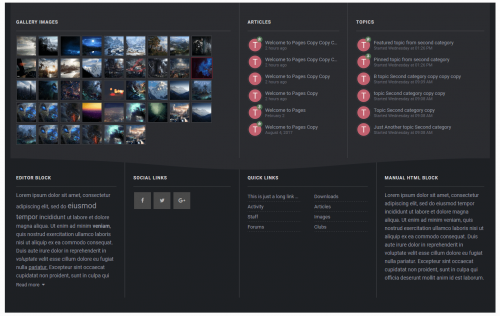
Advanced footer allows you to add a footer to your site with as many blocks as you want, including feeds from Forums, Gallery, Downloads, Pages, Facebook page feed, Twitter timeline feed, Adding members block, Custom Editor/HTML blocks and more.
Beautiful and clean design it is fully responsive and perfectly suits your theme due to its highly customizable options, it is entirely customizable, resizable, and reorderable.
Features
Custom blocks. Custom HTML/Editor blocks. Member blocks. Quick Links. Social blocks ( Facebook page feed, Twitter timeline feed, Social links )
Feed from IPS applications. ( New ) Forums. Gallery. Downloads. Pages.
Create columns and optionally show it to specific themes, you can also set a custom column background color. ( New ) Create blocks and optionally set a specific width or a custom background color. ( New ) Resizable and reorderable Columns/blocks. Custom color options. / or Match colors to your theme.
Creating footer rows
Creating blocks
What's New in Version 1.0.3
Advanced footer is now an application instead of a plugin.
-You can now show feeds from IPS applications
Forums. Gallery. Downloads. Pages. -Add as many columns and blocks as you want, You can also create columns and show it to a specific themes
and many more...
Read the documentation file included with the .zip folder for more information
Version 1.0.2
Added settings to hide on tablets and/or mobiles. Minor bug fixes and improvements. Version 1.0.3
Fixing Gallery images not showing in footer after IPS 4.39 downloads
- advanced
- advanced footer
- (and 13 more)
0 comments
Updated
-
application (itzknotty) social network widgets
By waqas dar
What is it?
Itzknotty is a small application that brings several widgets with it to display your tweets from twitter or posts from your facebook pages / groups:
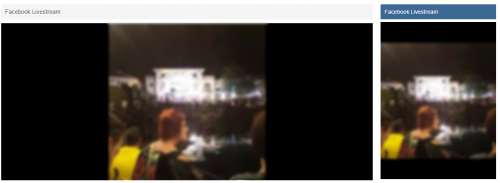
A widget to display the latest posts of a configured facebook page A widget to display the latest live stream of a configured facebook page. The livestream widget will only be displayed if there are users viewing the stream at the moment. A widget to display the tweets of a configured twitter page There is also a page...
...that shows the complete activity stream of the configured facebook page. The user can click on a button to load the next activity items from the facebook page. Configure the application (Facebook)
Go to the admin control panel of your site and login with your account. Go to Community > Itzknotty > Settings Select the tab for the facebook settings Fill in your data:
Facebook Pagename
The name of the page you want retrieve data from (https://www.facebook.com/your-pagename). You could also insert the id of a group or other endpoints that support the "feed" configuration. But: the data must be public accessable!
Facebook App ID
The app id of your application. For further information how to create an app scroll down.
Facebook App Secret
The secret of your application.
Place the widgets you prefere to your board.
Add a link to the complete stream if you want:
How to create a Facebook application to access data of your page
You need an active Facebook account to create an app.
Go to https://developers.facebook.com/apps/ and make sure you are logged in with your preferred account. Click the button "Add a new App" And fill in the information for Display Name, Contact Email and choose Apps for Pages as category.
Click on Create App ID and confirm the security check to proceed. Navigate to the Settings page in the left navigation bar. Copy your App ID and your App Secret and insert both in your admin control panel.
Everything should work now.
Configure the application (Twitter)
Go to the admin control panel of your site and login with your account. Go to Community > Itzknotty > Settings Select the tab for the twitter settings Fill in your data you can get from your twitter application. Place the widgets you prefere to your board. How to create a Twitter application to access data of your page
You need an active Twitter account to create an app.
Go to https://dev.twitter.com/ and make sure you are logged in with your preferred account. Click the button "My Apps" and "Create new app" Fill in the details and accept the Developer Agreement. Choose "read permissions" only to be more secure. You do not need write permission for the application. You can copy & paste your data from there Update Facebook Graph SDK to the latest version Make compatible to 4.37 downloads
- (itzknotty)
- (itzknotty) social network widgets
- (and 11 more)
0 comments
Submitted
-
application Menu/Navigation Icons
By waqas dar
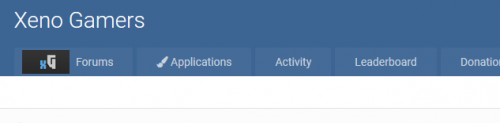
This applications lets you upload an icon or use a fontawesome icon on the menu/navigation.
It is fully built into the menu manager so no learning curve required.
Features include:
Icons appear on primary navigation bar, as well as the mobile bar. Allows for various icon types including images, FontAwesome icons, or raw HTML/CSS to not have to mess around with your templates. Live viewing of your icon directly in the menu manager. Bug Fixes
Completely rewrote to be less hacky, and solve all issues with saving. However due to a limitation in IPS, some menu item types may have to manually be added to the application (extremely easy, just PM me and I can do it in 2 minutes), but no further issues should arise. Add icons for new menu items without having to save them initially.7 downloads
- fundayforum
- icons
- (and 12 more)
0 comments
Submitted
-
.thumb.png.37a07272a3e8e8e01653ae5ac0f23ef7.png)
application PM Viewer
By waqas dar
NOTE: THERE'S AN ISSUE USING THE SEARCH IN THIS APP DUE TO CHANGES IPS MADE TO 4.1. IN THE MEANTIME, SEARCH WON'T WORK. DO NOT INSTALL IF YOU CAN'T WAIT FOR SEARCH IMPLEMENTATION.
An internal search is being developed for this app for the IPS 4.3 version.
This application will allow administrators to read conversations on Admin CP. If admins has a special permission, they will also be able to VIEW hidden conversations, EDIT, HIDE/UNHIDE conversations (from appearing on PM Viewer application) and INVITE/REMOVE MEMBERS from conversations. Conversations can also be tracked by filtering keywords. If a specific keyword added by an admin is used on Conversation, users from selected group will receive a notification with a link to the conversation on PM Viewer application. Admins can also use tools to HIDE or UNHIDE all conversations with one click.
Settings:
Number of conversations per page Number of log entries per page Enable keyword monitoring Keywords to monitor Notification Groups: Members from selected groups will be notified when someone sends a private message that contaims a monitored keyword. Groups Permissions:
Protected groups: If a member from a selected group is involved in a conversation, then this conversation will be not viewable in the PM Viewer application regardless of who else is involved. Can view HIDDEN conversations Can HIDE/UNHIDE conversations Can INVITE/REMOVE members from conversations Can EDIT message content: Users will also be able to view Revisions from posts and delete/restore the original text Tools:
Hide All Conversations Unhide All Conversations Logs:
Added log in all actions: view a conversation, hide/unhide conversation, add/remove users from conversations and restore or delete a revision from a post Added a Logs module to display Admin Logs from this application.
Compatibility:
IPS Community 4.1.X IPS Community 4.0.X
Comming soon:
Ability to view deleted messages Upgrade to get all the data from this app for IP.Board 3.X
Note:
This application was made by request and sponsored by a few users and was made based on PM Viewer for IP.Board 3.X from signet51. Fix:
Not sending notifications on monitored keywords IPS 4.2:
An internal search is being developed for this app.8 downloads
- fundayforum
- invision apps
- (and 8 more)
0 comments
Submitted
-
![More information about "Cometchat [ips]"](https://fundayforum.com/uploads/monthly_2018_04/1.thumb.png.8cfc8908a72eaa094d3ef0526ea31b3d.png)
application Cometchat [ips]
By waqas dar
Cometchat for ips 4.1.x and 4.2.x
CometChat – that can be integrated into your website. This chat enhances interactivity, allowing users to chat with friends and other Internet users. CometChat uses standard PHP and MySQL to communicate. No additional modules on the server side is not required. CometChat can be used to create online support on the site, as well as a regular chat for all users.
New Cloud Plans
We have updated our Cloud Plans to fit your needs. You get hassle-free setup, Real-time messaging and an included SDK to build on. Our cloud plans are scalable, with dedicated service and are as easy as 1,2,3. You can further read about our could plans here.Your post count must be 5 in order to see this link. You currently have 0 post(s)
New Dashboard Stats
The new Dashboard stats feature gives you access to real-time data with pointers such as Active users, Messages sent and more. Access to this data allows you more control and scalability.
Voice Notes
Your users can now send audio snippets and have more personalized conversations and express themselves with the new Voice Notes feature. The feature is well integrated and available on all of our platforms so that no one is left out.
Improved UI for Audio Calling
With constant developments, we have now updated our UI interface for the audio calling feature. A more clean and fluid interface for your users to interact with for a better experience.
Support for Xamarin Forms
We have updated our Xamarin Chat SDK Component to support Xamarin Forms. Use the Xamarin.Forms API to quickly build native apps for iOS and Android completely in C#.
New WordPress and BuddyPress Plugin
CometChats new WordPress Plugin is now available! Our plugin makes it effortless to install CometChat on your WordPress and BuddyPress site. Friends’ list synchronization happens auto-magically if you have BuddyPress installed.
23 downloads
0 comments
Updated
-

Trophies and Medals latest version
By waqas dar
Trophies and medals is the best new way to award trophies to the community in the complete system of rewards! It offers interesting and attractive new way to give a reward ( "trophies and the medal") for your community, based on the conditions and criteria that you get to determine, or you can manually enable moderators to give awards for the unique circumstances! Trophies and medals also includes a REST API, so that the application can be extended to unlimited possibilities.
- Are you looking for the premium application, where you can automatically provide rewards, prizes and medals based on forum posts, topic, and many others?
- Do you want to increase the re-engagement, giving awards? Or you are struggling to grow a new community?
- You want to add new functions Gamification encourage positive behavior as the quality of the wiring?
- Are you looking for more opportunities outside the IPS Leaderboard adjust the levels, types and images of the awards?
- Do you want to monetize Community ($$) and add bonuses for members of the payment?
- Are you looking for a well-supported application using a third-party IPS, which IPS is passionate about supporting the community?
Start creating a complete system of rewards with trophies and medals!
THINGS TO KNOW
competition - Trophies * * automatically awarded based on the criteria. Criteria defined in the ACP.
Medals - Medals will be awarded * * manually by moderators and administrators. They are listed on the front end.
The app supports both trophies and medals!
This application allows you to make the trophies awarded automatically to their members on the basis of the following criteria:
the criteria the system uses system extensions IPS4, and I will add more criteria in future versions. Just let me know what you need
Medals are like trophies, but they are awarded manually moderators directly on the profile member or administrator in the ACP.
On the web - interface, they will also be displayed on the user's profile.
There's also a REST API, which allows to award medals to its members using 3 - third-party websites or applications.
Available REST method:
Integration
- the API the REST
- Rules automate Carwile @Kevin
- Sources @fosters
HOW TO INSTALL
file is an application (.TAR), which can be installed in the ACP.
1. Go to System> Applications
2. Click on the "Install" button
3. Upload a .tar file and click on the "Install" button.
Fixed bugs:
Fixed an issue where offline criteria were not raised
New opportunities:
A new setting for max. prizes and medals in the template postbit
49 downloads
0 comments
Updated
-

IPS VideoBox
By waqas dar
VideoBox is an application that allows sharing videos, the best choice to run your own Movies/TV Shows website.
Features:
2 display modes: Grid view & List view. Categories/subcategories. Custom fields for video's informations. Protected custom fields that only display for logged members, or who liked the video. Search videos by custom fields. Video Collections: create/edit/remove the collections for your videos. Widgets: top poster, top videos, random videos, featured videos in slider, collections in carousel, quick search by custom fields,... Pages system: easy to add new page with custom content. Uploading or using external video url (supports: mp4, m4v, webm, flv, rmtp, youtube, vimeo, dailymotion). Using VideoJS Framework to play video formats: mp4, m4v, webm, flv. Full support for VTT captions. Watermark on video player. Media Tags system to define your custom player embedded from any video services (YouTube, Vimeo, Dailymotion...). Live Streams for Twitch.tv, Mixer.com and Smashcast.tv. Friendly URL. Comment system. Rating system. Following system. Clubs (IPS 4.2.x) *New* Reactions (IPS 4.2.x) *New* Tags. Latest Videos RSS feed. Pages system: easy to add new page with custom content. If using IPS 4.1.x, download 1.x versions. If you use IPS 4.2.x, download 2.x versions. (Click the "Change logs" button to select versions to download)
Fixes:
Missing thumbnail when promoting video. An issue with 10 stars in review block. FURL issue.40 downloads
0 comments
Updated
-

Sidebar Poll
By waqas dar
Sidebar Polls For Ips Compatibility update for IP.Board 4.2.x.
Adds the poll contents from a topic into your forums sidebar. Includes permissions for who can view the sidebar poll.
3 downloads
0 comments
Submitted
-

Staff Applications System
By waqas dar
Staff Applications System
Are you looking for staff? Developers? Designers? Or anything else? This application will help admins/moderators to find people to help in their boards.
Here's a quick rundown of some of the features for this resource:
Extra Fields
Module to add Positions on ACP (moderator, webdesigner, developer, etc)
Ability to inform how many places the position has. Example: you can create an application record to "hire" 3 moderators.
Ability to move the "winner" member to a group chosen group (you inform the group when you're adding the application record)
Ability to restrict the application by: Content count, Reputation points/likes, Number of days as member, Minimum age and groups
Ability to create a topic at every new application submission.
Module on ModeratorCP to view all pending records from all applications
Compatible with most important features from IPS 4.2 (Recommended Comments, Content Message, Reactions, Member History, Richer Embeds, etc.)
Integrated to the framework: Tag system, Follow System, Report system, Search system, Share Links, etc.
Moderator actions on applications and comments/reviews
Moderator permission to approve/reject applications
Ability to create RSS feeds from member applications
Etc.
Permission: NO ONE except staff (with proper permisison) will be able to view/read or know who are the applicants. All that regular members will know is the number of users who applied to it.
New Feature:
Added support to Forums app as a new setting in the category A topic will be created when a new application is submitted This topic will be udpated everytime the application is edit to reflex the changes16 downloads
0 comments
Submitted
-

Group Collaboration Badges
By waqas dar
This application extends Kevin Carwile's Group Collaboration application, adding per-collab, per-role badges.
These badges display in the user panel next to every forum post/reply. Per-role badges are managed in the Group Collaboration > Collab Management > Manage Roles panel.
Settings are provided for maximum badge width/height, maximum memberships to display and maximum number of roles per collab to display.
7 downloads
0 comments
Submitted
-

Discord Integration
By waqas dar
Discord Integration This application is in beta stage! Only use it if you are comfortable using beta software!
This application will NOT embed any kind of chat into your forum!
This will merely syncs groups/roles and posts notifications from your forum to discord.
Role syncing only works one-way (IPS->Discord).
Features:
Group/Role syncing. OAUTH2 authentication for IPS. Ban syncing. Post automated notifications to channels about new topics/posts. Post automated notifications to channels about new calendar events. Post automated notifications to channels about new downloads. Why is the price so "high"?
I raised the price quite a bit to cut down support requests, so I can focus more on building new features.
As it stands now, I have not worked on new features for months but only on support requests.
33 downloads
0 comments
Submitted
-
![More information about "[IPS42] Sticky Notes"](https://fundayforum.com/uploads/monthly_2018_01/5a6be22a2f7a2_StickyNotes1.thumb.png.07936ef4683b036c0cf23047ed3dad83.png)
[IPS42] Sticky Notes
By waqas dar
This application will allow you, or if you have selected members, To post global sticky notes to other members on your board
Global Sticky Notes ( ACP )
Display up to 10 admin based global sticky notes to your members Choose what user groups can see the sticky notes Add a signature (username and avatar) to the bottom of each sticky note allowing members to see who wrote it, as a clickable link to said profile Choose the colour of the sticky notes Choose from 9 different positions to show each individual sticky note Set a expiry time and date for each sticky note with a option to just show it until the user dismisses it Global Sticky Notes Front End Admin
The admin/s can send the global sticky notes from the front end via the create menu ( Only admins can use this feature ) Personal Sticky Notes ( MEMBERS )
Allow chosen user groups to send personal sticky notes to other members Members can receive a unlimited amount of sticky notes All sticky notes are dismissable All personal sticky notes will automatically add the username and avatar, unless you have selected in the ACP to allow anonymous sticky notes (read ACP Menu below) Personal sticky notes will display the time the note was sent to the member for example "just now", " 5 minutes ago", "4 hours ago", "16th July" and so on Members can either send personal sticky notes to members by their hover card or via their forums topics and you can also send them via the users create menu Each ( Non anonymous ) personal sticky note has a reply icon on allowing users to easily reply to other members notes Front End ( PERSONAL STICKY NOTES )
Added a link to the users drop down menu linking to the new tables listed below Shows a table listing all the members received sticky notes with the ability to restore the note bringing it back to life Shows a table listing all the members sent sticky notes with the ability to edit and resend or just resend the stickynote, it also shows if the user has dismissed the sticky note Members can view all their sent and received sticky notes between them and X member All tables can be sorted by time and date and also have a advanced search for members or a time and date stamp Widgets
Show a widget with a list of members who have sent the most sticky notes Show a widget with a list of members who have received the most sticky notes ACP Menu
Sticky Notes (Global including personal) Choose to use either a pin or a bit of sticky tape to hold the sticky note Choose to show or hide sticky notes on mobile or tablet devices Personal Sticky Notes Allow members to send anonymous sticky notes to other members (admin can view all sticky notes in the ACP read below) Read all the sticky notes send by members in a nice and tidy table and you (being the admin) can even view the sender if they sent it anoymous Select what member groups can use personal sticky notes Choose from 9 different positions to place the sticky notes Mass delete sticky notes by either "ALL", "READ", "UNREAD", by individual members or by chosen user groups Choose the colour of personal sticky notes Member Group ACP Menu
Choose how many personal sticky notes each member group can send per day, with a unlimited option Members Settings ACP Menu
Block individual members from using personal sticky notes Block individual members from receiving sticky notes How to install
If you have version 1.0.3 or below installed, uninstall it as it's a plugin and will conflict with the new application Go to your ACP and applications then click to install and upload the downloaded .tar file
New Features
Members can now block other members from sending them personal sticky notes via their profile setting page Added the ability for members to mass dismiss personal sticky notes ( This can be turned on or off in the ACP settings of the personal sticky notes ) Added the ability to hide the ' send sticky note ' link on the members topic posts via the ACP settings of the personal sticky notes Added a little note count bubble to the dismiss button on personal sticky notes showing the amount of notes they have got to dismiss ( This will only show if there is more than 1 )6 downloads
0 comments
Submitted
-

IPS Testimonials Manager
By waqas dar
This application allows you to showcase testimonials on your Invision community forum site.
Main Features:
Display testimonials friendly on sliders. There are 3 slider's styles. Option to sort descending/ascending or random. Responsive layout (desktops, tablets, mobile devices). Support caterories. Enable/Disable Title on testimonial. Enable/Disable Rating on testimonial. Enable/Disable testimonial must be approved by moderators. Enable/Disalbe other informations: Company, Job, Website. Permissions to View, Submit and Manage. Fully manageable (edit, show/hide, delete). RSS for latest testimonials
If using IPS 4.1.x, download 1.0.x versions. If you use IPS 4.2.x, download 2.0.x versions. (Click the "Change logs" button to select versions to download)
9 downloads
0 comments
Updated
-

iAwards
By waqas dar
The long awaited awards application for IPS has arrived!
iAwards provides administrators the ability to award their members with badges that show in their profile and, if chosen, on their posts.
Standalone this application has the ability to manually award members and to award members based on the amount of awards the member has. You can award both from the ACP as well as from the create menu at the top of your site.
In order to give everyone a fully customizable way to award we have integrated it with the Rules application. This gives you the power to award your members based on rules that you create instead of the ones that we think up.
Features include:
Choose location of awards – Under the post or under the author pane. Hide awards – To allow members to show the ones they want. Award based on number of awards. Manual awarding. Upgrade Tools for both HQ Awards and Awards (Free). Category and awards management. Recommended addons:
Automation Rules Lite or Automation Rules Full35 downloads
0 comments
Updated
-

Automation Rules - FULL Latest version
By waqas dar
Synopsis
Automatically update/modify content and member attributes, statuses, and properties Automatically send emails, create conversations, and send notifications Add your own custom data fields to any content, categories, or members Build relationships between fields and content to keep data synchronized Create rule sets that work together to form automated workflows Define your own custom actions that can be used in rules Schedule actions to happen at specific times (one-time or recurring) Schedule bulk processing routines for content and members on your site Share and refine your rules with other communities using import/export Example Rule #823:
This will send all new members a welcome email after their first post.
Example Rule Set #56:
Rules also allows you to attach new “custom data” fields to any member, content container, or content type in your system which you can use to create all new features and behaviors on your site that go beyond what was ever imagined with the core IPS suite. For example, you can create a new “integer” data field for members and call it “Prestige”. Then you can create a rule such as:
Congratulations, you’ve just created a brand new type of reputation system. And to take that example a step further, you could write another rule such as:
You have just created a whole new social promotion system within your community! The possibilities of what you can do with rules are only limited by your imagination.
Expansion Packs (plugins that add ECA's to apps): Forums Calendar Pages Commerce
Enhanced Applications (apps with customized ECA's): Group Collaboration Account Deactivation by Makoto Forms by Mike John Advanced Path Aliases Points Economy iAwards by -RAW-
Rule Packs (pre-built customizable rules): Rules Starter Pack free Member Pip Ranks System Auto Join Collaborations Move Topic Between Collaborations 8 Hour Lock Forum Game Topic Ban Members Rules Cookbook on IPS Guru Notable Features
Over 500 built in events, conditions, and actions for stock IPS products and contributed apps. Rule actions can be configured to happen in real time or at a future time. Schedule and unscheduled actions from inside of rules or manually through your ACP. Built in lists of “replacement tokens” for including variable data in text entry fields (like email content) Fully extensible by other apps and plugins to add new tokens, events, conditions, and actions. Look for Rules Expansion Packs in the marketplace which add new events/conditions/actions. Create your own custom actions within the rules app which can be invoked by rules. Create your own custom data fields for any entity on your site to manipulate with rules. Rules can be grouped together into rule groups and rule sets for easy management. Easily import and export rules and sets to share with friends or distribute as your own rule packs. Built-in rule debugging console for full visibility of what your rules are doing on your system. Built in rules error and performance logging console. Complete Stock ECA List:
New in Version 1.1.x
New range of custom data input fields for public/admin use Limit custom data fields by category/container Set member group permissions on custom data fields View complete overview summaries of rules and rulesets Choose content items from autocomplete form input New in Version 1.2.x
added ability to manually schedule custom actions added ability to schedule custom actions on a recurring basis added ability to bulk process records with custom actions added new table filters to scheduled actions page20 downloads
0 comments
Updated
-

(SOS42) Links Directory
By waqas dar
Links Directory is an application that provides your community with a member driven web directory. Allow members to submit websites for approval in categories you define. Users can comment and rate on other member’s submissions. You can also mark websites as official affiliates, fostering traffic between friends.
Features
Submit links to websites along with a title, description, and an image generated from extensible APIs: Sneak.pw, WebThumbnail, Thumbshots (requires an API Key) and Upload field. You can also save the image locally, which will reduce the API call. Image is updated when you update the link. Admin can choose if new links are moderated, per category. Submit comments to links. Admin can choose if new comments are moderated, per category. Rate links using the star rating system used throughout the IPS4. Per category setting. Integrates to Share Links to share or email inks. Inregrates to Google Maps if and address is provided in the link submission (IPS 4.1.13+: Google Map APIs now requires an API key. Go toAdminCP -> System -> Community Enhancements to enable Google Maps support) Ability for users to report potentially offensive content or broken links using the built-in Report Center Search integration: search links along with the rest of your community’s content Supports item marking, allowing your users to see what links have been added or commented on Integrates into Activity Streams. Supports the built-in tagging system including prefixes. Support for notifications such as new links and comments on user links. Ability to follow/like categories and individual links. Unlimited categories of links, plus unlimited depth of parent-child relationships Category Icons Drag & drop reordering of categories in the ACP. Per-category permissions to show category, view links, submit links, add comments, and avoid approval queues Provide “link back” code so other websites can link back to yours. Mark links as official affiliates and display them in a different section on the Links Directory index Integrates into IPS4 Moderating system, which all commons permissions, such as pin, unpin, delete, feature, move, etc. Per-category Permissions allowing you to specify which permission sets are allowed to view category, view links, add links, edit links, comment, rate, and avoid moderation at a granular level. Robust Admin Restrictions. Integration with the Advertisements system Integration with Sitemap system to include links in your sitemap Ability to create RSS feeds of all links Integration with ACP Live Seach (Links categories) Support Extra Fields so you can define different fields per category Friendly URLs for links and categories Ability to configure the Links Index page to display the blocks you want And much, much more! Notes
Each purchase entitles you to use of Links on one Community installation. Upgrade tested only from versions 4.1.1 and 4.1.0. So if you're using an older version, update to 4.1.X first.11 downloads
0 comments
Updated
-

(BIM42) Topic Thumbnail
By waqas dar
( This file requires an upload so you will not be able to install this on an IPS Cloud hosted community. )
Main Features:
Display thumbnails of topics in the main forum view. Topic's authors or member groups that you specify can change thumbnails. They can choose a thumbnail from images in topic content, external URL, or upload from computer. Abitily to generate thumbnail from Youtube, Vimeo, Dailymotion and Wistia. Using ajax, no need to reload the page after changing the thumbnails. Support "Gallery View Mode" with big images in responsive grid. (credits to Masonry) Widget to display new topics with thumbnails. Option to replace Forum Icons with Topic Thumbnail. Thumbnails in search results, activity. Permissions for viewing and changing thumbnails. A Toggle Show/Hide for members. Live Demo: http://demo.ipsviet.com/forums/ If you use IPS 4.1.x, download 1.2.x versions. If you use IPS 4.2.x, download 2.0.x versions. (Click the "Change logs" button to select versions to download)
Fixed:
Vimeo's thumbnails problem. Missing original thumbnail when editing topic. Gallery Mode permission issue. Forum Icons permission issue.32 downloads
Submitted
-
Top Downloads
Week
Month
Year
All Time
-
-
Download Statistics
537
Files185
Comments29
Reviews



![More information about "Dilchasp_Hikayat-e_Saadi-[fundayforum.com] Urdu PDF Book"](https://fundayforum.com/uploads/monthly_2018_06/1178326569_Dilchasp_Hikayat-e_Saadi-fundayforum_com.thumb.jpg.1d0d05334dd4fd5194494a6b71b7fbbb.jpg)