Applications 4.x
Invision power board applications 4.x version.
99 files
-

application Members Social Info
By waqas dar
Let your members set their social profile links and show them on their profiles, topic posts and hover card as a choice of stacked font-awesome icons or normal font-awesome icons or upload your own icons, each icon is clickable to open a new window to their selected link Application Settings
Choose what user groups can use Members Social Info Choose what user groups can see the Members Social Info icons Enable or disable each social link from being accessed by members Choose the font-awesome icon for each social link Select 3 different styles of the icons from normal to square to round or UPLOAD your own icons Hide the member social icons from the topics, hover card or the profile blocks Choose to display the member social icons on either the members user info panel or the members posts Choose to display the members social icons at the top or bottom of the members profile blocks Admin/Moderator Settings (Member Profile Edit Settings)
Manually add / edit the users Member Social Info in their profile edit settings (If the mod has edit permissions) Social Links Included So Far
Facebook Twitter Google YouTube GitHub Steam Instagram LinkedIn Skype Website Twitch Odnoklassniki vKontakte Discord Reddit Vine Vidme Snapchat Smashcast PlayStation Xbox Origin Deviantart Pinterest Tumblr Flickr Foursquare Whatsapp Artstation Toyhouse More to come Displays Where?
On the users posts and topics in the user info panel or at the bottom of their posts On their profile as a block On their hover card at the bottom of the info list On the members search page How To Install
Go to your admin panel and applications then install the downloaded .tar file NOTE IF YOU ARE UPDATING FROM THE PLUGIN TO THE APPLICATION
Do not uninstall the plugin before you install the application just disable it, Now install the new application you will need to go to the ACP menu on the Social Sites page located in the members tabs and click the button to sync all the links that any members currently have stored on their profile, Once that is done you will need to uninstall the plugin so it does not clash
Whats New in 2.0 Version
Read below * ) Added 8 more social info links ( now sits at a total 31 to choose from ) Deviantart Pinterest Tumblr Flickr Foursquare Whatsapp Artstation Toyhouse * Do not uninstall the plugin before you install the application just disable it, Now install the new application you will need to go to the ACP menu on the Social Sites page located in the members tabs and click the button to sync all the links that any members currently have stored on their profile, Once that is done you will need to uninstall the plugin so it does not clash
3 downloads
- free ips 4.3 application nulled
- fundayforum
- (and 12 more)
0 comments
Submitted
-

plugin Chatbox Extender
By waqas dar
Chatbox Extender for 4.1 and 4.2 version.
This plugin extends (BIM) Chatbox by creating a new chat when a new topic or post is posted. You can configure which user groups can use it and in which forums.
Note: Initial release, I am available to suggestions for improvements.
Fixed:
Avoid to send notification of first post on new topic61 downloads
Updated
-

(BIM43) Quick Search
By waqas dar
(BIM42) Quick Search
Features:
This plugin provides a search form that will search for any content with autocomplete and show results with icons for applications: Downloads, Forums (Theme Sketches Required), Pages, Gallery, Videobox and Musicbox. Settings:
Enable / disable the plugin. Permissions for user groups. Results Max. Find incomplete words Find results: only the titles Content | Names of publications and bodies Search mode: AND / OR The default setting is the type of global page search. Show the category, the author in the search results.16 downloads
0 comments
Updated
-

application Linked Accounts - Post As
By waqas dar
Linked Accounts - Post As 3.1.5.2
Linked Accounts allows your members to link one or more accounts then quickly switch between them. You have a full range of options about which usergroups can use the Linked Accounts system and which usergroups cannot be linked to. The POST AS feature allows the user with linked accounts to create/reply to a topic using a Linked Account. Each action is logged so you can keep a track of what linked account users do.
The Linked Accounts system could be useful for fan fiction forums, roleplaying forums, or just those of you with multiple accounts (e.g, John Doe, Administrator, Forum News).
Notes:
Linked Accounts is integrated to Login system of IPS4, so to control the number of failed logins, Reset failed login count (minutes) on ACP -> Login Handlers -> Login Settings. This version contains an upgrader, so you can keep on using accounts created on this app for IP.Board 3.4 .6 downloads
- accounts
- applications
- (and 12 more)
0 comments
Updated
-

application (BIM43) Easy Popup
By waqas dar
EasyPopup Ips Application 2.1.6 is a simple application to create the modal popups for your site.
Some features:
Width/Height for your popup. Transition open/close: FadeIn/FadeOut, SlideIn, SlideUp, SlideDown, SlideBack. Transition speed. Positions: Top Left, Top Center, Top Right, Middle Left, Middle Center, Middle Right, Bottom Left, Bottom Center, Bottom Right Background color. HTML content or upload image. Supports advertisement tag in the HTML code: {advertisement="key"} Auto close and show timer on popup. Showing popups every page loads or every X minutes. Waiting for X miliseconds to show. Easy to determine URL where to show popups. Uses IPS Member Filter System to show popups. (filter by groups, content count, joined date, last posted, last visited, reputation, member of the day....)1 download
0 comments
Submitted
-
![More information about "[ips4] Members Shop"](https://fundayforum.com/uploads/monthly_2018_04/Front1.png.9470d146ce33d6d4d834136fa5777534.thumb.png.31dc9ed666436bc5635900669ef01d6a.png)
[ips4] Members Shop
By waqas dar
Members Shop This application will add a members shop and a built in point system to your site, where your members can earn and spend their well earned points they gained ( or brought if you have IPCommerce installed ) from this app or you can intregrate it to run along with Points by Anatik
Main Features
Points Earning System Forums Allow members to earn points for starting topics Allow members to earn points for replying to topics Allow topic starter to earn points for replies to their topics You can set different amounts of points for each category of the forums Downloads ( IPDownloads must be installed for this feature but is not required to run / use the app ) Allow your members to earn points for uploading files Allow the file uploader to earn points for each download received from their file You can set different amounts of points for each category in the downloads section Reactions Allow your members to earn points for receiving reactions from their content ( If a user removes the reaction it will also remove the points awarded ) If you are using evox_points then this feature will not show / work, as points has its own reputation system Clubs Award users for joining a club Remove points from users for leaving / getting kicked from a club Bonus Points Award bonus points based on a daily basis ( Members will need to login at least once in that time period ) Award bonus points based on a weekly basis ( Members will need to login at least once in that time period ) Award bonus points based on a monthly basis ( Members will need to login at least once in that time period ) You can enable or disable any of them features Award Points Award points to your selected members or user groups via the ACP Users Profile Adds a section to the users profile showing the amount of points they have and a link to donate ( Read below ) Donations Select what user groups can donate their points Set the minimum and maximum amount of points allowed to donate per donation Shows a page in the ACP with a list of all donations / who donated / who received the donation / the amount and the time & date of the donation Points Format All points are formatted with decimals for the users to read / understand easy ( example 1,000 10,000 10,000,000 ) Members Shop Items ( Allow your members to spend their well earned points in the shop ) Each item can be created unlimited times and you can select different prices and permissions for each user group for each item giving you unlimited options to pick from Create categories to place the items in All random amounts ( LIke mystery boxes, random post count etc ) can be set by the admin in the shop items menu from the minimum amount to the maximum amount they can receive from redeeming the items Set a stock amount on each item with a unlimited option ( How many you have in stock ) After a user purchases a item it will store the rewards for that purchased item, so say they buy multiple and store them away, then at a later time you change the rewards for that item in the ACP, they will still receive the rewards set when they purchased the item, as that's how they bought it All items use their own code, Example, if you have selected say the member group to not be able to upload avatars in the ACP member group permissions, the avatar item will still allow them to upload one if they redeem it, if you gave them permissions to buy that item or they got the item sent to them Each item can have its own permission matrix to select what usergroups can view it / buy it / send it DEFAULT ITEMS LISTED BELOW ( These can be added unlimited times giving you unlimited rewards to choose from ) Open a random post count mystery box Open a random reputaion points mystery box Change their username Change their member title Add or edit their signature Upload a avatar Steal a random amount of reputation from another member Will also send a notification to both users saying that they stole X amount of reputation Open a mystery points box Reset their warning points Allow members to go browse anonymous until their session ends ( Session means till they logout ) View a password from a password protected forum Play Rock, Paper, Scissors, Lizard, Spock ( Basically Rock, Paper, Scissors but the extended Big Bang Theory's version ), Users can double up their points if they win, Get their points back if they draw, Or get nothing if they lose, You can also allow users to increase their bet by a selected maximum amount you will set in the ACP item settings Allow users to pin topics for a selected amount of days ( Topic's will automatically be unpinned after X amount of days ) Allow members to feature files for a selected amount of days ( Files's will automatically be unfeatured after X amount of days, IPDownloads must be installed for this item ) Upgrade your usergroup for x amount of days, months or years, ( Members will automatically move back to their original user group after X days, months or years ) Gamble to win a random trophy from Trophy's & Medals ( Trophys & Medals must be installed for this item ) Guess the number ( You will set a maximum amount to generate and the members will guess from 1-X and if they get it correct they will win their stake multiplied by your chosen amount ( Each item will generate a different number this is not one where you remove the wrong answers from the equasion, if you buy one and guess number 20 and it is wrong then it still could be nu,ber 20 in the next box ) CUSTOM ITEMS ( You can add unlimited custom items in the store where the admin fills in the price and the name / description etc ) Each Custom Item has to be manually awarded to the members, it could be for a coupon code, it could be anything ( as long as you can manually award it that is ) Choose to receive a notification or email saying x member brought x custom item and you need to award it etc Pick what member receives the notification Pick what member will receive a email saying a custom item has been redeemed Shows a table in the ACP with all custom purchases your users have brought showing if the item has been awarded or not Click to confirm you have awarded the item to the user so that you keep the table updated letting you know what you need to do When confirming you have awarded the item you can choose to send a PM to the user with your own message saying that you have done it or you could use that to send them what you have awarded them, example the coupon code, or a voucher code etc Add a block to the ACP dashboard with the total amount of items you need to award manually Rewards & Logs View all the rewards and logs of the redeemed items in a nice members table or grid Shows the award they redeemed or received Shows what they got from the reward Statistics Pages Shows a statistics page with a graph of the global points gained on your site per day / week / month Shows a leaderboard with 3 tables under the graph mentioned above Shows a list of the members with the most points Shows a list of the members who have generated the most points via their content ( example, for the reactions they get / topics they create ) Shows a list of the members who have received the most rewards from their redeemed items and their posted content Shows another statistics page with a graph of the amount of shop items purchased globally and the global points spent per day / week / month Shows a leaderboard with 3 tables under the graph mentioned above Who brought the most items Who spent the most points Who sent the most items Shows a 3rd statistics page with a graph of the global points won using items what you gamble your points with Shows a leaderboard with 3 tables under the graph mentioned above Who has won the most points Who has brought the most items to gamble with Shows a list of the latest item redeemed rewards and the members who redeemed / won them Notifications Members will receive notifications when someone steals reputation from them Members will receive notifications if they have received a item from someone or a item has been generated from the ACP for them Members will receive notifications if they have received a donation of points with the amount of points donated and the donator You can select a member ( Admin probably ) to receive a notification when a member buys a custom item from the shop saying that you need to award it etc Other ACP Stuff Choose what points system you want to use from this apps own points or if you have installed Points by Anatik then you can select to use evox_points instead Choose what user groups can gain points with-in the forums / downloads / reaction settings You can generate unique purchases ( Of the items available in the shop ) for members and fully customize the items rewards to what you see fit ( You can charge the user for this or send it free ) Shows the shop items in a nice and clean node table giving you the ability to drag and drop them to different categories and sort them in your prefered positions Edit members points via their edit member page in the member section of the ACP Reset all members points / reset x member's points / reset all points from x usergroup Select the amount of items to show per page in the shop and my items page Choose the select to view the shop page / my items page / rewards & logs page from either a table view or a nice new grid view If you allow users to send items to others you can select a % of the value of the item to charge the users to send said item You can pick to show either a category in the sidebar of show the categories in a filter button on the table it self Add a block to the ACP dashboard showing the amount of custom items you need to award to the users IPCommerce ( IPCommerce must be installed for this feature but is not required to run / use this app ) Store And Packages Users can buy points in the store for real money ( IPCommerce store not the members shop ) You add amount of points in the packages so there are 2 ways to sell points You can just sell the points on their own You can award the points when buying x package Trophys & Medals ( Trophys & Medals must be installed for this feature but is not required to run / use the app ) Shop Items Try your luck for a random trophy ( This will generate a random trophy and award it to the member, If the member has the award already then they will lose and not gain anything, By the laws of average 10 trophys in play will work out to a 10% chance of winning ) Trophy Criteria Award trophy if user has at least X amount of points Award trophy if user has at redeemed at least X amount of items Award trophy if user has sent more than X amount of items Available Add-Ons
Sports Betting App Note..
IPDownloads, IPCommerce, Trophys & Medals & Points are all intregraded to work with this app ALTHOUGH NONE ARE REQUIRED TO RUN / USE IT, If you don't own any of them apps it just won't show or allow use of them features How to install
Download the .tar file and go to your ACP and applications then install the downloaded .tar file Navigate to the members shop tab in the ACP and go to categories & items then create your own categories and add the items from the little plus icon on the category header If there is anything you would like to see added to this application then feel free to visit one of the support topics and let me know your ideas, I am always happy to update my files with requests
18 downloads
Updated
-
![More information about "[IPS] Member Map"](https://fundayforum.com/uploads/monthly_2019_01/MartinTest_-_Members_-_IPS_Community_Suite.thumb.png.d11cf2599e638ddcab4392c236e3002e.png)
application [IPS] Member Map
By waqas dar
IPS 4.3 ONLY
Member Map is an application that allows your users to put their (Exact or approx) location onto an interactive map. Member Map has a permission model so you can limit which groups can add to the map.
As an administrator you have the ability to place custom markers on the map, for example if you would like to post the location of an upcoming meet.
Re-upload since version 3.0.1 was accidentally marked as 3.0.2 - If you already upgraded to 3.0.1, you do not need to upgrade to this version (it is the same version) Select the types of maps you want to use trough the Map Manager Custom markers are now in their own group on the map Marker counter on the bottom of the page Various issues with HTTPS Set a forced bounding box (map will only project this area, regardless of markers on the opposite side of the globe) Added a setting to disable clustering Full editor in custom marker description, meaning that you can upload images, format text, etc.
6 downloads
0 comments
Updated
-

application (BIM42-43) Chatbox
By waqas dar
Chatbox - This is very simple chat system with the basic features:
Ajax chat, auto update. Display as IPS widgets, so you can place it in sidebar or top page. Sound notification. User can toggle on/off. Admins/Moderators can block users. Users can ignore some chatters they don't want to see. Load more messages when scrolling end (or top). Announcement (on Top or Tab). Support emoticons, URL, Image URL (gif, png, jpg) @mention by clicking on usernames. Flood control. Time format. Display newer messages in top or bottom. Permissions for viewing, chatting & management. Edit/Delete messages.
Bug fixes:
Scrollbar when posting long links. Spliting words in half across lines.130 downloads
- (bim41)
- (bim42-43)
- (and 2 more)
0 comments
Updated
-

application IPS Pages SuperDocs
By waqas dar
Pages SuperDocs is a set of responsive Pages templates. It is loosely based on the design of the IPS Developer Documentation section, but the concept has been extended into a turnkey solution for all sorts of category-based Pages databases.
Live Demo
Version 1.1.2 for 4.3 only added.
What’s needed:
IPS 4.2 or 4.3 in its most recent version with the Pages application A pages database that uses Categories. (Up to 4 levels can be shown in the Record View navigation) What’s recommended:
Pages SuperDocs is compatible with the Pages Category Images plugin. Upload images for your database categories with it and Pages SuperDocs will make your database look even more appealing (See screenshots for a comparison). Without this plugin, you will only be able to change the header image of the SuperDocs templates. Which templates are included:
A category listing template to be used as the homepage for your database. It features a header box with the database title and description on a user-defined color gradient and background image. A Listing template replacing the dull forum listing design that is used by default. Both your categories and records are shown in a simplistic and beautiful grid layout. If you have the Pages Category Images plugin, your category images will be shown here as well. A unique Record View template. It supports all the stock features (Ratings, reactions, comments, reviews …), but adds a useful navigation tree at the side. With it, users can easily jump between individual records. The main level is always shown. All categories and records within a main level entry will be shown automatically, once you open records within that category. For database with many records per category, the output of records in the navigation can be suppressed. Note: You can use the templates for any number of databases, but the settings will always apply to all SuperDocs templates. Detailed Feature Description and Notes:
The templates are fully responsive but work best on pages without a sidebar, since the included navigation in the record view adds a column to the layout. The templates come with several options you can easily adjust through the included settings plugin. Base color—Used for the category boxes and the gradient Gradient color—When different from base color, creates a gradient for the header area Category image aspect ratio—Only used if you have the category image plugin installed. Box font color—The font color in the header area sitting over the box and gradient colors Active color—Link color of the active record in the SuperDocs navigation Use custom header image—Link a file to be shown in the header area Author in Record View—show/hide author in record view Levels of Records—How many levels of records are shown in the navigation? Category box text alignment—left/center/right alignment of text in category boxes
0 downloads
- free ips 4.3 application nulled
- fundayforum
- (and 11 more)
0 comments
Submitted
-

application IPS Pages SuperHelp
By waqas dar
Pages SuperHelp is a set of Pages templates for help/FAQ sections, tutorials, online courses and similar content.
Live Demo
What’s needed:
IPS 4.2 or 4.3 in its most recent version with the Pages application A Pages databases that uses several levels of categories. Benefits of SuperHelp:
The Pages stock templates are limited to show only one level at a time: One level of categories; one level of record links in one category; one full record. SuperHelp is based on an older version of IPS’ Help Guide Section and can show much more information and make browsing your database much easier. The template set has a beautiful and clean look and is of course fully responsive. It adopts to almost all IPS sites and the included settings plugin lets you edit the template appearance without any HTML knowledge.
What is included:
A Frontpage category listing template which shows main and sub categories. A Listing template which shows sub categories, records in sub-categories and records in the current category. A Record View template with a sidebar, which shows other records in the same category. A Plugin which lets you change the settings of the templates easily. An installation PDF with detailed instructions and tips to set up your SuperHelp database. Note: You can use the templates for any number of databases, but the settings will always apply to all SuperHelp templates. The main level can use category images using the IPS Pages Category Image plugin by All Astronauts Plugin Settings:
Show category follow button: Yes/No Show record images in listing view: Yes/No Show record image in record view: Yes/No Number of lines after which the preview text gets cut off Number of records to show in a sub-category list Type of icon to use for help steps: Automatic numbering or user-defined FontAwesome pictogram Text alignment for title/description on frontpage Text alignment for title/description on listing page Text alignment for category title/description on frontpage What's New in Version 1.3.0
Released December 1
New version 1.3 for IPS Pages 4.3 and up. No upgrade is necessary or advised for 4.2 installations. Stay at version 1.2.0. New feature of the 1.3 version: support for the IPS Pages Category Images plugin for the top SuperHelp category level0 downloads
- free ips 4.3 application nulled
- fundayforum
- (and 12 more)
0 comments
Submitted
-

application Musicbox Invision Community Application
By waqas dar
MUSICBOX INVISION COMMUNITY APPLICATION 3.1.1.2
MusicBox is an application for IPS 4.x that allows users to upload their music online and share them to social networks.
Demo:http://demo.ipsviet.com/
Support Topic:https://invisionpower.com/forums/topic/427989-musicbox-support/
Features:
Upload your music. Create playlists. Genres (categories) for songs, playlists. Custom Fields: create any number of custom fields that can be required (or optional) when users upload songs. Integrated with Nexus so users can sell/buy songs. Profile page for artist with rating system. Favorite system: users can create custom playlists. Play music when embedding the link in other apps (Forums, Pages, Blogs,...). Comment system. Rating system. Sharing system. Friendly URL.51 downloads
0 comments
Updated
-

application Basic Points
By waqas dar
Points application to issue new points to members and new points for new topics, posts, signing up or giving points manually via their profile page. Control the points given for various things and permissions from the admin cp.
Features:
NEW Redeem points into a manually processed value with custom field support. NEW Integration with the Commerce application to redeem points into account credit. NEW Set per forum values for members giving and receiving reactions. Set how many points new members get on signup. Enable an auto reset for points. Top points widget to display the members with the top points. Customize the fixed point options given out for each post. Change the name or prefix of points. Set how many points new topics, replies are given in each forum. Set how many points are given to the topic starter if someone replies to their topic in each forum. Import points from other Points apps if they store their points in the forums database. (Confirmed working with ibEconomy.) Points displayed in profile information of each members post. Manually modify a members points count from their profile. Including a note stating the reason. Profile tab that displays a list of that members points log. Set group permissions for who can view and manage (add/remove) points. Global points page to display all the recent points logs and actions.
New Features In 1.1.0
Several new features and improvements: Enable an auto reset for points. Top points widget to display the members with the top points. Customize the fixed point options given out for each post. Change the name or prefix of points.11 downloads
0 comments
Updated
-

application IPS Pages Application Category Images
By waqas dar
Add an image to every IPS Pages database category for use in your templates!
NOTE: V1 plugin users please see note near bottom for installation instructions - short version is do NOT uninstall the plugin!
Any settings?
Nope. Just install and go. When editing/creating a category in an IPS Pages database this application appends a new tab where you can upload an image. That's it.
And how do I use this?
Images are stored wherever you have set the Pages Category Images file handler set to store them and you can access the image anywhere the $category variable is available to you in Pages templates.
$category->pcimage = The local url to the stored image. You will rarely use this by itself as it will return "uploads/monthly_07/thisismyimagename_34erjfhrufhdheh.jpg" or something along those lines.
{file="$category->pcimage"} = The COMPLETE url to the stored image. "https://myawesomesite.com/uploads/monthly_07/thisismyimagename_34erjfhrufhdheh.jpg". Just sticking this in a template will output that as a line of text.
<img src='{file="$category->pcimage"}'> = The image will be displayed in your template at this location at full size.
You get the idea. From here you can format the image with css, use it as a background element, and so on.
Why am I using this again?
Give every category its own image. Format it like an icon and stick it next to the category title in your templates. You could create a large section background for your categories using this image. And so on...
Why $category->pcimage and not just $category->image?
If IPS ever adds something like this to Pages database categories themselves I predict with 99.999% certainty they would use the word "image". I added the "pc" in front to hedge against that potential future conflict.
What happens if I disable this application?
Everything will continue to work, you just won't be able to add an image to Pages database categories until you re-enable it. You are just disabling the category edit/create category image tab when you disable this; that's all.
And if I uninstall this?
All of your uploaded images will be deleted of course. Consider that you will be editing your Pages templates to add calls to these images too. You'll need to edit your templates to remove those calls after you uninstall this.
Did this used to be a plugin?
Yep. Now its an application with a proper file handler.
I have the plugin now should I uninstall that or...?
DO NOT UNINSTALL THE PLUGIN! You'll lose all of your files and have to re-upload them again. I've set up the install routine for the new application to handle it all for you.
Install the app just like any other app and it will automatically take over the file handling from the piggybacked core_Attachments handler, remove the plugin uninstall routine that would normally delete your uploaded images, and then uninstalls the plugin for you. If for some reason you install the plugin again afterwards you're on your own... Seriously, delete any copies of the plugin you have lying around. Only bad can come from those being used after you've installed the app.
What's New in Version 2.0
Moved to application from plugin. Own File Handler0 downloads
- category
- free ips 4.3 application nulled
- (and 13 more)
0 comments
Submitted
-

0 comments
Updated
-

application (SOS43) Invite System
By waqas dar
(SOS43) Invite System
This application will allow your community to use an invitation system for new registrations. You can make it mandatory (or not, depending on your configuration). In this case, an invitantion code will be required in order to register a new account in your community.
Public side features:
Users can send invitation in 2 places: + Create menu and Invitations on Account Settings. New icon on board top (beside Notifications and Messenger) to display the converted invitees and how many invites the user has. This icon also shows the remaining invitations for the member (just like how many users are online on Chat). 2 widgets: Top Inviters (per week, month, year and general) and Latest Converted Invitees, which are invitations converted to membership. Shows "Invited by" on user profile and on profile card (hover on user link). Tab on user profile to display their invitees (converted invitations) Settings:
Enable Invite System Require an Invitation to Register an Account Restore deleted or expired invitation Display "Invitation" option on + Create menu Display the popup Invitations link on board top? Display total of remaining invitations Invitation Expires after X days Earn one Invitation at every X new content posted ACP Features:
Invitations Management: a place where you can see the status of each invitation. The status are: PENDING, CONVERTED and EXPIRED. You can invite people, delete or resend invitations. You can also create batch invitations, to be used on a campaign or to be posted elsewhere. It won't send any emails. Bonus form: you can give invitations to a specific member or to a whole member group Note:
It doesn't work in Commerce registration (if you have packages in register screen)
18 downloads
0 comments
Updated
-

application Admin CP Useful Links
By waqas dar
This application will allow admins to create shortcuts to most visited pages on the Admin CP. The new block will be available as a new option on Dashboard blocks.
Links created must be ACP links. Just copy the url from the browser as needed, or right click on an ACP link and choose copy link or whatever.
Compatibility:
IPS Community 4.3.X IPS Community 4.2.X IPS Community 4.1.X IPS Community 4.0.X3 downloads
- admin
- admin cp useful links
- (and 12 more)
0 comments
Submitted
-

download Social Icons
By waqas dar
Social Icons for IPS4 is the most advanced plugin available for integrating your favorite social media networks into several locations throughout the suite. This plugin takes full advantage of font icons by allowing full control over size, colour and positioning using simple cross-browser & cross-device CSS code. This eliminates the need for additional raster based icons thus massively improving site performance.
Features
The plugin is shipped with over 170 vector icons that cover all popular social networks. Choose to show your icons in seven locations including – header, footer, navigation & sidebar. Drag & drop icons directly to your homepage widgetable areas. Search for and then preview the icons you need directly from the plugin settings. Customize the size of your icons directly from the plugin settings. Want to override the default brand colors? We’ve included a setting for just that. The settings offer complete control over which groups can and cannot use the plugin. Integrated with IPS4 Localization. - Compatible with IPS 4.1.
- Can be installed on IPS Cloud.0 downloads
0 comments
Submitted
-

application Classifieds System
By waqas dar
Classifieds System is an application that enables your members to list items for sale/trade, monetizing your community.
https://invisionpower.com/files/file/8311-classifieds-system/
Requirement:
Commerce: https://invisionpower.com/features/commerce How does it work?
Admin can enable TRANSACTIONS, which will allow members to buy items directly from another member via app and the advertiser receives the amount paid via account credit. If TRANSACTIONS is disabled, things has to be done manually: member needs to contact the advertiser in ways he wants (he chooses when posting the advert), make the deal, then the advertiser will set the advert as PENDING DEAL. After the payment/deal is done, advertiser sets the advert as COMPLETED. In both cases, if the advert is a SALES advert type BIDS (offers) are allowed if the admin enables the setting and if the advertiser also enables it when posting the advert.
Notices:
THIS IS NOT AN UPGRADE of the old app (for IP.Board 3.4), so if you used the old app you probably still have data from the old app in your database, take a read on manual.pdf (page 2) in the zip file or request support before you install this app. Each purchase entitles you to use Classifieds System on one Community installation. Features:
Unlimited categories of adverts, plus unlimited depth of parent-child relationships with a lot of settings Per-category permissions to show category, view adverts, submit adverts, ask questions and review adverts Category Icons Ability to choose the order and which blocks to display on the app index: Expiring Soon, What's New and Categories block Support Extra Fields so you can define different fields per category Integrates to Commerce, so you can choose a specific payment gateway, tax, fee and comission and use multi-currencies. Ability to force users to fill the price in currencies Adverts Management on ACP: a place where admins can control status of adverts: expire, complete, set as active, change expiration date, etc. Advert History (advert view): works like the Moderation History, but will log all actions related to the advert itself, like who changed the expiration date, who set the advert as complete, etc. Ability to post external advert link: you can link an advert posted in other sites, like eBay, etc. Ability to hide adverts when expired and/or completed from category view Ability to switch between currencies with a click to display advert prices Ability do add a default address for new adverts in Account Settings. Ability to add multiple packages and charge for your listings at varying price points to suit your users. Listing packages allow you to choose whether or not specific member groups should need to pay to advertise and also whether adverts will be billed according to the value of the item being sold Central area where advertiser can view all expired adverts and renew them at anytime, if the package allows renewal Users can make offers (bid) to the adverts, if the advertiser allows Advertiser can reject offers Admin can enable transactions, which means that a user can buy something from another member directly, monetizing the site with fee/comission Per member settings: allows to access the app and allows to submit adverts Per group settings: allows to access the app, how many approvwd content items must have to access the app and mpderate first X free adverts from users of the group. That will make moderator's life easier Integrates into IPS4 Moderating system, which all commons permissions, such as pin, unpin, delete, feature, move, etc. Advert Images settings: require image, max number of images per advert, max image filezie and max image dimensions Robust Admin Restrictions Ability to take specific actions when a member is deleted or flagged as a spammer Ability to give account credit to new members Ability to set the minimum/maximum title length and description length Ability to remove the upload of attachments in the advert description editor Submit questions and reviews to advert. Admin can choose if new questions or reviews are moderated, per category. Advertiser can reply to the questions Ability for users to report potentially offensive content using the built-in Report Center Search integration: search adverts along with the rest of your community’s content Supports item marking, allowing your users to see what adverts have been added or commented/reviewed on Integrates into Activity Streams Integrates to Share Links to share Integrates to Google Maps if and address is provided in the link submission (IPS 4.1.13+: Google Map APIs now requires an API key. Go to AdminCP -> System -> Community Enhancements to enable Google Maps support) Integration to IPS4 Announcements Integration to Member Filters (Bulk Mail, etc.) Integration to IPS4 Advertisements Supports the built-in tagging system including prefixes Support for notifications such as new adverts and questions comments on adverts Ability to follow/like categories and individual adverts Ability to add adverts to a wish list Drag & drop reordering of categories, advert types, items conditions and packages in the ACP. Ability to create RSS feeds of all adverts Integration with ACP Live Seach (categories, advert types, items conditions and packages) Friendly URLs for adverts and categories Matrix permission on Groups (editing a group) More. Support and Online Tests:
Preferably, submit a report to the official Bug Tracker for this app: http://www.sosinvision.com.br/ips4/index.php?/tracker/classifieds/ Account to test the app: URL: http://www.sosinvision.com.br/ips4/index.php?/classifieds/ User: Test Classifieds Password: 111111 Forthcoming versions:
Shipment feature Feedback system APP will be improved based on feedback and suggestions (that will be pondered by me due to technical reasons)
What's New in Version 1.0.3.1
New Features/Enhancements: 4.1.18 Compatibility version (quick edit of link title on Link view). Watch the video: https://youtu.be/IsBhvSQV3FQ Added Contact Details: Other to the Accounts Settings -> Adverts Defaults. Integration to Trader Feedback System ( version 2.2.4 or higher), by @stoo2000 Captcha on email contact form for guests New setting to display other adverts from the advertiser in advert view (slide block) Advert status on index blocks (hidden and payment pending), for those who have permission to view Advert rating on category view Rework on category template for mobile devices to make the thumbnail larger Fixes:
All issues reported in the Tracker were fixed26 downloads
- applications
- classifieds
- (and 8 more)
0 comments
Updated
-
![More information about "[IPS43] Referrals System"](https://fundayforum.com/uploads/monthly_2018_10/2003600548_ReferralsSystem1.thumb.jpg.8ac6f294627852fd07931808f3f070a0.jpg)
[IPS43] Referrals System
By waqas dar
With this app you can allow your members invite other members.
Features:
enable/disable system, select allowed groups to use this mod, three invite types: free -> user may or may not enter inviter name; force -> user must enter inviter name; invite only: user must be referred by invite form (with hashed keycode), list of all invited users, list of all invited users in ACP with filter options, invites by referral link, points system integration (any system!), promotion to the new group after reaching specific amount of referred users, ability to enable/disable member powers to raising people via ACP, info in member profiles about referrer, ability to add/edit/remove referred transactions, ability to turn off the "Referrer Information" block in profiles, ability to award referrer if his referrred member made topic/post, invite form, option to enable/disable custom invite message, option to disable invites from the same IP and much more, resend option to resend sent invites, option to approve transaction only if referrer add more than X defined post.9 downloads
0 comments
Updated
-
![More information about "[IPS] Birthday Greeter"](https://fundayforum.com/uploads/monthly_2018_09/b1.thumb.png.c676c7a06d4f6e9a071cbf5874d9f28b.png)
application [IPS] Birthday Greeter
By waqas dar
Birthday greeter that can send out birthday emails, topics, personal messages, status updates and chatbox messages to members celebrating their birthday. Included widgets to also wish members a happy birthday.
Features
NEW Support for Chatbox birthday alert. NEW Support for status update birthday alert. NEW Select a preferred local time and timezone to send out birthday greetings. Exclude member groups such as Banned and Validating from receiving birthday greetings. Optional customizable birthday greetings via email. Smart quick tags allow you to send out birthday greetings with information such as Board Name, Member's Name and Age. Optional widget that lists the members celebrating their birthday each day. Optional customizable birthday greetings via IPB personal message system. Choose to pin or close new birthday topics created. Option to include all birthday users each day in 1 topic, instead of 1 topic per members birthday. Create optional customizable birthday topics. Create new birthday topics or add replies to a "birthday topic" when there is a members birthday.
Requirements: IP.Board 4.1.x+ - PHP 5.6+ - MySQL 5.1+ -
5 downloads
- birthday
- fundayforum
- (and 10 more)
0 comments
Submitted
-
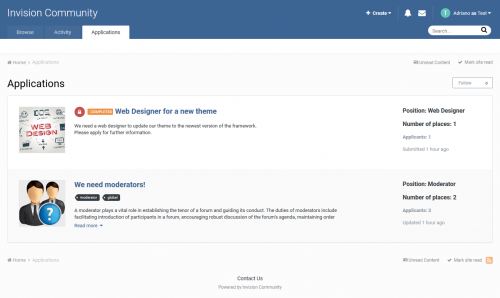
application Staff Applications System
By waqas dar
Are you looking for staff? Developers? Designers? Or anything else? This application will help admins/moderators to find people to help in their boards.
Here's a quick rundown of some of the features for this resource:
Extra Fields Module to add Positions on ACP (moderator, webdesigner, developer, etc) Ability to inform how many places the position has. Example: you can create an application record to "hire" 3 moderators. Ability to move the "winner" member to a group chosen group (you inform the group when you're adding the application record) Ability to restrict the application by: Content count, Reputation points/likes, Number of days as member, Minimum age and groups Ability to create a topic at every new application submission. Module on ModeratorCP to view all pending records from all applications Compatible with most important features from IPS 4.2 (Recommended Comments, Content Message, Reactions, Member History, Richer Embeds, etc.) Integrated to the framework: Tag system, Follow System, Report system, Search system, Share Links, etc. Moderator actions on applications and comments/reviews Moderator permission to approve/reject applications Ability to create RSS feeds from member applications Etc. Permission: NO ONE except staff (with proper permisison) will be able to view/read or know who are the applicants. All that regular members will know is the number of users who applied to it.
Fix error Compatible with IPS 4.3 only.9 downloads
- applications
- fundayforum
- (and 10 more)
0 comments
Updated
-
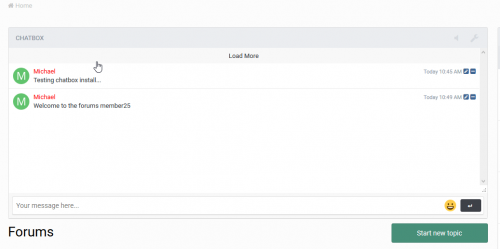
application Auto Welcome
By waqas dar
auto welcome ips application 4.3
Don't be a leech, click the reputation button if you want to get more files in the future.
Auto Welcome Ips Application:
To put it simply, it welcomes newly registered members. It will welcome them with an optional personal message, email or topic alert. From there you can further customize each pm, email or topic message, the subject / title and so on. It also has the ability to welcome members that are added manually through the Admin CP.
39 downloads
- auto
- auto welcome
- (and 3 more)
0 comments
Updated
-

application Application Forms
By waqas dar
Application Forms opens up a world of possibility for you and your community by designing, curating, and managing custom application forms. Application forms can be designed from scratch with an infinite number of custom field types in over 20 different types, enabling you to fill any need you might have. Let your community submit their application for your position, proposal, project, or idea!
Do you want to harness the power of your community for brainstorming ideas? Do you want to run contests where everyone must follow the same guidelines? Are you looking for way to interview new clanmates or members? Do you require a background check on new staff members? If you need a way to ultimately manage user input in a methodical and orderly manner, then Application Forms is the best way to do it. Instead of wasting your time with forum posts where users may or may not follow your posting guidelines, require and draft a custom proposal form where users must follow your specifications.
Buy Application Forms to build amazing submission forms!
FEATURES
Application Forms features deep integration with native IPS functionality, giving you the design macro to let IPS power your custom field types:
Address Checkbox Code Color Date Editor Email Address Member Number Password Poll Radio Rating Select Box Telephone Number Text Text Area Upload URL Other features include:
Unlimited number of Forms Unlimited number of fields in each Form View all submissions with ability to edit and PM member Auto-link to new Forum Topic with ability to create poll for voting Send a PM After form submission Only allow members to apply once Member benefits such as promoting membergroups and secondary membergroups
This application also includes support for the Rules App
7 downloads
0 comments
Updated
-

application iAwards
By waqas dar
iAwards Invision community Application 4.3
The long awaited awards application for IPS has arrived!
iAwards provides administrators the ability to award their members with badges that show in their profile and, if chosen, on their posts.
Standalone this application has the ability to manually award members and to award members based on the amount of awards the member has. You can award both from the ACP as well as from the create menu at the top of your site.
In order to give everyone a fully customizable way to award we have integrated it with the Rules application.
This gives you the power to award your members based on rules that you create instead of the ones that we think up.
Features include:
Choose location of awards – Under the post or under the author pane. Hide awards – To allow members to show the ones they want. Award based on number of awards. Manual awarding. Upgrade Tools for both HQ Awards and Awards (Free). Category and awards management. For the best support please register at http://bbcode.it
Recommended addons:
What's New in Version 1.2.1
4.3 Compatibility release Fixed OutOfRangeException bug when giving award NEW FEATURE Stacked awards
22 downloads
- fundayforum
- iawards
- (and 7 more)
0 comments
Updated
-
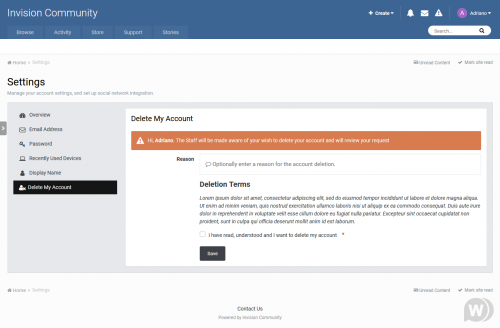
application Delete My Account 2.2.1 - removing the IPS 4.3 account
By waqas dar
This application will allow users from specific user groups to request to delete their account. All requests will be reviewed by Staff (admins), directly on ModeratorCP -> Delete Account Requests, to approve or deny the request. The whole user content (topics, posts, attachments, polls, etc.) will be preserved; only the account will be deleted.
Features:
Admins can choose which user groups can request delete account and how many posts a user must have to do it Users can request to delete their accouts directly on Account Settings The Staff will review each request to approve it or deny it on ModeratorCP -> Delete Account Requests A Notification will be sent to Staff when there's a new deletion request Each action of Staff (approve or deny a request) is logged on Moderator Logs Compatibility:
IPS 4.3 Upgrade from 2.0.3 to 2.1.0:
Uninstall the plugin
Remove the following files via FTP:
applications\core\extensions\core\ModCp\DeleteAccount.php
applications\core\extensions\core\Notifications\DeleteAccount.php
Install the application
7 downloads
0 comments
Submitted
-
Top Downloads
Week
Month
Year
All Time
-
-
Download Statistics
537
Files185
Comments29
Reviews



![More information about "Dilchasp_Hikayat-e_Saadi-[fundayforum.com] Urdu PDF Book"](https://fundayforum.com/uploads/monthly_2018_06/1178326569_Dilchasp_Hikayat-e_Saadi-fundayforum_com.thumb.jpg.1d0d05334dd4fd5194494a6b71b7fbbb.jpg)