Plugins
Browse our IPS4 Plugins. Please check IPS Compatible Version before you download or install any Plugin. Like, Share and pass your Reviews. All files are free to download. Thanks to joining us.
132 files
-
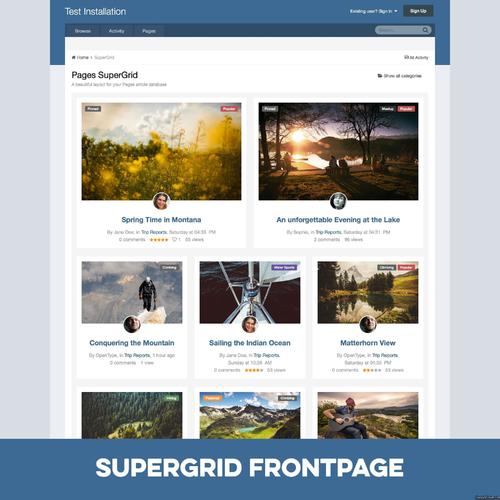
Pages SuperGrid
By waqas dar
Pages SuperGrid is a set of Pages templates and a complete solution to make your Pages databases (with articles, directories and so on) appealing and engaging.
What’s needed:
IPS 4.1 in its most recent version with the Pages application A pages databases that uses the stock Record Image field and has images with a sufficient resolution uploaded through that field. (Technically, the templates also work without images, but it’s an image-centered design and works best when most or all records have images.)
Which templates are included:
A beautiful grid-based Front Page template with two records featured at the top — for when your database is set to article mode. A beautiful grid-based Listing template replacing the dull forum listing design — for when you open a category or have a database without categories. A unique Record View template with a large header image — for when you open a specific record. A category listing template – in case you use more than one category. Note: You can use the templates for any number of databases, but the settings will always apply to all SuperGrid templates. 2 Bonus Features included:
Twitter Card support! Yes, you read that correctly! The SuperGrid record view template adds Twitter Card support to your records. You just have to provide your Twitter handle. Tweets with images have a significantly higher click rate and with Pages SuperGrid any link to an article in your database (which has a record image) will automatically get a beautiful Twitter Card like this:
Block template! Create blocks anywhere on your site – pointing to your database – and make them as beautiful as the database itself.
Detailed Feature Description and Notes:
Pages SuperGrid is built with the IPS design framework and is therefore fully responsive and compatible to most well-coded/well-designed themes. The styling of your theme(s) is inherited and the Pages SuperGrid templates will usually work out of the box. The template is designed to work on single-column pages with or without a sidebar. The grid will automatically adopt to the available width and collapse on smaller devices. The content field is not shown in the grid-based listing templates and all images will be scaled and cropped (without distortion) to the same size to allow a consistent look. If you need to show the content field or need to use images shown with different sizes, check out Taman’s templates. The templates come with lots of options you can easily adjust within the template. Front Page/Listing Template: Show author/category/date: Yes/No Alignment author/category/date Show comments/views/ratings/likes: Yes/No Alignment comments/views/ratings/likes Show record owner’s avatar: Yes/no Alignment record owner’s avatar Title alignment Image Aspect Ratio Use thumbnail or full-size images Turn images into record link: Yes/No Assign fallback image for records without an image Show “featured record” badge for featured records: Yes/No Pick badge style for featured records Show “pinned record” badge for pinned records: Yes/No Pick badge style for pinned records Record View Template: Image Aspect Ratio Pick Avatar size from 7 options Turn header image on or off Assign Twitter handle for Twitter Cards Show “featured record” badge for featured records: Yes/No Pick badge style for featured records Show “pinned record” badge for pinned records: Yes/No Pick badge style for pinned records
What's New in Version 2.1
Minor update to also support manual pages beside horizontal/vertical blocks on Page Builder pages. You only need to upgrade from 2.0 if you need this feature. The upgrade requires a complete deinstallation of all 2.0 components.
6 downloads
0 comments
Submitted
-
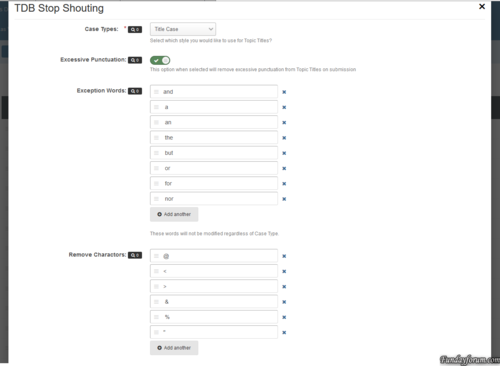
plugin TDB Stop Shouting (RC)
By waqas dar
What does it do?
This plug-in prevents your members from trying to steal attention, by entering a title in purely uppercasing with lots of punctuation. The Plug-in will try and strip the text to a more readable format that is constant with your board posting guidelines.
Plug-in Settings:
Case Types: There are 5 different types of casing that you can use. No Modification, Sentence Case, Upper Case, Lower Case and Title Case. Excessive Punctuation: This tries to reduce excessive punctuation from the title. This will turn ??????? to ? and !!!!!! to !. Exception Words: These are word of your choosing that will never have their casing changed, regardless of your plug-in settings. If the word is upper case, all of these words in the title will be forced Upper case for example. Remove Characters: These are characters that will be removed regardless of how many there are in the title text. Names that begin with O', Mc or Mac will be processed automatically from o'neill to O'Neill or mcneill to McNeill.
At the moment, only the Forum Topics and Pages Applications will have their titles changed.
Please note: This is a RC version and use on a production site at your own risk.
1 download
0 comments
Submitted
-
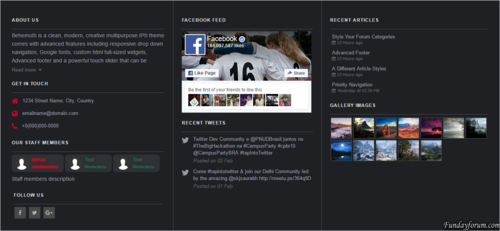
Advanced Footer
By waqas dar
Advanced footer allows you to add a footer to your site with many blocks including Facebook feed, Twitter feed, Gallery images, Articles feed, Staff members, Custom blocks and more, Beautiful and clean design it is fully responsive and perfectly suits your theme due to its highly customizable options.
Advanced footer is featured with two row layouts with multiple columns it has a unique design with a lot of options, Footer blocks are entirely customizable, resizable, and reorderable.
__________________________________________________________
Features:
Up to 10 blocks and more in feature updates
Blocks: About us, Staff members, Social links, Get in touch, Quick links, Twitter feed, facebook feed, Custom block templates for gallery images and articles, two Custom blocks.
Custom color options. / or Match colors to your theme.
Resizable and reorderable blocks.
Highly customizable options.
Super clean and fully responsive design.
Fixing facebook and twitter feed not showing up.
10 downloads
0 comments
Submitted
-

Submitted
-
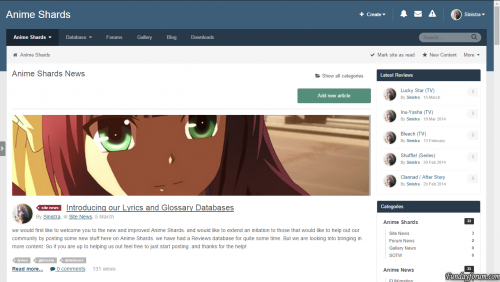
(Sin) Article Images
By ADMIN
The plugin will allow you to have a nice looking display articles images as a cover pic.
9 downloads
0 comments
Submitted
-
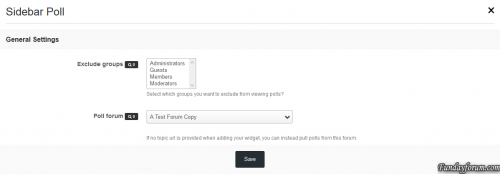
Sidebar Poll
By waqas dar
Adds the poll contents from a topic into your forums sidebar. Includes permissions for who can view the sidebar poll.
4 downloads
0 comments
Updated
-
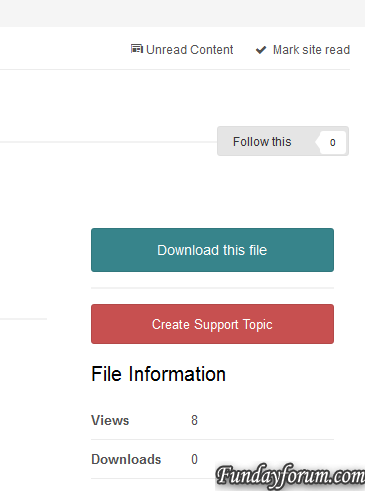
Create Missing Support Topic for Files
By waqas dar
This plugin will create missing topics for files. A button will appear to staff when these requirements are met:
The Downloads application is installed and enabled.
The Forums application is installed and enabled.
The downloads category has a Forum set on the Forum Topics tab.
The file has no topic associated with it.
Fixed bug preventing topic from being saved if previous topic was deleted.2 downloads
0 comments
Submitted
-
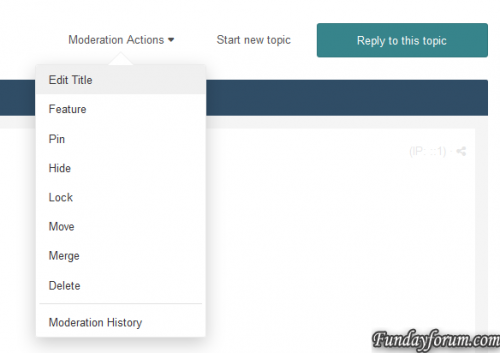
Quick Topic Title Edit
By waqas dar
This plugin will add an option to edit topic title on Moderation Actions. Only users with permission to edit the topic will be able to view/use this feature.
8 downloads
0 comments
Submitted
-

(SOS41) Notify Me of Replies Enabled on New Topics-Replies
By waqas dar
This functionality is now included with IPS 4.1.17.1. Search for Automatic Following in the ACP to find the settings.
This plugin will enable/check the checkbox NOTIFY ME OF REPLIES on new topic/reply form, regardless the 'Automatically follow content' notification setting of the user.
Setting:
Groups that will have the checkbox enabled
NOTE: If you got the error 1S111/1 mkdir(): No such file or directory when installing this plugin, simply uninstall it and reinstall it. It will work just fine.
Fixed error when trying to split posts (post option)7 downloads
0 comments
Submitted
-
Admin Login Background
By waqas dar
Admin Login Background by IPS Themes adds the ability to select your own background image on the IPS Suite 4.0 administrator login page. Set a default image for all visitors of the login page or allow visitors to select from a series of images. Selections are saved in a cookie so all future visits will show the selected background.
This plugin is unsupported. The current version is stable with the IPS 4 series with 0 known issues.
Features
Set default image to show to all visitors of the admin page
Upload multiple images and allow visitors to select their own background image.
Integrated with IPS4 Localization
11 downloads
0 comments
Submitted
-
0 comments
Submitted
-

EZ Scroll Top
By waqas dar
This is a straight forward plugin and it does what the title says.... scroll to top.
This is the first of my EZ plugin line-up. My main design goal for the EZ plugin line-up is simplicity. They must be easy (a.k.a EZ) to install, maintain, configure, and to use.
Enjoy!
13 downloads
0 comments
Submitted
-

EZ Full Width
By waqas dar
Full Width does not always mean full width... WAIT! WHAT?
EZ Full Width is another plugin from my EZ plugin line-up. My main design goal for the EZ plugin line-up is simplicity. They must be easy (a.k.a EZ) to install, maintain, configure, and to use.
Problem: When you enable fluid width and set the full width to 100% in your theme appearance custom setting there is an actually padding residual left behind and your site is not exactly full width.
Solution: EZ Full Width removes this residual padding and restores the true meaning of full width.
Looks like Full Width does mean Full Width after all.
Enjoy!
4 downloads
0 comments
Submitted
-
plugin Recycle Bin for Forum
By waqas dar
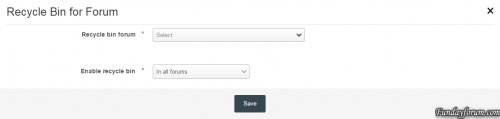
The plugin allows you to choose the forum for deleted topics.
Instead of deleting the topic will be moved to this forum.
Instruction
1. Create a new forum for deleted topics. You can make it unavailable for public access.
2. Select this forum in the plugin settings (field "Recycle bin forum").
3. Select the forums from which topics when you delete will be moved to trash.
6 downloads
0 comments
Submitted
-

plugin (LF41) Spoiler Titles
By waqas dar
There are some boards, where moderating staff is just going crazy about spoilers. They want to hide everything under spoilers. But in fact sometimes spoilers are really good to organize content.
This simple and light plugin won't change any code of your posts, it won't also add any new custom short-codes.
The only things this plugin do are following:
After page load plugin will check all spoilers on page for any bold text inside. If some bold text found, plugin will make spoiler title based on first bold text entry found inside of spoiler Some extra look-and-feel changes also applied to make default spoilers look better.
How to use:
Just put any bold text inside of the spoiler, plugin will automatically find first bold piece of text and add as spoiler title.
You may adjust CSS if needed by changing custom CSS stylesheet file you may find on template code edit page.
7 downloads
0 comments
Submitted
-
(SL) Add rating to topics list
By waqas dar
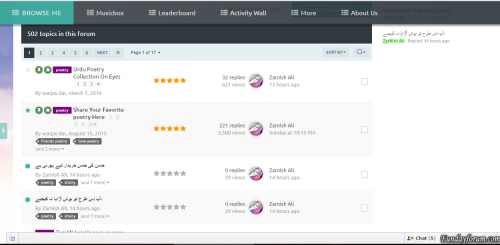
This hook will add topic rating in topics list.
14 downloads
0 comments
Submitted
-

(SIV41) Insert Nickname
By waqas dar
Insert the user name in a quick editor.
What's New in Version 1.0.2
Fixed an issue when you insert nickname at an undisclosed editor Added setting for the @ symbol before the username
12 downloads
0 comments
Updated
-

plugin (NB40) Separate Pinned Topics
By waqas dar
This plugin will separate pinned topics (Forum View Page)
Fixed bug with moved topics
15 downloads
0 comments
Submitted
-
Birthday in Registration Screen
By waqas dar
ATTENTION: Be sure you download the correct version for 4.1.13 onward.
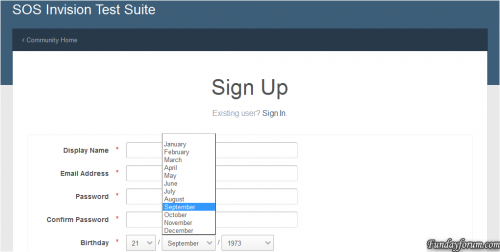
This plugin will allow new users to fill the Birthday on register form.
Settings:
Require birth date on registration screen? Require full birth date? If enabled, MONTH, DAY and YEAR will be required. If disabled, only MONTH and DAY are required. Update for 4.1.13 compatibility. Use the file marked as 4.1.13 onward.3 downloads
0 comments
Submitted
-
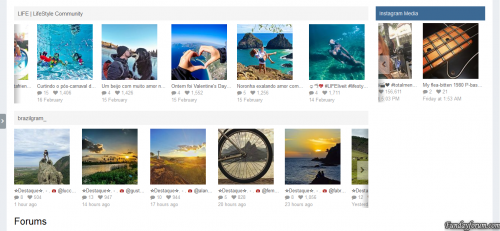
(IPS4) Instagram Photos 1.0.0
By waqas dar
This plugin will display photos from Instagram accounts on your board via widgets that can be used more than once in any page.
Settings:
Token: watch this video to see how to get your access token. Photo click behavior: if opens a popup with photo details or go to Instagram to display the photo details there. If admin decides for the popup view, will be display all info about the image, such as submitter, likes, date, location, tags, comments, etc.
Per Widget block settings:
Block title Display Recent Images or Liked Images. If admin chooses Recent Images, he can inform any User Id to display images from. Liked Images will display only images from the token owner. Get the User id informing the username on this page. Number of images to show Groups allowed to view the block
Note:
This plugin requires the PHP cURL extension to work.4 downloads
0 comments
Submitted
-
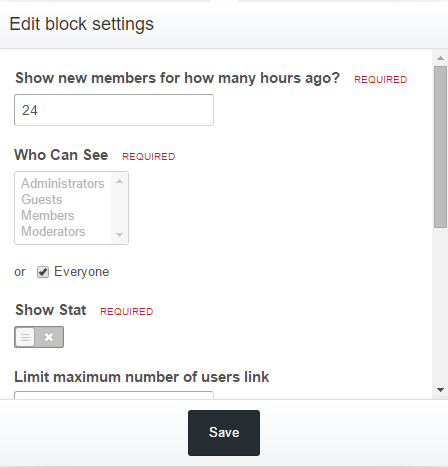
New Members Today
By waqas dar
Description
This plugin allow you see the new members that join your site within given time set by yourself in settings.
Installation
To install you just need upload XML file (Admin CP > System > Site Features > Plugins > Install)
Upgrade
To upgrade you just need upload XML file (Admin CP > System > Site Features > Plugins > Upgrade)
Setup
You need change settings in Block Manager on front end
7 downloads
0 comments
Submitted
-
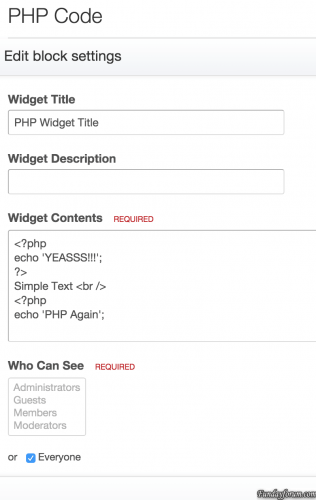
TXT & PHP Widget
By waqas dar
This mod will let you add Text, HTML and PHP widget IPS4's blocks. also you can disable PHP widget from Admin CP
How To Install
You just need install the plugin (Admin CP > System > Site Features > Plugins > Install)
19 downloads
0 comments
Submitted
-

(SIV41) Search Bots Online
By waqas dar
Search bots in the online list.
The plugin, by the rules of IPS, extends the function and does not replace it, thus managed to maintain compatibility with other plug-ins for this function.
In the New's for What the Version 1.0.1
Added settings formatting bots
6 downloads
0 comments
Updated
-
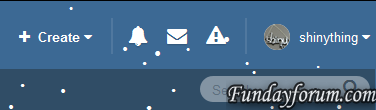
Snow Falling
By waqas dar
The Snow plugin adds a festive, wintry touch to any IPS4 website with configurable JavaScript-driven snow.
Features:
Snow that gently falls and gathers, with wind speed and direction determined by the mouse X position. Settings provided include: Number of snow particles on screen and active ("falling") at any time Configurable Animation tick rate Snow Color (with color picker) Snow by default is in the header, but can be configured to be in any HTML element ID, or within the document body. Snow "floor" can be set in pixels (the absolute pixel value at which the snow stops falling or sticks) Stickiness of snow (does it stick to the bottom of the window/element or not?) Twinkle effect - snow fades in and out as it goes down the screen Optional support for mobile devices (will be cruel to their CPU and battery!) New feature to enable/disable snow on specific themes only. Enjoy what is perhaps the second most useless plugin ever developed for IPS4!
Original BSD-licensed code for snowstorm provided by Scott Schiller (2007).
WARNING: Will slow down browsers. As the JavaScript implementing this functionality is not mine, only critical IPS-breaking issues will be fixed. What you see is what you get, take it or leave it.
10 downloads
0 comments
Submitted
-

Don't automatically log out other sessions on login
By waqas dar
By default, IPS4 will automatically log out other sessions if you log in more than 90 days after logging into the first device. This behaviour is counter-intuitive and annoying for users.
This plugin prevents members from being automatically logged out because they logged into a new device.
This free plugin is provided with no warranty of any kind, either explicit or implied, to the extent permissible by the applicable laws. Please do report bugs to me, but I make no promises about fixing them.
3 downloads
0 comments
Submitted
-
Top Downloads
Week
Month
Year
All Time
-
-
Download Statistics
532
Files185
Comments29
Reviews


![More information about "Dilchasp_Hikayat-e_Saadi-[fundayforum.com] Urdu PDF Book"](https://fundayforum.com/uploads/monthly_2018_06/1178326569_Dilchasp_Hikayat-e_Saadi-fundayforum_com.thumb.jpg.1d0d05334dd4fd5194494a6b71b7fbbb.jpg)