
LIVE UPDATES
- 📢 Welcome to FundayForum – Explore Trending Topics
- 🌟 Discover What’s Trending Today
- King Charles makes exciting announcement on Meghan's big day
- Targeted by Trump, ICC wins top EU rights prize
- Norway's sovereign wealth fund slips to $30 billion loss: Here's what went wrong
- What is age-related macular degeneration? Everything to know about the condition affecting Dame Judi Dench
- 'One Direction' Louis Tomlinson to take break from tour plans
- World Bank warns Middle East conflict could strain Pakistan's economy
- Princess Kate marks huge royal milestone in Victoria Beckham's power suit
- France records first human case of Shamonda virus, officials say
- ‘Dune: Part Three' sets new record as ‘The Odyssey' falls behind
- Gwen Stefani consoles Blake Shelton over John Anderson's death: 'I am sick'


Waqas Dar
-
Posts
11,303 -
Joined
-
Last visited
-
Days Won
559
Content Type
Profiles
Events
Forums
Gallery
Blogs
Downloads
Articles
Page News
Release Notes
Store
Everything posted by Waqas Dar
-

Version 2.0.0
7 downloads
(BIM41) Gallery In Post 1.1.4 The plugin allows you to add preview images in a neat carousel anywhere. Images can be inserted as a link to an album in Gallery, or add images to the URL from any resource.Free -

Version 2.0.0
94 downloads
This plugin will allow you to add music to your profile. Profile Songs is originally a 4.1.x plugin developed by Rory Soh from the IPS Marketplace. It's been abandoned for nearly a year so I've taken the liberty of updating the plugin. Original File Description This allows you to set a custom song to the forum profile. Moderators and Administrators are allowed to remove them easily, it will erase the file from your web server as well. You simply just go to the member's profile who has an inappropriate song and remove it by selecting "Remove Song" from Profile Song option. You can also set profile songs for members if you wish. What's New 4.3.x compatibility, no template changes needed. Any changes you made to your profile template for this plugin should be reverted. NEW configurable profile song size setting. Song size is in kB (kilobytes). A minimum size of 1,000 (1MB or 1 Megabyte) and a maximum size of 50,000 (50MB). This setting defaults to 2,500 (or 2.5MB). Future Updates I'll do my best to update this plugin for 4.4.x compatibility, if necessary, in a timely fashion. I'd also like to implement a configurable volume setting. In the meantime, you can use the steps below to add your own volume setting manually. Add your own volume setting Locate your ps_display HTML template and replace this: <div class='ipsType_center'> <p> {{if \IPS\Settings::i()->song_display_autoplay}} <audio autoplay="" controls="" loop="" preload="" class="ps_audio"> <source src="{$profileSong->file->url}"></source> </audio> {{else}} <audio controls="" loop="" preload="" class="ps_audio"> <source src="{$profileSong->file->url}"></source> </audio> {{endif}} </p> </div> With this: <div class='ipsType_center'> <p> {{if \IPS\Settings::i()->song_display_autoplay}} <audio autoplay="" controls="" loop="" preload="" class="ps_audio" id="profilesong"> <source src="{$profileSong->file->url}"></source> </audio> {{else}} <audio controls="" loop="" preload="" class="ps_audio" id="profilesong"> <source src="{$profileSong->file->url}"></source> </audio> {{endif}} </p> </div> And then add the following code to the bottom of that template: <script> var audio = document.getElementById("profilesong"); audio.volume = 0.25; </script> You can change the volume setting by changing the 0.25 (1.0 is default).Free -
Version 1.0.0
19 downloads
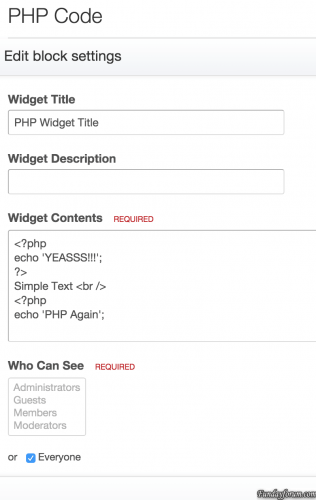
This mod will let you add Text, HTML and PHP widget IPS4's blocks. also you can disable PHP widget from Admin CP How To Install You just need install the plugin (Admin CP > System > Site Features > Plugins > Install)Free -

16 downloads
Pro Gamer is Black theme for ips best for gaming community or black theme lover.Free -

44 downloads
Dispersion features an animated gradient background image which is randomized on each page load and overlaid by a selected image from the background picker. The gradient is both created and animated (in compatible browsers) using css and your visitors are given the option of using a greyscale background by clicking a simple toggle button. Additionally, the animation effect can be paused by your members if it hinders their browsing experience. The header collapses on-scroll, and stays at the top of the screen for easy access.Free -
 View File Namal Complete Novel By Nimra Ahmad All Episode Namal Complete Novel by Nimra Ahmed Episode 1 to 30 (Murder Mystery & Crime Thriller) is being serialized in Monthly Khawateen Digest, published in hardcover book form by Ilm o Irfan Publishers, Lahore and you can download at Fundayforum.com for online reading. Namal Novel Plot is a complex matrix and summarizing it can do injustice to it. Namal’s plot has all this and much more substance beautifully weaved and exceptionally narrated into a single story. Namal is an intense story involving brutal murders and devious deceptions. Faris Ghazi (an intelligence officer) is convicted for the murder of his step-brother and wife and attempted murder of his relative Zumar Yousuf. His nephew Saadi Yousuf is convinced of his innocence and ultimately gets him out of the jail. On the other hand, Saadi’s aunt Zumar who also happens to be a district attorney lost her kidneys in the assault and is convinced that Faris is guilty, mostly because of a fake telephone call in Faris’s voice to Zumar prior to the attack. The actual guilty one is Hashim Kardaar (Faris’s first cousin) who, apart from being an accomplished lawyer, owns an inherited oil cartel. Hashim murdered Faris’s brother Waris in order to hide his corruption cases and in order to cover his tracks created the scenario in which Zumar was shot and Faris’s wife was murdered. Saadi’s younger sister Haneen is super genius. A basic theme of this novel is the conspiracies woven and the misunderstandings they create. The cunning lawyer Hashim and his devil of a mother Jawahirat manipulate reality in such a way that people like Zumar also believe this alternate reality and misunderstandings spawn. All the Characters of the Novel are well The genius/ evil genius Haneen, the sweet and caring Saadi, the brute but honest Faris Ghazi, the sharp but stubborn Zumar, the cunning Hashim or the envious Naushervan, every character is carefully etched and has depth in it. Every major character of Namal is portrayed not in complete black or white, but in shades of grey and every character has been given equal exposure. Nemrah Ahmed has emerged as a very popular writer in recent years and produced some Marvellous and Best Seller Novels. Her Novels and Short Stories Books are published by various publishers and some of them are Mere Khawab Mere Jugnu - Shuaa Digest, Pahari Ka Qaidi - Shuaa Digest, Mehrunnisa - Khawateen Digest, Sans Sakin Thi - Khawateen Digest, Beli Rajputan Ki Malika, Qaraqaram Ka Taj Mahel - Shuaa Digest, Mus'haf - Khawateen Digest, Namal - Khawateen Digest. Nimra Ahmed is the author of Namal Novel. It is a beautiful novel which is publishing in the monthly episode. Namal Novel is continuing from some months. The book is a social, romantic story. Nimra Ahmed gave a touch of Islamic Sufism to the book. Here on the site, you can download all books by Nimra Ahmad in pdf format. Nimara Ahmed is a famous female writer. She got fame in his young age. She has a natural talent for writing. I hope you like the book Namal Novel. All Episode are available. Please click at download button to download monthly episode of namal novel by nimra ahmad. Namal Novel Episode 1, Namal Novel Episode 2, Namal Novel Episode 3, Namal Novel Episode 4, Namal Novel Episode 5, Namal Novel Episode 6, Namal Novel Episode 7, Namal Novel Episode 8, Namal Novel Episode 9, Namal Novel Episode 10, Namal Novel Episode 11, Namal Novel Episode 12, Namal Novel Episode 13, Namal Novel Episode 14, Namal Novel Episode 15, Namal Novel Episode 16, Namal Novel Episode 17, Namal Novel Episode 18, Namal Novel Episode 19, Namal Novel Episode 20, Namal Novel Episode 21, Namal Novel Episode 22, Namal Novel Episode 23, Namal Novel Episode 24, Namal Novel Episode 25, Namal Novel Episode 26, Namal Novel Episode 27, Namal Novel Episode 28, Namal Novel Episode 29, Namal Novel Last Episode 30, Submitter Waqas Dar Submitted 01/03/2017 Category Urdu Afsana & Novels Hub Writer/Author Nimra Ahmad
 -

Version 1 - 30
27,274 downloads
Namal Complete Novel by Nimra Ahmed (Episodes 1 to 30) “Namal” by Nimra Ahmed is a powerful Urdu novel that combines mystery, crime thriller, conspiracy, romance, and Islamic philosophical themes. It was originally published in monthly episodes in Khawateen Digest and later compiled into book form by Ilm o Irfan Publishers, Lahore. 📖 Novel Overview The story of Namal revolves around a complex web of lies, misunderstandings, and hidden truths. It explores how perception can be manipulated and how justice can be distorted through powerful conspiracies. The plot is known for its deep storytelling, emotional intensity, and multi-layered characters where no one is completely black or white. 🧩 Main Story Plot Faris Ghazi, an intelligence officer, is falsely accused of murdering his step-brother and wife along with an attempted murder of his relative Zumar Yousuf. He is imprisoned for crimes he did not commit. His nephew Saadi Yousuf strongly believes in his innocence and works tirelessly to prove it and secure his release. On the other side, Zumar Yousuf, who is a district attorney and also Saadi’s aunt, survives a brutal attack but loses her kidneys. She firmly believes Faris is guilty due to a manipulated phone call mimicking his voice before the incident. 🕵️ True Antagonist The real mastermind behind the conspiracy is Hashim Kardaar, Faris’s cousin. He is a highly intelligent yet corrupt lawyer who controls an inherited oil cartel. Hashim murders Faris’s brother Waris to hide corruption cases and frames Faris in a carefully constructed conspiracy involving multiple deaths and attacks. His mother Jawahirat also plays a key role in manipulating facts and shaping false realities. 🧠 Major Themes Truth vs. deception Legal manipulation and corruption Family betrayal and revenge Psychological warfare Islamic moral and spiritual reflection 👥 Key Characters Faris Ghazi – Brave, honest intelligence officer falsely accused Saadi Yousuf – Loyal, intelligent nephew fighting for justice Zumar Yousuf – Strong district attorney with a firm belief system Hashim Kardaar – Main antagonist, corrupt and manipulative lawyer Haneen – Genius child character with extraordinary intelligence Jawahirat – Strategic and manipulative mother figure 📚 About the Author Nimra Ahmed is a renowned Urdu fiction writer known for her unique storytelling style that blends romance, mystery, and spiritual insight. Her novels are widely read across South Asia. 📖 Other Popular Works Mushaf Pahari Ka Qaidi Jannat Ke Pattay Karakoram Ka Taj Mahal Mehr-un-Nisa 📥 Namal Episodes (1 to 30) The complete novel is available in serialized form: Episode 1, Episode 2, Episode 3, Episode 4, Episode 5, Episode 6, Episode 7, Episode 8, Episode 9, Episode 10, Episode 11, Episode 12, Episode 13, Episode 14, Episode 15, Episode 16, Episode 17, Episode 18, Episode 19, Episode 20, Episode 21, Episode 22, Episode 23, Episode 24, Episode 25, Episode 26, Episode 27, Episode 28, Episode 29, Last Episode 30 ⚠️ Note This novel is a blend of fiction, moral lessons, and emotional depth. Readers should experience it as a full story to understand its true meaning and complexity.Free -
maharaja phopinder singh مہاراجا پٹیالہ کے دربار میں کیا ہوتا تھا؟
Waqas Dar posted a blog entry in Tareekhi Waqiat Hub
1891 میں پیدا ہونے والے مہاراجا بھوپندر سنگھ آف پٹیالہ نے 1938 ء میں وفات پائی تو اس کی پانچ بیویاں ، 88 اولادیں اور 350 سے زیادہ داشتائیں تھیں۔ بھوپندر سنگھ مہاراجہ اعلیٰ سنگھ کی نسل میں سے تھا۔ اس خاندان کے سربراہ نے تاریخی ہیروں اور دیگر نایاب جواہرات پر مشتمل خزانہ چھوڑا تھا۔ اس نے ایک بڑی ریاست قائم کی تھی اور اپنی اولاد کو اقتدار دے گیا تھا۔ مہاراجہ بھوپندر سنگھ بہت قابل انسان تھا۔ اس کے وزیر اور افسر نہایت لائق افراد تھے۔ ہندوستان کے ہر علاقے کا لائق ترین شخص چن کر اس کا وزیر بنایا گیا تھا۔ اس کے وزیر ساری زندگی اس کے وفادار رہے۔ آزاد ہندوستان کا سفیر برائے چین، مصر اور فرانس سردار کے ایم پانیکر اس کا بااعتماد وزیر خارجہ تھا۔ ایک سابق بھارتی وزیراعلیٰ کرنل رگھبیر سنگھ بھی پٹیالہ کا وزیر داخلہ رہ چکا تھا۔ نواب لیاقت حیات خان کئی سال پٹیالہ کا وزیراعظم رہا۔ قانون کا وزیر الٰہ آباد کا ممتاز وکیل ایم اے رائنا تھا۔ دیوان جرمنی داس زراعت، صنعت اور جنگلات کا وزیر ہونے کے علاوہ مہاراجا کی صحت کے امور کا انچارج تھا۔ بھوپندر سنگھ نے ریاست کا انتظام چلانے میں اپنی مدد کے لیے نہایت لائق افراد کو منتخب کیا تھا۔ مہاراجا بھوپندر سنگھ کا باپ مہاراجہ سر راجندر سنگھ سی سی ایس آئی شراب نوشی کے ہاتھوں صرف 28 سال کی عمر میں مر گیا تھا۔ مہاراجا کے مشیر اس امر کا خا ص خیال رکھتے تھے کہ وہ اپنے باپ دادا کی طرح شراب کا عادی نہ ہو جائے۔ اسے ایک انگریز ٹیوٹر نے بچپن سے تعلیم و تربیت دی تھی۔ اس کے علاوہ اسے ہندو اور سکھ ٹیوٹر بھی تعلیم و تربیت دیا کرتے تھے۔ 18سال کی عمر میں وہ بہت سی خوبیوں کا مالک بن چکا تھا۔ جب وہ بالغ ہوا تو اس کے درباریوں نے اسے عورت اور شراب کے مزے سے آشنا کروانا چاہا۔ تاہم مہاراجا ان تمام ترغیبات سے بچا رہا۔ چونکہ مہاراجا کے بگڑنے ہی میں درباریوں کا مفاد تھا اس لیے جلد ہی مہاراجا ان کی سازشوں کا شکار ہو گیا۔ درباری ولن اسے نوجوان عورتوں کے ذریعے بھٹکانے کی کوشش کرتے رہے۔ وہ نوجوان تھا اس لیے ایسی ترغیبات سے زیادہ عرصہ نہ بچ سکا۔ ان عورتوں کو ہندوستان کے مختلف علاقوں سے لایا جاتا تھا۔ وہ بہت کم عمر اور نہایت حسین ہوا کرتی تھیں۔ جب وہ مرا تو اس کے حرم میں تقریباً 322 عورتیں تھیں۔ ان میں سے صرف دس مہارانیاں تسلیم کی گئی تھیں، تقریباً پچاس کو رانی کہا جاتا جبکہ باقی سب کنیزیں تھیں۔ وہ سب مہاراجا کے اشارے کی منتظر رہتی تھیں۔ وہ دن یا رات کے کسی بھی لمحے ان کے ساتھ قربت اختیار کر سکتا تھا۔ چھوٹی چھوٹی بچیوں کو محل میں لایا جاتا اور انہیں پالا پوسا جاتا یہاں تک کہ وہ بالغ ہو جاتیں۔ انہیں مہاراجا کی پسند کے مطابق تربیت دی جاتی تھی۔ محل میں شروع شروع میں ان لڑکیوں کا بہت خیال رکھا جاتا تھا۔ انہیں صرف مہاراجا کو سگریٹ اور شراب پیش کرنے یا دوسری خدمات ادا کرنے کا کہا جاتا تھا۔ مہارانیاں ان کو آغوش میں لیتی اور چومتی تھیں۔ پہلے وہ لڑکیاں محض کنیزیں ہوتی تھیں لیکن مہاراجا کو پسند آنے پر ان کا رتبہ بڑھتا جاتا یہاں تک کہ وہ اعلیٰ ترین رتبے پر پہنچ کر مہارانی کہلاتیں۔ جب مہاراجا کسی عورت کو مہارانی منتخب کر لیتا تو حکومت ہندوستان کو اس امر کی اطلاع دیتا اور حکومت اس عورت کو مہارانی تسلیم کر لیتی۔ اس کے بطن سے جنم لینے والے لڑکے کو مہاراجا کا جائز بیٹا تصور کیا جاتا اور اسے شہزادے کے حقوق دیے جاتے تھے۔ مہارانیوں اور داشتاؤں میں اور بھی فرق تھے۔ مہارانیوں کو دوپہر اور رات کا کھانا اور چائے سونے کے برتنوں میں پیش کیے جاتے تھے۔ رانیوں کو چاندی کے برتنوں میں کھانا پیش کیا جاتا تھا۔ ان کو پچاس اقسام کے کھانے پیش کیے جاتے تھے۔ اعلیٰ تر رتبے کی آرزو مند دیگر عورتوں کو پیتل کے برتنوں میں کھانا پیش کیا جاتا تھا۔ ان کو بیس اقسام کے کھانے پیش کیے جاتے تھے۔ خود مہاراجا کو ہیرے جڑے سونے کے برتنوں میں کھانا پیش کیا جاتا تھا۔ اسے 150 سے زیادہ اقسام کے کھانے پیش کیے جاتے تھے۔ مہاراجا ، مہارانیوں اور شہزادوں یا شہزادیوں کی سالگرہ پر عظیم الشان تقریبات برپاکی جاتیں۔ دو سو پچھتر یا تین سو مہمانوں کے لیے میز لگائی جاتیں۔ مردوں میں صرف مہاراجا، اس کے بیٹے، داماد اور چند خاص مدعوئین ہوتے جبکہ عورتوں میں صرف مہارانیاں اور محل کی چند منتخب عورتیں ہوتیں۔ ان تقریبات میں اطالوی، فرانسیسی اور انگریز بیرے اور خانساماں ہوتے تھے اور کھانے اور شرابیں نہایت مزیدار ہوتے۔ پکوانوں کو بڑی بڑی پلیٹوں میں لا کر اوپر تلے رکھ دیا جاتا۔ یہ ڈھیر کھانے والوں کے منہ تک پہنچ جاتا تھا۔ بعض اوقات دس سے بیس پلیٹوں تک کی قطاریں بن جاتی تھیں۔ کھانے کے بعد موسیقی کی محفل ہوتی، جس میں مختلف ریاستوں سے بلوائی گئیں رقاصائیں مہاراجا، مہارانیوں اور مہمانوں کا جی بہلاتیں۔ ایسی تقریبات صبح سویرے انجام کو پہنچتیں۔ اس وقت تک سب لوگ نشے میں دھت ہو چکے ہوتے تھے۔ یہ سلسلہ کئی سال جاری رہا۔ محل میں ایسی عورتیں بھی تھیں جنہیں یورپ، نیپال اور قبرص سے لایا گیا تھا۔ محل کی عورتوں نے ایسا لباس اور ہیرے جواہرات پہنے ہوتے تھے کہ دنیا میں ان کی مثال ملنا ناممکن تھی۔ تقریب کے اختتام پر مہاراجا عورتوں میں سے چند ایک کو منتخب کر لیتا اور انہیں لے کر اپنے محل میں چلا جاتا۔ یہ عورتیں مہاراجا کی توجہ حاصل کرنے کے لیے بہت سی ترکیبیں استعمال کرتی تھیں۔ مہاراجا کے دل میں ان سب کے لیے نرم گوشہ تھا۔ وہ روزانہ اپنے معائنے کے لیے آنے والے ڈاکٹروں کو اپنی بیماریوں کے بارے میں بتاتی تھی۔ یہ عورتیں بعض اوقات مہاراجا کی محبت اور فرقت میں خودکشی کرنے کی دھمکی دیتیں۔ سچ تو یہ ہے کہ ان میں سے چند ایک نے کمرے کی چھت سے رسی باندھ کر اس کے ذریعے خودکشی کی کوشش بھی تھی۔ جب کوئی عورت تنہائی کا شکوہ کرتی تو مہاراجا خوفزدہ ہو جاتا۔ عموماً وہ اس سے ملتا اور ہر ممکن طریقے سے اسے دلاسا دینے کی کوشش کرتا۔ مہاراجا کے حرم میں ایسی بدنصیب عورتیں بھی تھیں جنہیں زندگی میں ایک مرتبہ بھی مہاراجا سے ہم آغوش ہونے کا موقع نہیں ملا تھا۔ مہاراجا کو اپنی ساری مہارانیوں، رانیوں اور دیگر عورتوں سے محبت تھی اور وہ سب کے ساتھ برابر کا محبت بھرا سلوک روا رکھنے کی کوشش کرتا تھا۔ عورتیں بھی جواباً اسے اپنا واحد مرد مانتی تھیں۔ وہ جب بھی یورپ جاتا کم از کم ایک درجن عورتوں کواپنے ساتھ لے کر جاتا تھا۔ ہندوستان سے باہر ان مہارانی، رانی اور کنیز والی تفریق ختم ہو جاتی۔ ان کے کھانوں، کپڑوں اور رہائش میں کوئی فرق نہ رہتا۔ موتی باغ محل کا پروٹوکول پیرس اور لندن میں ایک طرف رکھ دیا جاتا تھا۔ مہارانیاں اور دوسری عورتیں موتی باغ کہلانے والے بڑے محل کے عقب میں واقع مختلف محلات میں رہتی تھیں۔ موتی باغ محل مہاراجا کی رہائش گاہ تھا۔ باہر سے کسی شخص کا محل کے ان اندرونی حصوں میں داخل ہونا انتہائی مشکل تھا۔ اگر کوئی شخص موتی باغ محل میں داخل ہونا چاہتا تو پہلے اسے تقریباً آدھا میل لمبا باغ عبور کرنا پڑتا، پھراسے بے شمار کمروں اور متعدد ہال کمروں سے گزرنا پڑتا۔ محل میں ہر بیس قدم کے فاصلے پر فوجی گارڈ موجود ہوتے۔ ان سب مراحل سے گزرنے کے بعد وہ شخص ایک چھوٹے گیٹ تک پہنچتا، جہاں سے داخلی محلات میں پہنچا جا سکتا تھا۔ اندرونی محل میں مہاراجا سے ملنے کے لیے آنے والوں کو شفاف اور قیمتی ریشمی لباس میں ملبوس اور ہیرے جواہرات سے لدی پھندی نہایت حسین و جمیل عورتیں مہاراجا کے خصوصی احکامات کی تعمیل میں مسکراہٹوں سے نوازتیں اور شراب پیش کرتیں۔ پنجابی لباس میں ملبوس چند عورتیں مہمانوں کو سگریٹ پیش کرتیں جبکہ ساڑھی میں ملبوس چند دیگر عورتیں شراب اور پھل پیش کرتیں۔ پٹیالہ کے دربار کی شان و شوکت کے سامنے الف لیلوی شان و شوکت ماند تھی۔ مہاراجا اپنی عورتوں سے حسد نہیں کرتا تھا اور اپنے مہمانوں کو ان سے گھلنے ملنے کی اجازت دے دیتا تھا۔ تاہم وہ گھٹیا پن اور بدتمیزی کو ذرا بھی برداشت نہیں کرتا تھا۔ مہاراجا کے پیروں میں درجنوں عورتیں پڑی رہتی تھیں۔ چند عورتیں اس کی ٹانگیں دبا رہی ہوتیں اور چند عورتیں پیغامات ادھر سے ادھر پہنچا رہی ہوتیں۔ مہاراجا کی پسندیدہ عورت اس کی دیوی ہوتی اور سب کی نگاہیں اس پر جمی ہوتیں۔ عموماً وہ مہاراجا کے گھٹنے کے پاس بیٹھی ہوتی۔ اس نے نہایت خوبصورت سرخ رنگ کا شفاف لباس پہنا ہوتا، ناک میں سونے کا کوکا، گلے میں موتیوں کا ہار اور کلائیوں میں ہیروں کے کنگن ڈالے ہوتے۔ حرم کی عیاشانہ زندگی اور ہمسایہ ریاستوں اور ہندوستان کے وائسرائے کے ساتھ چپقلشوں کی وجہ سے مہاراجا کو ہائی بلڈ پریشر کا عارضہ لاحق ہو گیا۔ فرانس کے مشہور ڈاکٹروں پروفیسر ابرامی اور ڈاکٹر آندرے سے لچوٹز نے ریڑھ کی ہڈی میں انجکشن لگا کر بلڈ پریشر کو گھٹانے کا نیا طریقہ دریافت کیا تھا۔ مہاراجا نے انہیں فرانس سے پٹیالہ بلوا لیا۔ مہاراجا علاج کے لیے یورپ بھی گیا لیکن بلڈ پریشر کنٹرول نہ ہو سکا، جس کا خاص سبب یہ تھا کہ اس نے ڈاکٹروں کی ہدایت کے برعکس عورتوں اور شراب کو نہیں چھوڑا۔ مہاراجہ صرف 47 برس کی عمر میں چل بسا۔ -

8 downloads
Skin XML file for installation All fonts used throughout the skin logo.psd team-icon.psd IBTheme copyright and license agreement Admin CP is themed to match forums 4.1.15Free -
11 downloads
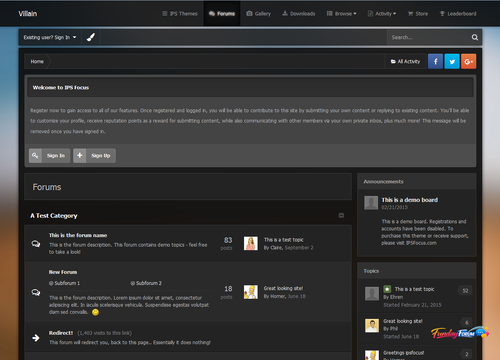
Updated Version for 4.1.17.1 Villain is a dark, semi-transparent dark skin which includes a simple background picker allowing your members to choose their own image from a preset array of high quality background images. Perfect for any community, and especially great for gaming forums or site who want to offer customization options to their members!Free -
Version 2.2.4
13 downloads
Babble is a real time chat system using node.js and sockets. It uses less resources and doesn’t rely on long polling or interval scripts to check for new message. Babble is fully featured with those features laid out below. NOTICE: If you are upgrading Babble, you will need to restart your babble.js application. if you have moved it from the default directory you will need to take the updated one, verify the information it contains, and replace the one you removed and then restart the babble.js app for node. Requirements: A modern browser that supports web sockets. (Firefox/IE11/Edge/Chrome/Safari supports websockets. For mobile browsers, I will only be supporting Safari and Chrome). Node.js installed on a local or a remote server that can run a node.js script. I have only tested the last 4 versions of node.js, but the latest version of node.js you can install, the better. I will attempt to compile a node.js versions that are compatible with Babble. Note: babble requires node.js. This is an unconditional requirement. So many of the features of babble are node.js dependent, that there isn’t any fallback to another web technology (like ajax/long polling). With that in mind, Babble is very javascript dependent, it will not degrade gracefully if javascript has been disabled in the browser,if you have any tin foil hat wearing members, they will not be able to use babble. Note 2: Cloudflare, cloudflare only has a limited range of ports that can be used if you choose to use this particular service, you will need to contact them about what ports are available to you. the only alternative to this is to use a sub-domain (not tied into cloudflare) and/or the servers IP address instead of your sites URL for the NODE URL in the ACP. Note 3: **if you are running a server that doesn't use a LAMP ( Linux, Apache, MySQL, PHP) or LEMP (Linux, NGINX, MySQL, PHP) server, I will not be able to give support for. AFAIK node.js/socket.io will run on windows and mac os x, but configuration might prove difficult. As for *BSD servers, they should operate similar to a Linux server. Refunds will be given at my discretion, this does not mean I will not provide them for any reason, but for a valid reason. Each purchase only entitles a installation on 1 live site and 1 dev site. If you wish to run babble on multiple sites, you will need to purchase babble for each site. If you are found in violation of this agreement, I can choose to revoke your access to future updates and support until the matter is rectified. If you purchase a copyright removal, Babble will occasional make a call home to http://codingjungle.com to validate the copyright removal key. Copyright Removal keys will need to be purchased for each purchase of babble if you wish to run it on multiple sites without branding. Features: Rooms: Babble comes with two default rooms that can not be removed. The “Babble” room is used by default for Babble, and the Widget Room is used by the “Widget” (the widget can be configured to use the default room). Each room has permissions that can be set like “View, Message, Whisper, Edit, Delete, Upload, and Archives”. Each room also has the ability to be configured independently of each other on uploads (what types and sizes), how many messages to show by default, rules to show before entering the room. Rooms can also have 3 bots they can configure (more on bots later). Rooms can be password protected. Uploads: Each room can be configured to allow uploads. If the upload is an image, the image will be “lazy loaded” and resized to fit the dimensions of the message area better. If it is a non-image upload, it will display a link to download. NOTE: Groups who can see the room, can also download and view images. Sounds: Babble comes with a collection of sounds for send, receive, entering, leaving and whispers. Users can enable or disable each sound as they see fit. The sound files can be replaced at any time in the ACP by pointing to the corresponding sound setting to the new location (this is to avoid future updates from overwriting your sound files). NOTE: due to some limitations in mobile OS’s (iOS and android) even if the sounds are enabled by the user, there is one additional step they must take to hear sounds on the effected OS’s. On mobile devices a Speaker Icon will appear, that will need to be activated to be able to hear sounds, this action must be done each page refresh. Whispers: Whispers are private messages that are sent in between users. They will open in a “tab” in the room and will flash when a new message is received if you aren’t currently active on the tab that is. Whispers only work inside the room, you currently can not “whisper” to some one who is not logged into the room you are in (at a later date this might change). Browser Notifications: A user can set how many new messages they receive in a room before a browser notification is triggered (or they can disable them all together). Currently these do not work on mobile OS’s, in the future I plan on adding notifications for iOS and Android. New Message Order: By default babble will order messages newest to oldest, for some users this might not be ideal, so they can reverse the order to oldest to newest. Any new message after this will honor the setting. Group Content: You can set a min. content count per room for each user group before they can send messages. You can use this feature as a reward to your members for participation on your site. Note: Messages made in babble will not increment content counts. Command Aliasing: you can set any number of aliases to existing/custom commands, this will help if you want to "localize" the commands. Stats - if stats are enabled for a room, you can keep track of basic stats like how many messages have been made in a room, the most online ever in a room, the current day's tally of how many have been in a room, and the top 5 users who make messages in a room. Archive - if enabled, a user can select to load messages previous made in the room. this is a group permission. BOTS: Babble comes with 4 bots, each serve a different function and are triggered in different ways. 3 of the bots can be configured per room, where the 4th bot can be configured to which rooms it sends messages too, as most of its settings are “global”. Hopefully Babble Bots can help you accomplish some pretty amazing things and enrich your users experience with babble. Time Bot: the time bot can be configured per room*. This bot can be configured to send different messages at different times**. You can use HTML/BBC in the bots messages. This bot runs from a task, so its HIGHLY recommend that you have your task configured to run as a cron job to see the best results. If not configured to a cron, this bot might not function properly. * you can configure this bot to store its messages in the database or not. Due to a technical limitation with node.js the bot is unable to check to see if there are any users in the room or not, so instead of having the chat history filled with messages from the time bot, they will “go away” on a page refresh. ** this is in minutes passed since the bot was configured, if you set a message to send every 10 minutes, then the first message will be sent 10 minutes after you configured the bot, and each additional message will be sent 10 minutes after this. Count Bot: This bot can be configured per room. You can configure this bot to send messages after x amount of messages sent by users*. You can also send different messages x amount of messages sent. You can use HTML/BBC and special variables(1) in your messages. * this does not include whispers sent or messages from other bots. Phrase Bot: This bot can be configured per room. You can configure this bot to send messages when a match to a word/phrase is made. You can have multiple matches for the same message or multiple messages for different matches. You can use HTML/BBC and specials variables(1) in the messages. Notifications: This is the bot that has a global configuration. This bot will send messages out when new content is posted to the supported applications*. Permissions are honored on these notifications, so if the user doesn’t have access to to view the area in question, they wont see the notification. This bot can only be configured to tell it which rooms to run in, the rest of its settings are global due to its nature. * IPS applications are the only ones support for notifications. In theory any application that uses the content item class should work, but I have only tested my own application that use this and they will work with it, so I’m pretty sure it will work with the other 3rd party application that use the classes. Babble has some API elements to it that will be document on my site later, so any application it doesn’t support, the application developer should be able to create a hook without much of a problem. (1) There are special variables that the count bot and phrase bot have access to, that can be used in the message, to show the name of the person who triggered, the bot’s name, and the match (this is for the phrase bot only). Bots can use commands, if it the command requires a the members name, use the special variable #member# Commands: Commands can perform special functions when issued. The commands can be issued thru the chat area (similar to how IRC does it). Some commands have group restrictions. You can add commands in 2 ways, in the ACP you can add basic commands , if you need more advanced functionality you can create a “command” file. Commands have been expanded greatly in 2.1, you can now "alias" them and the phrase/count bot can now use commands (the time bot can as well, but it wont have access to the #member# special variable). Command list: Announce – adds or removes an announcement to the room Ban – bans a user for a room. Unban – unbans a user for a room. BanList – Show’s who has been banned from a room. Ignore – Ignore a user in a room. Unignore – Stop ignored a user in a room. Kick – kick a user from a room. Me – an action command for a room. Mute – Mutes a member for everyone in a room. Unmute – unmutes the member in a room. Mutelist – shows a list of users who have been muted. Notifications – disables or enables notifications from the notification bot. Topic – adds or removes a chat topic from a room. Rules - Show the rules for a room if they have them. Password - sets a password for a room Purge - deletes all the existing messages in a room Stats - displays a rooms stats if enabled Rand - display a random GIF from giphy.com and many more!Free -
53 downloads
Key Changes fixed version 4.1.17.1 This is a maintenance release to fix minor issues. Additional Information This release: Fixes an issue where the "Who's Online" widget / "Online Users" page shows the wrong number of guests or the wrong date. Fixes an issue where Display Name History shows the history from other accounts. Fixes an issue where deleting a member in the AdminCP may not work. Fixes an error when using tags in some circumstances. Fixes an error when creating an advertisement. Fixes an error when setting profile photo to use Gravatar. Improves the Diagnostics section of the AdminCP Support wizard. Key Changes 4.1.17 In addition to many small bug fixes, this release includes: Accounts flagged as spammers are now more visibly different on the member list in AdminCP Added quite a few new embed providers codepen.io coub.com deviantart.com docs.com funnyordie.com gettyimages.com iFixit.com kickstarter.com meetup.com mixcloud.com mix.office.com on.aol.com reddit.com reverbnation.com screencast.com screenr.com slideshare.net smugmug.com ustream.tv Google Maps (requires free Google API key) Default location for an AdminCP tab honors the admin's ordering Staff notification emails for tickets in Commerce now include the ticket ID Auto-saved content in the editor will now expire after 48 hours If you load an editor that has previous auto-saved content you will now be prompted to keep or remove it You can now set pre-filled reasons for Warning actions that will automatically populate the member notes editor when a moderator warns a user Escape key will now cancel quick-edit on titles Adds a setting to restrict member birthday view to admins only or to completely disable prompting for birthday to member There are now more "save and reload" options in various places to keep your place when editing content or settings New check all box when viewing activity on a member profile for easier moderation You can now hide posts that are unapproved rather than just approve or delete When a moderator changes the status of a report in the ModCP the system now puts a reply in moderator comments noting the change When you see a "could not write file" error the file it was trying to write now shows in the error logs You can now quickly edit tags when viewing an item without having to edit it if you have permission If you are using multiple devices to login to a site you will be less likely to be logged out Tags can now be quickly edited when viewing an item Administrators can now create custom RSS feeds for various content Enhancements to IP discovery tools for moderators Actions for reports in ModCP now show when status is changed as a comment Redesigned support tool More REST API methods Password strength rating and requirement option Guest terms of service alert Minimum age requirement Ban Filters are now Word Filters and can set words to automatically moderate Display name history is now available on profile view Better analytics integration Leaderboard More release information... Additional Information Developer Changes The \IPS\Ftp class now has a chmod() method Node Controllers can now implement an _afterReorder() method that is fired after reordering nodes The REST API POST /forums/topic/id endpoint will now update the first post content appropriately XRegExp has been upgraded to 3.1.1 Whoops has been upgraded to 2.1.4 php-punycode has been upgraded to 2.1 FontAwesome has been upgraded to 4.7 CodeMirror has been upgraded to 5.20.2 Stripe has removed the feature used for payouts, so that functionality is now deprecated The image proxy cache now uses a proper file storage extension (core_Imageproxycache) Stack form helpers can now specify a minimum amount of items "Word Filters" (previously, "Profanity Filters") now use an Active Record model, and are now extendable (\IPS\core\Profanity) The installation will now define an \IPS\CIC constant to indicate whether or not the community is on IPS Community in the Cloud platform \IPS\Content::searchResult() can now specify an optional $template parameter to use a custom template. \IPS\Content\Search\Result\Content::html() can now specify an optional $template parameter to use a custom template. \IPS\Content\Search\Result\Content now has an asArray() method, which will return search index data as an array The Translatable form helper now has an sprintf option, to allow for swapping sprintf parameter within the text box with a different value The Password form helper can now show a "strength" meter, and set a minimum strength requiredFree -

Version 1.2.0
10 downloads
The Snow plugin adds a festive, wintry touch to any IPS4 website with configurable JavaScript-driven snow. Features: Snow that gently falls and gathers, with wind speed and direction determined by the mouse X position. Settings provided include: Number of snow particles on screen and active ("falling") at any time Configurable Animation tick rate Snow Color (with color picker) Snow by default is in the header, but can be configured to be in any HTML element ID, or within the document body. Snow "floor" can be set in pixels (the absolute pixel value at which the snow stops falling or sticks) Stickiness of snow (does it stick to the bottom of the window/element or not?) Twinkle effect - snow fades in and out as it goes down the screen Optional support for mobile devices (will be cruel to their CPU and battery!) New feature to enable/disable snow on specific themes only. Enjoy what is perhaps the second most useless plugin ever developed for IPS4! Original BSD-licensed code for snowstorm provided by Scott Schiller (2007). WARNING: Will slow down browsers. As the JavaScript implementing this functionality is not mine, only critical IPS-breaking issues will be fixed. What you see is what you get, take it or leave it.Free -
Version 1.0.0
3 downloads
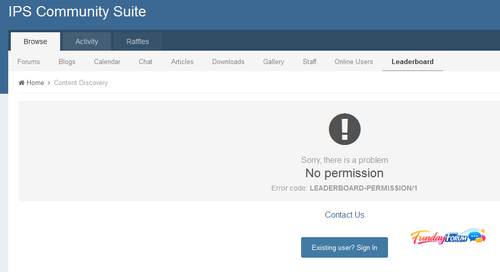
By default, IPS4 will automatically log out other sessions if you log in more than 90 days after logging into the first device. This behaviour is counter-intuitive and annoying for users. This plugin prevents members from being automatically logged out because they logged into a new device. This free plugin is provided with no warranty of any kind, either explicit or implied, to the extent permissible by the applicable laws. Please do report bugs to me, but I make no promises about fixing them.Free -
Version 1.0.0
1 download
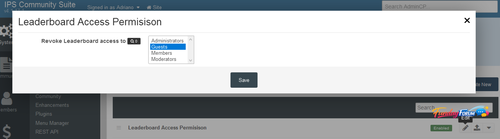
Will restrict Leaderboard acces to specific groups. Settings: Groups that won't have access to LeaderboardFree -
Version 2.2.4
7 downloads
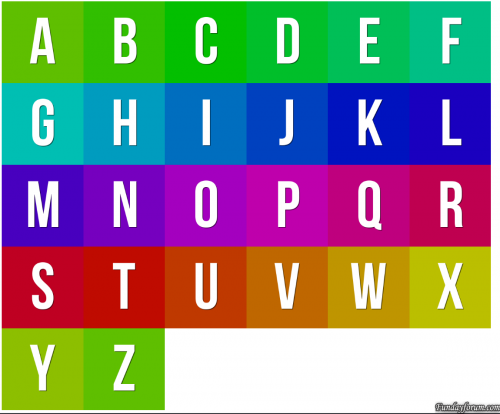
I was bored and was browsing around and saw a list of "new features" in a competing software to IPS and was like "now IPS should have this". if the USER has the "default" user avatar, the "egg person" not sure what else to call it, this plugin will take the first character of their username and create a color code out of it (they are not unique to the user, its not that advance) and create a "text based" avatar for the account. feel free to use however want or add it to any project you'd like. no support will be provided. What's New in Version 2.0.2 if you have the plugin installed, please remove it before installing this. added in support for imagick, if you have imagick installed and your suite set to use it, it will use this to generate the images. the images come out cleaner. prerendered images are now rendered by imagick.Free -

Version 2.2.2
7 downloads
Application Forms opens up a world of possibility for you and your community by designing, curating, and managing custom application forms. Application forms can be designed from scratch with an infinite number of custom field types in over 20 different types, enabling you to fill any need you might have. Let your community submit their application for your position, proposal, project, or idea! Do you want to harness the power of your community for brainstorming ideas? Do you want to run contests where everyone must follow the same guidelines? Are you looking for way to interview new clanmates or members? Do you require a background check on new staff members? If you need a way to ultimately manage user input in a methodical and orderly manner, then Application Forms is the best way to do it. Instead of wasting your time with forum posts where users may or may not follow your posting guidelines, require and draft a custom proposal form where users must follow your specifications. Buy Application Forms to build amazing submission forms! FEATURES Application Forms features deep integration with native IPS functionality, giving you the design macro to let IPS power your custom field types: Address Checkbox Code Color Date Editor Email Address Member Number Password Poll Radio Rating Select Box Telephone Number Text Text Area Upload URL Other features include: Unlimited number of Forms Unlimited number of fields in each Form View all submissions with ability to edit and PM member Auto-link to new Forum Topic with ability to create poll for voting Send a PM After form submission Only allow members to apply once Member benefits such as promoting membergroups and secondary membergroups This application also includes support for the Rules AppFree -
Version 4.1 4.1
10 downloads
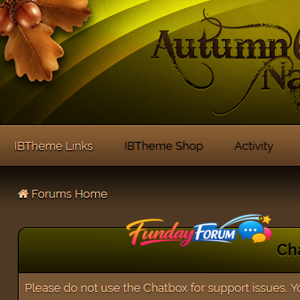
Works with the latest versions of these applications: IP.Board 4.1.x Admin Control Panel IP.Commerce IP.Pages IP.Downloads IP.Gallery IP.Blog IP.Calendar IP.Chat Chatbox Included in the download: Skin XML file for installation All fonts used throughout the skin logo.psd team-icon.psd IBTheme copyright and license agreement Admin CP is themed to match forumsFree -
Version 1.0.0
15 downloads
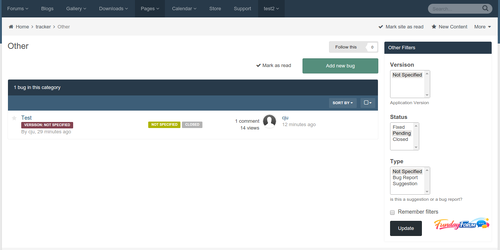
Read the Install.txt file for proper use. Used to create a custom Page to report bugs or suggestions.Free -
Version 1.0.0
3 downloads
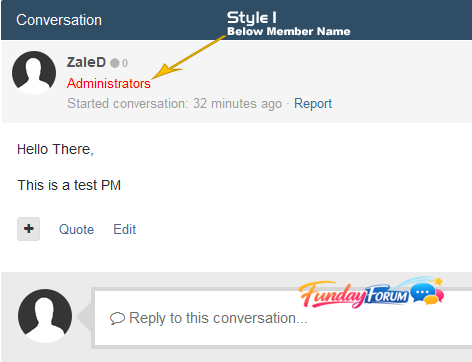
This plugin will display member group in messenger in two locations (as you choose): - Below Member Name - Beside Member NameFree -
Version 1.0.2
2 downloads
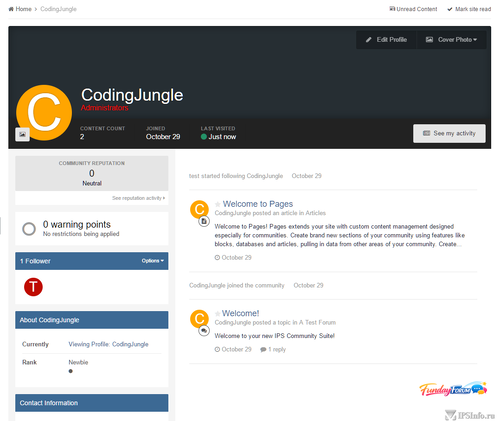
I was bored and was browsing around and saw a list of "new features" in a competing software to IPS and was like "now IPS should have this". if the USER has the "default" user avatar, the "egg person" not sure what else to call it, this plugin will take the first character of their username and create a color code out of it (they are not unique to the user, its not that advance) and create a "text based" avatar for the account. should work with a majority of places as long as they are using the IPS templates: userPhoto and uaserPhotoFromData. the css is pretty straight forward, and follows a similar path to what ipsPhoto does (related to sizing and positioning). should work just like if there was an avatar image. the colors for the backgrounds are auto generated, if you want to override the colors, you can do this: take the first character of the username, uppercase it, as name2color Avatar will uppercase it. for our example we will use "bob". in your customs.css add this: .toColorNameClass_B { background-color: orange !important; //you can use any hex/rgb you want here } this will make any B name2color avatar's this color. feel free to use however want or add it to any project you'd like.Free -
15 downloads
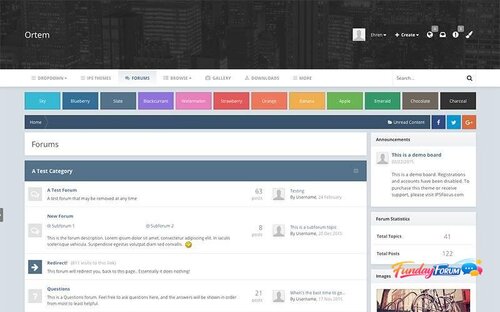
Demo Ortem for IP.Suite 4.1.x Bugs fix for 4.1.16.1 Ortem is a minimalistic design focused around a simple color picker, allowing your members to easily customize the colors of the layout by selecting from a preset array. The header area is large enough to accommodate for big logos and full width banners, and the navigation bar sticks to the top of the screen for easy access.Free -
12 downloads
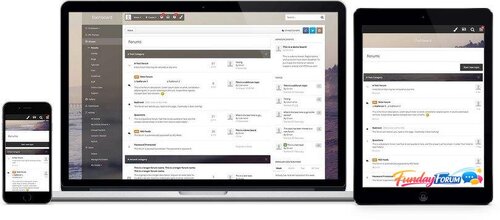
Demo Dashboard for IP.Suite 4.1.x Bugs fix for 4.1.16.1 Dashboard is a feature-rich IPS theme and includes a nice blur effect behind the vertical navigation panel, a background changer and 'transparent' strips which allow the background image to alter specific internal areas of the theme.Free -
Version 4.1.16.1
10 downloads
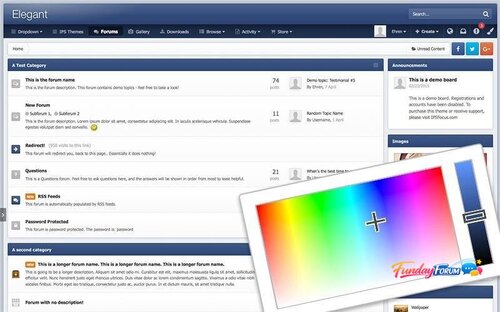
Demo Elegant for IP.Suite 4.1.x Bugs fix for 4.1.16.1 Elegant is a minimalistic theme controlled by a color picker, allowing each of your members to choose their own unique color scheme.Free -

Version 1.0.1
10 downloads
Displays a banner advert or header message on selected Commerce pages. Can be used for promotional offers etc. Use built in advert (single image upload, linked image or HMTL), IPS formatted message or plain text. Group Selector Page Selector: index, category, product. Sidebar widget to add banner to other pages Compatibility: tested on 4.1.14.3 with default skin only. Requirements: Commerce App NEW: Sidebar widget to add your banner to any page on your site. Bug Fix: Fixed multiple page selectorFree
-
Recently Browsing 0 members
- No registered users viewing this page.