
- 📢 Welcome to FundayForum – Explore Trending Topics
- 🌟 Discover What’s Trending Today
- Prince Harry, Meghan finally give up hope for reunion? Expert explains
- Rahul Gandhi's nephew says he was forced to remove protest artwork from Delhi exhibition
- Two teenage girls arrested in alleged Southern California school shooting plot
- Jimin shocks fans, bids goodbye to blonde locks for BTS Argentina shows
- Prince William says 'there is no going back' with Harry
- Taylor Swift sparks backlash for selling 'overpriced voice memos' on vinyl
- PM backs KP emergency rule, blasts PTI for 'criminal negligence' over worsening security
- Cara Delevingne shares rare bts of Taylor Swift's 'Patient Zero'
- Charli XCX apologises to fans as she cancels Arizona show
- TTAP sets two conditions for PM-Achakzai meeting after govt's offer for talks


Waqas Dar
-
Posts
11,303 -
Joined
-
Last visited
-
Days Won
559
Content Type
Profiles
Events
Forums
Gallery
Blogs
Downloads
Articles
Page News
Release Notes
Store
Everything posted by Waqas Dar
-

application IPBWI for WordPress v4 - Sync Groups 4.0.0
Waqas Dar posted a file in IPS 4 Applications

5 downloads
Automatically synchronize WordPress' user roles with IPS community suite groups! No core files touched! Once you have mapped the WordPress user roles with IPS user groups of your choice, you will get IPS secondary usergroups synced with WordPress' user roles. Primary Group in IPS community suite remains untouched - this allows you to give users in IPS and WordPress extra permissions without showing them to public. You can map each WordPress user role to a unique corresponding IPS user group or map several WP user roles to the same IPS user groups - once a user group in IPS is removed or added from member, all mapped user roles from WordPress are synced instantly, too. Important Requirements: IPBWI for WordPress v4 installed on WordPress and IPS Community Suite Please note that we only test on most recent release version of IPBWI for WordPress v4. Documentation Bulk Sync/Import all members at once? This Group Sync addon works for all future changes. If you want to bulk sync or import existing IPS members to WordPress, you will need IPBWI4WP – IPS User to WordPress ImportFree -
![More information about "Advanced User Info [IPS]"](https://fundayforum.com/uploads/monthly_2018_04/Capture.thumb.PNG.72f8d573ed4d79680119100e9dfd8d4a.PNG)
Version 1.0.2
43 downloads
Turn your boring type of information the user panel in a nice user information panel Information Added by (each of them has its own Font Awesome Icon) Group Rank User ID Counting posts Reputation Effective Date Online status mood of the user (must be set HQ4 mood) Total wins high-rap per day (banner must be active) Show or hide any of the users - the plugin panel - Edit You can add your own user profile, go to the Admin Panel -> Settings -> Profiles now: Create a new field and select the field that you want to use Seeding is required, the field format: Enter the code below and replace the amazing code font to the one you want to use <li class = 'ipsResponsive_hidePhone' > <span class = 'aupTitle' > <i class = "fa fa-id-card-o" aria-hidden = "to true" > </ i> {title}: </ span> <span class = 'aupContent' > {content} </ span> </ li> <br/> <hr class = 'aupHr' >Free -

4 downloads
This "rule pack" consists of starter (example) rules which you can import into the Rules application and learn from, or customize to fit your own needs and use them in production. In order to use any of these rules on your site, you must first install the Rules application: The following rule sets are included: Prestige Reputation System The prestige reputation system is an example of how you can create your own reputation rankings based on the existing reputation system built into IPS4. It works by attaching a new integer data field to members called "Prestige Rank", which in turn is updated when a member recieves reputation in the core IPS suite. You can customize the rule conditions to your liking to determine when a member actually recieves the "prestige" reputation rank ( the default is when an admin or moderator gives the reputation.) Also included is another rule that will promote the member to a group of your choosing when they reach a certain "prestige" rank level. You can customize the threshold and the group by editing the "Promote member" rule settings. Member Re-Engagement Rule Set This rule demonstrates the power of scheduling with rules. The first rule in this set schedules an email for a member to be sent 2 months after they log in to the site. If they do not log in again within that timeframe, then the email will be sent. However, if they do log into the site again, then the email is simply re-scheduled to be sent another 2 months in the future. This way, you can have a "re-engagement" email always scheduled for members to be sent out if they haven't logged into the site for a while. Another rule included with this set will delete any scheduled "re-engagement" email for a member when they are removed from the system. Auto Lock Old Topics This rule set schedules a topic to be automatically closed, a reply made, and a PM sent to the author after a period of inactivity of the forum topic. When a reply is made to the topic, the date for auto-locking is automatically rescheduled for the set time period. If the topic is not replied within that time period, then the custom action is taken which locks, replies, and PM's the topic author. Much more to come. Follow and stay tuned. If you have any ideas or requests for new rules to go into the example pack, drop me a line in the discussion topic!Free -

Version 1.4.1
20 downloads
Synopsis Automatically update/modify content and member attributes, statuses, and properties Automatically send emails, create conversations, and send notifications Add your own custom data fields to any content, categories, or members Build relationships between fields and content to keep data synchronized Create rule sets that work together to form automated workflows Define your own custom actions that can be used in rules Schedule actions to happen at specific times (one-time or recurring) Schedule bulk processing routines for content and members on your site Share and refine your rules with other communities using import/export Example Rule #823: This will send all new members a welcome email after their first post. Example Rule Set #56: Rules also allows you to attach new “custom data” fields to any member, content container, or content type in your system which you can use to create all new features and behaviors on your site that go beyond what was ever imagined with the core IPS suite. For example, you can create a new “integer” data field for members and call it “Prestige”. Then you can create a rule such as: Congratulations, you’ve just created a brand new type of reputation system. And to take that example a step further, you could write another rule such as: You have just created a whole new social promotion system within your community! The possibilities of what you can do with rules are only limited by your imagination. Expansion Packs (plugins that add ECA's to apps): Forums Calendar Pages Commerce Enhanced Applications (apps with customized ECA's): Group Collaboration Account Deactivation by Makoto Forms by Mike John Advanced Path Aliases Points Economy iAwards by -RAW- Rule Packs (pre-built customizable rules): Rules Starter Pack free Member Pip Ranks System Auto Join Collaborations Move Topic Between Collaborations 8 Hour Lock Forum Game Topic Ban Members Rules Cookbook on IPS Guru Notable Features Over 500 built in events, conditions, and actions for stock IPS products and contributed apps. Rule actions can be configured to happen in real time or at a future time. Schedule and unscheduled actions from inside of rules or manually through your ACP. Built in lists of “replacement tokens” for including variable data in text entry fields (like email content) Fully extensible by other apps and plugins to add new tokens, events, conditions, and actions. Look for Rules Expansion Packs in the marketplace which add new events/conditions/actions. Create your own custom actions within the rules app which can be invoked by rules. Create your own custom data fields for any entity on your site to manipulate with rules. Rules can be grouped together into rule groups and rule sets for easy management. Easily import and export rules and sets to share with friends or distribute as your own rule packs. Built-in rule debugging console for full visibility of what your rules are doing on your system. Built in rules error and performance logging console. Complete Stock ECA List: Standard Content Driven Events Content has been created or updated Content has been approved Content has been pinned / unpinned Content has been featured / unfeatured Content has been locked / unlocked Content has been hidden / unhidden Content has been reported Content has been deleted Content author has changed Content Item has been published / unpublished Content Item has been moved Content Items are being merged Content Item tags have been updated Content Item is being viewed Standard Custom Events Custom data has been updated Custom event has been triggered Standard Member Driven Events Member logged in / out of system Member account is created Member profile is updated Member is flagged as spammer Member is unflagged as spammer Member is banned Member is unbanned Member account is validated Member accounts being merged Member account is deleted Member receives reputation points Member has been given a warning Standard Global Events Any record is created or updated in the database Any record is deleted from the database Any page is being viewed Standard Content Conditions Content is of a certain type Content has a particular status ( pinned, locked, featured, etc ) Content has a particular author Content has particular tags Content attribute values ( comment count, start date, last post, etc ) Content is in a particular container ( Forum, Category, etc ) Standard Member Conditions Member is in certain member group(s) Member has a particular status ( validated, banned, etc ) Member attribute values ( post count, join date, title, etc ) Member is following another member Member is ignoring another member Standard Global Conditions String values ( starts with, contains, ends with, etc ) Number values ( greater than, less than, equal to, etc ) Truth values ( is true, is false, is not empty, etc ) Value type ( string, integer, currency, etc ) Array (list) values ( list length, list contains, etc ) Date comparisons ( before, after, on, etc ) Object comparisons ( object class, object subclass, etc ) Board Status ( Offline / Online ) Execute Custom PHP Code Standard Content Actions Modify content tags ( add to, remove from, set explicitly ) Pin / unpin content Feature / unfeature content Lock / unlock content Hide / unhide content Delete content Change content author Move content to a new container Create new content Create new comment Standard Custom Actions Trigger custom action Update custom data value Standard Member Actions Change primary group of member Add secondary group(s) to member Remove secondary group(s) from member Set secondary group(s) on member Change member title Flag / unflag member as spammer Ban / unban member Prune member Standard Global Actions Send an email Create new private conversation Create new member notification Display inline message on page Redirect to another page Delete a scheduled action Execute Custom PHP Code New in Version 1.1.x New range of custom data input fields for public/admin use Limit custom data fields by category/container Set member group permissions on custom data fields View complete overview summaries of rules and rulesets Choose content items from autocomplete form input New in Version 1.2.x added ability to manually schedule custom actions added ability to schedule custom actions on a recurring basis added ability to bulk process records with custom actions added new table filters to scheduled actions pageFree -
download IPS Community Suite 4.1.19.2 Nulled With All Apps
Waqas Dar commented on Waqas Dar's file in IPS Community Suite 4 Resources
 u welcome keep sharing and commenting thats wht we need for u guys just a lil promotion
 -
download IPS Community Suite 4.1.19.2 Nulled With All Apps
Waqas Dar commented on Waqas Dar's file in IPS Community Suite 4 Resources
u welcome -
Version 1.0.6
12 downloads
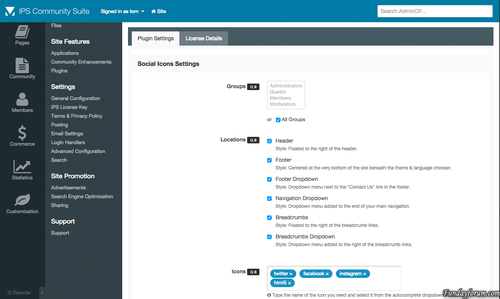
About Social Icons for IPS4 is the most advanced plugin available for integrating your favourite social media networks into several locations throughout the suite. This plugin takes full advantage of font icons by allowing full control over size, colour and positioning using simple cross-browser & cross-device CSS code. This eliminates the need for additional raster based icons thus massively improving site performance. Features The plugin is shipped with over 170 vector icons that cover all popular social networks. Choose to show your icons in seven locations including – header, footer, navigation & sidebar. Drag & drop icons directly to your homepage widgetable areas. Search for and then preview the icons you need directly from the plugin settings. Customize the size of your icons directly from the plugin settings. Want to override the default brand colors? We’ve included a setting for just that. The settings offer complete control over which groups can and cannot use the plugin. Integrated with IPS4 Localization. Coming Soon Additional icons (after several have been requested)Free -

Version 1.0.0
7 downloads
how to create an Hello World app? I'm uploading the .tar with the app and dev folder for those lazy people tutorial is here.Free -
Version 1.0.0
0 downloads
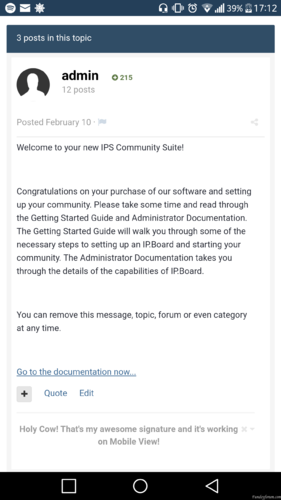
This plugin is enabling member's signature in topic.Free -
Version 4.1.19.2
418 downloads
IPS Community Suite 4.1.19.2 Nulled With All Apps This is a security release and we recommend all clients upgrade as soon as possible. After downloading file update facebook.php file too else ur facebook login won't work Facebook recently disabled v2.2 of their OpenGraph API which may affect Facebook logins if you created a Facebook Application that is set to v2.2. If you find that after using the Facebook log in button, you are returned to the log in form with a red banner informing "Something went wrong", please apply this fix. Simply download the linked file and upload to: system/Login/Facebook.php Key Changes This release focuses on bug fixes and performance. You should see speed improvements. New features include: A new moderator setting to restrict users from ignoring moderators. A new group setting to allow members to lock their own content. A new group setting to hide a group from filters in search. When moving content moderators are now prompted for where you want to be redirected after the action. Activity Streams can be created with condensed view as default. An email is now sent when an account is locked for too many bad login attempts. When editing a member in the AdminCP, it will now show how much of their messenger storage quota is being used. Release Patches We sometimes release patches for issues that come up frequently between full releases. If you are experiencing any of the issues below on this version you can download and apply the patches using the instructions provided. An issue has been identified where certain hooks may stop working on 4.1.19. If you are having problems with some third party plugins or applications, upload this file: system/Theme/Theme.php If you are encountering problems with services that rely on outbound connections such as Sparkpost, Gravatar, RSS Imports etc please upload the following files: system/Http/Request/Curl.php system/Http/Request/Sockets.php Additional Information This release contains two stored XSS security fixes caused by: Profile cover photos not being properly checked to be valid images Sidebar block titles not being properly escaped (this can only be triggered by moderators who have permission to edit the sidebar)Free -
Version 1.0.2
6 downloads
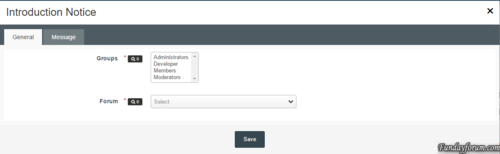
This plugin will redirect a user to a forum until they have posted in it. Settings: Groups - selected groups that will be redirected if they haven't posted Forum - the forum to redirect users to Title - title of the notice Content - content of the notice Fixed the issue where all users no matter which group (except guests) where being redirected.Free -
Version 1.0.1
1 download
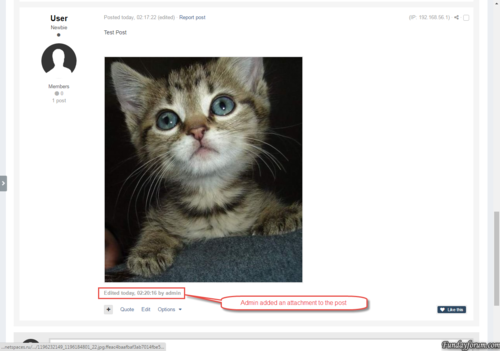
The plugin changes the owners of the attachments. The author of the post becomes the owner attached to the post attachments. This can be useful if your moderators often change other people's attachments. The plugin has no settings, and runs as a task 1 time per day.Free -
Version 0.0.9
6 downloads
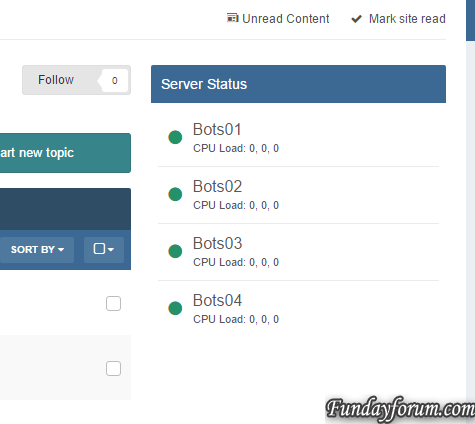
Server Console Simple Application to observe multiply servers and bigger infrastructures. The application was basically written that I can keep track of all my servers, without having different pages for monitoring, backups and so on. Features: Frequent checks if a server is online/offline and also getting some information, such as: CPU Usage CPU Load RAM Usage (free/total/percentage) DISK Usage (free/total/percentage) Uptime Block/Widget that users can see the status of the servers as well Dedicated Front Page to observe the status Maintenance mode for servers As this is only an early development a lot things are planned: Graphs displaying status/values over the time More detailed stats Dedicated status page Notifications on downtimes / uptimes Backup system This applications requires the PHP-cURL extension! This applications requires that this script is installed on any client server and is reachable by the forum server. Besides there application there some plugins that are created per request, but are not mandatory or useful for everyone using the application. Here is a list of plugins: Allow users on selection to select servers which they want to get notified from, commonly useful for hosting companies with infrastructure and a support forum: https://dev.grief.network/files/file/3-server-console-register/ What's New in Version 0.1.9 Added protection against false positive alerts Created config option to define failure tolerance per server before the status is actually changedFree -
Version 1.0.0
22 downloads
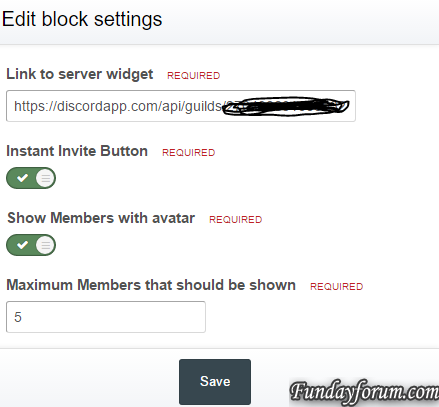
Simple widget to display activity and online members on a discord server. The widget uses the wdiget.json api provided by discord: This widget requires that PHP cUrl extension.Free -

Version 1.0.0
17 downloads
Includes: Fonts .PSD FileFree -
Version 2.1
6 downloads
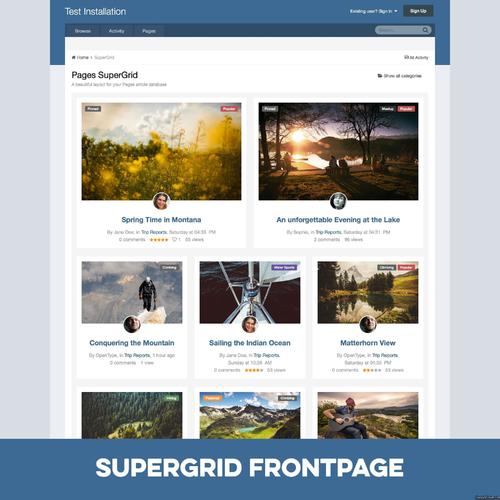
Pages SuperGrid is a set of Pages templates and a complete solution to make your Pages databases (with articles, directories and so on) appealing and engaging. What’s needed: IPS 4.1 in its most recent version with the Pages application A pages databases that uses the stock Record Image field and has images with a sufficient resolution uploaded through that field. (Technically, the templates also work without images, but it’s an image-centered design and works best when most or all records have images.) Which templates are included: A beautiful grid-based Front Page template with two records featured at the top — for when your database is set to article mode. A beautiful grid-based Listing template replacing the dull forum listing design — for when you open a category or have a database without categories. A unique Record View template with a large header image — for when you open a specific record. A category listing template – in case you use more than one category. Note: You can use the templates for any number of databases, but the settings will always apply to all SuperGrid templates. 2 Bonus Features included: Twitter Card support! Yes, you read that correctly! The SuperGrid record view template adds Twitter Card support to your records. You just have to provide your Twitter handle. Tweets with images have a significantly higher click rate and with Pages SuperGrid any link to an article in your database (which has a record image) will automatically get a beautiful Twitter Card like this: Block template! Create blocks anywhere on your site – pointing to your database – and make them as beautiful as the database itself. Detailed Feature Description and Notes: Pages SuperGrid is built with the IPS design framework and is therefore fully responsive and compatible to most well-coded/well-designed themes. The styling of your theme(s) is inherited and the Pages SuperGrid templates will usually work out of the box. The template is designed to work on single-column pages with or without a sidebar. The grid will automatically adopt to the available width and collapse on smaller devices. The content field is not shown in the grid-based listing templates and all images will be scaled and cropped (without distortion) to the same size to allow a consistent look. If you need to show the content field or need to use images shown with different sizes, check out Taman’s templates. The templates come with lots of options you can easily adjust within the template. Front Page/Listing Template: Show author/category/date: Yes/No Alignment author/category/date Show comments/views/ratings/likes: Yes/No Alignment comments/views/ratings/likes Show record owner’s avatar: Yes/no Alignment record owner’s avatar Title alignment Image Aspect Ratio Use thumbnail or full-size images Turn images into record link: Yes/No Assign fallback image for records without an image Show “featured record” badge for featured records: Yes/No Pick badge style for featured records Show “pinned record” badge for pinned records: Yes/No Pick badge style for pinned records Record View Template: Image Aspect Ratio Pick Avatar size from 7 options Turn header image on or off Assign Twitter handle for Twitter Cards Show “featured record” badge for featured records: Yes/No Pick badge style for featured records Show “pinned record” badge for pinned records: Yes/No Pick badge style for pinned records What's New in Version 2.1 Minor update to also support manual pages beside horizontal/vertical blocks on Page Builder pages. You only need to upgrade from 2.0 if you need this feature. The upgrade requires a complete deinstallation of all 2.0 components.Free -
Version 1.0.0
1 download
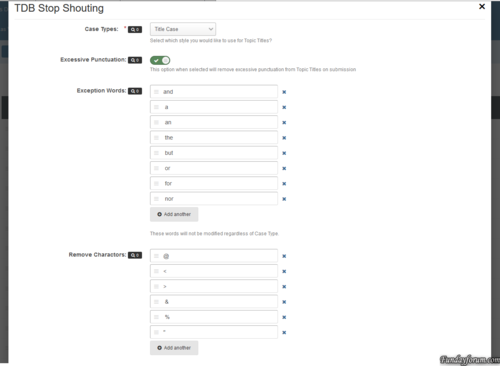
What does it do? This plug-in prevents your members from trying to steal attention, by entering a title in purely uppercasing with lots of punctuation. The Plug-in will try and strip the text to a more readable format that is constant with your board posting guidelines. Plug-in Settings: Case Types: There are 5 different types of casing that you can use. No Modification, Sentence Case, Upper Case, Lower Case and Title Case. Excessive Punctuation: This tries to reduce excessive punctuation from the title. This will turn ??????? to ? and !!!!!! to !. Exception Words: These are word of your choosing that will never have their casing changed, regardless of your plug-in settings. If the word is upper case, all of these words in the title will be forced Upper case for example. Remove Characters: These are characters that will be removed regardless of how many there are in the title text. Names that begin with O', Mc or Mac will be processed automatically from o'neill to O'Neill or mcneill to McNeill. At the moment, only the Forum Topics and Pages Applications will have their titles changed. Please note: This is a RC version and use on a production site at your own risk.Free -
Version 1.0.2
10 downloads
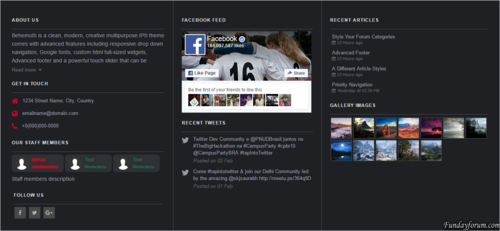
Advanced footer allows you to add a footer to your site with many blocks including Facebook feed, Twitter feed, Gallery images, Articles feed, Staff members, Custom blocks and more, Beautiful and clean design it is fully responsive and perfectly suits your theme due to its highly customizable options. Advanced footer is featured with two row layouts with multiple columns it has a unique design with a lot of options, Footer blocks are entirely customizable, resizable, and reorderable. __________________________________________________________ Features: Up to 10 blocks and more in feature updates Blocks: About us, Staff members, Social links, Get in touch, Quick links, Twitter feed, facebook feed, Custom block templates for gallery images and articles, two Custom blocks. Custom color options. / or Match colors to your theme. Resizable and reorderable blocks. Highly customizable options. Super clean and fully responsive design. Fixing facebook and twitter feed not showing up.Free -

30 downloads
Chameleon by ipsfocus Updated for IPS.Suite 4.1.18 This update also includes minor bug fixes based on customer feedback Chameleon Dark is an adaptive skin which uses semi-transparent "frosted glass" content boxes, allowing your background image to partially show through. This allows you to easily customize the genre of the theme by changing only the background image. The header collapses on-scroll, and stays at the top of the screen for easy access. Themes features Theme Settings Easily enable, disable or modify theme features such as background images, logos, social media links, guest messages and colors. This makes modifications and upgrades very simple since little code changes are required. Sticky, shrinking header The header shrinks in size and sticks to the top of the page for easy access to user controls and the board index. Frosted Glass content boxes Your background image is displayed beneath your content boxes which have a frosted glass effect (available in all modern browsers except IE and Edge). Background picker If enabled, your members can choose their own background image from a predefined selection and their choice is saved via cookies. Guest message A customizable message can be shown to guests, prompting them to either register or login to your forum. Two designs, "billboard" and "alert" (shown) are available. Social links Over 20 social links can be enabled/disabled and customized to your own URL, allowing you to easily link to your social network pages (facebook, twitter, etc). If your site doesn't exist, it's easy to add custom icons to the list! HTML logo with slogan Easily add/edit your text logo and slogan from within the theme settings. If required, the text can be replaced by an image instead. Mega Footer A mega footer with configurable column numbers and content can be enabled and customized all within the theme settings. High quality on every screen! By using scalable fonts and css effects to create the theme, it'll look great on any screen - even ones with high resolutions! Want to see more? Check out the screenshots and live demo on IPSFocus!Free -

Version 1.1.11
26 downloads
Classifieds System is an application that enables your members to list items for sale/trade, monetizing your community. https://invisionpower.com/files/file/8311-classifieds-system/ Requirement: Commerce: https://invisionpower.com/features/commerce How does it work? Admin can enable TRANSACTIONS, which will allow members to buy items directly from another member via app and the advertiser receives the amount paid via account credit. If TRANSACTIONS is disabled, things has to be done manually: member needs to contact the advertiser in ways he wants (he chooses when posting the advert), make the deal, then the advertiser will set the advert as PENDING DEAL. After the payment/deal is done, advertiser sets the advert as COMPLETED. In both cases, if the advert is a SALES advert type BIDS (offers) are allowed if the admin enables the setting and if the advertiser also enables it when posting the advert. Notices: THIS IS NOT AN UPGRADE of the old app (for IP.Board 3.4), so if you used the old app you probably still have data from the old app in your database, take a read on manual.pdf (page 2) in the zip file or request support before you install this app. Each purchase entitles you to use Classifieds System on one Community installation. Features: Unlimited categories of adverts, plus unlimited depth of parent-child relationships with a lot of settings Per-category permissions to show category, view adverts, submit adverts, ask questions and review adverts Category Icons Ability to choose the order and which blocks to display on the app index: Expiring Soon, What's New and Categories block Support Extra Fields so you can define different fields per category Integrates to Commerce, so you can choose a specific payment gateway, tax, fee and comission and use multi-currencies. Ability to force users to fill the price in currencies Adverts Management on ACP: a place where admins can control status of adverts: expire, complete, set as active, change expiration date, etc. Advert History (advert view): works like the Moderation History, but will log all actions related to the advert itself, like who changed the expiration date, who set the advert as complete, etc. Ability to post external advert link: you can link an advert posted in other sites, like eBay, etc. Ability to hide adverts when expired and/or completed from category view Ability to switch between currencies with a click to display advert prices Ability do add a default address for new adverts in Account Settings. Ability to add multiple packages and charge for your listings at varying price points to suit your users. Listing packages allow you to choose whether or not specific member groups should need to pay to advertise and also whether adverts will be billed according to the value of the item being sold Central area where advertiser can view all expired adverts and renew them at anytime, if the package allows renewal Users can make offers (bid) to the adverts, if the advertiser allows Advertiser can reject offers Admin can enable transactions, which means that a user can buy something from another member directly, monetizing the site with fee/comission Per member settings: allows to access the app and allows to submit adverts Per group settings: allows to access the app, how many approvwd content items must have to access the app and mpderate first X free adverts from users of the group. That will make moderator's life easier Integrates into IPS4 Moderating system, which all commons permissions, such as pin, unpin, delete, feature, move, etc. Advert Images settings: require image, max number of images per advert, max image filezie and max image dimensions Robust Admin Restrictions Ability to take specific actions when a member is deleted or flagged as a spammer Ability to give account credit to new members Ability to set the minimum/maximum title length and description length Ability to remove the upload of attachments in the advert description editor Submit questions and reviews to advert. Admin can choose if new questions or reviews are moderated, per category. Advertiser can reply to the questions Ability for users to report potentially offensive content using the built-in Report Center Search integration: search adverts along with the rest of your community’s content Supports item marking, allowing your users to see what adverts have been added or commented/reviewed on Integrates into Activity Streams Integrates to Share Links to share Integrates to Google Maps if and address is provided in the link submission (IPS 4.1.13+: Google Map APIs now requires an API key. Go to AdminCP -> System -> Community Enhancements to enable Google Maps support) Integration to IPS4 Announcements Integration to Member Filters (Bulk Mail, etc.) Integration to IPS4 Advertisements Supports the built-in tagging system including prefixes Support for notifications such as new adverts and questions comments on adverts Ability to follow/like categories and individual adverts Ability to add adverts to a wish list Drag & drop reordering of categories, advert types, items conditions and packages in the ACP. Ability to create RSS feeds of all adverts Integration with ACP Live Seach (categories, advert types, items conditions and packages) Friendly URLs for adverts and categories Matrix permission on Groups (editing a group) More. Support and Online Tests: Preferably, submit a report to the official Bug Tracker for this app: http://www.sosinvision.com.br/ips4/index.php?/tracker/classifieds/ Account to test the app: URL: http://www.sosinvision.com.br/ips4/index.php?/classifieds/ User: Test Classifieds Password: 111111 Forthcoming versions: Shipment feature Feedback system APP will be improved based on feedback and suggestions (that will be pondered by me due to technical reasons) What's New in Version 1.0.3.1 New Features/Enhancements: 4.1.18 Compatibility version (quick edit of link title on Link view). Watch the video: https://youtu.be/IsBhvSQV3FQ Added Contact Details: Other to the Accounts Settings -> Adverts Defaults. Integration to Trader Feedback System ( version 2.2.4 or higher), by @stoo2000 Captcha on email contact form for guests New setting to display other adverts from the advertiser in advert view (slide block) Advert status on index blocks (hidden and payment pending), for those who have permission to view Advert rating on category view Rework on category template for mobile devices to make the thumbnail larger Fixes: All issues reported in the Tracker were fixedFree -

Version 1.0.0
5 downloads
This plugin will preserve the identity of your moderators by using a generic user as the author of warnings. Notes: Only moderators with permission Can issue warnings? can view the real moderator on warning details Warned members won't be aware of the real moderator who issued the warning: the user won't see the real moderator on warning details or on received email The generic moderator does not have to be a moderator; you can choose a regular member. Real moderators will be back on plugin uninstallFree -

46 downloads
Key Changes Fixes the following issues: SQL error when adding Commerce package or customer field. SQL error when setting up topic archiving. The ‘show reply’ button in notification popup reloads the page instead of loading content inline. Opting out of security questions may not work. Word filters not applying correctly. Reordering custom profile fields may not work properly. Draft or future blog entries may be included in the sitemap. Rounding issue with half-percentage tax rates in Commerce. Adds a "More Colors" option to the color dropdown in the editor.Free -

Version 1.0.2
57 downloads
Gaming style black theme for IPS 4Free -

Version 4.1.19.4
7 downloads
If a specific conversion has things available to convert but there are none in the third party database, you will no longer be required to convert them. For example, if you are converting from vBulletin and you do not have any profile field groups, you will not be required to 'convert' this step. The converters have been updated to work with developer mode properly (which has in turn led to many miscellaneous bug fixes) Converting from SMF will now prompt you to choose whether to keep member real names or display names when converting members Full language abstraction Redirections are now handled automatically without the need for uploading extra PHP files (and in the case of some conversions, overwriting the default index.php upon each upgrade) Converted links (i.e. links to topics, forums, profiles, etc.) will no longer redirect to the new locations within the Suite if the user does not have permission to view the content Gallery images embedded as attachments in posts in vBulletin will now work correctly post-conversion (for new conversions) Improved converters so that conversions that require a 'parent' (i.e. converting forums requires members to be converted first) will not allow you to start until the parent has been converted Converter version number has not been set inline with the rest of the Suite API endpoint added for converters to fetch details about what can be converted Joomla, Photoplog, Coppermine, BBPress converters added Miscellaneous performance improvements Dozens of bug fixesFree -
Version 1.0.1
2 downloads
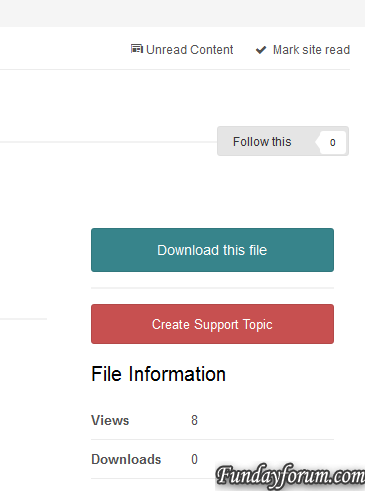
This plugin will create missing topics for files. A button will appear to staff when these requirements are met: The Downloads application is installed and enabled. The Forums application is installed and enabled. The downloads category has a Forum set on the Forum Topics tab. The file has no topic associated with it. Fixed bug preventing topic from being saved if previous topic was deleted.Free
-
Recently Browsing 0 members
- No registered users viewing this page.