
LIVE UPDATES
- 📢 Welcome to FundayForum – Explore Trending Topics
- 🌟 Discover What’s Trending Today
- King Charles team extends special invites after Harry's 'cry' for reunion
- Piers Morgan reacts to Prince Harry's latest claim, gives Duke a new title
- Matt Damon marriage hits roadblock amid career success
- Pakistan to host int'l conference on space technology for climate action, disaster risk reduction
- Diana Vickers reveals two men have ghosted her in just one month
- Princess Kate private call to Meghan as family rift turns ‘public joke'
- Megyn Kelly under fire after mocking Christina Applegate's health struggles
- Gracie Abrams dishes on preparing for 'SNL' Halloween show
- Australian fast bowler Megan Schutt suspended over medication breach
- Jake LaRavia injury: Lakers' head coach JJ Redick shares positive update after win


Waqas Dar
-
Posts
11,303 -
Joined
-
Last visited
-
Days Won
559
Content Type
Profiles
Events
Forums
Gallery
Blogs
Downloads
Articles
Page News
Release Notes
Store
Everything posted by Waqas Dar
-


Version 4.3.4
579 downloads
IPS Community Suite 4.3.4 IPS Community Suite 4.3.2 IPS Community Suite 4.3.1 IPS Community Suite 4.3.3 NULLED By Fundayforum.com Key Changes Welcome to Invision Community 4.3! This release brings numerous improvements and several new features, so be sure to read our announcement for everything new! Version 4.3.2 is a small maintenance update to fix issues reported since 4.3.0. **IMPORTANT UPGRADE NOTICE** Please note that not all third party applications and themes are yet compatible with Invision Community 4.3. If you utilize third party resources, including custom themes, please ensure they have been declared compatible by their respective authors or your site may be non-functional after upgrade. There is a new compatibility field on all marketplace resource listings. If this field is missing or does not specifically list 4.3, it is likely not yet compatible.Free -
Version 4.1.2
7 downloads
What is it? Itzknotty is a small application that brings several widgets with it to display your tweets from twitter or posts from your facebook pages / groups: A widget to display the latest posts of a configured facebook page A widget to display the latest live stream of a configured facebook page. The livestream widget will only be displayed if there are users viewing the stream at the moment. A widget to display the tweets of a configured twitter page There is also a page... ...that shows the complete activity stream of the configured facebook page. The user can click on a button to load the next activity items from the facebook page. Configure the application (Facebook) Go to the admin control panel of your site and login with your account. Go to Community > Itzknotty > Settings Select the tab for the facebook settings Fill in your data: Facebook Pagename The name of the page you want retrieve data from (https://www.facebook.com/your-pagename). You could also insert the id of a group or other endpoints that support the "feed" configuration. But: the data must be public accessable! Facebook App ID The app id of your application. For further information how to create an app scroll down. Facebook App Secret The secret of your application. Place the widgets you prefere to your board. Add a link to the complete stream if you want: How to create a Facebook application to access data of your page You need an active Facebook account to create an app. Go to https://developers.facebook.com/apps/ and make sure you are logged in with your preferred account. Click the button "Add a new App" And fill in the information for Display Name, Contact Email and choose Apps for Pages as category. Click on Create App ID and confirm the security check to proceed. Navigate to the Settings page in the left navigation bar. Copy your App ID and your App Secret and insert both in your admin control panel. Everything should work now. Configure the application (Twitter) Go to the admin control panel of your site and login with your account. Go to Community > Itzknotty > Settings Select the tab for the twitter settings Fill in your data you can get from your twitter application. Place the widgets you prefere to your board. How to create a Twitter application to access data of your page You need an active Twitter account to create an app. Go to https://dev.twitter.com/ and make sure you are logged in with your preferred account. Click the button "My Apps" and "Create new app" Fill in the details and accept the Developer Agreement. Choose "read permissions" only to be more secure. You do not need write permission for the application. You can copy & paste your data from there Update Facebook Graph SDK to the latest version Make compatible to 4.3Free -
Version 1.1.5
7 downloads
This applications lets you upload an icon or use a fontawesome icon on the menu/navigation. It is fully built into the menu manager so no learning curve required. Features include: Icons appear on primary navigation bar, as well as the mobile bar. Allows for various icon types including images, FontAwesome icons, or raw HTML/CSS to not have to mess around with your templates. Live viewing of your icon directly in the menu manager. Bug Fixes Completely rewrote to be less hacky, and solve all issues with saving. However due to a limitation in IPS, some menu item types may have to manually be added to the application (extremely easy, just PM me and I can do it in 2 minutes), but no further issues should arise. Add icons for new menu items without having to save them initially.Free -
.thumb.png.37a07272a3e8e8e01653ae5ac0f23ef7.png)
Version 1.0.5
8 downloads
NOTE: THERE'S AN ISSUE USING THE SEARCH IN THIS APP DUE TO CHANGES IPS MADE TO 4.1. IN THE MEANTIME, SEARCH WON'T WORK. DO NOT INSTALL IF YOU CAN'T WAIT FOR SEARCH IMPLEMENTATION. An internal search is being developed for this app for the IPS 4.3 version. This application will allow administrators to read conversations on Admin CP. If admins has a special permission, they will also be able to VIEW hidden conversations, EDIT, HIDE/UNHIDE conversations (from appearing on PM Viewer application) and INVITE/REMOVE MEMBERS from conversations. Conversations can also be tracked by filtering keywords. If a specific keyword added by an admin is used on Conversation, users from selected group will receive a notification with a link to the conversation on PM Viewer application. Admins can also use tools to HIDE or UNHIDE all conversations with one click. Settings: Number of conversations per page Number of log entries per page Enable keyword monitoring Keywords to monitor Notification Groups: Members from selected groups will be notified when someone sends a private message that contaims a monitored keyword. Groups Permissions: Protected groups: If a member from a selected group is involved in a conversation, then this conversation will be not viewable in the PM Viewer application regardless of who else is involved. Can view HIDDEN conversations Can HIDE/UNHIDE conversations Can INVITE/REMOVE members from conversations Can EDIT message content: Users will also be able to view Revisions from posts and delete/restore the original text Tools: Hide All Conversations Unhide All Conversations Logs: Added log in all actions: view a conversation, hide/unhide conversation, add/remove users from conversations and restore or delete a revision from a post Added a Logs module to display Admin Logs from this application. Compatibility: IPS Community 4.1.X IPS Community 4.0.X Comming soon: Ability to view deleted messages Upgrade to get all the data from this app for IP.Board 3.X Note: This application was made by request and sponsored by a few users and was made based on PM Viewer for IP.Board 3.X from signet51. Fix: Not sending notifications on monitored keywords IPS 4.2: An internal search is being developed for this app.Free -

Version 2.1.0.6
55 downloads
Mind theme has been updated to the latest version 4.3. Basic instructions are included in the package. IMPORTANT UPDATE: A series of blocks has been included in this version, so it's recommended to use PAGES App.Free -

19 downloads
Animate is a dark, modern design and is named after the animated background effect seen in its header. The theme comes with an animated header and is perfect for any forum looking for a quick loading dark design - especially great for gaming forums! Theme Features Theme Settings Easily enable, disable or modify theme features such as background images, logos, social media links, guest messages and colors. This makes modifications and upgrades very simple since little code changes are required. Animated header This theme features two animated images in the header, powered by css animations. The effect can be customized extensively, or removed entirely if necessary. Background picker Your members can choose their own background image (or color) from a predefined selection and their choice is saved via cookies. This feature can be configured or disabled within the theme settings. Guest message The "Guest message" widget is restyled to grab your visitors attention. It can be added to any widget location: header, footer or sidebar. Social links Social links can be enabled/disabled and customized to your own URL, allowing you to easily link to your social network pages (facebook, twitter, etc) HTML logo with slogan Easily add/edit your text logo and slogan from within the theme settings. If required, the text can be replaced by an image instead. Mega Footer A mega footer with configurable column numbers and content can be enabled and customized all within the theme settings. Minimal HTML edits This theme has very few template files, which means in most cases, you will not need to install theme updates between IPS versions. Too easy! Latest Topic on Mobiles The latest topic title is visible on tablets and mobiles, allowing more convenient access to your latest content for mobile users. Global Message Display a message across the top of your site with important announcements. Once your members have seen the message, they can press the Dismiss button to remove it (until you configure a new one). Retina Ready All gradients, shadows and icons are generated using css which means your site will look great on all devices - even those with high resolution screens. Demo // Detailed list of featuresFree -

63 downloads
Welcome to Invision Community 4.3.0! There is a lot to know so be sure to read our announcement for everything new! **IMPORTANT UPGRADE NOTICE** Please note that not all third party applications and themes are yet compatible with Invision Community 4.3. If you utilize third party resources, including custom themes, please ensure they have been declared compatible by their respective authors or your site may be non-functional after upgrade. There is a new compatibility field on all marketplace resource listings. If this field is missing or does not specifically list 4.3, it is likely not yet compatible. Improved Search We now support Elasticsearch for scalable and accurate searching that MySQL alone cannot provided. There are also enhancements to the overall search interfaces based on your feedback. Emoji Express yourself with native emoji support in all editors. You can also keep your custom emoticons as you have now. Member Management The AdminCP interface to manage your members is all new allowing you easier control and management of your membership. Automatic Community Moderation You as the administrator set up rules to define how many unique member reports a piece of content needs to receive before it's automatically hidden from view and moderators notified. Clubs The new Clubs feature has been a huge hit with Invision Community users and we are expanding it to include invite-only options, notifications, exposure on the main community pages, paid memberships, and more. Custom Email Footers Your community generates a lot of email and you can now include dynamic content in the footer to help drive engagement and content discovery. New Gallery Interface We have reworked our Gallery system with a simplified upload process and more streamlined image viewing. The full list follows. Enjoy! Content Discovery We now support Elasticsearch which is a search utility that allows for much faster and more reliable searching. The REST API now supports search functions. Both MySQL and Elasticsearch have new settings for the admin to use to set search-defaults and default content weighting to better customize search logic to your community. Visitors can now search for Content Pages and Commerce Products. When entering a search term, members now see a more clear interface so they know what areas they are searching in and the method of search. Member Engagement Commerce can now send a customizable account welcome email after checkout. You can whitelist emails in the spam service to stop false-positives. REST API has many enhancements to mange members. Ability to join any OAuth service for login management. Invision Community can now be an OAuth endpoint. Wordpress OAuth login method built in. Support for Google's Invisible ReCaptcha. Groups can be excluded from Leaderboard (such as admins or bot groups). All emails generated by Invision Community can now contain admin-defined extra promotional text in the footer such as recent topics, Our Picks, and more. Admins can now define the order of Complete Your Profile to better control user experience. Clubs Option to make a Club visible but invite-only Admins can set an option so any Club a member is part of will also show in the parent application. So if you are in a Club that has a Gallery tab then those image will show both in the Club and in the main Gallery section of the community. Club members can now follow an entire Club rather than just each content section. There is a new option on the Club directory page for a list view which is useful for communities with many Clubs. If you have Commerce you can now enable paid memberships to Clubs. Admins can set limits on number of Clubs per group. If a group has delete permission in their Club, they can now delete empty containers as well. Members can ignore invitations. Moderation and Administration Unrestricted moderator or administrator permission sets in the AdminCP are visually flagged. This prevents administrator confusion when they cannot do something as they will be able to quickly see if their account has restrictions. You can choose to be notified with a new Club is created. Moderators can now reply to any content item with a hidden reply. Download screenshot/watermarks can now be rebuilt if you change settings. Support for Facebook Pixel to easily track visitors. Moderators can now delete Gallery albums. Automatic moderation tools with rules to define when content should auto-hide based on user reports. Totally new member management view in AdminCP. More areas are mass-selectable like comments and AdminCP functions for easier management. New Features Commerce now has full Stripe support including fraud tools, Apple Pay, and other Stripe features. Commerce packages can now have various custom email events configured (expiring soon, purchased, expired). Full Emojii support in the editor. Setting so when someone is typing in an editor, other members will see a "Member X is typing..." status in the editor view. Complete overhaul of the Gallery upload and image views. Announcements system overhaul. Now global on all pages (not via widget) and new modes including dismissible announcements and top-header floating bar option. Many new reports on traffic and engagement in the AdminCP. Blog has new view modes to offer options for a traditional site blog or a community multi-member blog platform. The content-starter can now leave one reply to Reviews on their item. Commerce now makes it much easier to do basic account-subscriptions when there is no product attached. Useful Improvements Forums has a new widget where you can filter by tags. If tags are not required, the tag input box now indicates this so the member knows they do not have to put in tags. Member cover photos can now be clicked to see the full image. Any item with a poll now has a symbol on the list view. Twitch.tv embed support. You can now update/overwrite media in the Pages Media Manager. Mapbox as an additional map provider to Google Maps. Technical Changes Direct support for Sparkpost has been removed. Anyone currently using Sparkpost will automatically have their settings converted to the Sparkpost SMTP mode so your email will still work. Your cache engines (like Redis) will be checked on upgrade and in the support tool to ensure they are reachable. Third-party applications will now be visually labeled to distinguish them from Invision Community official applications. The queued tasks list in the AdminCP is now collapsed by default as queued tasks are not something people need to pay much attention to during normal operations. When upgrading from version 3 series you must convert your database to UTF8 and the system saves your original data in tables prefixed with orig. The AdminCP now alerts you these are still present and allows you to remove them to reclaim storage space. On new installs there are now reasonable defaults for upload limits to keep people from eating up storage space. Categories in all apps (forums, gallery albums, databases, etc.) no longer allow HTML in their titles. This has been a concern both in terms of security and usability so we were forced to restrict it. Large improvements to the Redis cache engine including use for sessions. The login with HTTPS option has been removed and those who were using it will be given instructions to convert their entire community to HTTPS. Images loaded through the proxy system now honor image limits for normal uploads. We now consider BBCode deprecated. We are not removing support but will not fix any future issues that may come up.Free -

Version 3.0.5
8 downloads
This plugin displays a cookie notice message popup. In the ACP you can set the message and specify an URL to read more about your cookies policy. You can also choose different positions and styles for the popup, as well as customize the colors. Clicking the "Got it!" button sets a cookie to no longer show the message. There are language strings for the "More Info" link, for the "Got it!" button, and for the message itself if you choose to use the translations. (cookieNotice_more, cookieNotice_dismiss and cookieNotice_message) Compatible with Community Suite 4.2.2 Fixed issue changing opacity. Now plugin's CSS cache is cleared after changing settings.Free -

Version 1.0.2
26 downloads
This plugin will join the statistics of members and forums into one widget that can be displayed on the front end. Requirements The Forums application installed and enabled. Updated for 4.2.XFree -
![More information about "Guest Message [ips]"](https://fundayforum.com/uploads/monthly_2018_04/g1.thumb.png.e8533537f9b42905d659f8112f350cb5.png)
Version 2.2.0
12 downloads
Add a message only viewable to guests explaining the benefits of registration to guests. Compatibility upgrade for IP.Board 4.2.x.Free -
![More information about "[IPS] Advanced Custom Widget"](https://fundayforum.com/uploads/monthly_2018_04/5ad348d8993bd_advancedcustomwidget.thumb.png.c41da00be483fa0b50d7b93fe82e805b.png)
Version 1.0.2
6 downloads
Advanced Custom Widgets Advanced custom widgets allows you to add advanced custom TXT and HTML widgets to your website, You can add Default and Fixed widgets, Each widget you add is fully customizable with its own configuration settings. Comes with a lot of configurations to customize, Fixed widgets can have a specific width and height or full screen height, Set a position to show the widget, Optionally hide on mobiles and tablets, Change colors, Choose who can see...etc) Demo Features: Fixed and normal widgets Fixed widgets. Add fixed widgets to website sides you choose in the widget configuration, each widget can have different position or even a custom position. Normal widgets. Add normal and default widgets TXT & HTML widgets Each widget can be TXT or HTML. Fully customizable widgets. Each widget you add can have different settings and different colors. You can customize widget width, height, fixed positions, optionally hide on mobiles and tablets, customize fixed sides switcher, Switcher type, Switcher style, set User group permissions and colors...etc) Whats New In 1.0.2 Added two more settings to customize the fixed widgets. Switcher type. You can now choose if you wanted the switcher to save and remember the toggle using browser cookies, for example if you open a fixed widget, you need to toggle to close even after page refresh Switcher style. You can now select from two different switcher styles.Free -

157 downloads
This is a security release and we recommend all clients upgrade as soon as possible. Key Changes This is a maintenance to release to address security issues. As we prepare for our next large release, version 4.3, we do large security audits. We decided to apply those security enhancements to the 4.2 series so you can get them now while we begin public betas of 4.3Free -

Version 1.2.1
55 downloads
Infraskew Infraskew is a Beautiful, Creative, Super advanced theme comes with a lot of customization's and features including responsive navigation, Google fonts, custom html full-sized widgets, Extra footer, Social links, News ticker, Custom forum category styles, Six of awesome article templates and a powerful touch slider that can be integrated with (IP.Content) as a complete package for infinite slider, theme colors are entirely customizable with easy settings, You can easily switch between a Dark or White scheme ALL with color settings.. Main features Swiper Slider Swiper is a modern touch slider beautifully designed to show your articles and custom slides, You can add custom slides and feeds from (Pages) app, comes with a lot of settings and customization's to work the way you desire. You can choose where to show the slider for example Forums only, or any of IPS applications You can also exclude the slider from showing on pages like register, Login, Search, Activity, topics...etc) Including all IPS applications You can add 5 custom and sortable sliders within theme settings, All sliders have its own Usergroup permissions You can also add a (Pages) feed block to show database records in the slider with a customized template made especially for slider. News ticker Responsive and easy to use news ticker, Add as many tickers as you want all within theme options, You can also show a (Pages) database records in the news ticker. Change auto scrolling speed, Change title, Customizable colors. Custom Widgets Add Two fully customizable custom widgets to show on top or bottom of your website, You can place it anywhere you want for example Registration page, Login page, Staff directory page, Search page, User profiles page...etc) You can also set user group permissions for each of the widgets, Great for guest messages, or to use it for custom ads and/or custom html. Header & Navigation Slick, flexible and responsive header comes with a lot of options to customize, All colors are customizable with settings including many more useful options to customize the way you want. Show your website navigation in a beautiful drop down, drop up, fading, sliding effects, Optionally enable or disabling sticky navigation on scroll, Use a custom google font for navigation, Change menus text alignment, Change font size, Two different menus hover effects...etc). Extra Footer Extra footer is a simple and responsive footer layout, you can add Links, Add (Pages) database records, Site Informations. Fully customizable colors with settings, You can also add a background image to apply on footer. Style your forum categories This theme included with an awesome feature which allows you to style your forum categories, For example adding a different background color gradients, Title background and color, or a cover to the forum section. Comes with 3 rules, with each rules You can select multiple forum categories to apply the styles. Web Font Loader Change website font to any custom font from google fonts site, all you have to do is typing your desired font name to apply. Change the body font to any custom font, Additionally you can also change the navigation font separately. Ultimate colors. Without touching a line of code, Theme colors are completely customizable with settings, You can easily change any element color on the theme to your desired colors, switch between a white or dark theme ALL within theme color settings, Personalize colors as desired of everything on the website E.g. Body, Wrapper, Headers, Navigation, User bar, Side bars, Footer, Titles, Topics, Author panels, Editor, Reactions, Messages, Pop-up, Breadcrumb, Reactions...etc) A different article styles This theme included with a free copy of «A different article styles» A beautiful design to Show your Pages database and blocks with six different styles, you can set the styles on the main (pages) database page and/or as blocks anywhere on the website. A plugin to customize the styles. With the plugin You can change the style colors and some useful settings to resize article images - Responsive and pixel-perfect design. Styles One column Two column Three column Two column first featured Three column first featured and a mini news feed block Feature Copyright Removal T.I.T License Copyright RemovalFree -
![More information about "[ips4] Members Shop"](https://fundayforum.com/uploads/monthly_2018_04/Front1.png.9470d146ce33d6d4d834136fa5777534.thumb.png.31dc9ed666436bc5635900669ef01d6a.png)
Version 1.1.2
18 downloads
Members Shop This application will add a members shop and a built in point system to your site, where your members can earn and spend their well earned points they gained ( or brought if you have IPCommerce installed ) from this app or you can intregrate it to run along with Points by Anatik Main Features Points Earning System Forums Allow members to earn points for starting topics Allow members to earn points for replying to topics Allow topic starter to earn points for replies to their topics You can set different amounts of points for each category of the forums Downloads ( IPDownloads must be installed for this feature but is not required to run / use the app ) Allow your members to earn points for uploading files Allow the file uploader to earn points for each download received from their file You can set different amounts of points for each category in the downloads section Reactions Allow your members to earn points for receiving reactions from their content ( If a user removes the reaction it will also remove the points awarded ) If you are using evox_points then this feature will not show / work, as points has its own reputation system Clubs Award users for joining a club Remove points from users for leaving / getting kicked from a club Bonus Points Award bonus points based on a daily basis ( Members will need to login at least once in that time period ) Award bonus points based on a weekly basis ( Members will need to login at least once in that time period ) Award bonus points based on a monthly basis ( Members will need to login at least once in that time period ) You can enable or disable any of them features Award Points Award points to your selected members or user groups via the ACP Users Profile Adds a section to the users profile showing the amount of points they have and a link to donate ( Read below ) Donations Select what user groups can donate their points Set the minimum and maximum amount of points allowed to donate per donation Shows a page in the ACP with a list of all donations / who donated / who received the donation / the amount and the time & date of the donation Points Format All points are formatted with decimals for the users to read / understand easy ( example 1,000 10,000 10,000,000 ) Members Shop Items ( Allow your members to spend their well earned points in the shop ) Each item can be created unlimited times and you can select different prices and permissions for each user group for each item giving you unlimited options to pick from Create categories to place the items in All random amounts ( LIke mystery boxes, random post count etc ) can be set by the admin in the shop items menu from the minimum amount to the maximum amount they can receive from redeeming the items Set a stock amount on each item with a unlimited option ( How many you have in stock ) After a user purchases a item it will store the rewards for that purchased item, so say they buy multiple and store them away, then at a later time you change the rewards for that item in the ACP, they will still receive the rewards set when they purchased the item, as that's how they bought it All items use their own code, Example, if you have selected say the member group to not be able to upload avatars in the ACP member group permissions, the avatar item will still allow them to upload one if they redeem it, if you gave them permissions to buy that item or they got the item sent to them Each item can have its own permission matrix to select what usergroups can view it / buy it / send it DEFAULT ITEMS LISTED BELOW ( These can be added unlimited times giving you unlimited rewards to choose from ) Open a random post count mystery box Open a random reputaion points mystery box Change their username Change their member title Add or edit their signature Upload a avatar Steal a random amount of reputation from another member Will also send a notification to both users saying that they stole X amount of reputation Open a mystery points box Reset their warning points Allow members to go browse anonymous until their session ends ( Session means till they logout ) View a password from a password protected forum Play Rock, Paper, Scissors, Lizard, Spock ( Basically Rock, Paper, Scissors but the extended Big Bang Theory's version ), Users can double up their points if they win, Get their points back if they draw, Or get nothing if they lose, You can also allow users to increase their bet by a selected maximum amount you will set in the ACP item settings Allow users to pin topics for a selected amount of days ( Topic's will automatically be unpinned after X amount of days ) Allow members to feature files for a selected amount of days ( Files's will automatically be unfeatured after X amount of days, IPDownloads must be installed for this item ) Upgrade your usergroup for x amount of days, months or years, ( Members will automatically move back to their original user group after X days, months or years ) Gamble to win a random trophy from Trophy's & Medals ( Trophys & Medals must be installed for this item ) Guess the number ( You will set a maximum amount to generate and the members will guess from 1-X and if they get it correct they will win their stake multiplied by your chosen amount ( Each item will generate a different number this is not one where you remove the wrong answers from the equasion, if you buy one and guess number 20 and it is wrong then it still could be nu,ber 20 in the next box ) CUSTOM ITEMS ( You can add unlimited custom items in the store where the admin fills in the price and the name / description etc ) Each Custom Item has to be manually awarded to the members, it could be for a coupon code, it could be anything ( as long as you can manually award it that is ) Choose to receive a notification or email saying x member brought x custom item and you need to award it etc Pick what member receives the notification Pick what member will receive a email saying a custom item has been redeemed Shows a table in the ACP with all custom purchases your users have brought showing if the item has been awarded or not Click to confirm you have awarded the item to the user so that you keep the table updated letting you know what you need to do When confirming you have awarded the item you can choose to send a PM to the user with your own message saying that you have done it or you could use that to send them what you have awarded them, example the coupon code, or a voucher code etc Add a block to the ACP dashboard with the total amount of items you need to award manually Rewards & Logs View all the rewards and logs of the redeemed items in a nice members table or grid Shows the award they redeemed or received Shows what they got from the reward Statistics Pages Shows a statistics page with a graph of the global points gained on your site per day / week / month Shows a leaderboard with 3 tables under the graph mentioned above Shows a list of the members with the most points Shows a list of the members who have generated the most points via their content ( example, for the reactions they get / topics they create ) Shows a list of the members who have received the most rewards from their redeemed items and their posted content Shows another statistics page with a graph of the amount of shop items purchased globally and the global points spent per day / week / month Shows a leaderboard with 3 tables under the graph mentioned above Who brought the most items Who spent the most points Who sent the most items Shows a 3rd statistics page with a graph of the global points won using items what you gamble your points with Shows a leaderboard with 3 tables under the graph mentioned above Who has won the most points Who has brought the most items to gamble with Shows a list of the latest item redeemed rewards and the members who redeemed / won them Notifications Members will receive notifications when someone steals reputation from them Members will receive notifications if they have received a item from someone or a item has been generated from the ACP for them Members will receive notifications if they have received a donation of points with the amount of points donated and the donator You can select a member ( Admin probably ) to receive a notification when a member buys a custom item from the shop saying that you need to award it etc Other ACP Stuff Choose what points system you want to use from this apps own points or if you have installed Points by Anatik then you can select to use evox_points instead Choose what user groups can gain points with-in the forums / downloads / reaction settings You can generate unique purchases ( Of the items available in the shop ) for members and fully customize the items rewards to what you see fit ( You can charge the user for this or send it free ) Shows the shop items in a nice and clean node table giving you the ability to drag and drop them to different categories and sort them in your prefered positions Edit members points via their edit member page in the member section of the ACP Reset all members points / reset x member's points / reset all points from x usergroup Select the amount of items to show per page in the shop and my items page Choose the select to view the shop page / my items page / rewards & logs page from either a table view or a nice new grid view If you allow users to send items to others you can select a % of the value of the item to charge the users to send said item You can pick to show either a category in the sidebar of show the categories in a filter button on the table it self Add a block to the ACP dashboard showing the amount of custom items you need to award to the users IPCommerce ( IPCommerce must be installed for this feature but is not required to run / use this app ) Store And Packages Users can buy points in the store for real money ( IPCommerce store not the members shop ) You add amount of points in the packages so there are 2 ways to sell points You can just sell the points on their own You can award the points when buying x package Trophys & Medals ( Trophys & Medals must be installed for this feature but is not required to run / use the app ) Shop Items Try your luck for a random trophy ( This will generate a random trophy and award it to the member, If the member has the award already then they will lose and not gain anything, By the laws of average 10 trophys in play will work out to a 10% chance of winning ) Trophy Criteria Award trophy if user has at least X amount of points Award trophy if user has at redeemed at least X amount of items Award trophy if user has sent more than X amount of items Available Add-Ons Sports Betting App Note.. IPDownloads, IPCommerce, Trophys & Medals & Points are all intregraded to work with this app ALTHOUGH NONE ARE REQUIRED TO RUN / USE IT, If you don't own any of them apps it just won't show or allow use of them features How to install Download the .tar file and go to your ACP and applications then install the downloaded .tar file Navigate to the members shop tab in the ACP and go to categories & items then create your own categories and add the items from the little plus icon on the category header If there is anything you would like to see added to this application then feel free to visit one of the support topics and let me know your ideas, I am always happy to update my files with requestsFree -

Version 1.0.3
97 downloads
UltraFPS + Addons A beautiful style brought to mind by a foreign encoder. ATTENTION! Before installing the style, be sure to install all the add-ons in the archive. Blue Dark Gaming Theme First install add-ons, next install theme and theme editor. Dark template for paid IPS. It has changed the appearance of the chat and a text editor. Live demo (change style UltraFPS_szablonet) : Click! Add-ons (must be installed!):Free -

Version 1.0.2
4 downloads
Notice: In order to use this Rules expansion pack on your site, you must first install Automation Rules. Synopsis The forums rules expansion brings the following important ECA's to your rules: Events: Automate site features based on forums events Saved Action used in forums ( rules can be triggered by saved actions ) Best answer set in Questions forum Best answer unset in Questions forum Conditions: Easily check for QA forums conditions Topic is in a questions/answers forum Question has a best answer set Actions: Take actions on QA forums Set a best answer for a question Unset a best answer for a questionFree -

Version 2.2.0
3 downloads
Sidebar Polls For Ips Compatibility update for IP.Board 4.2.x. Adds the poll contents from a topic into your forums sidebar. Includes permissions for who can view the sidebar poll.Free -

Version 1.0.1
16 downloads
Staff Applications System Are you looking for staff? Developers? Designers? Or anything else? This application will help admins/moderators to find people to help in their boards. Here's a quick rundown of some of the features for this resource: Extra Fields Module to add Positions on ACP (moderator, webdesigner, developer, etc) Ability to inform how many places the position has. Example: you can create an application record to "hire" 3 moderators. Ability to move the "winner" member to a group chosen group (you inform the group when you're adding the application record) Ability to restrict the application by: Content count, Reputation points/likes, Number of days as member, Minimum age and groups Ability to create a topic at every new application submission. Module on ModeratorCP to view all pending records from all applications Compatible with most important features from IPS 4.2 (Recommended Comments, Content Message, Reactions, Member History, Richer Embeds, etc.) Integrated to the framework: Tag system, Follow System, Report system, Search system, Share Links, etc. Moderator actions on applications and comments/reviews Moderator permission to approve/reject applications Ability to create RSS feeds from member applications Etc. Permission: NO ONE except staff (with proper permisison) will be able to view/read or know who are the applicants. All that regular members will know is the number of users who applied to it. New Feature: Added support to Forums app as a new setting in the category A topic will be created when a new application is submitted This topic will be udpated everytime the application is edit to reflex the changesFree -

Version 1.0.2
7 downloads
This application extends Kevin Carwile's Group Collaboration application, adding per-collab, per-role badges. These badges display in the user panel next to every forum post/reply. Per-role badges are managed in the Group Collaboration > Collab Management > Manage Roles panel. Settings are provided for maximum badge width/height, maximum memberships to display and maximum number of roles per collab to display.Free -
![More information about "[IPS4] Member Notes"](https://fundayforum.com/uploads/monthly_2019_03/1420050192_MemberNotes.thumb.png.c079c8c4021d92c515524b304f413306.png)
Version 2.1.2
5 downloads
Member Notes This application will allow users from specific user groups to add notes to members, in order to have better control of the member's life in the community Adding Notes: Users from specific groups can add notes in two places: + Create menu Directly on user Profile, on a new tab called Notes, where notes can be edited or deleted, if you have permission to do it. Directly on member's posts Features: New tab called Member Notes on ModeratorCP -> Member Management to display notes from all members, where notes can be edited or deleted, if you have permission to do it. Number of notes on user's posts, linked to the tab in his profile. You can also add a note from the post. Number of notes on user's personal card (mini profile on hover user link) Widget to display the latest notes. Notification to all users who can view notes when someone gets a new note. Ability to send a private message to the member with the note content. Group permissions: Can view notes Can add notes Can edit notes Can delete notes Settings: Show the PM option on Member Notes form Notes: This version contains an upgrader, so you will get the notes from this hook for IP.Board 3.4. Due to the rework on this app (every new resource has to be done from the scratch to run on IPS4 and it was a hook on 3.4), a new purchase is required. Thank you for your understanding. 2.10.3: Fixed the URL for the notification (now it is sending to the Notes profile tab) 2.10.2: Display number of notes im posts, even if the user has no note (linked to the Notes profile tab) + a button to add a note 2.1.0.1: Fix notes display on profile tab and Admin CP Member Notes 2.1.0: IPS 4.2 compatibility New feature: Admin CP module to list all member notes: ACP -> Members -> Member Notes.Free -

Version 1.0.0
3 downloads
The simplest plugin for disabling engine control is the mandatory filling of ALL address fields in the appropriate settings and sections.Free -

Version 3.0.4
16 downloads
(BIM42) Quick Search Features: This plugin provides a search form that will search for any content with autocomplete and show results with icons for applications: Downloads, Forums (Theme Sketches Required), Pages, Gallery, Videobox and Musicbox. Settings: Enable / disable the plugin. Permissions for user groups. Results Max. Find incomplete words Find results: only the titles Content | Names of publications and bodies Search mode: AND / OR The default setting is the type of global page search. Show the category, the author in the search results.Free -

Version 1.1.0 Beta 3
33 downloads
Discord Integration This application is in beta stage! Only use it if you are comfortable using beta software! This application will NOT embed any kind of chat into your forum! This will merely syncs groups/roles and posts notifications from your forum to discord. Role syncing only works one-way (IPS->Discord). Features: Group/Role syncing. OAUTH2 authentication for IPS. Ban syncing. Post automated notifications to channels about new topics/posts. Post automated notifications to channels about new calendar events. Post automated notifications to channels about new downloads. Why is the price so "high"? I raised the price quite a bit to cut down support requests, so I can focus more on building new features. As it stands now, I have not worked on new features for months but only on support requests.Free -

Version 1.0.0
31 downloads
Facebook reaction for IPS community - includes a PSD file, as well as transparent png-s with high and low resolution for use on your forum to replace standard reaction icons.Free -
Version 6.9.12
24 downloads
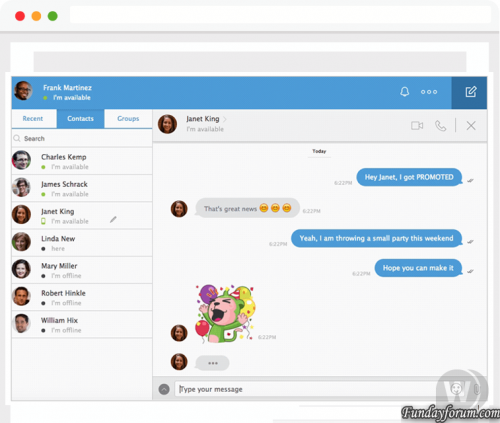
CometChat Platinum Nulled 6.9.12 - Software for organizing chat and conversation in PHP or on popular cms Organize conversations and chat, as well as a full system of communication on your site and mobile application in a matter of minutes. Allow your users anywhere to jointly organize the communication on your website, going from both the computer and the mobile. 1) Unzip CometChat 2) Upload cometchat folder in your root forum directory 3) Go for installing cometchat https://yoursiteweb.com/cometchat/install.php 4) Go to Admin panel Login => cometchat Pass => cometchat 5) In the left go to Settings and General 6) under License Key put this key D2KBK-1GXGT-3OELN-RMCN0-SFP9T and update (now you have all Features ) 7) Go in your Theme and "Edit HTML and CSS" under Global Template Paste this code after this Tag <head> and save License key: D2KBK-1GXGT-3OELN-RMCN0-SFP9T connect the script to any engine: <link type = "text / css" href = "/ cometchat / css.php" rel = "stylesheet" charset = "utf-8"> <script type = "text / javascript" src = "/ cometchat / js.php "charset =" utf-8 "> </ script> 8) Refresh your web page, enjoy PS: don't forget delete install.php file and change login and password for admin panel Troobleshooting: 1) My Admin panel isn't working correctely and cometchat not working Go to Settings and General and under Base URL change with /cometchat/ or /forum/cometchat/ or change Where your forum is installedFree
-
Recently Browsing 0 members
- No registered users viewing this page.