
- 📢 Welcome to FundayForum – Explore Trending Topics
- 🌟 Discover What’s Trending Today
- King Charles team extends special invites after Harry's 'cry' for reunion
- Piers Morgan reacts to Prince Harry's latest claim, gives Duke a new title
- Matt Damon marriage hits roadblock amid career success
- Pakistan to host int'l conference on space technology for climate action, disaster risk reduction
- Diana Vickers reveals two men have ghosted her in just one month
- Princess Kate private call to Meghan as family rift turns ‘public joke'
- Megyn Kelly under fire after mocking Christina Applegate's health struggles
- Gracie Abrams dishes on preparing for 'SNL' Halloween show
- Australian fast bowler Megan Schutt suspended over medication breach
- Jake LaRavia injury: Lakers' head coach JJ Redick shares positive update after win


Waqas Dar
-
Posts
11,303 -
Joined
-
Last visited
-
Days Won
559
Content Type
Profiles
Events
Forums
Gallery
Blogs
Downloads
Articles
Page News
Release Notes
Store
Everything posted by Waqas Dar
-

download IPS Community Suite 4.3.4 NULLED latest version
Waqas Dar commented on Waqas Dar's file in IPS Community Suite 4 Resources
 @lazarob i have checked ur path. u r install 4.2.2 . download 4.3.5 this one. click below file path and download this version upload and thn check hope this will fix ur prob
 -
download IPS Community Suite 4.3.4 NULLED latest version
Waqas Dar commented on Waqas Dar's file in IPS Community Suite 4 Resources
if u r installing new forum.. try to create new database and install in it. download latest version 4.3.5 and install with new database if u still getting error pm me with ur installing path and database details . i will try to install for u . -
Ceyandme
08/13/2018
Welcome to Fundayforum.com - Pakistani Urdu Community Forum.
Please feel free to browse around and get to know the others. If you have any questions please don't hesitate to ask.
Please click here and find out your name post at the end of last page of topic. So lets start your 1st post with your introduction. How about that

-
Jarinity
08/13/2018
Welcome to Fundayforum.com - Pakistani Urdu Community Forum.
Please feel free to browse around and get to know the others. If you have any questions please don't hesitate to ask.
Please click here and find out your name post at the end of last page of topic. So lets start your 1st post with your introduction. How about that
-
download IPS Community Suite 4.3.4 NULLED latest version
Waqas Dar commented on Waqas Dar's file in IPS Community Suite 4 Resources
try to upload single file of template.php in specific location. r u installing new forum or upgrading ?? -
download IPS Community Suite 4.3.4 NULLED latest version
Waqas Dar commented on Waqas Dar's file in IPS Community Suite 4 Resources
ne version is uploaded. now u can download and upload new version which is fixed now. thanks for letting me know u solved the prob please like and share links with others. -

456 downloads
Version 4.3.5 is a small maintenance update to fix issues reported since 4.3.4. Additional Information Core - Members & Accounts: Language tweak to clarify the "Remove unvalidated members" setting. Fixed filters based on joined, last post or last visit time, and if bulk mails are allowed in the AdminCP member list and member filters (for example for group promotion) not fetching correct results. Fixed administrators receiving multiple "new device" emails when logging into the AdminCP if that device has not be used to log into the front-end. Fixed broken images in signatures and custom fields in the AdminCP member profile. Fixed registering through alternate login handlers (Facebook, Twitter, etc.) not logging that the new member accepted the terms and mailing list subscription. Fixed log which shows in member history when a member is promoted by group promotion showing the wrong old group. Fixed error with Wordpress login handler after access token expires. Fixed issue where the "import members from csv" feature did not check if the ID/display name/email address is too large. Fixed error in AdminCP search results for members which do not yet have a display name and/or email address. Fixed how maximum attachment size per post and edit cutoff time is calculated when a user has multiple secondary groups. Fixed some fields on the warning form not correctly indicating they are not available if the moderator does not have permission to change the punishment for the warning level the member will reach. Core - Mass Member Management Added Administrator Log when mass deleting/moving/unsubscribing members. Improved performance off mass moving members by skipping over accounts already in the target group. Removed the existing group from the form to move all members in one group to another. Core - Search & Activity Streams: Improved searching for phrases (when the search term is wrapped in quotes) when using Elasticsearch. Fixed creating activity streams on front-end. Fixed duplicate topics showing in some streams if using Elasticsearch and posts/comments have been split. Fixed error being logged when accessing an invalid page number of paginated results when using Elasticsearch. Fixed a typo in the Elasticsearch "Analyzer" setting description. Improved performance of some activity streams when using MySQL. Core - Staff Permissions & Logs Fixed restricted moderators not being able to hide or unhide announcements. Removed Warnings tab from ModCP if warning system is disabled. Core - Social Promotion / Our Picks: Fixed reputation information sometimes missing from replies to status updates and from topics on the "Our Picks" page. Fixed promotion occurring at wrong time if scheduled to occur at midnight. Fixed missing CSS if "Our Picks" is the community's home page causing missing images. Changed "Promote" button to say "Re-promote" if the content has already been promoted. Core - Posting: Fixed posting links to images if "Allow remote images?" setting is disabled. Fixed edit being lost if the edit triggers the URL or word filter. Fixed issue where attachments may be rejected if URL filter is set to reject all URLs. Core - UI: Fixed zebra-striping on AdminCP tables for browsers other than Safari. Fixed quick registration form not scrollable on mobile devices. Fixed height of blocks in some grids. Fixed missing Tumblr icon in email footer. Fixed W3C validation error. Core - Clubs: Fixed possible error when editing a club. Fixed price not showing correctly for paid clubs which do not have a renewal term. Fixed error manually generating an invoice in the AdminCP for a paid club. Core - Misc: Updated CKEditor to 4.10. Fixed moving files from one storage configuration to another not working properly for theme resources where a file is uploaded directly (email logo, watermark image in Gallery, etc.), reaction images, and social promotion images. Fixed error when editing a site's social profile links. Fixed URL input fields not handling the value correctly if a "?" is immediately after the domain without any path. Fixed some tasks becoming locked when running tasks via cron. Fixed guests not being able to view announcement if site requires users to log in. Fixed disabled reaction types showing in the reputation summary on user's profiles. Fixed error when saving some custom OAuth login methods. Fixed error if an application is disabled with certain background tasks still queued. Fixed it being possible to add a member back into a personal conversation after they've left by accessing the URL directly. Changed the "next" link which shows on mobile on the last page of a paginated table which, although disabled, points to a page that doesn't exist which was reported to trigger an error on some SEO diagnostics tools. Changed the online user list cutoff when using Redis to be consistent with when not using Redis (30 minutes). Changed behaviour if Redis server is offline to use site without Redis rather than show error. Changed database structure for new installs to allow for more member records. Removed logging of server-end MySQL errors, which could cause further server issues from lots of simultaneous writes to the disk-level fallback log. Removed a code comment which was reported to trigger a particular hosting provider's malware scanner. Forums: Added the ability for announcements to be set to show specifically on the main forum index. Commerce - Subscriptions Fixed reactivating a previously expired subscription not moving the member back into the correct group. Fixed transferring a subscription from one member to another. Fixed duplicate subscriptions being created if member generates multiple orders for Subscriptions before paying and then pays more than once. Fixed error when adding a subscription for a member manually in the AdminCP if the subscription plan is taxable. Fixed error when a subscription is purchased if the subscription changes secondary groups and site is running on PHP 7.2 or higher. Fixed secondary groups not being removed when a subscription expires. Fixed broken record showing in the list of subscriptions if a member with a subscription is deleted. Fixed handling of subscriptions when merging two members. Fixed cover image when copying a subscription plan. Commerce - Support Fixed incoming emails not being received if the email was CC'd to the support system rather than sent directly. Fixed merging two accounts not reassigning ratings/feedback on support request replies. Commerce - Misc Improved UI for refunding/crediting transactions and added ability for a transaction which has been credited for that to be reversed and the transaction refunded. Improved the task to capture payments which have been authorised but not yet captured for better performance and error handling. Fixed the "total amount spent" value for a customer being incorrect if the customer has purchased something with account credit. Fixed purchase grouped at checkout not being retaining their grouping. Fixed entering a coupon a code may redirect user back to the first step of the checkout process. Fixed history log not being saved when a stored card is deleted. Fixed error caused by history logs related to gift vouchers created on 3.x. Fixed error caused by history logs for an alternate contact which has been deleted. Fixed error when submitting a review for a product from an IPv6 address. Fixed searching for coupons in the AdminCP not returning results. Removed rating data from jsonLD if the product has no ratings which Google Webmaster tools reported as an error. Pages Improved UI when downloading templates. Fixed error on "create article" page if the database is on the community's home page. Fixed error creating records in the AdminCP on databases which are set to sync records with forum topics. Fixed attachments to editor fields in databases not being saved correctly. Gallery Fixed error when editing a video in Gallery which does not have a thumbnail uploaded. Fixed moderators not being able to view private albums. Fixed albums created on certain older versions which have no default sort order set. Fixed URLs for video thumbnails in the XML sitemap. Increased maximum size of image descriptions to prevent value being cut off. Downloads Fixed possible duplicate notifications for Downloads files. Blog Fixed error viewing the blog comments a member has made from their profile. Fixed possible duplicate notifications for Blog entries. Removed name of blog from the header of each entry when viewing a specific blog. Calendar Fixed issue where recurring events may show in wrong timezone. Fixed error when editing an event to remove the end time. REST & OAuth Fixed error when using REST API to follow something. Fixed error when fetching Pages reviews in REST API. Fixed "totalResults" value in paginated REST API responses being sent as a string rather than an integer. Fixed refresh tokens not being used. Fixed files not being deleted from storage when deleting Downloads Files through REST API. Changed the error code when the OAuth authorize endpoint is accessed without a client ID to level 2 rather than level 3 to prevent unnecessary notifications. Converters Added support for redirecting a previously unsupported friendly URL style from SMF (index.php/topic,1000.0.html). Added support for converting links to direct attachment locations from phpBB. Fixed duplicate tags being created if Downloads files are reconverted. Fixed error when converting content from phpBB 3.2. Fixed converting some phpBB gallery avatars. Fixed potential errors when merging content into an existing site. Changed the UI of the message explaining permissions must be set after a conversion to be more noticeable. Added information on Converters to usage data report if enabled. Upgrader Fixed some profile photos being lost when upgrading through 4.0 or 4.2. Fixed error when upgrading from 3.x with MySQL strict mode enabled. Fixed error when upgrading from 3.x with Gallery installed. Third-Party / Developer / Designer Mode Added an indication in the AdminCP that the community is running in developer or designer mode. Added an extra parameter to \IPS\Db::bitwiseWhere() which allows it to be used if the database table uses a column prefix. Fixed using multi-selects within Stack form fields. Fixed field validation error messages in Matrixes showing the language key rather than the actual error. Fixed positioning of announcements on some third party themes. Fixed svg files being used as theme resources potentially not being saved correctly. Fixed AdminCP tables advanced search on radio fields. Fixed an undefined index notice within the developer center for third party applications. Fixed error when casting an \IPS\Helpers\Form\FormAbstract element to a string. Fixed undefined constant error in developer-mode-only code which isn't used internally but may be used by some third party developers. Fixed error when adding an item to cart in Commerce when using PHP 7 and developer mode. Fixed several incorrect phpDoc commentsFree -
download IPS Community Suite 4.3.4 NULLED latest version
Waqas Dar commented on Waqas Dar's file in IPS Community Suite 4 Resources
hmmm ok i will chk and upload tht file for u guys soon or new version is out now so will upload 4.3.5 maybe today or 2morow. -
download IPS Community Suite 4.3.4 NULLED latest version
Waqas Dar commented on Waqas Dar's file in IPS Community Suite 4 Resources
whts the error ? if its same error which i mention above plz do those steps .. -
Version 2.2.1
7 downloads
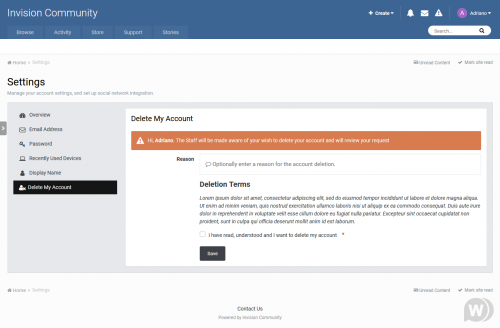
This application will allow users from specific user groups to request to delete their account. All requests will be reviewed by Staff (admins), directly on ModeratorCP -> Delete Account Requests, to approve or deny the request. The whole user content (topics, posts, attachments, polls, etc.) will be preserved; only the account will be deleted. Features: Admins can choose which user groups can request delete account and how many posts a user must have to do it Users can request to delete their accouts directly on Account Settings The Staff will review each request to approve it or deny it on ModeratorCP -> Delete Account Requests A Notification will be sent to Staff when there's a new deletion request Each action of Staff (approve or deny a request) is logged on Moderator Logs Compatibility: IPS 4.3 Upgrade from 2.0.3 to 2.1.0: Uninstall the plugin Remove the following files via FTP: applications\core\extensions\core\ModCp\DeleteAccount.php applications\core\extensions\core\Notifications\DeleteAccount.php Install the applicationFree -
![More information about "[IPS THEME] Carbon"](https://fundayforum.com/uploads/monthly_2018_07/carbon.thumb.jpg.749696ed04b253e5bdf1493e3bec6921.jpg)
Version 4.3.4+
18 downloads
Carbon for IPS.Suite 4.x! Carbon, named after the carbon texture which is used throughout the design, is a dark theme for IPS.Suite 4.x and is especially perfect for gaming sites. The blue color scheme can be modified easily with a few simple clicks in your ACP theme settings, and your members can customize the theme themselves by choosing their own background image from a preset array! Theme features Theme Settings Easily enable, disable or modify theme features such as background images, logos, social media links, guest messages and colors. This makes modifications and upgrades very simple since little code changes are required. Easily edit color scheme Changing the default color scheme to your own color is very simple via the theme settings! With a few clicks, you'll have an entirely unique color scheme for your site! Social links Social links can be enabled/disabled and customized to your own URL, allowing you to easily link to your social network pages (facebook, twitter, etc) Background picker Your members can choose their own background image (or color) from a predefined selection and their choice is saved via cookies. This feature can be configured and disabled if necessary within the theme settings. Background settings Restrict the background picker to certain groups such as registered members or VIP's. Or remove the picker entirely from mobiles to save bandwidth on the go. All within the settings! Global message Display a message across the top of your site with important announcements. Once your members have seen the message, they can press the Dismiss button to remove it (until you configure a new one). Guest message A customizable message can be shown to guests, prompting them to either register or login to your forum. Two designs, "billboard" and "alert" (shown) are available. HTML logo with slogan Easily add/edit your text logo and slogan from within the theme settings. If required, the text can be replaced by an image instead. Mega Footer A mega footer with configurable column numbers and content can be enabled and customized all within the theme settings. A full list of features and a live demo can be found on ipsfocus. What's New in Version 4.3.4+ Released July 7 Numerous enhancements to the ipsfocus framework have been applied, including the addition of modern css techniques such as flexbox and css grid. These methods replace the dated javascript framework for grids, resulting in a faster and modern approach to formatting your site.Free -
![More information about "[IPS] Veizor - Innovative gaming style - 4.3"](https://fundayforum.com/uploads/monthly_2018_07/veizor-innovative-gaming.thumb.png.0a83fe7ad257dfa0841b4718956d30ee.png)
Version 1.2.7.1
50 downloads
Veizor Is a unique playing style, made in very soft dark colors. Due to the large number of settings You can fully customize it in every possible way changing the colors of the site and including/disabling the functionality inherent in the style. When developing the style we used SVG and Font-Awesome icons, so Your site will load even faster. Full Screen: Home Page, Calendar, Gallery, Blogs Click here for demo! Main Settings Backgrounds Forms CKEditor Forum Nodes GuestMessage Toogle & Pagination Other Settings Footer Header NavBar Slider Social Icons Typography Notice: If You need to install style on Your forum, but You can't do that, write me in personal messages. MetaTags: Gaming style for IPS 4, Modern style for IPS 4, Beautiful style for ips4. FAQ: Q: How to make backgrounds for this style ? A: If You like the style, then like and share with othersFree -

Version 1.3
21 downloads
A very clean beautiful template for the latest IPS 4.3.x The Landing Page is not included in the theme. It is a part of my site and what you can do with "pages" application. Live Demo at my site. Change theme to UltiMaze. Only for IPS 4.3.x Advanced custom footer with 4 column, or choose how many column you want! Background upload setting preview. Global template changes, reported css error fixed.Free -

Version 1.0.1
1 download
New Content Type Default to Topics The plugin sets the TOPICs as the default filter for searching NEW CONTENT.Free -

Version 1.2.1
7 downloads
This sends returning banned members to url of your choosing.Free -

Version 1.0.0
7 downloads
This app allows your members to login using their Instagram account. Updated for IPS 4.3 https://github.com/Recouse/IPS-Instagram-Login-HandlerFree -
.thumb.jpg.43569e4380bcef03d481ff7e1818b6cf.jpg)
Version 3.0.0
6 downloads
Pages SuperGrid is a set of Pages templates and a complete solution to make your Pages databases (with articles, directories and so on) appealing and engaging. SuperGrid is one of the most popular files in the Applications & Plugins category on the IPS Marketplace. What’s needed: IPS 4.2 or 4.3 in its most recent version with the Pages application A pages databases that uses the stock Record Image field and has images with a sufficient resolution uploaded through that field. (Technically, the templates also work without images, but it’s an image-centered design and works best when most or all records have images.) Which templates are included: A beautiful grid-based Front Page template with two records featured at the top — for when your database is set to article mode. A beautiful grid-based Listing template replacing the dull forum listing design — for when you open a category or have a database without categories. A unique Record View template with a large header image — for when you open a specific record. A category listing template – in case you use more than one category. Note: You can use the templates for any number of databases, but the settings will always apply to all SuperGrid templates. Bonus Feature: Block template! Create blocks anywhere on your site – pointing to your database – and make them as beautiful as the database itself. Detailed Feature Description and Notes: Pages SuperGrid is built with the IPS design framework and is therefore fully responsive and compatible to most well-coded/well-designed themes. The styling of your theme(s) is inherited and the Pages SuperGrid templates will usually work out of the box. The template is designed to work on single-column pages with or without a sidebar. The grid will automatically adopt to the available width and collapse on smaller devices. The content field is not shown in the grid-based listing templates and all images will be scaled and cropped (without distortion) to the same size to allow a consistent look. The templates come with lots of options you can easily adjust within the template. Front Page/Listing Template: Show author/category/date: Yes/No Alignment author/category/date Show comments/views/ratings/likes: Yes/No Alignment comments/views/ratings/likes Show record owner’s avatar: Yes/no Alignment record owner’s avatar Title alignment Image Aspect Ratio Use thumbnail or full-size images Turn images into record link: Yes/No Assign fallback image for records without an image Show “featured record” badge for featured records: Yes/No Pick badge style for featured records Show “pinned record” badge for pinned records: Yes/No Pick badge style for pinned records support for category images using the Pages Category Images plugin Record View Template: Image Aspect Ratio Pick Avatar size from 7 options Turn header image on or off Show “featured record” badge for featured records: Yes/No Pick badge style for featured records Show “pinned record” badge for pinned records: Yes/No Pick badge style for pinned records Block Template: Show or hide block title Shuffle entries Randomize shuffled entriesFree -
Version 1.0.2.2
6 downloads
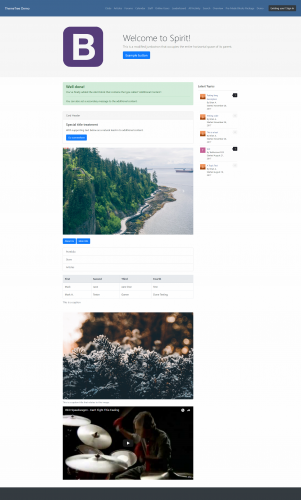
Turn Your Homepage into a Beautiful Landing Page Spirit -a custom landing page template built with CMS (Pages) and runs on Bootstrap & IPS framework to make your homepage look beautiful. Settings You don’t just get a custom landing page template, you’ll get settings that will change the Bootstrap & IPS framework into your own. It’s your forum homepage, make it yours! Appearance Header Body color Link & hover Jumbotron background Widget color Footer background Footer color Google Font Who Can See? (Jumbotron) Enable Jumbotron Background Source Background Font Enable Header Image Source Description Title Navigation Enable sticky navigation Sign in button class (you can use IPS buttons or Bootstrap buttons) Hide Navbar Items Widget Block Keys Fluid Content Block Guest Side View Sidebar Guest Column # Right Middle Left Member Side View Sidebar Member Column # Left Middle Right Advanced Layout Container (in %) Custom CSS REQUIREMENT Pages Documentation Spirit Need some help setting it up? Don't worry, we got that cover for you. Go here to see all the articles for setting up Spirit and configuring the settings to fit your community. The articles didn't help that much? If they didn't, watch this video below so you can start setting up Spirit. Bootstrap Click the link here to get started on learning on how to input components, layout, content, and much more. Making Pages your default app Go here (from IPS) to see the article on making Pages the default app. If you need help with this, please email us at admin@themetree.net and we will get back to you as soon as possible. Tired of messing with code inside your block editor? There's a solution to this. It's called "Pre-Made Spirit Blocks Package". This package will enhance your homepage by getting some components from Bootstrap and custom ones from ThemeTree. It's fast from not hassling with code and simple to configure! Live Demo w/ Test Account Go here to see the demo of Spirit. Login Details: Display Name: TestAccount123 Password: testyaccount123 What's New in Version 1.0.2.2 Plugin Added 'Fluid Content Block' setting in the 'Blocks' tab. Spirit Note: Download the XML file called "spirit_landing_page_templates" to get the latest changes.Free -

Version 1.0.7
60 downloads
FLine 4.3 Ips gaming Theme Fline is a new, unique theme for your forum. Great design combined with a huge number of settings. The theme is suitable for any forums of different directions. Added new types of articles and sliders with the possibility of editing. Full Screen: Home Page, Calendar Blogs, Gallery Articles Backgrounds Main Settings Forms Forum Nodes GuestMessage Header NavBar Other Footer Slider Social Icons Typography Version 1.0.7 - 4.3 What's new: Fixed all bugs that people have found Added new function Added almost full support for right-wing languages Added the ability to use as a new type of search. so old. And much more... In this version the key block Articles Block has changed since a article_block_1 on articles_block_1. Keep that in mind. To refresh the skin go to the APP -> Customization -> Themes -> Arrow icon -> Upload New VersionFree -
 its working fine and u can download maybe ur download limit is exceed. try again after 24 hrs . 5 files per day u can download if u r regular member
 -
Version 1.2.2
9 downloads
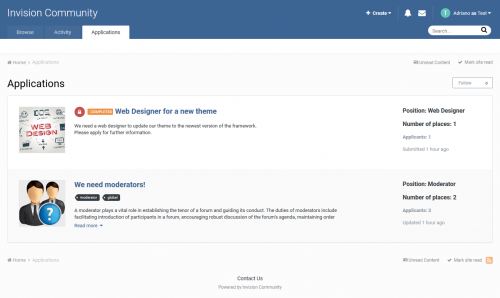
Are you looking for staff? Developers? Designers? Or anything else? This application will help admins/moderators to find people to help in their boards. Here's a quick rundown of some of the features for this resource: Extra Fields Module to add Positions on ACP (moderator, webdesigner, developer, etc) Ability to inform how many places the position has. Example: you can create an application record to "hire" 3 moderators. Ability to move the "winner" member to a group chosen group (you inform the group when you're adding the application record) Ability to restrict the application by: Content count, Reputation points/likes, Number of days as member, Minimum age and groups Ability to create a topic at every new application submission. Module on ModeratorCP to view all pending records from all applications Compatible with most important features from IPS 4.2 (Recommended Comments, Content Message, Reactions, Member History, Richer Embeds, etc.) Integrated to the framework: Tag system, Follow System, Report system, Search system, Share Links, etc. Moderator actions on applications and comments/reviews Moderator permission to approve/reject applications Ability to create RSS feeds from member applications Etc. Permission: NO ONE except staff (with proper permisison) will be able to view/read or know who are the applicants. All that regular members will know is the number of users who applied to it. Fix error Compatible with IPS 4.3 only.Free -
download IPS Community Suite 4.3.4 NULLED latest version
Waqas Dar commented on Waqas Dar's file in IPS Community Suite 4 Resources
can u please send me ur link or just delete files and reupload files. i can check for u or install forum. if u r getting error of lang 682 line while installing or upgrading forum. please delete these line 681 to 683 { throw new \UnderflowException( ( is_string( $key ) ? 'lang_not_exists__' . $key : 'lang_not_exists__' . implode( ',', $key ) ) ); } -
Version 2.2.7
5 downloads
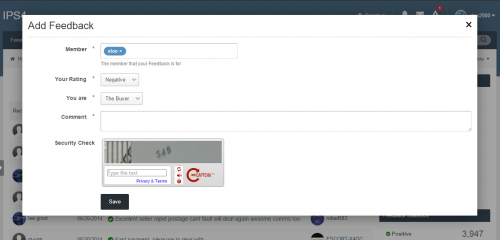
Trader Feedback System Build trust in your community, or forum-based marketplace with the Trader Feedback System. This application allows members to leave feedback for each other on forum transactions. Members can leave positive, negative, or neutral feedback Optional or mandatory link in feedback to the topic or classifieds item where the deal took place (currently IP.Board 3 only) Integrates with IP.Board's notification system (currently IP.Board 3 only) Integrates feedback information in member profiles Restrict access and features based on user group Source code is completely un-encoded One-click install. No file edits required. Captcha on Feedback Submission Flood Control on Feedback Submission Upgrading Please see the included documentation for upgrade instructions Please note The current version of this application is compatible with both 4.2.x and 4.3Free -
Version 1.0.3
5 downloads
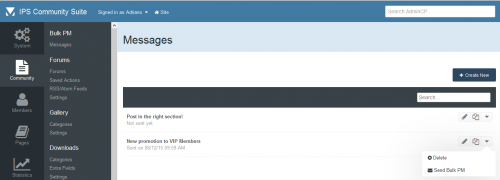
This application will allow admins to send Bulk PMs to specific user groups. PM Settings: Author Allow reply & add a copy on author Inbox folder Title Content PM Filters: Groups to send the PM Include Secondary Groups Content Count Reputation Points Joined Date Last Visit to the Site Compatibility: IPS 4.3 IPS 4.2 IPS 4.1 What's New in Version 1.0.3 FIxed error that was sending multiple emails to pm sender in certain circumstances. Fixed error: it wasn't sending notification (email) when receiving the new PM. Added Update Check URL to notifify administrator when a new version of the app is released.Free -
Version 1.0.7
10 downloads
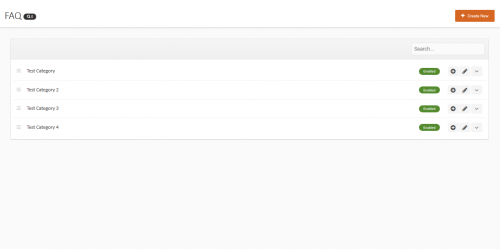
This application will add a FAQ module to your site allowing admins, moderators even your members if you choose to allow them add frequently asked questions to your site DEMO Main Features Create unlimited Questions & Answers Create categories to place the Q & A's in Allow certain usergroups to add Q & A's After a user submit's a Q & A it will require approval by the admin or moderators ( Read below ) Allow moderators to add Q & A's without needing approval Allow moderators to be able to approve member submitted Q & A's Moderators with approval access will receive a notification when a user submits a Q & A Pending submissions will also show a little green button showing that is it pending Pick and choose to either use a javascript show/hide feature for the answers or choose to show the answers using Ajax pop up's If there are pending submissions to the Q & A moderators with approval permissions will see a button on the FAQ with the amount of pending submissions there are Easily add / edit / move / disable / enable or delete any Q & A from the front end How to install Download the .tar file and go to your ACP then applications and install the downloaded file New Features You can now pick to choose from showing the answers using either the javascript show/hide or show them using Axax pop up's You can now add Q & A's from the front end You can now allow members to submit Q & A's Each member submitted Q & A will require approval You can approve these from the front end You can now also edit, delete, approve, move, disable or enable each Q & A from the front end Allow moderators to approve member submitted Q & A's When a user submits a Q & A the moderators with approval permissions will receive a notification Allow moderators to add Q & A's without requiring approval Added a new table to the front FAQ with all the pending submissions listed Only moderators with approval permissions will be able to see this Added a new setting in the ACP allowing you to change the F.A.Q text above the FAQ table on the front Added a new setting so you can pick the amount of Q & A's to show on each page of the tableFree

-
Recently Browsing 0 members
- No registered users viewing this page.