
LIVE UPDATES
- 📢 Welcome to FundayForum – Explore Trending Topics
- 🌟 Discover What’s Trending Today
- Prince Harry, Meghan finally give up hope for reunion? Expert explains
- Rahul Gandhi's nephew says he was forced to remove protest artwork from Delhi exhibition
- Two teenage girls arrested in alleged Southern California school shooting plot
- Jimin shocks fans, bids goodbye to blonde locks for BTS Argentina shows
- Prince William says 'there is no going back' with Harry
- Taylor Swift sparks backlash for selling 'overpriced voice memos' on vinyl
- PM backs KP emergency rule, blasts PTI for 'criminal negligence' over worsening security
- Cara Delevingne shares rare bts of Taylor Swift's 'Patient Zero'
- Charli XCX apologises to fans as she cancels Arizona show
- TTAP sets two conditions for PM-Achakzai meeting after govt's offer for talks


Waqas Dar
-
Posts
11,303 -
Joined
-
Last visited
-
Days Won
559
Content Type
Profiles
Events
Forums
Gallery
Blogs
Downloads
Articles
Page News
Release Notes
Store
Everything posted by Waqas Dar
-

Version 1.0.0
38 downloads
Dark Theme 4.3.3 Beautiful Dark theme for IPS 4.2 and 4.3 Features Slider Advanced Footer Slider with a lot of options: Align header, content and buttons Vertical and horizontal slides! Permissions slider and slides Fullscreen and container slider size. Specific pages where show slider Pagination buttons Navigation buttons Background color and image for per slide Height slider Effect transitions Autoplay mode Loop mode Footer 4 blocks with customization width Permissions for per block Background footer Social links Comming soon more features! Demo site Forum view ACP Slider ACP Footer ACP CustomFree -
Version 1.2.2
17 downloads
Custom Notifications Custom Notifications adds a powerful yet easy feature for admins to generate their own inline notifications, which behave like native IPS notifications. Admins can write and send as many custom notifications as they like, and basic options like authorship and link help enhance the behavior of the notifications.Free -
Mentionlistenhancements1.thumb.png.aeb2e8e015c0f4fb5a74f2514133bb4d.png)
Version 1.0.0
9 downloads
(NE) Mention list enhancements 1.0.0 Plugin which enhances the information available in the list of names generated when using @mention functionality Option to show account's online status. Option to show icons showing the account's notification settings for "Someone mentions me in a post" i.e. email & inline includes ability to manage the icons for enabled/disabled status of those settings (uses Font-Awesome) Option to show name of account's primary group. includes ability to show group as plain text or as formatted in group settings. Ability to exclude certain groups from the list, as well as exclude banned and validating accounts. Compatible with IPS 4.1 (tested with 4.1.19.4), IPS 4.2 and IPS 4.3 Plugin hooks in to the core->global->editor->mentionrow template This plugin does not provide the ability to mention a group. If you require that functionality, then this plugin is more suitable.Free -

Version 16.2
17 downloads
NOTE Version Spacious ACP 14 is for 4.3 and above. Tweaks! Customizations Galore! New Widgets! So many I'm just going to start listing them... Header, primary, and secondary menu background colors fully changeable. Header, primary, and secondary menu font colors fully changeable. Change background color of message information and message warnings. Option for tighter row spacing throughout. Page fade-in animation effect for an app-like feel. Secondary menu options have mouse-over hover effect so you can actually see what you are about to select. Secondary menu options have expanded hotlink area across the entire list element instead of just the text: easy navigation for you! Change the name of the ACP to whatever you want! Online users embedded in Dashboard header with popup details (including search bots). Un-sticky the ACP header to gain more screen-estate when scrolling. Optional modern-style dashboard widget format. New in Version 12: Dashboard Patches and Updates! Patch and Update buttons only show when there is a patch or update to 3rd Party app/plugin available. Can disable this function entirely in settings if you would rather not be bothered. New Widgets! System Overview: Redesigned for version 11! Real-time server load, IPS installation size, IPS database size, memory available (or free), storage space available, options for Community in the Cloud customers, database details including your database engine and character search limits. Graph colors match your chosen ACP header colors, option to over-ride. When memory/server space becomes critical graphs go red! You configure when the memory and server space warnings kick in! Gallery Overview: Mostly a rework of the default Gallery widget but with better formatting. Note the default widget (and this one) only tracks the storage space of the original images, not all the copies actually made and used by the IPS system - those stats are not saved anywhere. Spacious ACP 11 now includes the four newest images along with the four most viewed. Widget is fine wide or side. Forum Statistics: The most glaring IPS omission. Sparkline trends for both topics created and responses made! Sparkline charts display the last eight weeks, the numbers alongside are the last three (so the right side of the sparkline chart displays those three amounts). Click the circle "i" icons for pop-up details! Lots more - check it out! Member Statistics: Mid-transformation with Spacious ACP 11. Online users now embedded in Dashboard header. Moved from average member age to median member age. Track which members are actually using your site vs. long-dead relic member accounts from years ago. Sparkline and "i" circles work just like the other widgets. Have fun! System Errors: Lists last five (max) system errors so you can actually see what problems are occurring under the hood. Direct links to error reports and system error page. Strongly recommend you have this widget up to see what 3rd-party apps/plugins are causing havoc on your system rather. Front and center and you can't ignore them and we 3rd party devs do not have a built in error reporting system like IPS does right now. SimilarWeb: A website ranking/tracking service. Two SW default widgets for tracking visitor types and relative rankings, embedded in a single IPS dashboard widget. The rankings widget can have two additional websites added for tracking alongside your own site. Alexa: Get your Alexa ranking (for whatever that's worth...) right in your dashboard. Both global and national. Updates daily and flags trending up or down from previous check. This widget is also undergoing additional dev as Alexa things have changed. Next Spacious version or two will see this one perked up. Most Active Topics Last 3 Days: As stated. Based on topic responses only. Maximum of five listed. Useful for large boards where you are likely to overlook where the action is at any given time. These are all under active development. Refinement and new widgets can be expected. I've also improved the Admins Online and IPS News widgets. Admins Online (which you should rename in your language files as ACP Admins Online or Active ACP Sessions) now displays avatars and the IPS news widget has been compressed vertically to not take up so much space. More! Login Page Customization: Add a background or just change the color. The login box is totally customizable as well including transparency and the option to add additional text. Dash Buttons: Add some more quick link buttons to the top of the dashboard - administrator logs, moderator logs, tasks, and a super-convenient wipe caches button! Wipe caches includes the CIC resync process to better fight the CIC caching system when installing/adjusting apps and plugins on your CIC site! Additional System Tweaks: Plugin versions displayed alongside plugins. Your most online stat is ALWAYS being tracked, not just tracked when the stats widget in on a page on the front end! Restores ACP favicon. Upload whatever you like (ico format for now) or use the giant black IPS ico provided. PM members from the member page. S3 file methods will now display endpoint and directory structure in their listed names allowing you to actually tell the difference between various S3 entities. See the rest of the screenshots; I've probably have forgotten things at this point. Installation: New Installations: There is just a single application file (tar) and an optional IPS black browser .ico file. Install the tar like you would any other application. That's it! 4.1 and earlier users: Starting with 4.2 there is only an application to install. If you already have the Spacious ACP theme and Spacious Widgets application installed first delete the Spacious ACP theme. It is not compatible with 4.2. Now, you can either upgrade the Spacious Widgets application with this Spacious ACP application (yes, just go ahead and upgrade, do not install as a new app) or you can delete the Spacious Widgets application and then install this new one. If you upgrade the existing application you'll probably need to hit the support tool to clear the caches before everything starts working with theme changes and so on. This is expected (happened to me during testing) The move to just the single application is due to IPS planning on removing the ability for themes to be set for the ACP. All the configuration settings to alter the ACP appearance, configure widgets that require configuring, and changing your ACP login page are all available in under Customization - Spacious ACP : Settings. To add the new widgets to your dashboard just click the add button on the dashboard, choose and then drag them where you want them to be. Be aware that both Forum and Member Statistics only support the large display widget area. They will work on the small area but may look odd... All the others can be used in the large or small areas. Front end widgets pass through a variable indicating if they are in a wide horizontal position or on the sidebar. ACP dashboard widgets do not have this which limits the custom formatting I can do to make things fit. Heads Up! Widgets with Google Charts in them will render weird when you first drag them onto the dashboard. Just refresh the page. On install AND upgrades, Spacious tasks are automatically marked as never ran (this behavior is standard for all apps). Some widgets rely on pulling saved information that is generated by these tasks. Feel free to manually run any Spacious tasks to spark the process along if you do not feel like waiting 10-15 minutes (or longer for some stats). Notes: Some of the new widgets give you a sampling of statistical information you probably want about your site and though you can request that I add some things of this nature to Spacious Widgets they will probably NOT be added as that will require storing substantial information in the database. That's well beyond the scope of an ACP theme and some add-on widgets. Better off in a separate application where it can be done right. be sure and look at the default statistics tab: somewhere along the line in the 4.2 series they've improved things there. In some server/hosting situations some data I try to read for the System Overview widget may not be accessible. Do not buy this if the Server Overview widget is the only thing you are interested in. No refunds will be approved due to some elements of that widget not working correctly on your site. Specifically, you will need allow read access to the /proc directory on Centos/Red Hat/Ubuntu systems and in some cases you may have an Apache setting called open_basedir preventing this. A simple file edit on your server will usually solve this. VestaCP users will need to edit some configuration templates to change this variable. Cost/Allowed Use: $25/$7 every six months. Basically $14 a year once you get going for a customizable ACP and a bunch of new dashboard widgets (with more on the way!). Renewals keep us devs going! Licensed for your IPS site bound to your IPS account plus any/all dev boards (localhost or otherwise). Other sites should/need to get their own licensed copy of Spacious ACP. All rights reserved, etc. NEW! 4.3 compatible, initial release. Revamped graphs, other changes, too many to list. This release is not feature complete. More to come but a decent 4.3 build needs to get out the door and this one is it. Note that as of 4/26/2018 the screenshots are still mucked up (happens when IPS CIC has problems with S3 and upgrades and so on and so forth). New shots forthcoming, along with a new Marketplace description.Free -
Version 1.0.1
8 downloads
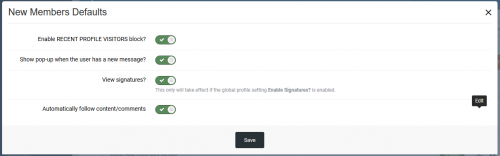
This plugin will enable 5 features that appears disabled when a new user creates the account: Status Update Recent Profile Visitors block Pop-up when the user receives a new message View signatures? Automatically follow content/comments Removed STATUS UPDATES option as it is a new setting on IPS 4.3.Free -

![More information about "[HQ4] IPS Moods for invision community suite"](https://fundayforum.com/uploads/monthly_2018_05/2124476008_mymoods.thumb.png.e6e60429f066495f5ea61e35f4ef4835.png)
Version 1.1.2
20 downloads
[HQ4] IPS Moods for invision community suite 4 IPS moods 1.1.2 is for 4.4 compatibility Increase the bond between the users of your community by allowing them to express their current mood and feeling. This application will allow your members to choose moods created by you and enter their own currently feeling (if permitted) which will be displayed in forum topics, hover cards and user’s profiles. Members will also be able to see the latest moods updates by all members through the included widget. This application will help give your community, a deeper “community” feel. View: bbcode.it (Create an account to demo mood changing) Create your own moods with your own images. Set the display position of moods around the avatar: top left & right, bottom left, center & right. Set the image size for display in topics and profile. Also supports wide width images for classic style mood images. Optional menu link & user nav icon. Members can enter custom feeling text for moods. Set the allowed feeling text length. Group based permissions. Moods displayed on profile, in topics and hover cards. Latest Mood Updates widget. Editable language strings. Starter Mood Pack with PSD Template. IPS 4.1.x (Use 1.0.4), IPS 4.2.x + (use 1.1.0+) Tested also on IPS 4.3.x If you have suggestions for Moods, we'd be happy to hear them via the forums: http://bbcode.it The cost of this application covers the ongoing support of the product and future development. You can request support via.. Forums: bbcode.itFree -
Version 2.0.5
11 downloads
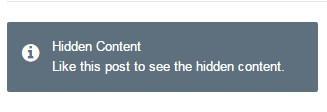
This plugin will hide links, code, images in forum posts automatically. Members can use REACTIONS or REPLY to see the hidden content. Features: Select content to hide: images, external links, code, [hide] tag, attachments Option to specify groups can bypass the hidden content. REACTIONS or Reply to see the hidden content. Supports Clubs. If you use IPS 4.1.x, download 1.0.x versions. If you use IPS 4.2.x, download 2.0.x versions. (Click the "Change logs" button to select versions to download)Free -

Version 1.1.3
14 downloads
Member & Staff Tools IPS Application 4.2 and 4.3 Member and Staff Tools by @Fosters is a comprehensive suite of tools designed to help enhance and add missing functionality for Users and Moderators. Instead of a dozen small plugins, you can get one tool to handle some of the most-requested missing features of IPS 4: Account Deletion Report other members Approve validating members in front-end And much more! Member and Staff Tools will immediately empower your members and staff to be able to manage their accounts with useful features and enhancements. Staff Features ModCP Validating Member Approval - Your moderators will be able to manage the validating/approval waiting members on the front-end. ModCP Account Deletions - Your moderators will be able to handle deletion requests from members. Online Status - A green dot will be displayed next to a members name in topics showing his online status Banned Members - A strikethrough will cut through all names of banned members Member Features Account Deletion Request - Your members will be able to request to delete their account Member Report on Profile - Your members will be able to report other members directly from their profile Post Areas - A new tab on the User Profile will show how many posts the user made in each section Hide Profile to Guests - Your members will be able to hide their profile from guests for privacy If any actions are required, a new menu will appear to your moderators for quick access.Free -

Version 1.0.2
15 downloads
This is a custom .htaccess to use on the IPS Community Suite Forums. It helps to improve your forums Google Page Speed and YSlow scores. The top segment is the same .htaccess that is generated by the IPS Forum software. This segment is Invision Power Services code and I do not claim it as my own. All rights and credit for this segment of the .htaccess are Invision Power Services. The bottom segment is based upon research of several websites and the references listed below. Please be careful when using this file because the contents may be incompatible with your server setup. Preventative measures have been taken to ensure that it should be safe to use in any Apache based environment. Google recommends a minimum of one week: https://developers.google.com/speed/docs/insights/LeverageBrowserCaching GTmetrix recommends a minimum of one month: https://gtmetrix.com/leverage-browser-caching.html Added the "map" part that IPS generates into the .htaccess file - 404 section. Included htaccess.txt Included changelog.txt Included Readme.txtFree -
Version 2.0.1
8 downloads
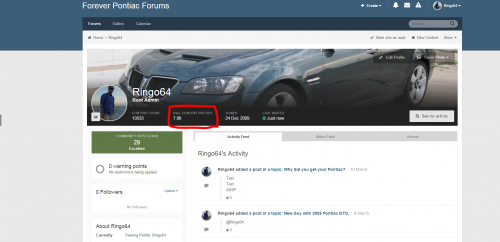
Average Content Per Day on Profile 2.0.1 Simple plugin that calculates the Average Number of Content that the user has created per day since they joined your community. Features: Custom language string for "Avg. Content Per Day" Template editable under "Themes" Follows IPS structure and style guide for head items Round Settings. Round to whole numbers, 1 or 2 decimal point values. Dev files included for those who want to extend this functionality Fix to error if user doesn't have any content Ability to choose decimal point location (none, 1 or 2) Dev files included for those having issues or wanting to extend this pluginFree -
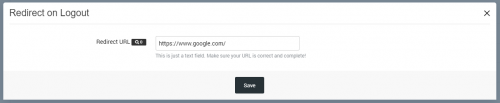
Version 3.0.0
4 downloads
Redirect your users elsewhere (your portal/site, for instance) when they logout from your board. Set the URL where they'll be redirected via a setting in ACP. Version 3 is EXCLUSIVELY for use with 4.3.x 4.3 Installation Uninstall the old 2.0 plugin, install this new 3.0 plugin. Configure URL in plugin settings.Free -

Version 4.3.1
38 downloads
Dimension 4.3 by ipsfocus Upgraded for Community Suite 4.3.1. This update also includes minor bug fixes for the "Sign up" button and the announcements feature. Dimension is a minimalistic theme for IPS.Suite with a unique header effect. Once scrolled, the header collapses into a fixed bar at the top of the page, providing easy access to your navigation links. Theme features Theme Settings Easily enable, disable or modify theme features such as background images, logos, social media links, guest messages and colors. This makes modifications and upgrades very simple since little code changes are required. Fixed header on-scroll Once scrolled, your header collapses and sticks to the top of the page. The background image becomes blurred (in compatible browsers), placing focus on your navigation links. "Inherited" background images Title bars inherit the same background image as your header, maintaining a consistent color scheme throughout your suite. Header Picker Your members can choose their own background image (or color) from a predefined selection and their choice is saved via cookies. This feature can be configured or disabled within the theme settings. Guest message The "Guest message" widget is restyled to grab your visitors attention. It can be added to any widget location: header, footer or sidebar. Social links Social links can be enabled/disabled and customized to your own URL, allowing you to easily link to your social network pages (facebook, twitter, etc) HTML logo with slogan Easily add/edit your text logo and slogan from within the theme settings. If required, the text can be replaced by an image instead. Mega Footer A mega footer with configurable column numbers and content can be enabled and customized all within the theme settings. Minimal HTML edits This theme has very few template files, which means in most cases, you will not need to install theme updates between IPS versions. Too easy! Latest Topic on Mobiles The latest topic title is visible on tablets and mobiles, allowing more convenient access to your latest content for mobile users. Global Message Display a message across the top of your site with important announcements. Once your members have seen the message, they can press the Dismiss button to remove it (until you configure a new one). Retina Ready All gradients, shadows and icons are generated using css which means your site will look great on all devices - even those with high resolution screens.Free -
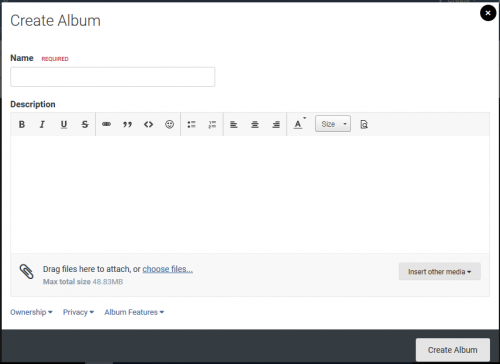
Version 1.1.0
2 downloads
Disallow Attachments on Gallery Descriptions This plugin prevents users from uploading attachments to the Album and Image description fields. Compatible with IPS 4.3 onlyFree -
download XF v2.0.xx innovate dark theme
Waqas Dar commented on FRiEND's file in XenForo UI/UX Styles Hub
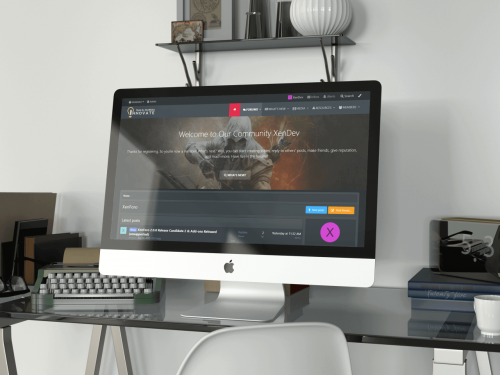 thanks for uploading xenforno theme keep uploading
 -
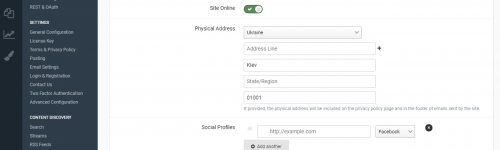
Version 1.0.1
6 downloads
(MIX) No Require Full Address Ips Plugin 4.2 and 4.3 The simplest plugin for disabling control is the mandatory filling of ALL address fields in the appropriate settings and sections. Supports work with versions IPS 4.2.x and 4.3 What's New in Version 1.0.1 Added check for updates of new versionsFree -
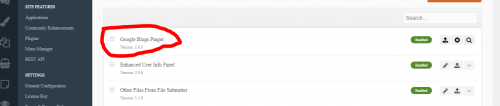
Version 1.0.0
3 downloads
Google Blogs Pinger Plugins automate ping xml-rpc ping requests for the Google Blogs service (http://blogsearch.google.com/ping). When you create a message in your forum, the plugin automatically sends an xml-rpc request to Google. You must have the PHP XML-RPC extension (http://php.net/xmlrpc) installed on your server.Free -
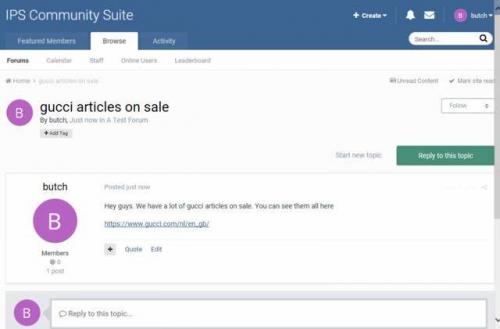
Version 1.0.0
2 downloads
This plugin will scan all new topics for specific keywords. If a match is found either in the topic title or message, it will show a notification to your staff. This can be very useful against spam. With this plugin, you and your staff will be made aware immediately if spam is posted in your forum by way of new topics. Settings You can specify the keywords that you want to be nofied of whenever thy will be posted at your forum at the plugin settings. You can also select the group(s) that you want to receive notifications.Free -
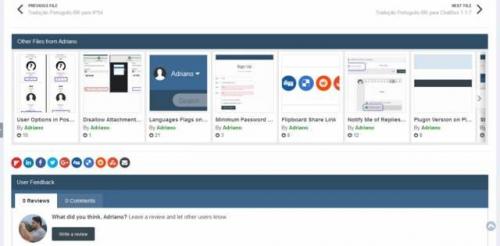
Version 1.1.0
2 downloads
This pluign will add a slider on file view to display other files from the file submitter. Settings: Number of files to display Type of files display: start date or random files Requirement: DownloadsFree -
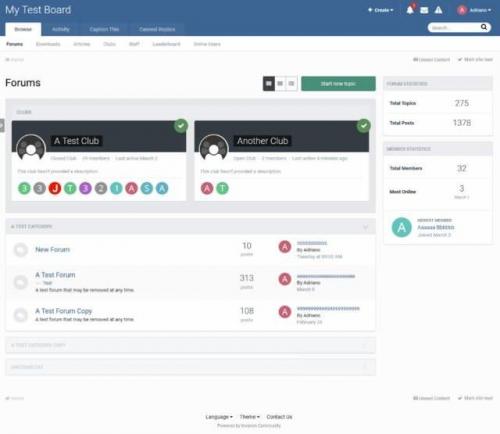
Version 1.0.0
5 downloads
The plugin displays the map of clubs on the forum index. Users will see the Clubs that have permission to view. Settings: Number of club cards to display Sort clubs by: Last activity, most members, most content, last created or name Position: above or below Forum categoriesFree -
Version 3.0.0
5 downloads
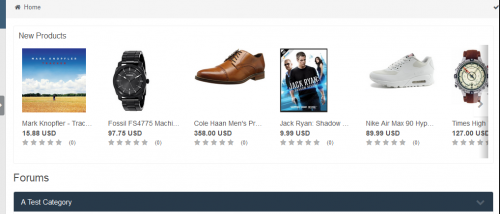
The plugin displays products from your store as a widget in two ways: new products or selected products.Free -

Version 2.0.7
51 downloads
Enhanced User Info Panel invision community Plugin 4.x Enhance your user info panel with this powerful fully customizable plugin for the forum topic posts, You do not need to show all the information you can choose to show or hide any one of them or just choose to hide them on mobile viewing, you can now even choose what user groups can see what information DEMO How to install Go to the ACP and then plugins then install the downloaded .xml file (Yes its that easy) How to configure Go the the ACP plugin panel and select the settings button on the plugin User Info Panel Edit the width of the user info panel between 200px - 350px Move the username to the user info panel Set a margin from the top of the post panel (Needed on some themes you won't need for the default theme) Change the font of the username (you can use web safe fonts, Google fonts or you can even upload your own!!!!!) Change the width & height of the avatar between 75px - 200px Choose to have a border-radius around the avatar and enter your own amount Show/Hide the users cover photo (If they have one) Change the height of the users cover photo Show/Hide a topic starter badge or field to the info panel (If the user is the topic starter) Move the users rank pips / rank image to below the info panel Profile Info Show/Hide the users group with colour formatting Show/Hide secondary group images Show/Hide the users rank / title Move the users rank / title to below the avatar / below the username or in the user info panel Show/Hide the users clubs as icons (if they are members of one) Show/Hide the users ID Content Show/Hide the users post count Show/Hide the users post per day ratio Show/Hide the users reputation Show/Hide the users amount of leader board member of the days won Choose to use a gold font for the member of the day Show/Hide the users topic count Show/Hide the users topic per day ratio Personal Info Show/Hide the users birthday Change the birthday view to the show the members age instead Show/Hide the users joined date Change the joined date to one saying "With Us For xxx Days" Show/Hide the users online status Change the online status to a pip Choose to use a pulsating green glow for when the users online Show/Hide the users last activity Show/Hide the users timezone Show/Hide the users follower count Show/Hide the users connected device (4.2.x Only) Clubs Show/Hide the users clubs as icons at the bottom of the user info panel (The club name will appear on hover) Change the size of the clubs icons 3rd Party Apps & Plugins (DF42) Members Social Info iAwards Member Away Trophys & Medals ( RECOMMENDED ) Members Shop Other Choose what font-awesome icons are used for each section from a pre-defined list of over 600 icons (Just start typing the name and they will appear) Show/Hide each section for mobile browsing Select what user groups can see what on the info panel Add any of your custom profile fields to the user info panel matching its theme and style What's New in Version 2.0.6 See changelog Released April 22 2.0.5 New Features If you have Members Shop installed you can show the users points in the user panel Added the users total topic count to the panel Added the users topics per day ratio to the panel Updated the 3rd party bit so it will work with the new version of Members Social Info 2.0.6 Bug Fix Fixed the post ratio bug where it didn't display the decimals Changed the topic ratio to show whatever the ratio instead of when it is over 1Free -
Version 1.0.3
9 downloads
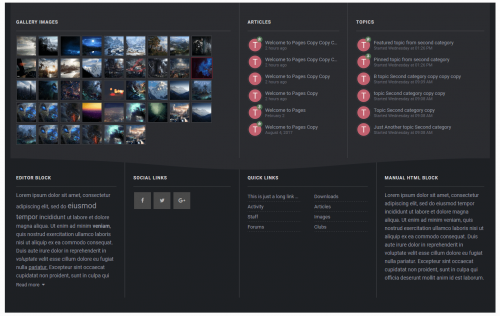
Advanced footer invision community board Application for 4.3 and 4.2 Advanced footer allows you to add a footer to your site with as many blocks as you want, including feeds from Forums, Gallery, Downloads, Pages, Facebook page feed, Twitter timeline feed, Adding members block, Custom Editor/HTML blocks and more. Beautiful and clean design it is fully responsive and perfectly suits your theme due to its highly customizable options, it is entirely customizable, resizable, and reorderable. Features Custom blocks. Custom HTML/Editor blocks. Member blocks. Quick Links. Social blocks ( Facebook page feed, Twitter timeline feed, Social links ) Feed from IPS applications. ( New ) Forums. Gallery. Downloads. Pages. Create columns and optionally show it to specific themes, you can also set a custom column background color. ( New ) Create blocks and optionally set a specific width or a custom background color. ( New ) Resizable and reorderable Columns/blocks. Custom color options. / or Match colors to your theme. Creating footer rows Creating blocks What's New in Version 1.0.3 Advanced footer is now an application instead of a plugin. -You can now show feeds from IPS applications Forums. Gallery. Downloads. Pages. -Add as many columns and blocks as you want, You can also create columns and show it to a specific themes and many more... Read the documentation file included with the .zip folder for more information Version 1.0.2 Added settings to hide on tablets and/or mobiles. Minor bug fixes and improvements. Version 1.0.3 Fixing Gallery images not showing in footer after IPS 4.3Free -

Version 1.4.4
15 downloads
Trophies and Medals invision power board application 4.3 and 4.2 is the best new way to award trophies to your community in a full rewards system! It offers a fun and engaging new way to give awards ("trophies and medals") to your community to promote positive behavior and more active participation! You can assign new trophies based upon conditions or criteria that you define, or you can let your moderators manually give medals for unique circumstances! Trophies and Medals also includes advanced integration with REST API and Automation Rules so the app can be extended for unlimited possibilities. Are you looking for an awards app where you can automatically give awards, trophies, and medals based upon forum posts, topics, and more? Are you looking to increase repeat engagement by giving out rewards? Or are you struggling to grow your new community? Are you looking to add gamification features to encourage positive behavior like quality posting? Are you looking for more features beyond the IPS Leaderboard to customize the levels, types, and images of awards? Are you looking to monetize your community ($$) and add bonus features for paying members? Are you looking for a well-supported app by a IPS third-party developer who passionately loves supporting the IPS community? Start creating a full awards system with Trophies and Medals. The Basics Trophies - Trophies are automatically awarded based upon criteria. The criteria are defined by the admin in the ACP. Medals - Medals are manually awarded by moderators, administrators, or groups who have permission. Medals are assigned on the front-end. The application supports both trophies and medals for both auto-awarding and custom awards! Trophy Filters Build a rich and advanced awards system with a nearly limitless variety of choices to help you promote the most awesome community you can! Create sets of new trophies based upon various criteria, and layer them with other sets to create a whole system of awards! The criteria system uses native IPS 4 extensions for deep integration, and more criteria can be added in future releases. Let us know what criteria you need . Member Criteria User is an Administrator User is a Moderator User has Avatar User does not have Avatar Registered for X days User is in Group User is in X clubs Content Criteria User has X content User has X reputation User has given X reactions Downloads Criteria User has uploaded X files User has file with X downloads Gallery Criteria User has uploaded X images User has uploaded X albums Forums Criteria User has started X topics User has posted X posts User has X best answers Commerce Criteria User has purchased X product Integration The app features extensions with various third-party systems to empower advanced admins and developers to get more out of the app. REST API. These are the available REST methods: POST /trophies/awardmedal GET /trophies/medals GET /trophies/medals/{id} GET /trophies/trophies GET /trophies/trophies{id} What's New in Version 1.4.0 IPS 4.3.0 compatibility releaseFree -

Version 1.2.2
22 downloads
iAwards Invision community Application 4.3 The long awaited awards application for IPS has arrived! iAwards provides administrators the ability to award their members with badges that show in their profile and, if chosen, on their posts. Standalone this application has the ability to manually award members and to award members based on the amount of awards the member has. You can award both from the ACP as well as from the create menu at the top of your site. In order to give everyone a fully customizable way to award we have integrated it with the Rules application. This gives you the power to award your members based on rules that you create instead of the ones that we think up. Features include: Choose location of awards – Under the post or under the author pane. Hide awards – To allow members to show the ones they want. Award based on number of awards. Manual awarding. Upgrade Tools for both HQ Awards and Awards (Free). Category and awards management. For the best support please register at http://bbcode.it Recommended addons: What's New in Version 1.2.1 4.3 Compatibility release Fixed OutOfRangeException bug when giving award NEW FEATURE Stacked awardsFree -

9 downloads
Elegant : A color picker powered theme for IPS.Suite 4.x! Elegant is a minimalistic theme controlled by a color picker, allowing each of your members to choose their own unique color scheme. Theme Features Theme Settings Easily enable, disable or modify theme features such as background images, logos, social media links, guest messages and colors. This makes modifications and upgrades very simple since little code changes are required. Color Picker Elegant comes with a color picker, allowing your members to choose their own unique color scheme. Their selection is saved via cookies and a "reset" buttons lets them easily revert back to your default color scheme. Optional fixed header If enabled via theme settings, your header will stick to the top of the page, allowing for easy access to your navigation. Background picker If enabled, your members can choose their own background image or color from a predefined selection. Their choice is saved via cookies and automatically load each page visit. Guest message A customizable message can be shown to guests, prompting them to either register or login to your forum. Two designs, "billboard" and "alert" (shown) are available. Global message Display a message across the top of your site with important announcements. Once your members have seen the message, they can press the Dismiss button to remove it (until you configure a new one). Social links Social links can be enabled/disabled and customized to your own URL, allowing you to easily link to your social network pages (facebook, twitter, etc) HTML logo with slogan Easily add/edit your text logo and slogan from within the theme settings. If required, the text can be replaced by an image instead. Mega Footer A mega footer with configurable column numbers and content can be enabled and customized all within the theme settings. Enhanced mobile layout The last topic title is visible on the board index on mobile layouts, allowing for easier access to your latest content. Image-free All icons and background effects (with the exception of the background picker) are created using css. This results in very fast page loads since no images are downloaded, as well as 'retina-quality' clarity on high resolution displays. Special holiday effects By toggling a switch in your theme settings, you can enable special effects to celebrate events throughout the year including Christmas, New Years, Halloween and Valentines. Upgraded for Community Suite 4.3.0. This update also includes the latest bug fixes from the 4.2 series.Free
-
Recently Browsing 0 members
- No registered users viewing this page.