
LIVE UPDATES
- 📢 Welcome to FundayForum – Explore Trending Topics
- 🌟 Discover What’s Trending Today
- Prince Harry, Meghan finally give up hope for reunion? Expert explains
- Rahul Gandhi's nephew says he was forced to remove protest artwork from Delhi exhibition
- Two teenage girls arrested in alleged Southern California school shooting plot
- Jimin shocks fans, bids goodbye to blonde locks for BTS Argentina shows
- Prince William says 'there is no going back' with Harry
- Taylor Swift sparks backlash for selling 'overpriced voice memos' on vinyl
- PM backs KP emergency rule, blasts PTI for 'criminal negligence' over worsening security
- Cara Delevingne shares rare bts of Taylor Swift's 'Patient Zero'
- Charli XCX apologises to fans as she cancels Arizona show
- TTAP sets two conditions for PM-Achakzai meeting after govt's offer for talks


Waqas Dar
-
Posts
11,303 -
Joined
-
Last visited
-
Days Won
559
Content Type
Profiles
Events
Forums
Gallery
Blogs
Downloads
Articles
Page News
Release Notes
Store
Everything posted by Waqas Dar
-

Version 1.0.0
6 downloads
This Plug-in Chatbox entries count on profile cover will displays the number of messages count of chatbox on profile cover. 4.1 pluginFree -

download IPS- Invision Power Board 4.2 Nulled Full Suite
Waqas Dar commented on Waqas Dar's file in IPS Community Suite 4 Resources
 it could be coz of database name , username or pw. and also please check from ur cpanel tht u gave access permission to database or not. @Potofonbest
 -
Version 4.2.2
1,010 downloads
This is latest nulled files of IPS Community board 4.2.1 -- 4.2.2 with all applications. Version 4.2 is the next large release for Invision Community! We are very excited to introduce all the new features and improvements. Full information on 4.2.0 ...Free -

Version 4.4.x
77 downloads
Theme features Theme Settings Easily enable, disable or modify theme features such as background images, logos, social media links, guest messages and colors. This makes modifications and upgrades very simple since no code changes are required. Minimal HTML edits This theme has only 3 modified template files, which means in most cases, you will not need to install theme updates between IPS versions. Too easy! Dropdown Navigation Menus All sub navigation links are placed inside a dropdown menu which is visible on-hover. Background Picker (optional) If enabled, your members can choose their own header background image from a predefined selection and their choice is saved via cookies. This feature can be customized within the theme settings. Mega Footer (optional) A mega footer with configurable column numbers and content can be enabled and customized all within the theme settings. Social links Social links from over 20 sites can be customized via the theme settings, allowing you to easily link to your social network pages (facebook, twitter, etc) Global message Display a message across the top of your site with important announcements. Once your members have seen the message, they can press the Dismiss button to remove it (until you configure a new one). Guest message A customizable message can be shown to guests, prompting them to either register or login to your forum. HTML logo with slogan Easily add/edit your text logo and slogan from within the theme settings. If required, the text can be replaced by an image instead. Latest Topic on Mobiles The latest topic title is visible on tablets and mobiles, allowing more convenient access to your latest content for mobile users. Retina Ready All gradients, shadows and icons are generated using css which means your site will look great on all devices - even those with high resolution screens.Free -

Version 2.0.7
56 downloads
Nerva & IPSMake : Very clean a skin with advanced features designed for the IPS 4.3 and 4.2.x Fully customizable with features you can create a website that you want. Very clean a skin with advanced features designed for the IPS 4.3.x. It has a fully responsive width adjusts automatically to any screen size or resolution.Free -
میری خواہشوں کی چادر چور چور ہو چکی ہے جو صرف میرا تھا ، وہ اب میرا نہیں رہا !میں ندی کنارے پتھر پر سر رکھ کر پتھر مزاج لوگوں کے بارے میں سوچ رہا ہوں۔۔۔ شام کی اداسی میری روح پیاسی کو ناجانے کب قرار آئے ،ندی کنارے ،ٹھنڈی ہوا بار بار مجھے اس کی یادوں سے فرار کا راستہ دیکھا رہی ہے ،نہ جانے اسے مجھ میں کیا اچھا لگتا ہے وہ کہتی ہے جو مجھے تم میں دیکھائی دیتا ہے کسی اور میں نہیں اور اسی بات پر میں ناچاہتے ہوئے بھی ہنس دیتا ہوں ،کیوں کہ وہ کہتی ہے تمہاری اس ہنسی میں میرے لیئے بہت سی خوشیاں رکھی ہیں ندی کی سر د ہوا نے میرے جسم میں کپکپی تاری کر دی ہے،شاید مجھے اٹھ کر چلے جانا چاہیئے،وہ پری چہرا لوگوں کی داستانوں سنوں،کسی پرستان میں میرا گھر ہو ،کوہکاف کا شہزدہ لگنا چاہتا ہوں،پتھر پر سویا سویا میرا سر تھکن سے شل ہو گیا ہے،نظریں آسمان کی طرف ،بادل چل رہے ہیں۔۔۔۔۔۔نہیں نہیں چاند سفر میں ہے ،پھر نظریں ہٹا کر پھر آسمان کو دیکھتا ہوں میری مجبوریاں میرے سامنے ہاتھ جوڑ کر کھڑی ہیں اور مجھے واپس لوٹ جانے کے واسطے دے رہی ہیں خدا جانے کیا ہونیوالا ہے ،قربتیں دوریاں بڑھاتی ہیں یہ اس کا کہنا ہے قریب ہو کر دور جانا تو میری آوازوں کی یادیں اور میری قربتیں مجھے لوٹا کے جانا ،فیصلہ تو تم کر چکے ہو ،اب کبھی نہ لوٹنا میری انگلیوں پر تسبی پھرتی ہے ،میری انگلیاں اپنی آنکھوں او ر اپنے ہونٹوں پر پھیر لو ان میں بہت سی برکتیں ہیں۔میری چاہتوں کو کبھی کسی ترازو میں مت تولنا ،اور ہی کوہکاف میں جا کر کسی پری کو میری داستانیں سنانا،جو ہوا اسے بھول جانا اور کبھیواپس مت آنا میرا ساتھ یہی تک تھا شاید،کہا تھا نا قربتیں دوریاں بڑھاتی ہیں

-

Version 1.0.1
6 downloads
This plugin will display 2 letters in the profile letter, if the user has 2 names, like Adriano Faria. Examples: Setting: Exclude word: First letter from these words will not be used in the avatar. You can see above it excluded the "di" word. Note: This change does not happen automatically for users already registered. It will occur after they change their display name. Compatibility: IPS Community 4.2 Script optimization.Free -

0 downloads
This is a free plugin. No guarantee of support is provided in any manner. This is a simple plugin which does just what the title says: it hides "empty" reviews. When upgrading your community from 3.4.x, you are able to convert "ratings" to "reviews" in the new system. However, these converted ratings all end up being displayed as reviews with no associated text, which is unsightly and generates pointless clutter. This plugin allows you to keep ratings from the old system and simply hides them from view the reviews tab. This means old ratings will still count towards an items overall rating, but the review page won't be cluttered with those empty reviews. Members will still see their own review, regardless; this way a member who previously rated a file in the old system can still edit their review and add content to it after you upgrade.Free -

Version 3.0.3
11 downloads
This modification adds a button to bump a topic, useful to avoid useless replies with something like "bump" or "up". Features Coded as plugin, disable it to disable the whole modification Each group has its own options: Enable/disable bump option Restrict only to specific forums or all Bump all topics or only the ones started Limit the number of bumps per day Set a waiting time after the last bump Set a waiting time after the last topic post Secondary groups options are properly checked Different icon to easily confirm the status visually Full star: bump option is available Half star: bump option will be available after some time (last post/bump limit) Empty star: bump option is not available until next day (daily limit) Bump button is always hidden for guests and search engines Javascript timer in the disabled button to show how much time the members must wait The topic is automatically marked as read for the member that bumps it, but not for the others! Fixed the error message not display correctly the number of days/hours remaining Fixed the uninstall process not handling correctly some columnsFree -
View File Full ramazan Timetable 2017 with Ashra Dua PDF File Ramazan Month ki daily dua'ain and timetable of 2017 . 28 May to 25 June 2017. click to download or read at fundayforum in pdf format. Submitter waqas dar Submitted 05/28/2017 Category Islamic Writer/Author
-
View File Ramazan Mubarika ki dua'ain.pdf Ramazan Month ki daily dua'ain. 1 to 30 . click to download or read at fundayforum in pdf format. Submitter waqas dar Submitted 05/28/2017 Category Islamic Writer/Author
-
View File Ramazan Timetable 2017 Pakistan Download or click to find out timetable of Ramazan 2017 Pakistan in PDF format. 28 May To 25 June 2017 Submitter waqas dar Submitted 05/28/2017 Category Islamic Writer/Author waqas dar
-
![More information about "[IPS4] CCBill Payment Gateway"](https://fundayforum.com/uploads/monthly_2017_05/ccbill1.thumb.png.683ac15f570cd64086eee4be0a19d6f8.png)
Version 1.0.1
4 downloads
Thank you for considering a purchase of the CCBill Payment Gateway, released by @Joel R. CCBill is now available (for the first time ever!) for IPS 4 with the integration of this payment gateway, enabling your users to check-out and pay for your goods and services using CCBill. This file is coded for IPS 4.x IP.Commerce. You are encouraged to read through the entirety of this description to ensure this file is appropriate for your use case. Why CCBill? CCBill offers a trusted and dedicated payment processing system used to process millions of transactions each year between webmasters and consumers. It's developed a reputation as one of the leading payment processing systems, where your clients can securely and conveniently buy and you can manage purchases and subscriptions. It offers complimentary fraud control, membership and purchase management, and 24/7 consumer and merchant support - all in a trusted brand built over a decade and a half. CCBill offers payment types that are familiar and convenient for your users, no matter where they are located. Whether your consumers are using credit cards, electronic checks, bank debit, or are in Europe, the United Kingdom, Canada, or the United States, they can buy your product or service. CCBill accepts all major payment methods in a global processing system with multiple currency options, multilingual support, and dedicated payment options for geographic regions. CCBill offers payment processing in a variety of channels, including online businesses, dating, nonprofit organizations, high risk websites, live entertainment, and subscriptions. As a brief highlight: Online Business - CCBill provides your company with affordable and easy options in a technology-driven system that accepts credit card, debit card, and checking accounts through secure payment pages that can be branded as your own. Dating - CCBill integrates high-risk management into a dating business model that offers dynamic pricing and shopping features. Nonprofit - CCBill offers discounted rates for 501 (C)(3) status and access to millions of potential donors. CCBill can increase your fundraising through low rates and automated renewals. High-Risk - If you are a high-risk business model such as online adult entertainment, live entertainment and cam sites, penny auction sites, and complex business selling, CCBill is one of the few trusted choices for you and your consumers. It handles fraud and risk mitigation, consumer satisfaction, and banking and credit card regulation in a trusted brand which layers regulatory support for regulatory and legal factors, compliance support for content and legal issues, and consumer support for consumer satisfaction. Live Entertainment - If you offer live entertainment through the use of webcams, CCBill offers highly configurable business concepts such as multi-sign and one click upgrades. Subscriptions - For content-rich websites that offer digital or soft goods, CCBill offers a decade of experience specializing in subscription billing for content-rich websites. Learn more about CCBill: Merchants | Pricing My Story I wanted to share my own experiences and how I came about commissioning this payment gateway in a heartfelt story about how important it is to me to offer this payment gateway to the IPS Community. IPS Clients create communities around a diverse variety of topics, not all of which are suitable for mainstream payment providers such as PayPal and 2Checkout. Unfortunately, due to our content or business model, we are locked out of mainstream payment processors and unable to financially fund our communities. My community is like that too, and ever since I installed IP.Nexus back in 2012, I've been rejected over and over - and over and over! - again by mainstream payment providers. I know what it's like to make painful choices such as killing my own traffic so my website doesn't become a financial drain. It's taken me 3 years to get here. I've burned through highly-reputable IPS third-party developers who were recommended to me, but who couldn't finish the gateway. I've burned through an IPS third-party developer who supposedly specializes in IP.Commerce. I've even burned through Indian, Nepalese, and Bangladesh developers I found through oDesk. I've burned through thousands of dollars in wasted efforts and failed attempts. But the payment gateway is finally made! Offering this gateway is an affirmation of the incredible array of IPS communities and our diverse audiences -- to help your community as well as mine thrive by allowing our communities to self-finance in a sustainable manner so we can continue to grow, build, and celebrate the richness of our awesome communities and members. My First Steps I recognize that due to its price, this purchase is not a casual purchase. It's not designed to be. This is not one of those free or low-cost plugins in the Marketplace that you try, buy, and then discard. This is an investment into your community's future sustainability and financial success, and you should consider it as such. As the first steps to getting started, I encourage you to follow the instructions below to ensure you and your community are properly onboarded: Your Merchant application to CCBill is approved. Your website has been reviewed and is approved. You read through the "Merchants" section of CCBill's Merchant Knowledge Base (Link) in its entirety. You outline the types of goods and services you want to offer and how you want users to pay (eg. payment workflow). You converse with CCBill's Merchant Support regarding your proper choice(s) for Subaccounts and Forms. This step is critical, as it will determine how you will configure your payment gateways. You upgrade to the latest stable version of IPS 4.x with IP.Commerce enabled and no outstanding bugs. You have no third-party applications, plugins, or hooks that interfere with the normal functioning of IP.Commerce. I will make every effort to explain what options are available to you in CCBill and to assist you. However, due to the nature of this payment gateway and how CCBill receives pricing information in their forms, it is critical that you ultimately communicate with your Account Representative at CCBill to determine what options are most appropriate for you. Learn More about CCBill: Learn More | Merchant Sign-Up | Admin Login My Commitment This file is tested. Before releasing this file to the Marketplace, I ran through three rounds of testing. In my first round, I ran six test transactions on my demo website to ensure they gave the right result: Discover Card - Approval Discover Card - Denial (Risk) Discover Card - Denial (Banking) US Checking Account - Approval US Checking Account - Denial (Risk) US Checking Account - Denial (Banking) In my second round of testing that happened on my live website, I ran the same 6 test transactions to ensure they gave the right result. Finally, I ran two real transactions on my live website using my own Discover Card and US Checking Account to ensure the payments were triggered in CCBill. I also ran so many other test transactions during the development phase that I lost count. This file works. If I personally want to make money on my website, then my only recourse is to use my own CCBill Payment Gateway. As such, I can provide a live demo on my own website which walks you through a live and functioning CCBill Payment Gateway. The screenshots are also of a live, real transaction on my community. This file will support IPS 4.x over its lifetime. I am personally committed to ensuring this file works for the lifetime of IPS 4.x, and if there are any changes that need to be made to the file, I will ensure those changes are immediately released. This file will be documented. Working with CCBill can be tricky and complex. This payment gateway is different from others and isn't a one-click install. CCBill doesn't have a true API, so you will need to configure both CCBill and your IP.Commerce settings to match your needs. I am personally committed to making sure you understand your options and steps you need to take through documentation, screenshots, and other assistance. Screenshots The screenshots walk you through a complete transaction from beginning to end, so you can see how IP.Commerce interacts with CCBill. Checkout - 2 Images. I add "VIP Olympian" purchase to my cart, which is a recurring subscription of $20 / mo. On the checkout page, I am presented with two payment options to pay using credit card or online check, both through CCBill. CCBill Forms - 2 images. I am redirected to the CCBill form, which requires me to enter in my billing, address, and new account information. Once I submit, CCBill gives a payment confirmation with a link back to website. Success! CCBill Portal - 2 images. The first image is homepage of CCBill with link to Admin Login. Second image is my dashboard, which confirms the 2 purchases made Yesterday. Email - 3 images. First email is CCBill's confirmation to the subscriber. Second email is CCBill's confirmation to merchant. Third email is IPS 4's confirmation. Payment Settings - 2 images. First image shows two different payment gateways for CCBill (one for credit cards; the other for online bank checks). Second image shows live transaction marked as approved in ACP. Images valid as of April 2016. Questions & Answers Does the gateway accept ## payment type in ## country? You will need to refer to CCBill's payment processing options for your account. Some countries allow certain payments while others don't. Most clients will find CCBill's payment options are more than enough. What pricing option do you use? I'm on the Direct plan, which is only available to new sign-ups, although you should converse with an Account Representative to determine which one is most appropriate. Can my website contain ## content? You will need to submit a Merchant Application to see if your project is approved. For example, during my website's risk and compliance review I had to remove certain kinds of content. How do I configure my webhooks / subaccounts / test user / dynamic pricing in CCBill? CCBill offers extensive documentation, and you'll find their Live Chat is fantastic and will even do most of the work for you if you ask nicely. Is this purchase for life? Yes, this is a one-time purchase that is for lifetime and gives you download rights to all future updates to this specific file. Are there any restrictions on the purchase? You are welcome to use your gateway on as many IPS communities that you personally own. Happy selling to you. However, I'd like to request that you not redistribute your personal copy to anyone else. You paid a lot for it, and you should protect your copy. Why is the purchase so expensive? This cost is a fraction of what it would cost for a custom development job. Let's face it, you're already losing money every month on server costs, bandwidth, storage, cloud distribution, domain renewals, and everything else - I know I was. How much more can you afford to lose before you find a suitable solution? This gateway is a one-time, upfront investment so you can begin earning money. This file's price point is calibrated for serious webmasters who need a reputable and trusted payment gateway for high risk content. And since you're a serious webmaster, then you're serious about finding a solution to make your community sustainable and financially prosper. Are refunds allowed? No, this file is designed for webmasters who understand and want to invest in their own communities for the long-run, and understand the expectations before purchase. Will the gateway work with Community in the Cloud customers? This payment gateway may not work on Community in the Cloud customers as you may not (in most cases ) have any direct filesystem (FTP) access. You will need to check with your IPS hosting representative to see if you have FTP access, or if they can upload the file on your behalf. Does the gateway support CCBill Flexforms? No. Flexforms are best used when you can customize forms in advance (eg. an Online Business sells one and only kind of product, and you can define product in advance). In our case, we pass along variables via dynamic pricing to CCBill's standard Jpost form based upon the buyer's cart, so the gateway already customizes the form for you. This gives flexibility to you as a webmaster, since you can add / remove products and increase / decrease prices in the ACP without worrying about changing your Flexform; when your buyers checkout, the exact price is passed on to CCBill's standard form. If you'd like to customize the standard form with colors and logos, CCBill will be happy to assist you. What are your use cases? I personally use the gateway to sell recurring membership subscriptions, although it can be used for any of the major classes of IPS products: digital goods, physical goods, advertising, subscriptions, etc. All this gateway does is handle the actual payment; everything else is handled by IP.Commerce. Does the gateway support the scenario where members sell ## and I get a commission (such as the IPS Marketplace)? Kind of. You, as webmaster, will get paid the full amount at time of checkout. CCBill does not offer an API and, by itself, cannot do automated pay-outs like PayPal. What instead will happen is that your sellers will be credited with funds into Account Credit. They may then use those Account Credits for other purchases on your website, manual payouts using another payment gateway, or automated payouts using another payment gateway. If I use CloudFlare, what do I need to do? Please be sure to add CCBill's IP address to your CloudFlare firewall, so the API notification will go through. Thank you to one of our purchasers for reporting this. More Q&A will be posted as inquiries are made. I am committed to providing as much upfront transparency as possible so you can be successful with the gateway. If you have a question, please ask. I will be more than happy to walk through your payment workflow. Reviews Feedback Thank you in advance for any positive feedback you leave below in the Reviews. I would love to hear your stories on how this payment gateway empowered you to start earning money and to become a profitable, self-sustaining community!Free -

Version 1.0.0
52 downloads
Cool Flat Forum Ranks With PSD File.Free -
Version 1.0.0
5 downloads
Description Footer - displaying message In Footer Settings set Description set Background color set Text color set Font Size set Margin set PaddingFree -
Version 3.0.0
8 downloads
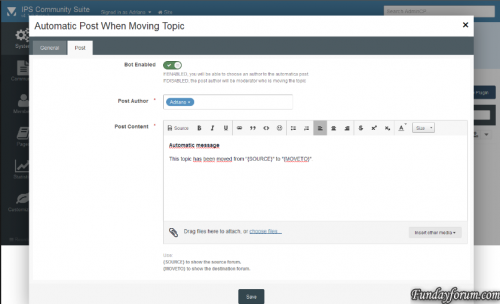
This plugin will create a automatic post when u will move some topic. Works with IPS 4.1.x IPS 4.0Free -
Version 2.1.2
9 downloads
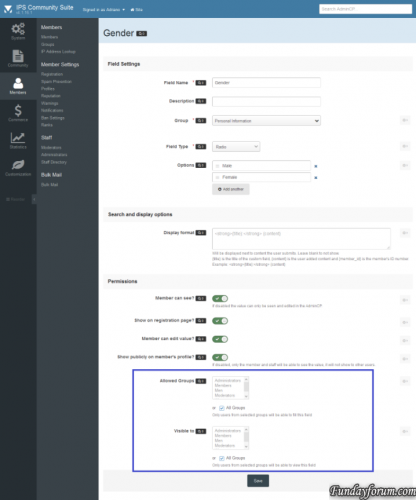
The plugin allows administrators to choose which user groups can use and view each profile field. All groups, by default, will be able to use any profile field. Members of the groups that are not selected in field settings, will not be able to view and fill the field in your profile.Free -

Version 1.2.0
17 downloads
Minimized Quote- This is a simple plugin that alters the amount of text/image shown in quote boxes. The changes are purely visual, no permanent change will be done to the stored post. It is also backward compatible with older posts. And everything will be restored if the plugin is disabled/uninstalled. The minimizer would in some cases be applied to the quote in an editor, making a permanent change to that quote box. This is now fixed.Free -
Version 1.0.0
2 downloads
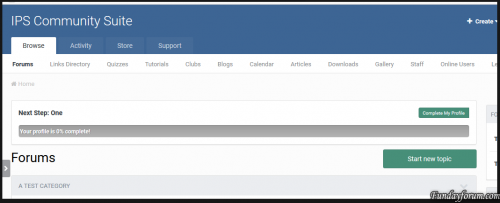
This plugin will hide the Dismiss button in the profile completition message.Free -
Version 3.4.3
6 downloads
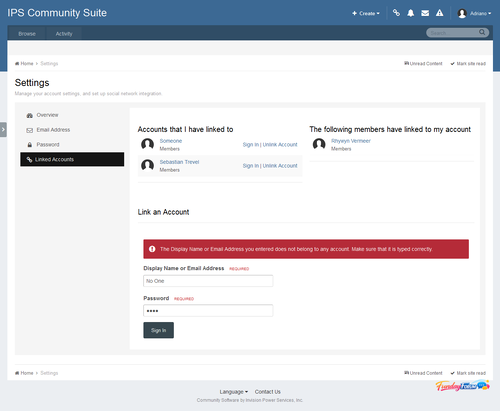
Linked Accounts - Post As 3.1.5.2 Linked Accounts allows your members to link one or more accounts then quickly switch between them. You have a full range of options about which usergroups can use the Linked Accounts system and which usergroups cannot be linked to. The POST AS feature allows the user with linked accounts to create/reply to a topic using a Linked Account. Each action is logged so you can keep a track of what linked account users do. The Linked Accounts system could be useful for fan fiction forums, roleplaying forums, or just those of you with multiple accounts (e.g, John Doe, Administrator, Forum News). Notes: Linked Accounts is integrated to Login system of IPS4, so to control the number of failed logins, Reset failed login count (minutes) on ACP -> Login Handlers -> Login Settings. This version contains an upgrader, so you can keep on using accounts created on this app for IP.Board 3.4 .Free -

Version 4.2 Beta 2
92 downloads
Please note the following: Beta 2 release. Do not use it on a live site. Invision Community 4.2 is now available as a beta in the client area. The final release will be later in summer 2017. Here is the roundup of what's new in Invision Community 4.2! Highlights There's a lot of new feature in 4.2 but here are a few of the highlights: Promoting Content - A new way to promote content in your Community internally, on Facebook, and on Twitter. Clubs - Clubs are a brand new way of supporting sub-communities within your site. Many people have requested social group functionality in the past and Clubs are our implementation of this concept. Reactions - Offer more fine-grained sentiments towards content than a simple up/down or 'like'. They are now in common usage on social networks, and so users expect to be able to be more nuanced in their response to something they see. Complete Your Profile - Encourage or require members to fill out the details on their profile. Also now allows for quick registration to encourage joining. And a whole lot more.. It goes on... here is the full list! Leaderboard Enhancements Richer Embeds Group Promotion Improvement Fluid Forum View Member History Editor Uploading Improvements Authy Integration Commerce Improvements New REST API Endpoints Gallery Improvements Statistic Reporting Copy Topic to Database Downloads Index Page Blog Sidebar Promoting Content Clubs Reactions Calendar Venues Social Sign In Streamlining Calendar Add Similar Event Gallery Lightbox Navigation Letter Profile Photos SEO Improvements Device Management Delayed Deletes Calendar Event Reminders Content Messages Recommended Replies Complete Your Profile Be sure to visit each entry above for more information and screenshots. We hope you enjoy Invision Community 4.2! Release The final release will be available summer 2017.Free -

Version 1.0.4
55 downloads
Chatwee is an advanced chat plugin for real time communication among members of online communities. It offers private, group, and public chats, including file uploads, clickable links, images, animated gifs, and a rich set of emoji. Users have several log in methods available, and chat owners can customize the plugin to a large extent. Chatwee chat is an excellent plugin for any IPB forum. It promotes interaction and engagement among visitors, as well as between visitors and site owners. Chatwee will help you build and grow a community of active users by providing a platform for real time, rich communication. Chatwee features include: Extensive customization options Multiple chat rooms Messenger-style group conversations Private chatting Offline messaging Rich media messages Multiple log in methods Cross-tab synchronization Powerful moderation options Click for a full features list Visit the official site for more information and to see Chatwee liveFree -

244 downloads
This is a security release and we recommend all clients upgrade as soon as possible. We know security updates can be distracting but we take security very seriously and do not want to delay getting you the latest enhancements. As we continue to audit security hardening, we will do these focused update releases. This release addresses two possible XSS scenarios.Free -

Version 2.1.2
18 downloads
(SOS43) Invite System This application will allow your community to use an invitation system for new registrations. You can make it mandatory (or not, depending on your configuration). In this case, an invitantion code will be required in order to register a new account in your community. Public side features: Users can send invitation in 2 places: + Create menu and Invitations on Account Settings. New icon on board top (beside Notifications and Messenger) to display the converted invitees and how many invites the user has. This icon also shows the remaining invitations for the member (just like how many users are online on Chat). 2 widgets: Top Inviters (per week, month, year and general) and Latest Converted Invitees, which are invitations converted to membership. Shows "Invited by" on user profile and on profile card (hover on user link). Tab on user profile to display their invitees (converted invitations) Settings: Enable Invite System Require an Invitation to Register an Account Restore deleted or expired invitation Display "Invitation" option on + Create menu Display the popup Invitations link on board top? Display total of remaining invitations Invitation Expires after X days Earn one Invitation at every X new content posted ACP Features: Invitations Management: a place where you can see the status of each invitation. The status are: PENDING, CONVERTED and EXPIRED. You can invite people, delete or resend invitations. You can also create batch invitations, to be used on a campaign or to be posted elsewhere. It won't send any emails. Bonus form: you can give invitations to a specific member or to a whole member group Note: It doesn't work in Commerce registration (if you have packages in register screen)Free -
Version 1.0.0
1 download
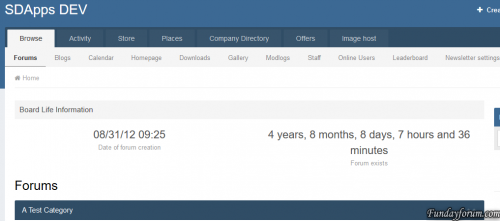
Plugin to display the time that has elapsed since the creation of your forum.Free

-
Recently Browsing 0 members
- No registered users viewing this page.