
LIVE UPDATES
- 📢 Welcome to FundayForum – Explore Trending Topics
- 🌟 Discover What’s Trending Today
- King Charles makes exciting announcement on Meghan's big day
- Targeted by Trump, ICC wins top EU rights prize
- Norway's sovereign wealth fund slips to $30 billion loss: Here's what went wrong
- What is age-related macular degeneration? Everything to know about the condition affecting Dame Judi Dench
- 'One Direction' Louis Tomlinson to take break from tour plans
- World Bank warns Middle East conflict could strain Pakistan's economy
- Princess Kate marks huge royal milestone in Victoria Beckham's power suit
- France records first human case of Shamonda virus, officials say
- ‘Dune: Part Three' sets new record as ‘The Odyssey' falls behind
- Gwen Stefani consoles Blake Shelton over John Anderson's death: 'I am sick'


Waqas Dar
-
Posts
11,303 -
Joined
-
Last visited
-
Days Won
559
Content Type
Profiles
Events
Forums
Gallery
Blogs
Downloads
Articles
Page News
Release Notes
Store
Everything posted by Waqas Dar
-
![More information about "[IPS43] Referrals System"](https://fundayforum.com/uploads/monthly_2018_10/2003600548_ReferralsSystem1.thumb.jpg.8ac6f294627852fd07931808f3f070a0.jpg)
Version 3.0.0
9 downloads
With this app you can allow your members invite other members. Features: enable/disable system, select allowed groups to use this mod, three invite types: free -> user may or may not enter inviter name; force -> user must enter inviter name; invite only: user must be referred by invite form (with hashed keycode), list of all invited users, list of all invited users in ACP with filter options, invites by referral link, points system integration (any system!), promotion to the new group after reaching specific amount of referred users, ability to enable/disable member powers to raising people via ACP, info in member profiles about referrer, ability to add/edit/remove referred transactions, ability to turn off the "Referrer Information" block in profiles, ability to award referrer if his referrred member made topic/post, invite form, option to enable/disable custom invite message, option to disable invites from the same IP and much more, resend option to resend sent invites, option to approve transaction only if referrer add more than X defined post.Free -
![More information about "[IPS42] Sticky Notes"](https://fundayforum.com/uploads/monthly_2018_01/5a6be22a2f7a2_StickyNotes1.thumb.png.07936ef4683b036c0cf23047ed3dad83.png)
Version 2.1.0
6 downloads
This application will allow you, or if you have selected members, To post global sticky notes to other members on your board Global Sticky Notes ( ACP ) Display up to 10 admin based global sticky notes to your members Choose what user groups can see the sticky notes Add a signature (username and avatar) to the bottom of each sticky note allowing members to see who wrote it, as a clickable link to said profile Choose the colour of the sticky notes Choose from 9 different positions to show each individual sticky note Set a expiry time and date for each sticky note with a option to just show it until the user dismisses it Global Sticky Notes Front End Admin The admin/s can send the global sticky notes from the front end via the create menu ( Only admins can use this feature ) Personal Sticky Notes ( MEMBERS ) Allow chosen user groups to send personal sticky notes to other members Members can receive a unlimited amount of sticky notes All sticky notes are dismissable All personal sticky notes will automatically add the username and avatar, unless you have selected in the ACP to allow anonymous sticky notes (read ACP Menu below) Personal sticky notes will display the time the note was sent to the member for example "just now", " 5 minutes ago", "4 hours ago", "16th July" and so on Members can either send personal sticky notes to members by their hover card or via their forums topics and you can also send them via the users create menu Each ( Non anonymous ) personal sticky note has a reply icon on allowing users to easily reply to other members notes Front End ( PERSONAL STICKY NOTES ) Added a link to the users drop down menu linking to the new tables listed below Shows a table listing all the members received sticky notes with the ability to restore the note bringing it back to life Shows a table listing all the members sent sticky notes with the ability to edit and resend or just resend the stickynote, it also shows if the user has dismissed the sticky note Members can view all their sent and received sticky notes between them and X member All tables can be sorted by time and date and also have a advanced search for members or a time and date stamp Widgets Show a widget with a list of members who have sent the most sticky notes Show a widget with a list of members who have received the most sticky notes ACP Menu Sticky Notes (Global including personal) Choose to use either a pin or a bit of sticky tape to hold the sticky note Choose to show or hide sticky notes on mobile or tablet devices Personal Sticky Notes Allow members to send anonymous sticky notes to other members (admin can view all sticky notes in the ACP read below) Read all the sticky notes send by members in a nice and tidy table and you (being the admin) can even view the sender if they sent it anoymous Select what member groups can use personal sticky notes Choose from 9 different positions to place the sticky notes Mass delete sticky notes by either "ALL", "READ", "UNREAD", by individual members or by chosen user groups Choose the colour of personal sticky notes Member Group ACP Menu Choose how many personal sticky notes each member group can send per day, with a unlimited option Members Settings ACP Menu Block individual members from using personal sticky notes Block individual members from receiving sticky notes How to install If you have version 1.0.3 or below installed, uninstall it as it's a plugin and will conflict with the new application Go to your ACP and applications then click to install and upload the downloaded .tar file New Features Members can now block other members from sending them personal sticky notes via their profile setting page Added the ability for members to mass dismiss personal sticky notes ( This can be turned on or off in the ACP settings of the personal sticky notes ) Added the ability to hide the ' send sticky note ' link on the members topic posts via the ACP settings of the personal sticky notes Added a little note count bubble to the dismiss button on personal sticky notes showing the amount of notes they have got to dismiss ( This will only show if there is more than 1 )Free -
 thank you for reminding me . new version is uploaded. u can download now if u have any new themes u can share as well with others.
 -
![More information about "[IPS] Videos Application"](https://fundayforum.com/uploads/monthly_2018_10/v1.thumb.png.cd5be37da7b523facc299da5ce8226ff.png)
Version 3.3.6
17 downloads
Allows your members to submit their own videos for community viewing. Support is included for all the major video sites. Features: NEW Per category custom field support. NEW Quick add video support. NEW Video.JS support for uploaded videos. NEW Improved front end design new trending, followed, discover and featured tabs .Including pagination and sorting. NEW RSS import support for videos. Mobile skin support for the portal index, category view, video form and view video pages. Support included for share links on view video page. Notification support for add, edit, approve, unapprove and moderator pending videos Support for category permissions. Set who can add videos, edit videos, delete videos, add comments, edit comments, delete comments per group. Support for per category settings, including view category, view and add video permissions and discussion topics. Ajax rating system with per group permissions who can rate and even who can change their votes. Share video option with page link, bbcode and html code provided for members to share videos more easily. Default per category settings for sort and filter as well as number of videos per page. Support for YouTube thumbnails. Thumbnails are downloaded and saved locally for display next to videos when new videos are added using media urls. (See below for which sites are supported.) Quick add video option, enter the media url and category and the system will attempt to get the video title/description automatically. (Not all media urls supported.) Support for category or video following. Support for IPB's tag class for videos. Per category or globally created discussion topics. Pending videos overview for mass approval/denial of new videos added. Full use of IPB's inbuilt cache system to minimize server load and resources. RSS feed for new videos added and per category rss feed export added for each category.Free -
 @behrooz not yet but soon we will update. keep visiting and get latest updates follow the files if u want updates pleae like and share as well
 -
 @SL![M] thanks .. keep liking commenting and sharing our page at ur social engine platform too .. thanks again
 -
Version 1.0.0
95 downloads
Siders theme for 4.2.x its really nice theme with dark colors. dont forget to click like button and pass ur comments . thanksFree -

 there is new version upload 4.2.6 with bugs fixed try to upload those files and install. hope this will fix ur prob once at all with latest version too
 -

248 downloads
IPS Community Suite 4.2.6 Nulled This is nulled version of latest IPS. Please dont forget to like and comments . Thanks Released 11/14/2017 Key Changes This is a maintenance release to fix reported bugs. Other changes include: RSS feeds now use guest page caching system Analytic tracking code has been moved to inside head tag Ad code placement has a new setting to clarify how sidebar display should be handled Various enhancements to Redis engine including data stored encrypted at rest Search result improvementsFree -
@facknrite yes u can upgrade to latest version 4.2.6 and soon we will upload that files too thanks for joining us and liking @telugumv u can use up to 5.6 version or latest php 7 version
-
Version 1.6.3
13 downloads
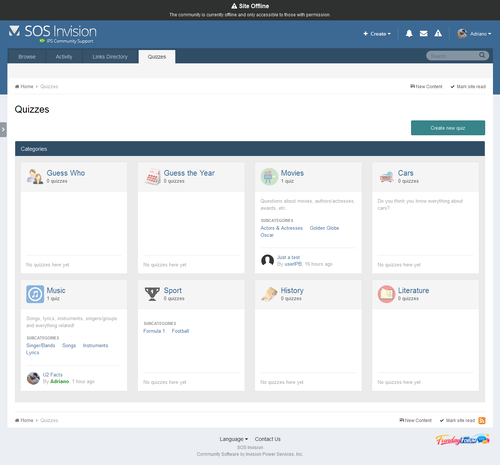
Quizzes Quizzes is a fun application which allows you and your members to add Quizzes to your forum. With leaderboards, categories and a unique layout, The Quizzes is sure to be a hit with your members. The Quizzes comes, among other things, with the following features: Two type of quizzes: graded moded (with time challenge and leaderboard ranking) and study mode (with no time challenge and leaderboard) Unlimited categories of quizzes, plus unlimited depth of parent-child relationships with a lot of settings, including: Category icon Extra fields Minimum and maximum number of questions and answers per quiz Comments and reviews, including requirement to play the quiz to submit a review Tags & Prefixes Requirement to take quizzes, by: Number of content items Number of reputation points/likes Number of days as a member Groups Discussion topic: will create a topic when a new quiz is submitted. Also there's an option to create a reply showing the score/time when someone completes the quiz Per-category permissions to show category, view quizzes, submit quizzes, comment and review quizzes Per member settings: allows to access the app and allows to submit quizzes Per group settings: allows to access the app, how many approved content items must have to access the app Integrates into IPS4 Moderating system, which all commons permissions, such as pin, unpin, delete, feature, move, etc. Robust Admin Restrictions Type of content field: textarea for plain text or IPS4 editor Ability to add an image to the quiz question Ability to set the minimum/maximum title length and description length Ability for users to report potentially offensive content using the built-in Report Center Search integration: search adverts along with the rest of your community’s content Supports item marking, allowing your users to see what adverts have been added or commented/reviewed on Integrates into Activity Streams Integrates to Share Links to share Integration to Member Filters (Bulk Mail, etc.) Integration with ACP Live Seach (categories) Support for notifications such as new quizzes, comments, reviews and when someone completes a quiz Ability to follow/like categories and individual quizzes Ability to upload or import an image from a URL to be the Quiz image. The image will be displayed on quiz view, categories, etc. Quiz protection: the game will be aborted if you leave the current tab/browser. This is to avoid users from search elsewhere. That's a setting. Setting to allow users to play a quiz only once Feedback: you can create funny phrases to be used on Quiz results according to user score New setting to randomize quizzes questions New setting to promote members to a group when they reach a specific rank in the quiz Totally functional on mobile devices More... What's New in Version 1.2.5.1 Version 1.2.5.1 Enhancement: Uses the quiz image when promoting the Quiz ----------------------------------------------- Version 1.2.5 Fixes: Number of quizzes in que Quizzes stats widgets Quizzes Leaderboard IP Address Tool Enhancement: Quiz Leaderboard: now it will display your position in the leaderboard if you're not in the TOP X users.Free -

Version 1.1.2
21 downloads
(BIM42) (BIM43) Clubs Enhancements This resource will give more power to Club Owners. They will be able to execute functions currently only possible in the Admin CP. Features: Add ability to create a custom HOME page for the Club Convert forums or apps categories into Club Features with a single click, so you don't need to manually move a bunch of items (topics, images, files, events, etc) - Admin CP feature. Convert Club Features into forums or categories Manage Club Features: Reorder (drag and drog) features Disable features: items from a disabled feature will not appear in the Club activity stream Delete features: just like on ACP, with option to delete content or move it to another club/category. Ability to ADMINS ban/unban members from the whole clubs. A banned member won't be able to access any club page, including its content (topics, files, images, etc.). IMPORTANT: Club items will continue to appear in Activity Streams, profiles, searchs, etc. The restriction will happen only when the member tries to read them. Allow members to choose which features will be automatically created when creating a club. Restrict number of equal features per club (example: you can only have one "topic" feature). Restrict Number of Clubs per member. Restrict Number of Clubs a member can join. Add ability to create a QUESTION feature when creating a feature from FORUMS app. Add members to the club (setting to allow Club Owners to use it. Admins can use it). Add members from a specific user group to the club (secondary groups checked) (setting to allow Club Owners to use it. Admins can use it). Change owner of the club. Change type of the club (option according to the owner group setting). Display club icons on users posts Display club icons on user profile (hover card) Settings: Allow admins/club owners to create a custom HOME page for the Club Restrict Number of Features? Number of features per club Allow Club Owners to manually ADD MEMBERS? Display 'Added By' info when admin/owner add members manually Display Club Icon on posts panel? Number of Club Icons to display Club Icons Sort Order: name, last activity and random Display Club Icons on Hovercard Profile? Number of Club Icons to display Club Icons Sort Order: name, last activity and random What's New in Version 1.0.17 New features: Add a new setting to give the admin the ability to add new registered members as a MEMBER in selected clubs when they create the account. Members will be deleted if the admin deletes the account Add a new setting: Allow Club Owners to change Club ownership? Added a button as a template by request.Free -
Version 2.0.7
32 downloads
( This file requires an upload so you will not be able to install this on an IPS Cloud hosted community. ) Main Features: Display thumbnails of topics in the main forum view. Topic's authors or member groups that you specify can change thumbnails. They can choose a thumbnail from images in topic content, external URL, or upload from computer. Abitily to generate thumbnail from Youtube, Vimeo, Dailymotion and Wistia. Using ajax, no need to reload the page after changing the thumbnails. Support "Gallery View Mode" with big images in responsive grid. (credits to Masonry) Widget to display new topics with thumbnails. Option to replace Forum Icons with Topic Thumbnail. Thumbnails in search results, activity. Permissions for viewing and changing thumbnails. A Toggle Show/Hide for members. Live Demo: http://demo.ipsviet.com/forums/ If you use IPS 4.1.x, download 1.2.x versions. If you use IPS 4.2.x, download 2.0.x versions. (Click the "Change logs" button to select versions to download) Fixed: Vimeo's thumbnails problem. Missing original thumbnail when editing topic. Gallery Mode permission issue. Forum Icons permission issue.Free -
Version 4.5.3
40 downloads
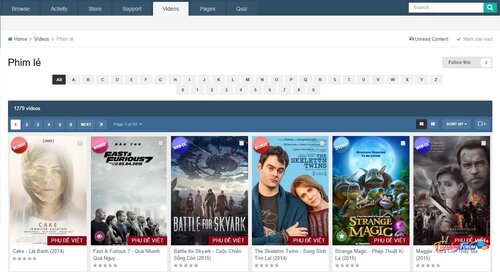
VideoBox is an application that allows sharing videos, the best choice to run your own Movies/TV Shows website. Features: 2 display modes: Grid view & List view. Categories/subcategories. Custom fields for video's informations. Protected custom fields that only display for logged members, or who liked the video. Search videos by custom fields. Video Collections: create/edit/remove the collections for your videos. Widgets: top poster, top videos, random videos, featured videos in slider, collections in carousel, quick search by custom fields,... Pages system: easy to add new page with custom content. Uploading or using external video url (supports: mp4, m4v, webm, flv, rmtp, youtube, vimeo, dailymotion). Using VideoJS Framework to play video formats: mp4, m4v, webm, flv. Full support for VTT captions. Watermark on video player. Media Tags system to define your custom player embedded from any video services (YouTube, Vimeo, Dailymotion...). Live Streams for Twitch.tv, Mixer.com and Smashcast.tv. Friendly URL. Comment system. Rating system. Following system. Clubs (IPS 4.2.x) *New* Reactions (IPS 4.2.x) *New* Tags. Latest Videos RSS feed. Pages system: easy to add new page with custom content. If using IPS 4.1.x, download 1.x versions. If you use IPS 4.2.x, download 2.x versions. (Click the "Change logs" button to select versions to download) Fixes: Missing thumbnail when promoting video. An issue with 10 stars in review block. FURL issue.Free -

Version 2.0.2
15 downloads
Weather website. This plugin can detect user's location using his IP and show the weather in his city, or it can display the weather in the default location on your forum header. You can customize the following options: Choose units: Celsius or Fahrenheit; Choose the type of weather icons: font icons or colorful image icons; Set icon height to fit your template. The weather and location information is cached in a browser Local Storage to reduce the number of external requests and provide fast and smooth experience. The weather is updated every 10 minutes. This plugin supports translation of all text strings except of location names (e.g. United States, Miami), because Yahoo Weather API currently doesn't provide them in other languages. Installation instructions Upload all files from uploads folder into your uploads folder on the server; Install the plugin in the ACP. Translation tip The archive includes two files which can help you to translate this plugin into Russian or German languages. Currently IPS doesn't support language packs for plugins, so you have to simply copy strings from these files and manually paste them in the translation tool in the ACP. This plugin uses Yahoo Weather API via SimpleWeather.JS, Weather Icons by Erik Flowers and image weather icons by umutavci. What's New in Version 2.0.2 JS library update, fix Yahoo problem. Weather description strings now are translatable.Free -

Version 1.0.3
20 downloads
(NE) HTML5 Audio/Video Player Plugin Forum, which will display the audio / video player for the HTML5 audio / video attachments and / or remotely connected audio / video files. Ability to turn on / off the player for audio or video or both (disabled by default, so the effect will not be seen immediately in the messages) Ability to turn on / off the relevant players from the processing of remote video / audio files. The ability to control the initial size of the video player in order to avoid the "big" video beyond the mail container. Ability to include the original link, to act as a backup for users with browsers that do not. Forum plugin which will display a HTML5 audio or video player for audio/video attachments and/or remotely linked audio/video files. Ability to enable/disable the player for audio or video or both (disabled by default, so effect will not be immediately seen on posts) Ability to enable/disable the respective players from handling remotely linked audio/video files. Ability to control the initial size of the video player so as to avoid 'large' videos pushing outside the post container. Ability to include the original link, to act as a fallback for users with browsers which cannot either display the HTML5 player or play the audio/video file Admin configurable list of audio/video file extensions. Plugin is compatible with IPS 4.1 (tested with 4.1.19.4) and IPS 4.2 (tested with 4.2.5) Please note the following: If you require support then please post in the provided support topic. Do not use PM and do not use the review functionality. Plugin support does not extend to assisting you with adding support for playing a specific audio/video file/codec to your browser (Google is your friend in this situation) Want to test your browser's ability to show a HTML5 player? Go here: https://tools.woolyss.com/html5-audio-video-tester/ Questions: Why are you charging more than your usual $5 for your plugin? Development of this plugin took longer than others, and I envisage future development and support will be time consuming too. Will the plugin be extended to work on other applications in the IPS suite? I will try to develop it to work within the Pages application, however other applications will be more difficult due to me not owning licenses to use them. Never say never, but for now it's a 'No' What's New in Version 1.0.3 Released November 22 added option to use fluid width instead of fixed width/height for videos (assists with responsiveness, and helps maintain aspect ratio of original video) minor typo fixes minor modifications to settings layout, in preparation for new functionality changes in version 1.1Free -

Version 1.0.1
18 downloads
(SOS42) Custom Username Icon 1.0.1 This plugin allows users to select one of 634 font awesome icons to be displayed in front of them through the reference package. The icon will be displayed only to the user's reference. This plugin will allow users to choose one among 634 font awesome icons to be displayed before their link across the suite. Icon will be displayed only before the user link. Setting: Groups allowed to choose an icon Compatibility: with IPS 4.1x and 4.2x Member's Country: Group Color on User Link:Free -
 @youtuber there is the file last one 4.2.5 u can get tht one if u want .. @Shadow thanks keep visiting us
 -
download IPS Community Suite 4.1.18.1 Nulled
Waqas Dar reviewed Waqas Dar's file in IPS Community Suite 4 Resources
 download the latest version of IPS thanks for leting us know i uploaded file again u can download now . sorry for that . @Flo
 -

Version 1.0.0
1 download
This plugin extends the sitemap to include products from your store. For some reason commerce products aren't included in the default sitemap, which can have a negative impact on your search ranking. With this plugin, your products will now show up in the sitemap that is submitted to search engines, and consequently be included in search result. Having used this on my site for the last week, I am starting to see my products show up in search where they previously were not. This will NOT include products that have "Show in store" turned off. Likewise anything that can't be seen by a guest will also not be included. To install just go to Applications -> Install and upload the .tar file. You can configure the options from Search Engine Optimisation -> Sitemap -> Untick 'Use recommended settings' and configure Commerce.Free -
316 downloads
IPS Community Suite 4.2.5 Nulled Suite Released 10/13/2017 This is a security release and we recommend all clients upgrade as soon as possible. Key Changes 4.2.5 is a maintenance release that fixes issues identified in 4.2.4. Additional Information This release addresses an XSS vulnerability. We would like to thank Maverick and Mike for responsibly disclosing the details of this vulnerability to us.Free -
download IPS- Invision Power Board 4.2 Nulled Full Suite
Waqas Dar commented on Waqas Dar's file in IPS Community Suite 4 Resources
it could be ur database username pw or permission errors. i installed tht version and checked before i uploaded here . -
Version 1.0.2
4 downloads
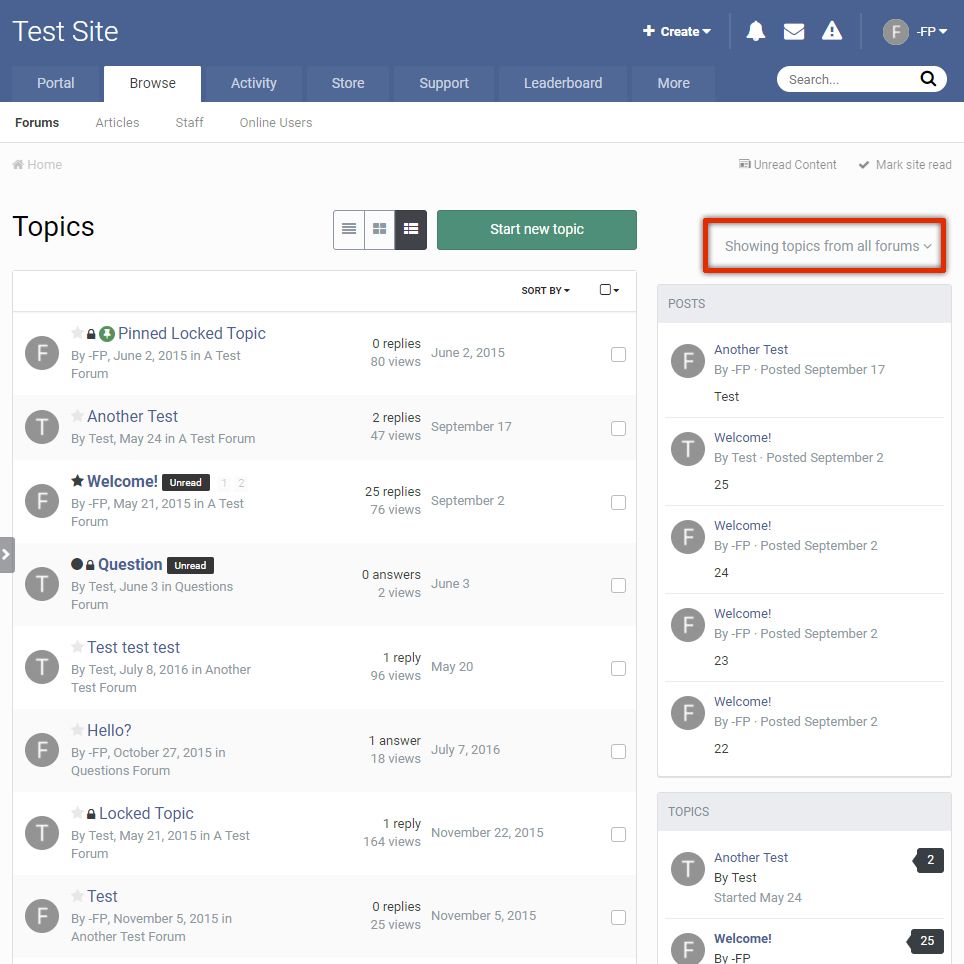
This plugin removes the default desktop view forum filter when in fluid forum view. It adds a button on the sidebar and/or on the forum index. Clicking this button brings up a window to filter the forums, like in mobile view. Compatible with Community Suite 4.2.4 (If the plugin seems not to be working on a 3rd party theme, try reinstalling it)Free -
![More information about "[4.1-4.2] Ips Profile Video"](https://fundayforum.com/uploads/monthly_2017_09/2.thumb.png.d64f72ad8428ff395b313a41d571281e.png)
Version 1.0.1
43 downloads
Plugin to embed video into profile. С youtube. player.twitch. player.vimeo Stated for versions: 4.1.x 4.2.x Original Description: Let your members set and display a video on their profiles with a user toggle button to show or hide the video Plugin Settings Choose what user groups can use Profile Video Choose what user groups can see the members Video Select to show the video in the sidebar blocks or the activity stream Hide the toggle button on the members profile Links Supported Any link what will play via embedding the src url For Example https://www.youtube.com/embed/TheUniqueID https://player.twitch.tv/?TheUniqueID https://player.vimeo.com/video/TheUniqueID How To Install Go to your admin panel and plugins then install the downloaded .xml file Version Compatibility 4.1.x 4.2.xFree -

Version 1.1.0
2 downloads
When this plugin is enabled, the checkbox "Send me news and updates" on the registration page will be removed by default to comply with certain email laws. The user can still turn it on, but it will start uncontrolled, whereas by default it will be started. Version Compatibility 4.1.x 4.2.xFree
-
Recently Browsing 0 members
- No registered users viewing this page.