Plugin 4.x
Ips Plugins 4.x version. download or upload Invision power board plugins
186 files
-

auto tagging (SD) Auto Tagging for ips forum
By waqas dar
Plugin creating automatic tags for topics in selected forums.
9 downloads
0 comments
Updated
-

plugin Anti-Spam IPS4
By waqas dar
Anti-Spam Ips4.3
No CAPTCHA, no questions, no counting animals, no puzzles, no math. No spambots signups, no spambots posts.
Hook uses invisible tests to stop spambots at the IP.Board.
Anti-spam features of the hook
Stop spambots at registrations. Stop spambots at the topics. Contact form protection (CAPTCHA should be disabled!) Allow guest posting on the forum without CAPTCHA. iPhone/iPad, Android app to control registrations and posts on the board. Anti-spam hook info
We have developed an anti-spam hook for IP.Board that would provide maximum protection from spam and you can provide for your visitors a simple and convenient form of posts/registrations without annoying CAPTCHAs and puzzles. Used to detect spam multistage test that allows us to block up to 100% of spambots.
Low false/positive rate
This hook uses multiple anti-spam tests to filter spambots with lower false/positive rate as possible. Multiple anti-spam tests avoid false/positive blocks for real website visitors even if one of the tests failed.
Spam attacks log
Service CleanTalk (this hook is a client application for CleanTalk anti-spam service) records all filtered comments, registration and other spam attacks in the "Log of spam attacks" and stores the data in the log up to 45 days. Using the log, you can ensure reliable protection of your website from spam and no false/positive filtering.
Private blacklists
Automatically block comments and registrations from your private black IP/email address list. This option helps to strengthen the protection from a manual spam or block unwanted comments from users. You can add not only the certain IP addresses but also a separate subnet to your personal blacklist.
Blocking users by country
Automatically block comments and registrations from the countries you have set a ban for. This option is useful in cases of manual spam protection and for protection enhancement. If your site is not intended for an international audience and you do not expect comments/users from other countries.
Blocking comments by "stop words"
You can block comments which contain "stop words" to enhance spam filtering and messages with obscene words blocking. You can add particular words or phrases.
SpamFireWall
CleanTalk has an advanced option "SpamFireWall". This option allows blocking the most active spambots before they get access to your website. It prevents spambots from loading website pages so your web server doesn't have to perform all scripts on these pages. Also, it prevents scanning of pages of the website by spambots. Therefore SpamFireWall significantly reduces the load on your web server. SpamFireWall also makes CleanTalk the two-step protection from spambots. SpamFireWall is the first step and it blocks the most active spambots. CleanTalk Anti-Spam is the second step and checks all other requests on the website at the moment of submitting comments/registers etc.
How SpamFireWall works?
The visitor enters to your website. HTTP request data are being checked in the nearly 5.8 million of the identified spambot IPs. If it is an active spambot, the bot gets a blank page, if it is a visitor then he receives a normal page. This process is completely transparent for the visitors. All the CleanTalk SpamFireWall activity is being logged in the process of filtering. Private blacklist for SpamFireWall
It allows you to add individual IP addresses and subnets to SpamFireWall. It blocks the attacks from IP addresses which are not included in the SFW base yet. This option can help to block HTTP/HTTPS DDoS, SQL, brute force attacks and any others that made it through the HTTP/HTTPS. You can add not only the certain IP addresses but also a separate subnet to your personal blacklist.
The CleanTalk is premium anti-spam for IPS4, please look at the pricing. We try to provide the service at the highest level and we can not afford to offer a free version of our service, as this will immediately affect the quality of providing anti-spam protection. Paying for a year of service, you save a lot more and get:
100% protection against spambots Time and resources saving More registrations/comments/visitors Protect several websites at once at different CMS Easy to install and use Traffic acquisition and user loyalty 24/7 technical support Clear statistics No captcha, puzzles, etc. Free mobile app Also, you can use CleanTalk app for iPhone/iPad to control anti-spam service on website or control comments, signups, contacts, and orders.
1. Download the latest version of the CleanTalk Anti-Spam hook.
2. Place the downloaded xml-file in the folder "<IPS4-root-folder>/plugins".
3. Go to "System —> Plugins" and press the button "Install New Plugin".
4. Choose the CleanTalk xml-file from "<IPS4-root-folder>/plugins" and press the button "Install".
5. During the installation 3 files will be downloaded to "<IPS4-root-folder>/uploads":
https://github.com/CleanTalk/ips4-antispam/blob/master/general/cleantalk-sfw.class.php
https://github.com/CleanTalk/ips4-antispam/blob/master/general/cleantalk.class.php
https://github.com/CleanTalk/ips4-antispam/blob/master/general/sfw_die_page.html
If it didn't happen for some reasons, download them manually and put them in the folder "uploads". Create this folder if it does not exist.
6. Click the pencil symbol opposite the "CleanTalk Spam protect" line.
7. Copy the access key from your CleanTalk Control Panel and paste it in the field "Access key", turn the plugin's options on and press the button "Save".
Do a test registration using the blacklisted e-mail stop_email@example.com.
Please go to Dashboard to see the anti-spam status, add new websites or manage existing ones!
Please check your email to get the account password.
The hook is a client application for cloud anti-spam service CleanTalk.org, which are daily protects 5k websites from spambots. Also, you can use CleanTalk app for iPhone/iPad to control anti-spam service on website or control posts and signups on the board.
How can I test anti-spam protection?
Please use email stop_email@example.com to test anti-spam for signups.
Should I use another antispam hook?
Use other antispam hooks not necessarily, because CleanTalk stops up to 100% of spambots. In some cases, several anti-spam hooks can conflict, so it will be better to use just one plugin.
Troubleshooting Guide
Anti-spam by CleanTalk support forum
If you're having trouble getting things to work after installing the hook, here are a few things to check:
If you haven't yet, please upgrade hook to the latest version. If you have error '*** Forbidden. Enable JavaScript. Anti-spam service cleantalk.org. ***' please check JavaScript support in your browser and do JavaScript test at this page Check out JavaScript support. If you have spam signups or posts please check the Access key at hook settings. The key should be same as you can find in service Control panel. Additional features
Online, daily and weekly anti-spam reports traffic VS spam. Apps for iPhone, Android to control anti-spam service, comments, signups, contacts. With traffic and spam statistics for last 7 days. Anti-spam apps for most popular CMS on cleantalk.org.
What's New in Version 1.9.5
Add update system Rework spam check users system Increase JS protection Bug fixes and other minor improvements3 downloads
- anti-spam
- anti-spam ips4
- (and 11 more)
0 comments
Submitted
-

(R41) User Block
By waqas dar
Widget shows information about logged user.
Fixed bug with cover photo and some language strings8 downloads
Updated
-

plugin IPB Chat Plugin by Chatwee
By waqas dar
Chatwee is an advanced chat plugin for real time communication among members of online communities.
It offers private, group, and public chats, including file uploads, clickable links, images, animated gifs, and a rich set of emoji. Users have several log in methods available, and chat owners can customize the plugin to a large extent.
Chatwee chat is an excellent plugin for any IPB forum. It promotes interaction and engagement among visitors, as well as between visitors and site owners. Chatwee will help you build and grow a community of active users by providing a platform for real time, rich communication.
Chatwee features include:
Extensive customization options Multiple chat rooms Messenger-style group conversations Private chatting Offline messaging Rich media messages Multiple log in methods Cross-tab synchronization Powerful moderation options Click for a full features list
Visit the official site for more information and to see Chatwee live
55 downloads
0 comments
Updated
-

plugin Latest Updated Files
By waqas dar
This plugin (hook) will add a new block on Downloads portal, below Most Downloaded files, to list the latest updated files.
Requirement For Latest Updated Files:
Downloads application
2 downloads
0 comments
Submitted
-

plugin Auto Follow Club
By waqas dar
This plugin will make the member who joins the club to follow it automatically. The follow will be removed when the member leave the club.
5 downloads
0 comments
Submitted
-
![More information about "Rankings: top posters, top topic creators, most liked [ips4]"](https://fundayforum.com/uploads/monthly_2018_09/mostliked.thumb.png.ff7471beed8c5633f8cf74f87d08bbdf.png)
plugin Rankings: top posters, top topic creators, most liked [ips4]
By waqas dar
Rankings: top posters, top topic creators, most liked [ips4] Plugin
LibterRanking plugin adds highly configurable members ranking widget which works both in horizontal and vertical orientation.
Configuration
Widget title Number of members to display Time in days to count posts/topics/reputation Content type (posts, topics or reputation) Excluded member groups31 downloads
0 comments
Submitted
-

Clear Cache From ACP
By waqas dar
This plugin will allow you to clear the cache without having to use the support tool.
Fixed an template issue15 downloads
0 comments
Updated
-

Hide Content Until Users Reply
By waqas dar
This plugin allows members to conceal the content in their posts so that other members of the need to reply to the topic before they can see the hidden content. With its powerful custom BBcode There are no file editing is required, additional plug-ins has an internal cache to keep all the threads Checked each session, which reduces the number of queries used. Due to the fact that only one additional request is used when viewing a topic and sometimes no queries at all!
Features
No edits files (it makes the use of plug-in system) 2 options to specify who can bypass Answer: Check, groups members All default areas are covered: Themes (Print preview in the complete set) Profiles (Both threads and posts Tabs) Quote Reply to both Ajax and Non-Ajax Citations (Hidden Content section) E-mail notifications The content is always Hidden (both forums and subscribe to threads digests Too) Easy integration with third party mods Display posts (As long as \ IPSorums \ theme \ Post class is used) New version add your own text Hidden text This is a modification (TB) Hidden Content If you have installed the offer you uninstall it before installing this
You must enter the content hidden in the [hide] [/ hide] Tags You can easily make a plugin for CKEditor response boxing going admin -> customization -> editor -> toolbars, and then select to add a button, select Custom and name it hide Content Loading and What ever image you want (I do not make the image) and in the HTML section of Just Add [hide] [/ hide] Now Save it to put it on the editor and job Easy Way to use [hide] [/ hide ] tags, otherwise just manually enter [hide] [/ hide]] tags
24 downloads
0 comments
Updated
-

plugin New Content Type Default to Topics
By waqas dar
New Content Type Default to Topics
The plugin sets the TOPICs as the default filter for searching NEW CONTENT.
1 download
0 comments
Submitted
-

plugin Bann Hammer
By waqas dar
This sends returning banned members to url of your choosing.
7 downloads
- bann
- bann hammer
- (and 11 more)
0 comments
Submitted
-

plugin Instagram Login Handler for IPS
By waqas dar
This app allows your members to login using their Instagram account.
Updated for IPS 4.3 https://github.com/Recouse/IPS-Instagram-Login-Handler
7 downloads
0 comments
Submitted
-
.thumb.jpg.43569e4380bcef03d481ff7e1818b6cf.jpg)
plugin Pages SuperGrid
By waqas dar
Pages SuperGrid is a set of Pages templates and a complete solution to make your Pages databases (with articles, directories and so on) appealing and engaging.
SuperGrid is one of the most popular files in the Applications & Plugins category on the IPS Marketplace.
What’s needed:
IPS 4.2 or 4.3 in its most recent version with the Pages application
A pages databases that uses the stock Record Image field and has images with a sufficient resolution uploaded through that field.
(Technically, the templates also work without images, but it’s an image-centered design and works best when most or all records have images.)
Which templates are included:
A beautiful grid-based Front Page template with two records featured at the top — for when your database is set to article mode.
A beautiful grid-based Listing template replacing the dull forum listing design — for when you open a category or have a database without categories.
A unique Record View template with a large header image — for when you open a specific record.
A category listing template – in case you use more than one category.
Note: You can use the templates for any number of databases, but the settings will always apply to all SuperGrid templates.
Bonus Feature:
Block template! Create blocks anywhere on your site – pointing to your database – and make them as beautiful as the database itself.
Detailed Feature Description and Notes:
Pages SuperGrid is built with the IPS design framework and is therefore fully responsive and compatible to most well-coded/well-designed themes. The styling of your theme(s) is inherited and the Pages SuperGrid templates will usually work out of the box.
The template is designed to work on single-column pages with or without a sidebar. The grid will automatically adopt to the available width and collapse on smaller devices.
The content field is not shown in the grid-based listing templates and all images will be scaled and cropped (without distortion) to the same size to allow a consistent look.
The templates come with lots of options you can easily adjust within the template. Front Page/Listing Template:
Show author/category/date: Yes/No
Alignment author/category/date
Show comments/views/ratings/likes: Yes/No
Alignment comments/views/ratings/likes
Show record owner’s avatar: Yes/no
Alignment record owner’s avatar
Title alignment
Image Aspect Ratio
Use thumbnail or full-size images
Turn images into record link: Yes/No
Assign fallback image for records without an image
Show “featured record” badge for featured records: Yes/No
Pick badge style for featured records
Show “pinned record” badge for pinned records: Yes/No
Pick badge style for pinned records
support for category images using the Pages Category Images plugin
Record View Template:
Image Aspect Ratio
Pick Avatar size from 7 options
Turn header image on or off
Show “featured record” badge for featured records: Yes/No
Pick badge style for featured records
Show “pinned record” badge for pinned records: Yes/No
Pick badge style for pinned records
Block Template:
Show or hide block title
Shuffle entries
Randomize shuffled entries
6 downloads
0 comments
Submitted
-

(BIM43) Gallery In Post
By waqas dar
(BIM41) Gallery In Post 1.1.4
The plugin allows you to add preview images in a neat carousel anywhere. Images can be inserted as a link to an album in Gallery, or add images to the URL from any resource.
7 downloads
0 comments
Updated
-
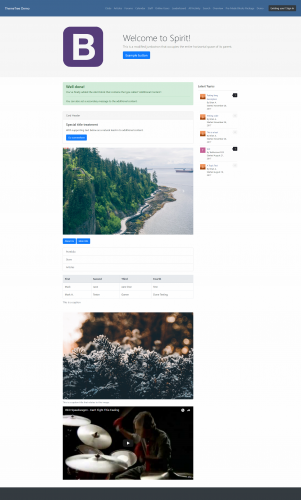
plugin Spirit - Power by IPS Pages
By waqas dar
Turn Your Homepage into a Beautiful Landing Page
Spirit -a custom landing page template built with CMS (Pages) and runs on Bootstrap & IPS framework to make your homepage look beautiful.
Settings
You don’t just get a custom landing page template, you’ll get settings that will change the Bootstrap & IPS framework into your own. It’s your forum homepage, make it yours!
Appearance Header Body color Link & hover Jumbotron background Widget color Footer background Footer color Google Font Who Can See? (Jumbotron) Enable Jumbotron Background Source Background Font Enable Header Image Source Description Title Navigation Enable sticky navigation Sign in button class (you can use IPS buttons or Bootstrap buttons) Hide Navbar Items Widget Block Keys Fluid Content Block Guest Side View Sidebar Guest Column # Right Middle Left Member Side View Sidebar Member Column # Left Middle Right Advanced Layout Container (in %) Custom CSS REQUIREMENT
Pages Documentation
Spirit
Need some help setting it up? Don't worry, we got that cover for you. Go here to see all the articles for setting up Spirit and configuring the settings to fit your community.
The articles didn't help that much? If they didn't, watch this video below so you can start setting up Spirit.
Bootstrap
Click the link here to get started on learning on how to input components, layout, content, and much more.
Making Pages your default app
Go here (from IPS) to see the article on making Pages the default app.
If you need help with this, please email us at admin@themetree.net and we will get back to you as soon as possible.
Tired of messing with code inside your block editor?
There's a solution to this. It's called "Pre-Made Spirit Blocks Package". This package will enhance your homepage by getting some components from Bootstrap and custom ones from ThemeTree.
It's fast from not hassling with code and simple to configure!
Live Demo w/ Test Account
Go here to see the demo of Spirit.
Login Details:
Display Name: TestAccount123
Password: testyaccount123
What's New in Version 1.0.2.2
Plugin
Added 'Fluid Content Block' setting in the 'Blocks' tab.
Spirit
Note: Download the XML file called "spirit_landing_page_templates" to get the latest changes.
6 downloads
0 comments
Submitted
-

Pre Defined Topic Fields
By waqas dar
Lets you set up some default text that will be filled in for all new topics in specified forums. You can define the default Topic Title and initial post content. People posting new topics in forums where this is active will be able to alter this text, but it is useful to provide a common template for specific types of topics.
Please Like, Review and Share With others.
11 downloads
0 comments
Updated
-

plugin Custom Notifications
By waqas dar
Custom Notifications
Custom Notifications adds a powerful yet easy feature for admins to generate their own inline notifications, which behave like native IPS notifications. Admins can write and send as many custom notifications as they like, and basic options like authorship and link help enhance the behavior of the notifications.
17 downloads
- custom
- custom notifications
- (and 12 more)
0 comments
Submitted
-
Mentionlistenhancements1.thumb.png.aeb2e8e015c0f4fb5a74f2514133bb4d.png)
plugin (NE) Mention list enhancements
By waqas dar
(NE) Mention list enhancements 1.0.0
Plugin which enhances the information available in the list of names generated when using @mention functionality
Option to show account's online status. Option to show icons showing the account's notification settings for "Someone mentions me in a post" i.e. email & inline includes ability to manage the icons for enabled/disabled status of those settings (uses Font-Awesome) Option to show name of account's primary group. includes ability to show group as plain text or as formatted in group settings. Ability to exclude certain groups from the list, as well as exclude banned and validating accounts. Compatible with IPS 4.1 (tested with 4.1.19.4), IPS 4.2 and IPS 4.3 Plugin hooks in to the core->global->editor->mentionrow template This plugin does not provide the ability to mention a group. If you require that functionality, then this plugin is more suitable.
9 downloads
- (ne)
- (ne) mention list enhancements
- (and 13 more)
0 comments
Submitted
-
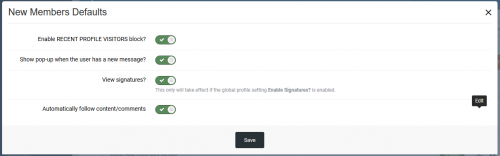
plugin New Members Defaults
By waqas dar
This plugin will enable 5 features that appears disabled when a new user creates the account:
Status Update Recent Profile Visitors block Pop-up when the user receives a new message View signatures? Automatically follow content/comments Removed STATUS UPDATES option as it is a new setting on IPS 4.3.
8 downloads
0 comments
Submitted
-
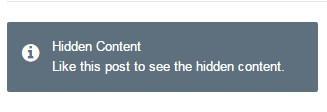
plugin (BIM43) Hide Link And Code
By waqas dar
This plugin will hide links, code, images in forum posts automatically. Members can use REACTIONS or REPLY to see the hidden content.
Features:
Select content to hide: images, external links, code, [hide] tag, attachments Option to specify groups can bypass the hidden content. REACTIONS or Reply to see the hidden content. Supports Clubs. If you use IPS 4.1.x, download 1.0.x versions. If you use IPS 4.2.x, download 2.0.x versions. (Click the "Change logs" button to select versions to download)
11 downloads
- (bim43)
- (bim43) hide link and code
- (and 13 more)
0 comments
Submitted
-

plugin htaccess for IPS Forums
By waqas dar
This is a custom .htaccess to use on the IPS Community Suite Forums. It helps to improve your forums Google Page Speed and YSlow scores.
The top segment is the same .htaccess that is generated by the IPS Forum software. This segment is Invision Power Services code and I do not claim it as my own. All rights and credit for this segment of the .htaccess are Invision Power Services.
The bottom segment is based upon research of several websites and the references listed below. Please be careful when using this file because the contents may be incompatible with your server setup. Preventative measures have been taken to ensure that it should be safe to use in any Apache based environment.
Google recommends a minimum of one week: https://developers.google.com/speed/docs/insights/LeverageBrowserCaching
GTmetrix recommends a minimum of one month: https://gtmetrix.com/leverage-browser-caching.html
Added the "map" part that IPS generates into the .htaccess file - 404 section. Included htaccess.txt Included changelog.txt Included Readme.txt15 downloads
0 comments
Submitted
-
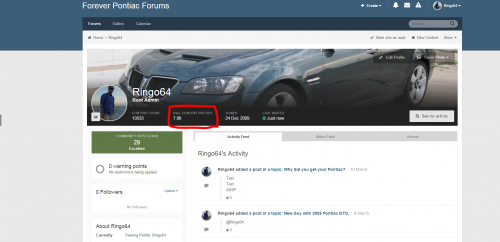
plugin Average Content Per Day on Ips forum Profile
By waqas dar
Average Content Per Day on Profile 2.0.1
Simple plugin that calculates the Average Number of Content that the user has created per day since they joined your community.
Features:
Custom language string for "Avg. Content Per Day" Template editable under "Themes" Follows IPS structure and style guide for head items Round Settings. Round to whole numbers, 1 or 2 decimal point values. Dev files included for those who want to extend this functionality Fix to error if user doesn't have any content
Ability to choose decimal point location (none, 1 or 2)
Dev files included for those having issues or wanting to extend this plugin
8 downloads
0 comments
Submitted
-
plugin Redirect on Logout 3
By waqas dar
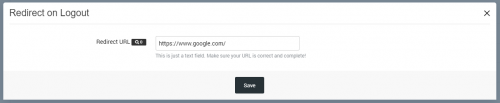
Redirect your users elsewhere (your portal/site, for instance) when they logout from your board.
Set the URL where they'll be redirected via a setting in ACP.
Version 3 is EXCLUSIVELY for use with 4.3.x
4.3 Installation
Uninstall the old 2.0 plugin, install this new 3.0 plugin. Configure URL in plugin settings.
4 downloads
0 comments
Submitted
-
plugin Disallow Attachments on Gallery Descriptions
By waqas dar
Disallow Attachments on Gallery Descriptions
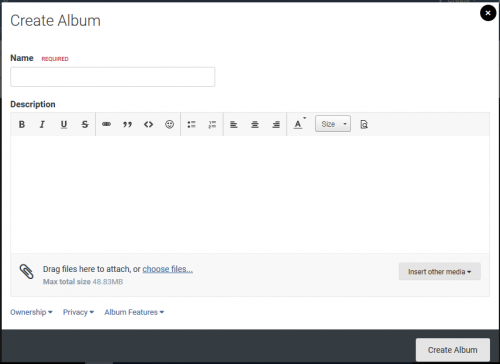
This plugin prevents users from uploading attachments to the Album and Image description fields.
Compatible with IPS 4.3 only2 downloads
- attachments
- descriptions
- (and 13 more)
0 comments
Submitted
-
plugin (MIX) No Require Full Address
By waqas dar
(MIX) No Require Full Address Ips Plugin 4.2 and 4.3
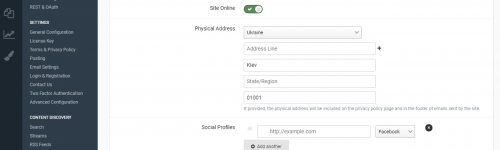
The simplest plugin for disabling control is the mandatory filling of ALL address fields in the appropriate settings and sections.
Supports work with versions IPS 4.2.x and 4.3
What's New in Version 1.0.1
Added check for updates of new versions6 downloads
- (mix)
- (mix) no require full address
- (and 13 more)
0 comments
Submitted
-
Top Downloads
Week
Month
Year
All Time
-
-
Download Statistics
537
Files185
Comments29
Reviews



![More information about "Dilchasp_Hikayat-e_Saadi-[fundayforum.com] Urdu PDF Book"](https://fundayforum.com/uploads/monthly_2018_06/1178326569_Dilchasp_Hikayat-e_Saadi-fundayforum_com.thumb.jpg.1d0d05334dd4fd5194494a6b71b7fbbb.jpg)