
LIVE UPDATES
- 📢 Welcome to FundayForum – Explore Trending Topics
- 🌟 Discover What’s Trending Today
- King Charles makes exciting announcement on Meghan's big day
- Targeted by Trump, ICC wins top EU rights prize
- Norway's sovereign wealth fund slips to $30 billion loss: Here's what went wrong
- What is age-related macular degeneration? Everything to know about the condition affecting Dame Judi Dench
- 'One Direction' Louis Tomlinson to take break from tour plans
- World Bank warns Middle East conflict could strain Pakistan's economy
- Princess Kate marks huge royal milestone in Victoria Beckham's power suit
- France records first human case of Shamonda virus, officials say
- ‘Dune: Part Three' sets new record as ‘The Odyssey' falls behind
- Gwen Stefani consoles Blake Shelton over John Anderson's death: 'I am sick'


Waqas Dar
-
Posts
11,303 -
Joined
-
Last visited
-
Days Won
559
Content Type
Profiles
Events
Forums
Gallery
Blogs
Downloads
Articles
Page News
Release Notes
Store
Everything posted by Waqas Dar
-

Version 1.0.0
14 downloads
SuperHelp page is a set of page templates to help / FAQ sections, books, online courses and similar content. What is necessary: IPS 4.1 in the latest version of the page application A page in the database, which uses multiple levels of categories. Benefits SuperHelp: Uterine templates page is restricted to show only one level at a time: one level categories; one level records links in the same category; a full report. SuperHelp based on IPS »Help section of the Guide and can show much more information and make browsing the database a lot easier. template set is beautiful and clean appearance and, of course, to fully react. It takes almost all sites and enable IPS plug-in allows you to change the appearance of the template without any - any HTML knowledge. What's included: The first sheet listing category template that shows the primary and secondary categories. Listing Template that shows subcategories entries in categories and entries in the current category. Record View template with the side panel that shows the other entries in the same category. A plugin that allows you to change the template settings easily. Setting a PDF with detailed instructions and tips to create your SuperHelp database. Note: You can use templates for any number of databases, but the settings will always be applied to all templates SuperHelp. Plugin Settings: Display category button followed by Yes / No Show images were recorded with a view to listing: Yes / No Show the image recording in the presentation of records: Yes / No The number of lines, then text gets cut off preview The number of entries displayed in the list of sub-categories icon type to use for reference steps: automatic numbering or a user-defined FontAwesome icon The text alignment for the title / description on the home page The text alignment for the title / description on the data page Align text to the category titles / descriptions on the main page Expert options: Add a photo of your main categories category Redefine the style (for example, the color icon) in your theme custom.cssFree -
Version 1.0.0
6 downloads
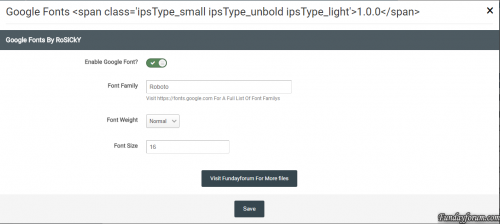
Use Google Fonts As Your Sites Body Font Features Enable Google Fonts Set Font Weight Set Font Size Visit https://fonts.google.com For A Full List Of Font Family's To Use In This PluginFree -

Version 1.0.0
9 downloads
This is created for those that wants to create their own Release Notes on their forum, please follow the guide linked below to create it with the files provided here. Please don't down vote this if you only download this without reading the tutorial - Its essential to follow the tutorial to make it all work.Free -

Version 1.0.1
24 downloads
This plugin allows members to conceal the content in their posts so that other members of the need to reply to the topic before they can see the hidden content. With its powerful custom BBcode There are no file editing is required, additional plug-ins has an internal cache to keep all the threads Checked each session, which reduces the number of queries used. Due to the fact that only one additional request is used when viewing a topic and sometimes no queries at all! Features No edits files (it makes the use of plug-in system) 2 options to specify who can bypass Answer: Check, groups members All default areas are covered: Themes (Print preview in the complete set) Profiles (Both threads and posts Tabs) Quote Reply to both Ajax and Non-Ajax Citations (Hidden Content section) E-mail notifications The content is always Hidden (both forums and subscribe to threads digests Too) Easy integration with third party mods Display posts (As long as \ IPSorums \ theme \ Post class is used) New version add your own text Hidden text This is a modification (TB) Hidden Content If you have installed the offer you uninstall it before installing this You must enter the content hidden in the [hide] [/ hide] Tags You can easily make a plugin for CKEditor response boxing going admin -> customization -> editor -> toolbars, and then select to add a button, select Custom and name it hide Content Loading and What ever image you want (I do not make the image) and in the HTML section of Just Add [hide] [/ hide] Now Save it to put it on the editor and job Easy Way to use [hide] [/ hide ] tags, otherwise just manually enter [hide] [/ hide]] tagsFree -
Version 1.0.0
2 downloads
displaying message In Footer Settings set Description set Background color set Text color set Font Size set Margin set PaddingFree -

Version 1.0.1
7 downloads
This application allows members to add notes to posts. Added new language stringsFree -

Version 1.4.0
11 downloads
Lets you set up some default text that will be filled in for all new topics in specified forums. You can define the default Topic Title and initial post content. People posting new topics in forums where this is active will be able to alter this text, but it is useful to provide a common template for specific types of topics. Please Like, Review and Share With others.Free -

Version 2.0.1
9 downloads
This application allows you to showcase testimonials on your Invision community forum site. Main Features: Display testimonials friendly on sliders. There are 3 slider's styles. Option to sort descending/ascending or random. Responsive layout (desktops, tablets, mobile devices). Support caterories. Enable/Disable Title on testimonial. Enable/Disable Rating on testimonial. Enable/Disable testimonial must be approved by moderators. Enable/Disalbe other informations: Company, Job, Website. Permissions to View, Submit and Manage. Fully manageable (edit, show/hide, delete). RSS for latest testimonials If using IPS 4.1.x, download 1.0.x versions. If you use IPS 4.2.x, download 2.0.x versions. (Click the "Change logs" button to select versions to download)Free -
Version 1.0.0
3 downloads
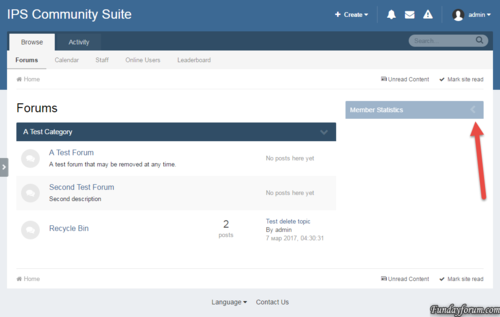
The plugin adds a button to collapse/disclosure widgets in the sidebar As the key to preserve the state of the widget is its title.Free -
Version 1.0.1
19 downloads
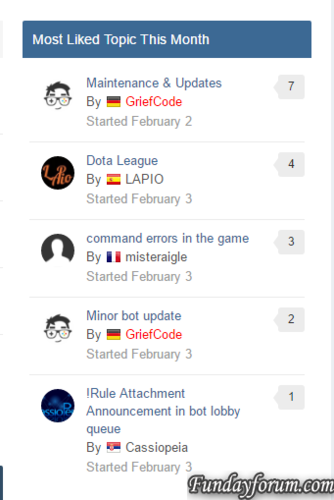
Simple widget to display the most liked topic per month Several bugs fixed: The topics are now checked against the year as well The display of likes is now correct The likes do now support also negative reputation counts Database prefix is now supportedFree -

Version 1.0.2
15 downloads
This plugin will allow you to clear the cache without having to use the support tool. Fixed an template issueFree -
Version 1.0.3
11 downloads
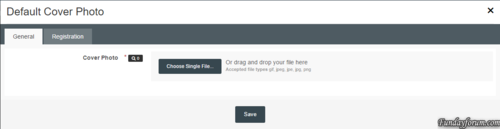
* Plugin: Default Cover Photo Installation Instructions: 1. Unzip the archive to a location on your computer 2. Login to your ACP 3. Go to System > Plugins 4. Click the "Install" button 5. Select the XML file from the unzipped archive and click "Install"Free -

Version 1.3.2
49 downloads
Trophies and medals is the best new way to award trophies to the community in the complete system of rewards! It offers interesting and attractive new way to give a reward ( "trophies and the medal") for your community, based on the conditions and criteria that you get to determine, or you can manually enable moderators to give awards for the unique circumstances! Trophies and medals also includes a REST API, so that the application can be extended to unlimited possibilities. - Are you looking for the premium application, where you can automatically provide rewards, prizes and medals based on forum posts, topic, and many others? - Do you want to increase the re-engagement, giving awards? Or you are struggling to grow a new community? - You want to add new functions Gamification encourage positive behavior as the quality of the wiring? - Are you looking for more opportunities outside the IPS Leaderboard adjust the levels, types and images of the awards? - Do you want to monetize Community ($$) and add bonuses for members of the payment? - Are you looking for a well-supported application using a third-party IPS, which IPS is passionate about supporting the community? Start creating a complete system of rewards with trophies and medals! THINGS TO KNOW competition - Trophies * * automatically awarded based on the criteria. Criteria defined in the ACP. Medals - Medals will be awarded * * manually by moderators and administrators. They are listed on the front end. The app supports both trophies and medals! This application allows you to make the trophies awarded automatically to their members on the basis of the following criteria: the criteria the system uses system extensions IPS4, and I will add more criteria in future versions. Just let me know what you need Medals are like trophies, but they are awarded manually moderators directly on the profile member or administrator in the ACP. On the web - interface, they will also be displayed on the user's profile. There's also a REST API, which allows to award medals to its members using 3 - third-party websites or applications. Available REST method: Integration - the API the REST - Rules automate Carwile @Kevin - Sources @fosters HOW TO INSTALL file is an application (.TAR), which can be installed in the ACP. 1. Go to System> Applications 2. Click on the "Install" button 3. Upload a .tar file and click on the "Install" button. Fixed bugs: Fixed an issue where offline criteria were not raised New opportunities: A new setting for max. prizes and medals in the template postbitFree -
Version 1.0.1
13 downloads
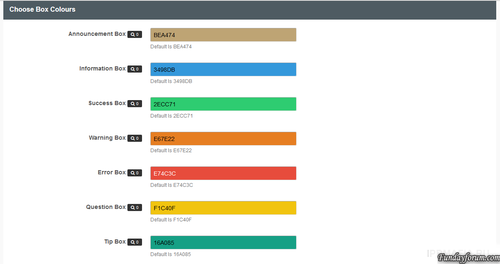
This plug-in to place the extension messages through your advice seats Global header Global Footer Index page above Categorys (You can also delete the Word Forums) Above categories Offline Pages Over the first message on the theme Below The Last Post on the topics Above the words registration on the registration page messages A warning success error Ad Information Tip Question You can also choose the color of each message fieldFree -
Version 1.0.0
3 downloads
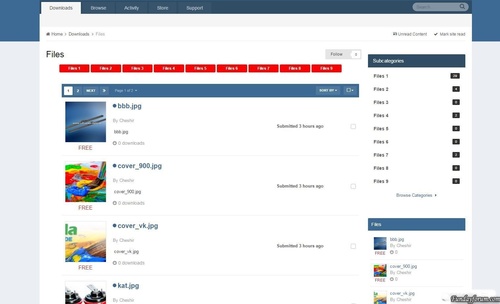
The plugin displays the files in the parent category of sub-categories.Free -

Version 1.1.1
160 downloads
Surface Dark Ips Theme 4.2.x The theme of «Surface» is a fully modernized design IPS in different colors. We tried to make the best design and make it easier to customize style, so have worked out every detail. We wish to make as high quality a product as possible and «Surface» will reveal it. Full Screen: Home Page, Calendar, Downloads, Blogs, Gallery, Article Page Styling Also in the archive are present: Skin Images (4 custom guestmessage cover backgrounds) Articles Main Settings Backgrounds Forms Forum Nodes GuestMessage NavBar Other Settings Footer Slider Social Icons TypographyFree -

Version 1.0.1
16 downloads
This plugin extends Suites editor support for the implementation for the box of messages. Message boxes are useful for any community, they allow you and your members to easily and aesthetic Highlight warning or any other general information. Features Add 7 different types of messages Select a color for each message boxes Each message has a width Box: -moz-Fit-content; What element is that the size of the window will depend on how long the message How to install Download and install the XML-file with the plugin section in the admin panel Go to Customization -> Toolbars and add a button Either download AMB_box.zip Or AMB_box_Dark.zip In The CKEditor Upload Plugin Section Whats In New Version A Little Bit More Added Padding around the Box Posts You can use either a standard width or -moz-FIT-content Standard width perfectly fit the Message Box / Box Topics Where How -moz-FIT-content will make the Box As long as the textFree -

41 downloads
Live Demo - Upgraded to support IPS 4.1.14.2 - Webfontloader updatedFree -

download IPS Community Suite 4.1.19.2 Nulled With All Apps
Waqas Dar commented on Waqas Dar's file in IPS Community Suite 4 Resources
 wht do u mean doesnt show u only blank page .. while installing or downloading ?
 -
11 downloads
This plugin will allow users to sign into your forum through Twitch Oauth2. Existing users can link their accounts in their account settings. Features: Syncs a users Twitch display name to their account. Existing users can link their accounts to Twitch. What's New in Version 1.0.3 - Fixes a bug where if a user does not have an email on their Twitch account it would error. Now it asks for an email if no email is found. - Adds an extra field to pull and store a users display name Version 1.0.2 - Compatible with 4.1.10 Version 1.0.3 - Changed Login with Twitch.tv to Sign in with Twitch.tvFree -

23 downloads
This app will obtain data from Steam for your users and place it in your IPS Community database for use anywhere on your site. Your board will re-load your members Steam Online information, in configurable batches, every 2 minutes, so you always have up to date information without impacting load times of your community pages. Out of the box, this app will display steam information in the following places Member Profile Next to Members' posts Member Hovercards (Steam Online Status only) Widget: X Random Online Steam Members displayed anywhere you can place a Widget More detailed information about the members Steam profile is displayed on the Members Profile page. Including an optional list of games the member owns. Out of the box the list of games can be shown in either an image grid layout, or list view. This app integrates seamlessly with Lavo's Sign in through Steam.. It will automatically detect if it is installed and pull that users Steam information. Don't have Lavo's sign in installed? No problem, this app works with a Custom Profile field also. Want to use both a custom profile field AND Lavo's hook? Not a problem, this app seamlessly pulls information from both locations to create a single list of users to pull information. Valid Steam Input format for Custom Profile Field: Steam Name: ex. ' Aiwa ' 17 digit Steam ID: ex. 76561197964468370 Old school Steam ID: ex. STEAM_0:0:2101321 *** If there are any other places you'd like to see a users steam information displayed, let me know! Scales seamlessly to work with larger boards without impacting site / server performance. IP.Board 3.4.x version available here. *** Supported natively on 64 bit server configurations. For 32 bit server configurations, php-bcmath is required to decode this format. What's New in Version 2.0.12 -Security Update: SQL injection vulnerability fixed. Thanks to Jazz Cat for reporting. -View Profiles Table enhancements. More to come here, wasn't quite finished but needed to get this released ASAP.Free -

1 download
A extension for WooCommerce, which adds multiple levels of wholesale pricing to your store depending on the user role. An extra field will be added to your product data tab for each role, where you can add a “wholesale” price. This is applied to simple products, as well as variations. Once a price has been entered, it will override the default product price with the new wholesale price you entered for that role. Wholesale prices will only be shown if the current user has a role that has been specified in the options page. Features Quick and easy installation Supports simple and variable products NEW Select multiple user roles to activate different pricing Show wholesale customers how much they save NEW Set minimum / maximum checkout quantities Demo http://woowholesale.com/ Username: demo Password: demo123Free -
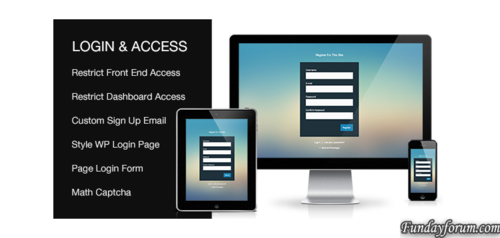
4 downloads
Style Default WP Login Page Add Login, Register, Forgotten Forms To a Page Modal Login and Register Forms Restrict Front End Access For Non Logged In Users (block specific pages, posts, post types, categories, taxonomies or all content) Restrict WP Dashboard Access For Subscriber Level Users Redirect User After Login And Logout Allow Users To Set Their Own Password During Registration Create Custom New User Registration Email Set Match Captcha For Login, Register and Forgotten Forms Regular Product Updates Custom Login & Access Plugin is kept up to date with the latest WordPress versionsFree -

Version (1.4.5)
15 downloads
Group Collaboration With group collaboration, members of your community are able to form their own groups, ranks, memberships and micro communities within the fold of your whole community. Any group can collaborate to create, maintain, and manage its own content based on what you allow as the site administrator. Out of the box, you can allow groups to manage their own forums, galleries, calendars, blogs, downloads, databases, and more. You control all the permissions and limits. Features Overview Create any number of categories and subcategories for groups to operate in, and set permissions and limits for groups on a per category basis. Move groups in and out of different categories at any time. Customize what groups are called on a per category basis. Set permissions for each category to determine which content types the group can use, how much they can use, what moderation permissions they are allowed within their group, who can view, create, and join groups in the category and more. Group leaders can create their own roles within the group, assign any of the permissions they’ve been allowed to those roles, and assign roles to other group members. Group leaders can set permissions on the content within their group based on the roles that they have created. All permissions for the content type are available. Group leaders can decide how they want to manage memberships to their group. Groups can be set to automatically accept new members, queue members for approval, be invitation only, or closed altogether. You can configure how many members a group can have total on a per category basis. You can configure how many groups an individual member can create or be a member in on a per category basis. You can configure how many groups members can own and be a part of on a sitewide level on a per member group basis. Group members have their own member titles, ranks, and post counts within each group which can be customized by group leaders. You can decide if post counts are added to the whole site post count or kept separate for the group on a per category basis. You can create “group models” in each category which act as a base layout and content structure for new groups. Group models can be used automatically, or you can give new group owners the choice as to which model they want to use. Features Added in 1.1 Added built in import utility for rsyvarth social groups 2.x Content feeds (widgets, etc) on collab pages will now only show content from that collab Content feeds on non-collab pages will only show non-collab content and content the user has access to see in collabs Added new private listing mode for collab categories Added ability to move/copy non-collab content into collabs Added ability to extract content from collabs into main site Added featured/latest collabs widgets Added autofill of member name when inviting to collab Added support for disabling "view other members topics" inside collabs Collab title in the group header now links to the collab homepage Collabs now inherit join mode of models Collabs now inherit default member title of models Collab stats can be added to collab header via Automation Rules Added collab menu manager Collabs and collab categories can now be shown on forums index New widget to show collabs for the currently logged in member Features Added in 1.2 Performance options are now available for unread content calculation inside of collaborations Events can now be created in collabs directly from the calendar Import from social groups has improved accuracy Group Collaboration Expansions Group Collaboration Badges ( by wohali ) Maintenance added a couple missing language strings fixed bug with content not showing to members in a private collab fixed an uncaught exception when check for forums linked to collab categories fixed an error caused if a content type was mising a language string on the collab management pageFree -

22 downloads
The plugin will add a block with countdown timer.Free
-
Recently Browsing 0 members
- No registered users viewing this page.